Recommended Free Tools
To use a DAC with your computer, connect it to a compatible USB port, select it as the computer’s audio output, and—if the DAC has an input selector—set that selector to USB. A USB connection by itself does not guarantee that sound is routed through the DAC.
Before connecting: check ports, power, and the manual
Find the DAC’s computer input and the ports available on your computer. Use a cable with matching connectors; some DACs have a USB-B input, while a computer may have USB-A or USB-C ports. The word “DAC” does not imply one universal cable or connection method. For example, Cambridge Audio specifies a USB A-to-B cable for a particular model in its USB audio troubleshooting guidance.
As an Amazon Associate I earn from qualifying purchases.
Follow the DAC maker’s instructions for powering the device. Some models may need external power, and connection, driver, and playback-format requirements vary by model. If you are using a USB-C adapter, check that it supports digital audio and is compatible with the computer and DAC; USB-C connectors alone do not establish what an adapter supports. Microsoft explains the difference between USB-C digital and analog audio adapters in its USB-C troubleshooting guidance.
What’s actually slowing this PC down?
Pick the symptom - the matching free tool is one click away.
Connect the DAC and route computer audio to it
On a Mac
- Connect and power the DAC as its maker specifies.
- Open Apple menu > System Settings > Sound > Output.
- Select the DAC from the available output devices. Apple notes that connected USB audio devices can appear as sound outputs in its Mac sound output instructions.
On Windows
- Connect and power the DAC as its maker specifies.
- Open Settings > System > Sound and choose the DAC under Output.
- If needed, set it as the default playback device. Microsoft’s Windows sound troubleshooting guide covers selecting and troubleshooting audio devices.
On the DAC
If the DAC has an input or source selector, choose its USB input. The computer can recognize a DAC while the DAC itself is set to listen to another input. Cambridge Audio includes checking the selected source among the steps in its USB audio troubleshooting guidance.
#1 Best Overall

- 2 in 1 USB Audio Adapter: UGREEN USB to 3.5mm jack audio adapter supports both listening and talking. In-line control and microphone function allows you to chat while gaming. This USB Aux adapter enables you to connect headphones, headset, speakers with 3.5mm jack to your PC through the USB A port. [*Note: The 3.5mm adapter can support the connection of a single microphone for use. Please note that the 3.5mm male microphone's attribute requirement is TRRS]
- 24bit 96KHz High Quality Sound: Built-in advanced smart chip, USB sound card supports CTIA and OMIP standard headsets. The USB to Aux adapter facilitates high-resolution audio output and noise reduction up to 24bit/96kHz (others are 16bit/48kHz)to enhance the original sound quality of your PC devices. Note: Microphone does not support 24bit 96KHz, only headphones can
- Built to Last: With aluminium alloy shell, the Aux to USB adapter is more durable and portable than other plastic USB audio adapter. Nylon braided design of USB to audio jack adapter ensures stable audio transmission. 10000+ bend tests prove that USB headset adapter can prevent damage caused by tangling and scratching
- Broad Compatibility: This USB external sound card is compatible with Windows 11/10/98SE/ME/2000/XP/Server 2003/Vista/7/8, Linux//Raspberry Pi, MacBook Pro 2019, MacBook Air 2018, PS5/ PS4, Switch 2, Google Chromebook, Windows Surface Pro 3. *Note: Does not support Apple headphone line control
- Plug and Play: No driver is required, just plug and play. USB bus-powered, no external power is required for this convenient sound card. *Note:Supports regular headphones with a resistance of less than 50 ohms, but does not support high-resistance headphones
Check audio settings only if necessary
Mac format options
Use Audio MIDI Setup to inspect the DAC’s available audio options. Apple says the format controls can include sample rate and bit depth, and that the options depend on the selected device. Check your DAC’s documentation before choosing a particular format; supported rates and bit depths are not the same for every model. See Apple’s Audio Devices window instructions.
Windows drivers and formats
Driver requirements depend on the DAC. If Windows does not list it as an output, check the manufacturer’s driver instructions and whether the device appears in Device Manager. Some models using USB Audio Class 2 may require a manufacturer driver on Windows; Cambridge Audio identifies this as a model-dependent consideration in its USB audio guidance. Change playback-format settings only when the DAC documentation or the manufacturer’s troubleshooting steps call for it.
Rank #2

- 【USB external sound card audio adapter】This USB to aux adapter supports listening and speaking,Easily adds a 3.5mm TRRS aux port integrated microphone-in and audio out interface to your devices
- 【High Quality Sound】 Equipped with an advanced built-in DAC chip, this USB sound card supports both CTIA and OMIP standard headphones. This USB to Aux adapter delivers stable 16-bit/48kHz audio output and effective noise reduction, faithfully reproducing and enhancing the original sound quality. Note: The 3.5mm male microphone jack does not support TS or TRS connectors
- 【Wide Compatibility】USB to 3.5mm Jack Audio Adapter support TRRS headsets and microphones.USB male wide compatibility with Windows 10/9/8/7/Vista/XP,Linux,Mac OS X google Chromebook,Raspberry Pi, PS4,PS5 and Windows Surface 3 etc
- 【Plug and Play】USB Sound Adapter no driver required,USB headset adapter plug and play;the durable nylon braided cable of the USB audio adapter ensures stable transmission and allows you to use your 3.5mm headphones more conveniently.USB to 3.5 mm port will be automatically recognized by system in seconds
- 【Portable and Durable】USB to audio jack adapter is equipped with an aluminum shell.The nylon braided of the USB to 3.5mm jack audio adapter is more durable,smaller and lighter than other plastic shells and PVC cable USB audio adapter,ensuring a much longer lasting life
Troubleshoot a DAC that has no sound or is not detected
The DAC powers on, but there is no sound
- Confirm the computer’s selected output is the DAC.
- Confirm the DAC’s input/source selector is set to USB.
- Check that the headphones, speakers, or downstream audio system are connected to the DAC’s correct output and are ready to play sound.
For a Mac-specific case, Cambridge Audio says its DacMagic 100 may remain powered while macOS switches the output back to the computer’s internal speakers after a crash or update. Recheck System Settings > Sound > Output before concluding that the DAC has failed. This report is specific to that model, but checking the selected Mac output is a useful first step for other USB DACs too. See the maker’s DacMagic 100 support page.
Free tools Windows power users keep installed
One-click scans. No signup required.
The DAC is missing from the output list
- Try another suitable USB port and a known-compatible cable.
- If the DAC is connected through a hub, connect it directly to the computer while diagnosing the problem.
- Check that any USB-C adapter supports digital audio and that the port, cable, and DAC are compatible.
- On Windows, check Device Manager for a disabled, missing, outdated, or malfunctioning driver, then follow the DAC maker’s driver guidance. Restart if the troubleshooting steps call for it.
Microsoft’s USB-C guidance recommends checking the adapter and connection; its Windows audio guidance covers driver and device checks. If the device needs external power, verify that it is receiving power as specified by its manufacturer.
Rank #3

- Upgraded USB C DAC for Better Sound Quality This USB C DAC audio adapter converts digital audio into clean analog sound, delivering clearer vocals, improved detail, and more balanced output than basic Type-C adapters.
- Built-In Headphone Amplifier for Stable Output Designed with an integrated headphone amplifier, this DAC adapter provides consistent volume and improved driving power for most wired 3.5mm headphones.
- USB C to 3.5mm Audio Adapter for Modern Devices Use this USB C to 3.5mm audio adapter to connect your favorite wired headphones to smartphones, tablets, and laptops without a headphone jack.
- Low Noise Type C DAC for Music, Calls & Gaming The advanced Type-C DAC reduces background noise and signal interference, making it suitable for music listening, video streaming, voice calls, and gaming.
- Plug and Play USB C DAC Audio Dongle Compact and lightweight design with no drivers required. Simply plug in and enjoy improved sound anywhere—at home, at work, or on the go.
Playback fails at a particular sample rate
Check the supported formats for both the DAC and computer, then try a format they both support. Do not apply a sample-rate limit from a troubleshooting example for another product: Cambridge Audio’s recommendation to use 384 kHz or lower refers to a particular network-player setup, not a universal limit for computer-connected DACs.
Independent reader supportYour contribution helps us test, update, and keep practical guides available for everyone.If you still need a DAC or an accessory
First confirm that the issue is not simply a misselected computer output, a DAC source setting, an unsuitable cable, or a power requirement. If you are choosing a DAC, compare the computer connection and port compatibility, whether your operating system needs a maker’s driver, the outputs required by your headphones or speakers, any external-power needs, and the formats the DAC supports. Choose cables or USB-C adapters only after checking the actual ports and the DAC’s documentation.
Quick Recap
Best Value
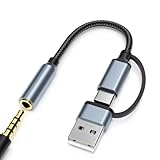
- 2-in-1 Dual-Interface: Combines both USB-C and USB-A connectors with a 3.5mm audio jack, letting you connect headphones or speakers to phones, tablets, laptops, or PCs. One compact adapter for all your devices — no extra dongles needed.
- DAC Chip for Hi-Fi Sound: Integrated DAC digital audio converter ensures clear, balanced, and detailed sound. Ideal for usb c headphone adapter, usb audio jack, and type c to aux users who want better sound quality.
- TRRS 3.5mm Audio & Mic Support: The 3.5mm headphone jack supports full TRRS function — microphone input, in-line control, and high-quality voice calls.
- Braided Cable & Alloy Housing: Featuring a nylon braided cord and aluminum alloy housing, this usb c to headphone jack adapter is heat-resistant, tangle-free, and made for long-lasting use.
- Wide Compatibility: Compatible with iPhone 15 / 16 / 17 Series, iPad Pro (M4 / M2 / M1), iPad Air (M2 / 5th Gen), iPad Mini (6th Gen), Samsung Galaxy S21 / S22 / S23 / S24 / Z Flip / Fold, Google Pixel 6 / 7 / 8 / 9, OnePlus 11 / 12, and more. Also works with MacBook Air / Pro, Windows laptops / PCs, USB audio interfaces, car stereos, and desktop speakers via USB-C or USB-A — a true all-in-one audio adapter.
Rank #4

- 2 in 1 Essential: DuKabel USB to aux adapter supports listening + speaking, dual functions. Easily adds a 3.5mm TRRS aux port (integrated microphone-in and audio out interface) to your devices. This stereo to usb adapter can work for your PC, PS4, PS5, Laptop, Desktop, and more. *DO NOT work for TV/Car/PS3/Truck etc.
- 0 to 1 Setup: The DuKabel USB audio adapter is super easy to setup. Simply plug and play. The USB port will be automatically recognized by system in seconds. No driver download required, no external power required.
- One for All Compatibility: Usb audio jack adapter support CTIA standards TRRS headsets and microphones. No system limitation. Support Windows 10/8.1/8/7/Vista/XP, Mac OS X, Linux, Google Chromebook, Windows Surface 3 pro, Raspberry Pi and PS4, PS5 etc.
- Smart Chip: The usb external sound card is built-in with DUKABEL's exclusive advanced chip for the better listening experience. Efficiently Decoding the signal of sound, and optimizely amplifying the analog signal to make a much clear sound. For optimize experience, we recommend to use with DuKabel cables.
- Compact yet Durable: Usb to microphone jack adapter with premium metal casing and durable braided cord, ensuring a much longer lasting life. Much more durable than other plastic casing USB adapters.
Product prices and availability are accurate as of the date/time indicated and are subject to change. Any price and availability information displayed on Amazon at the time of purchase will apply.




