What’s actually slowing this PC down?
Pick the symptom - the matching free tool is one click away.
To secure a smart home, agree on which devices belong in it, protect the router, harden each device account, and review what data each product collects or shares. No internet-connected device is completely secure, but careful setup and regular maintenance can reduce avoidable risks.
Start with household agreement and product support
Before buying or installing a device, ask everyone in the household whether they are comfortable with its cameras, microphones, location awareness, or cloud recording. As NIST computer scientist and cybersecurity researcher Julie Haney puts it, “If it’s in your home, everyone should agree to its use.”
As an Amazon Associate I earn from qualifying purchases.
Check the product’s security features, privacy controls, how updates are delivered, and its history of complaints or breaches. Look for clear information about how long the manufacturer will provide security updates. A thermostat or other device that seems low risk can still matter if it is connected to the home network.
NIST’s April 2, 2025 smart-home guidance emphasizes that connected products cannot be made completely risk-free. The practical goal is to make sensible choices and reduce exposure.
#1 Best Overall
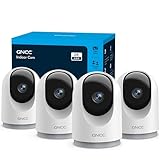
- 【2K & Night Vision】: GNCC Security Camera Indoor comes with 2K FHD quality video and images. You can access a live view of anything you care about or recorded video anytime and anywhere, keeping an eye on your baby, pet, home, and more. Even at night, the baby/pet camera provides super clear night vision and a wide video of any area you wish to monitor. The home cameras indoor always connects with a type-C power cord that gives you peace of mind with continuous 24/7 protection.
- 【Smart Pan/Tilt Rotation & Smart Motion Detection】: Pet camera indoor with phone app features smart 355°horizontal and 90°vertical rotation for complete 355°coverage, allowing it to track people and pets and capture everything anywhere at any time. Receive instant notifications whenever movement is detected by the WiFi camera, helping you stay connected to your home at all times. This indoor security camera ensures you can monitor pets, kids, or your space seamlessly through the OSAIO app.
- 【Two-Way Audio & Multi-device Viewing】: GNCC house cameras with audio and video comes with a built-in microphone and speaker, supporting real-time, two-way audio calls. You can communicate in real-time with your family, baby, pet, and even warn off and drive away thieves via your phone app wherever you are. Sharing memorable moments with your family up to 3 devices simultaneously and enjoy the convenience that indoor camera brings to you.
- 【Optional Cloud & 24/7 SD Card Storage】: GNCC security camera indoor to save the alert video on SD card(not included) or 30-day trial cloud storage to ensure your data safe, and enable 24/7 continuous recording on SD card storage to avoid the risk of losing anything important.
- 【Work with Alexa & Easy to Set Up】: The indoor camera is compatible with Alexa and Google Assistant. Pair the wifi camera with Alexa or Google Assistant, then use a simple voice command to ask Alexa or Google Assistant to view your live camera feed. The security camera is also easy to set up, just follow the detailed instructions on the app. Make sure the pet camera is connected to Wifi within a 3 feet range.
Secure the router before connecting devices
“Your home Wi-Fi router is a key part of your cybersecurity plan,” Haney says. Secure it before adding smart devices, because they rely on the network to reach your phone, cloud services, and sometimes one another.
- Use current Wi-Fi encryption. Choose WPA3 Personal if your router and devices support it. WPA2 Personal is also a suitable option. The FTC says, “WPA3 is the newer — and best — encryption available, but both will work to scramble your information.” If an older router still supports only WPA or WEP after a software update, the FTC advises considering replacement.
- Change the router credentials. Replace the default administrator password and Wi-Fi password with unique, hard-to-guess credentials. Do not reuse passwords from other accounts.
- Update router software. Install available firmware updates and enable automatic updates if the router offers them. Confirm that its firewall is on.
- Review convenience features. The FTC recommends turning off remote management, Wi-Fi Protected Setup (WPS), and Universal Plug and Play (UPnP), which can weaken security. Before disabling any feature, check whether a household device or service depends on it.
- Consider network separation. A guest network can keep visitors from needing your primary Wi-Fi password. If your router supports it, a separate network for smart devices or cameras can also help limit exposure between devices. This is a defense-in-depth measure, not a guarantee; router capabilities and setup differ.
- Finish safely. Log out of the router administrator account after making changes. Use the router maker’s or internet provider’s instructions for its specific menus rather than relying on a universal path.
The FTC’s December 2022 home Wi-Fi guidance explains encryption, router settings, and guest networks. NIST’s September 10, 2024 router report provides a security framework for consumer-grade routers; it is not a ranking of particular models.
Rank #2

- Stay Connected Anywhere: This wired Wi-Fi Camera access 24/7 live streams via LaView app on mobile or web browser; supports up to 9 simultaneous live feeds; stay in touch with your home at all times
- 1080P HD & Night Vision: Capture clear 2.1MP live views; equipped with advanced IR night vision for up to 33 ft coverage; compatible with 2.4GHz WiFI network(5GHz not supported); ensures quality monitoring even in darkness
- Motion Detection & Clear Two-way audio: Instant motion detection with smart alerts; this indoor home security camera supports clear two-way audio with noise cancellation; stay informed and communicate with family anytime
- Fit for most scenes & Sharing: The camera can be installed anywhere such as the living room & kitchen & office; space-efficient design; share access with up to 20 people; monitor multiple cameras from a single account
- 30 days free-trial US Cloud Storage & Micro-SD Storage: 30-day US cloud storage trial; The cloud storage bases on the AWS server in the US to encrypt your data and avoid the risk of losing video clips; microSD slot up to 128GB; store recordings securely
Inventory and harden every connected device
Open your router’s connected-device list, which may be labelled “connected devices,” “wireless clients,” or “DHCP clients.” Identify each entry so you can spot devices you do not recognize and notice equipment that is no longer used.
Do these 3 things before closing this tab:
1Scan for outdated or missing drivers - takes under a minute2Repair Windows errors before they cause bigger problems3Fix the driver behind crashes, sound loss and screen glitches- Change default usernames and passwords, and use a unique password for each device or associated account.
- Turn on multifactor or two-factor authentication wherever it is offered.
- Install current firmware for the device and updates for its controlling phone app. Enable automatic updates where available, then check that updates are actually arriving.
- Use available protections such as encryption and passcode lockout.
- Disable remote administration and other features you do not need.
- Disconnect devices that are unused, and remove their accounts when appropriate.
The FTC’s August 2022 connected-device guidance covers passwords, updates, and unused equipment.
Rank #3

- AI Motion Detection 2.0 – Driving AI to the next level, human&vehicle detection and flexible detection area are more accurate than before. For quicker locating in crucial moments, human&vehicle smart searching in recordings offers you great help.
- Tried-and-True Safe Guard – This one-stop security solution can work with TVI, AHD, CVI, CVBS & IP cameras, the kit includes 1080P cams. The 8CH 3K lite DVR can hook up with 1080P@30fps or 3K/5MP@20fps cams. Therefore, you can also DIY it with other cameras in your home.
- Reliable 24/7 Continuous Recording – With a pre-installed 1TB HDD(Support up to 10TB HDD), providing 24/7 surveillance recording for you. Upgraded H.265+ saves more storage space and uses less bandwidth, recording videos longer and smoother viewing.
- Smart Dual-Light Effectively Guard Your Home – This newly upgraded security system offers you a crisp full color night vision, IR mode and color night vision switch flexibly. Once detect intruders, immediate pushes pop up on your phone, securing your peace of mind day&night.
- Color Night Vision & IP67 Weatherproof – Built-in IR lights and white lights, these cameras can see up to 100ft in B&W night vision, full-color night vision up to 66ft. Rated IP67, these wired cameras can brave all weather, and stand from cold to hot.
Review privacy settings device by device
Security settings do not answer every privacy question. For each product, review what it collects, whether information goes to the manufacturer, how long audio or video is retained, and which apps or people can access it. Turn off features the household does not need.
Smart TVs
Review tracking and data-sharing settings, and remove unused apps. Apps and viewing-related features may collect behavior data; check the TV’s current settings and manufacturer documentation for controls.
Rank #4

- CAPTURE CRIME FROM DETAILS: Discover potential crime has never been so easier with superior 5MP HD. With advanced IR lights, you can see up to 100ft in the dark, helping to protect your property and loved ones even at night.
- SMART PERSON/ANIMAL/VEHICLE DETECTION – Smart PoE IP cameras can identify people, animals, and vehicles, minimizing unwanted alerts triggered by bugs or leaves (please upgrade to the latest firmware version). Filter out true threats and get to know what happened simply by glancing at the lock screen. General motion detection is also available.
- PLUG & PLAY: With everything needed, the poe security camera system can be easily installed even by yourself. Just hook all the poe cameras up with the NVR and you can enjoy your whole new security system day and night.
- HEAR THE EVIDENCE: Watch and also hear every detail of surroundings and make sure everything is under control. With the built-in microphone, you won’t miss any suspicious noise or conversation when the crisis arises with just one click to turn the function on.
- HDD Storage and Remote Playback – Including a pre-installed 2TB HDD, videos can be recorded and stored for ten days without overwriting occurring. Users can add one additional external 8TB HDD via the camera’s e-SATA port. With the free Reolink app, all videos can be played back through your smart device anywhere, anytime.
Voice assistants
Voice assistants listen for commands and may send recordings to the manufacturer. Review recording retention and sharing settings, and disable purchasing or other functions the household does not use.
Other connected devices
Check whether microphones, cameras, location access, or remote controls can be disabled independently. The available choices vary by model, so confirm what each setting does in the device’s documentation.
Best Value

- A great fit for 2-4 bedroom homes, this Alarm Kit includes one Base Station, two Keypads, eight Contact Sensors, two Motion Detectors, and one Range Extender.
- Includes an intuitive Keypad that can arm and disarm your Alarm and Contact Sensors that detect when doors or windows open.
- Choose the Ring Alarm Kit that fits your needs and detect even more with additional Alarm Sensors and accessories (sold separately) at any time.
- Receive mobile notifications when your system is triggered and monitor all your Ring devices all through the Ring app.
- More peace of mind. Subscribe to a compatible Ring Protect Plan (sold separately) to Arm your Alarm from anywhere, keep your system online if the Wi-Fi goes down, and more. Plus, get 24/7 Professional Monitoring for emergency police, fire and medical response, and more.
Give smart cameras extra scrutiny
A camera can expose live activity and stored footage, so assess its protections before purchase as well as after installation. Review whether account information, live streams, and archived video are encrypted, and how to enable encryption. Confirm these details for the specific model rather than assuming a product is secure based on its brand.
- Use a unique account password, install camera and app updates, and enable two-factor authentication for the associated cloud account when available.
- Inspect access logs for unfamiliar IP addresses or activity at unusual times.
- Limit who can view a shared feed and use any controls that restrict access by person or time.
- Before enabling remote viewing, consider whether the camera points into a private area and whether remote access is necessary.
- If the router supports it, consider putting cameras on a separate network to reduce their exposure to other devices.
Consult the FTC’s camera security guidance and the camera maker’s current documentation for model-specific settings.
Maintain the setup and retire unsupported devices
Security is an ongoing task: updates, new accounts, and changes in household use can alter the risks. Periodically review the router’s device list, account access, and privacy settings. When ownership changes, remove accounts or reset equipment so the next owner does not inherit your access or data.
The Tool Desk
Outbyte Driver Updater FREEScan for outdated or missing drivers - takes under a minuteDriver Scan →Outbyte PC Repair FREERepair Windows errors before they cause bigger problemsFix Now →If an older device no longer receives security updates, consider replacing or retiring it. Haney’s advice is direct: “If your device is older and can no longer receive updates, you should consider replacing or retiring that item.” The FTC likewise advises disconnecting obsolete or unused devices that may have outdated security protections.
For ongoing checks, the NIST smart-home guidance and the FTC’s connected-device guidance offer consumer-focused recommendations. Settings and update support vary by model and can change, so verify them with the manufacturer.
Quick Recap
Product prices and availability are accurate as of the date/time indicated and are subject to change. Any price and availability information displayed on Amazon at the time of purchase will apply.




