What’s actually slowing this PC down?
Pick the symptom - the matching free tool is one click away.
Safari Private Browsing limits what Safari saves from a new session; Clear History removes selected Safari records from browsing that has already happened. One is mainly a before-you-browse choice, the other an after-the-fact cleanup. Neither deletes records held independently by websites or other apps, and neither makes you anonymous online.
How the two options differ
| Question | Private Browsing | Clear History |
|---|---|---|
| When to use it | Before or during a new browsing session. | After browsing, to remove selected Safari records from the past. |
| What it affects | Limits Safari’s retention of details from the private session, including visited pages, searches, and AutoFill information. Apple also describes tracker blocking and other tracking protections. Apple Support: Browse privately in Safari on Mac; Apple Support: Browse privately in Safari on iPhone | Removes selected stored Safari history data. On Mac, the available range can be selected, and the removal can include more than the visible list of visited pages. Apple Support: Clear your browsing history in Safari on Mac |
| Across Apple devices | Private tabs do not appear in Safari History or the list of tabs on other Apple devices. Apple Support: Browse the web privately on iPhone | If Safari in iCloud is configured, clearing history on Mac also removes it from the other devices using that setup. Apple Support: Clear your browsing history in Safari on Mac |
| What remains | Downloaded files remain on the device. An open private window can still contain pages you can navigate until you close it. | Downloaded files remain; clearing history removes Safari’s download-list entries, not the files themselves. Website-held and other-app records are outside Safari’s control. |
What Private Browsing protects
In a private window, Safari does not save browsing details in the same way it does in a regular session. Apple says Mac private browsing keeps visited websites from being shared with your other Apple devices. On iPhone, Apple says Safari does not remember visited pages, search history, or AutoFill information in Private Browsing. Apple Support: Browse privately in Safari on Mac; Apple Support: Browse privately in Safari on iPhone
As an Amazon Associate I earn from qualifying purchases.
Private Browsing also changes how Safari handles tracking. Apple describes blocking known trackers, removing URL tracking information used to identify individuals, and adding protections against advanced fingerprinting. These protections do not mean every website, network, or service is unable to identify or observe you.
Private sessions can behave differently
Safari keeps private tabs separate from regular tabs, and websites may behave differently because they cannot modify information stored on your Mac in the usual way during a private session. Downloaded items stay on the computer, even though they do not appear in Safari’s downloads list. Apple Support: Browse privately in Safari on Mac
#1 Best Overall

- [2 Pack] This product includes 2 pack privacy screen protectors.WORKS FOR iPhone 17e/16e/14/iPhone 13/13 Pro 6.1 Inch tempered glass screen protector.Featuring maximum protection from scratches, scrapes, and bumps.[Not for iPhone 16 6.1 inch, iPhone 13 mini 5.4 inch, iPhone 13 Pro Max/iPhone 14 Pro Max/iPhone 14 Plus 6.7 inch, iPhone 14 Pro 6.1 inch]
- Specialty: to enhance compatibility with most cases, the Tempered glass does not cover the entire screen. HD ultra-clear rounded glass for iPhone 17e/16e/14/iPhone 13/13 Pro is 99.99% touch-screen accurate.
- 99.99% High-definition clear hydrophobic and oleophobic screen coating protects against sweat and oil residue from fingerprints.
- High Privacy: Keeps your personal, private, and sensitive information hidden from strangers,screen is only visible to persons directly in front of screen.Good choose when you are in the bus,elevator,metro or other public occasions.(Note: Due to this privacy cover will darken the image to prevent the peeking eyes near you, you might need to turn your device display brightness up a bit when use it.)
- Online video installation instruction: Easiest Installation - removing dust and aligning it properly before actual installation,enjoy your screen as if it wasn't there.
Locking private windows depends on software version
Apple says locked Private Browsing is available starting with iOS 17, iPadOS 17, and Safari 17 or later on macOS Monterey 12 or later. Private windows can lock when a device is locked or asleep, or Safari is inactive, and may require device authentication to reopen. Apple Support: Browse privately in Safari on iPhone
What Clear History removes
On Mac, go to Safari > History > Clear History, then choose how far back to clear. Apple lists these records as potentially affected:
Rank #2

- [3 Pack] This product includes 3 pack privacy screen protectors.WORKS FOR iPhone 16/iPhone 15/iPhone 15 Pro 6.1 Inch tempered glass screen protector. Due to the rounded edge design of the iPhone 16/iPhone 15/iPhone 15 Pro and to enhance compatibility with most cases,the tempered glass screen protectors will be slightly smaller than the phone screen.[Not for iPhone 16e 6.1 inch, iPhone 15 Plus/iPhone 15 Pro Max/iPhone 16 Plus 6.7 inch,iPhone 16 Pro 6.3 inch,iPhone 16 Pro Max 6.9 inch]
- Specialty: HD rounded glass for iPhone 16/iPhone 15/iPhone 15 Pro 6.1 Inch is 99.99% touch-screen accurate.
- 99.99% High-definition hydrophobic and oleophobic screen coating protects against sweat and oil residue from fingerprints. Featuring maximum protection from scratches, scrapes, and bumps.
- High Privacy: Keeps your personal, private, and sensitive information hidden from strangers,screen is only visible to persons directly in front of screen.Good choose when you are in the bus,elevator,metro or other public occasions.(Note: Due to this privacy cover will darken the image to prevent the peeking eyes near you, you might need to turn your device display brightness up a bit when use it.)
- Online video installation instruction: Easiest Installation - removing dust and aligning it properly before actual installation,enjoy your screen as if it wasn't there.
- Visited webpages and the Back and Forward lists.
- Frequently visited sites and recent searches.
- Webpage icons and snapshots for open pages.
- Safari’s download-list entries, but not downloaded files.
- Quick Website Search sites.
- Some site permissions, including websites that requested location or notification access.
The exact records removed depend on the selected range and Safari setup. If Safari in iCloud is configured, clearing Mac history also clears it from the other devices using that setup. This is a sync effect, not a way to erase a website’s own records. Apple Support: Clear your browsing history in Safari on Mac
Which should you use?
- Want Safari to retain less from a session you are about to start? Open a Private Browsing window or tab first.
- Want to remove Safari records left by earlier browsing? Use Clear History and select the appropriate time range where offered.
- Want to remove a downloaded file? Delete the file itself; neither private browsing nor clearing history deletes it.
- Want to remove records held by a website or another browser app? Safari’s Clear History control does not do that; use the relevant website or app controls.
What neither option protects against
Private Browsing is not a network anonymity service. It does not delete browsing histories that websites or other apps keep independently. Likewise, clearing Safari history is not a promise to erase all evidence of activity: it acts on Safari’s records, not records held elsewhere. Apple notes these limits in its guidance for iPhone and Mac. Apple Support: Browse the web privately on iPhone; Apple Support: Clear your browsing history in Safari on Mac
Rank #3
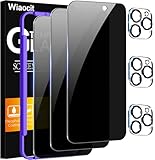
- True Privacy Protection: Wiaocit Compatible for iPhone 16 Pro Privacy Screen protector for made of New Upgrade Privacy Coatings tempered glass, only visible to persons directly in front of phone screen. It keeps your personal, private, information hidden from public place.
- Strongest Explosion-Proof Protection: iPhone 16 Pro screen protector Privacy glass made of 2024 the newest Explosion-Proof Tempered Glass, superior protection beyond 9H, 8000+Tests with 0 damaged. Shock-proof and Shatterproof, protecting your screen from scratches, bumps, and drops in daily use.
- Original Touch Sensitivity: Our screen protector maintains excellent responsiveness sensitivity touch make you feel natural 3D smooth touch. With AF molecular oleophobic layer, the screen protector of iPhone 16 Pro always anti-fingerprint, dirt- proof and oil-proof, giving you a lasting clean and clear.
- Frontal 8K High Transparency: Wiaocit for iPhone 16 Pro Privacy screen protector breaking through the defects of the blurred dark dizzy picture of the privacy glass films, making the front view ultra clear, truly restoring the natural color reproduction and view of iPhone 16 Pro screen. Even in the sunlight, you still can see the screen clearly.
- Easy Installation: the screen protector equipped with a installation frame, makes it very easy to align the screen protector privacy glass, It can be installed within 20 seconds.
iCloud Private Relay is a separate Apple feature, not another name for Private Browsing. Apple says it routes Safari traffic through two internet relays to help prevent network providers from collecting Safari browsing activity and websites from seeing your IP address and exact location. Apple Support: About iCloud Private Relay
Independent reader supportYour contribution helps us test, update, and keep practical guides available for everyone.Where to find the controls on iPhone and iPad
Apple provides device-specific controls for clearing Safari history on iPhone and iPad, and private browsing has its own controls. Menu wording and paths can change with iOS and iPadOS updates, so use the labels shown on your device rather than assuming the Mac menu path applies. Apple’s current guides cover private browsing and history controls for iPhone. Apple Support: Browse the web privately on iPhone; Apple Support: Browse privately in Safari on iPhone
Quick Recap
Best Value

- WORKS FOR iPhone 17 Pro 6.3 Inch tempered glass privacy screen protector with Installation Frame. Featuring maximum protection from scratches, scrapes, and bumps. [Not for iPhone 17 6.3 inch, iPhone Air 6.5 inch, iPhone 17 Pro Max 6.9 inch]
- Specialty: HD rounded glass for iPhone 17 Pro 6.3 Inch is 99.99% touch-screen accurate.
- 99.99% High-definition hydrophobic and oleophobic screen coating protects against sweat and oil residue from fingerprints.
- High Privacy: Keeps your personal, private, and sensitive information hidden from strangers,screen is only visible to persons directly in front of screen.Good choose when you are in the bus,elevator,metro or other public occasions.(Note: Due to this privacy cover will darken the image to prevent the peeking eyes near you, you might need to turn your device display brightness up a bit when use it.)
- Online video installation instruction: Easiest Installation - removing dust and aligning it properly with the help of the included installation frame before actual installation,enjoy your screen as if it wasn't there.
Rank #4

- 【Innovative 1-Step Installation! 】Simplify the application process! Featuring automatic alignment functionality, enjoy a quick and easy installation,swiftly eliminate air bubbles, providing you a hassle-free installation experience for the iPhone 16 Pro privacy screen protector.Friendly Reminder: Please watch the installation video before you begin.
- 【Indestructible Ultra 9H Glass for Ultimate Protection】With nearly diamond-like 9H hardness, this privacy screen protector for iPhone 16 Pro effectively avoids shattering, cracking, and scratches. It is up to 4X stronger than traditional tempered glass protectors and reliably protects the entire phone screen from compression and other impacts.
- 【Ultra-Clear and Ultra-Sensitive】This protective film covers the iPhone 16 Pro 6.3-inch, ensuring you feel as if there's nothing on your iPhone screen.The high-quality anti-fingerprint surface keeps your screen clean, bubble-free, delivering the most natural viewing and sensitive touch for videos and gaming.
- 【26° Anti-Spy Privacy Protection】Featuring upgraded micro-louver optical technology, this iPhone 16 Pro privacy screen protector delivers a precise 26° privacy viewing angle. It maintains ultra HD clarity from the front view, while instantly darkening the screen for anyone viewing from the sides or behind.
- 【Professional After-Sales Support】Each package contains 4 privacy screen protectors for the 6.3-inch iPhone 16 Pro. We also offer a 365-day warranty service. We provide free replacement support for installation failures caused by product defects, size mismatch, or other verified quality issues. Please feel free to contact our customer support team for assistance.
Product prices and availability are accurate as of the date/time indicated and are subject to change. Any price and availability information displayed on Amazon at the time of purchase will apply.
Free tools Windows power users keep installed
One-click scans. No signup required.




