Windows Errors? Fix Them Before They Spread
Repair common Windows errors and clear accumulated junk for a smoother, more stable PC - no reinstall needed.Free scan · no reinstallCrashes, No Sound, or Screen Glitches?
Random freezes, missing sound and display glitches usually trace back to one bad driver. Find and replace yours safely.Free scan · under a minuteTo adjust volume on a Ring Video Doorbell 2, open the Ring app and go to Menu → Devices → Ring Video Doorbell 2 → Device Settings → Audio Settings. Use Device Speaker for the sound of your voice during Two-Way Talk, or Doorbell Sounds for the sound made when someone presses the button. These controls affect different sounds.
Choose the volume control for the sound you mean
| Sound | When you hear it | Setting |
|---|---|---|
| Device speaker | During Two-Way Talk, including the voice coming from the doorbell | Device Speaker in the doorbell’s Audio Settings |
| Doorbell sound | When someone presses the doorbell button | Doorbell Sounds in the doorbell’s Audio Settings |
| In-home chime | When the doorbell activates a connected mechanical or digital chime | Configure the chime separately under In-home Chime Settings |
| Ring Chime or Chime Pro | For linked indoor alerts, such as ring or motion alerts | Adjust alert volume in the Chime’s app settings |
Ring documents the doorbell audio controls separately from in-home chime configuration; it does not establish that the doorbell’s Audio Settings sliders change an in-home chime’s loudness. See Ring’s volume guidance and in-home chime guidance.
As an Amazon Associate I earn from qualifying purchases.
Adjust the Ring Video Doorbell 2’s audio
- Open the Ring app and tap the menu icon (☰).
- Tap Devices, then select Ring Video Doorbell 2.
- Tap Device Settings, then Audio Settings.
- Move the Device Speaker slider to change Two-Way Talk volume, or move Doorbell Sounds to change the sound made when the button is pressed.
If the Device Speaker slider is missing
Ring says Two-Way Talk volume adjustment is not available on every Ring device. Its guidance does not specify a Ring Video Doorbell 2-specific workaround if the control is absent. The Doorbell Sounds control is for the button-press sound, not a substitute for the Two-Way Talk speaker setting.
Do these 3 things before closing this tab:
1Scan for outdated or missing drivers - takes under a minute2Clear out junk files and repair common Windows errors3Fix the driver behind crashes, sound loss and screen glitchesAdjust a separate Ring Chime’s indoor alert
A Ring Chime or Chime Pro is optional: it can play linked alerts indoors, and its alert volume can be customized in the app. This is a separate device setting, not a requirement for changing the Doorbell 2’s speaker or doorbell sound. Ring explains linking a Chime in its Chime setup guidance.
Quick Recap
Best Value

- [For Ring S2 Battery 6 Pin]: compatible with for doorbell 2nd generation. Please double check if it is compatible with your device. NOT for S1(5Pin) and V4
- [For Ring Doorbell 2nd Generation Battery]: has 5200mAh high capaticy and 3.8 Volts. Delivers long-lasting power, reducing the need for frequent battery swaps
- [For Ring Doorbell Gen 2 S2 Battery 6 Pin]: Replacement battery for ring video doorbell built-in protection functions, such as: overcharge, overheating, short-circuit, and so on. These mechanisms work in conjunction with each other, giving priority to ensuring a safe and stable power supply and the normal operation of the doorbell
- [S2 Lithium Battery Model]: for ring is fast charging and portable. Ideal for use as a backup battery. Engineered to match the exact dimensions and connectors of the original batteries, ensuring hassle-free installation and reliable performance
- [Rechargeable Battery for Ring Doorbell]: comes with year warranty, if you have any question, please don't hesitate to contact us
Rank #4
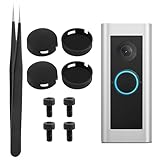
- 【DIY Installation Instruction, No Need to Disassemble Doorbell Housing】:This kit replaces only the outer silicone protective cover, NOT the internal electronic push‑button switch. Step1: Carefully pry off old cracked cover with included tweezer, work around the edge and avoid damaging inner mechanism. Step2: Locate the slit notch at the 6‑o’clock position on your doorbell. Step3: Align new cover’s notch with 6‑o’clock slit, press firmly until it snaps into place. Step4: Gently tug to confirm secure fit, then test your doorbell function. All repair work can be finished in minutes.
- 【4‑Pack Cost‑Effective Spare Button Covers】:Get 4‑pack silicone replacement covers for value‑added spare parts. Fix cracked, split or worn‑out doorbell outer shell directly, avoid expensive cost of purchasing a brand‑new complete doorbell unit.
- 【Weather‑Resistant Flexible Silicone for Outdoor Use】:Made of durable flexible silicone material for long‑term outdoor exposure. Restore the waterproof seal for your doorbell, prevent water intrusion and protect internal hardware from rain damage.
- 【Complete Repair Kit with Tweezer & 4 Mounting Screws】:Package comes with 4 silicone button covers, 4 mounting screws and precision stainless‑steel tweezer. Extra screws are provided for your installation backup, tweezer helps you remove stuck old broken covers conveniently.
- 【Perfect Fit for Ring Doorbell Pro & Peephole Camera】:Precision‑molded to match original contour of Ring Doorbell Pro and Peephole Camera. Simple home DIY repair, no professional tools or technician required.
Rank #3

- Spare Parts Kit will help you safely install your Wired Doorbell (2nd Gen).
- This kit includes a mounting plate, (2) fork connector extenders, a bypass cable, screws and anchors.
- Only works with Wired Doorbell (2nd Gen).
Rank #2

- Compatibility - Our replacement buttons are exclusively designed for the Video Doorbell Pro model.
- 4-Piece Value Pack - Take advantage of this cost-effective 4-piece set to resolve issues without the need for purchasing new devices.
- Equivalent to Original - Replacing damaged buttons ensures the normal operation of your doorbell, prioritizing both your safety and privacy, just like the original buttons.
- Upgraded Design - Doorbell Pro replacement buttons offer improved performance compared to the original buttons as they are made with high-strength material. They are more responsive, allowing you to easily press and activate your Doorbell Pro. .
- Installation Guide - Does not require taking the unit apart; instead, a needle nose plier does the trick, ensuring that the small slot faces down. Replacing your cracked button with a new one only takes a few minutes.
#1 Best Overall

- Hear when someone's there — Receive notifications when motion is detected by your cameras or someone rings your doorbell.
- Real-time alerts, clear as a bell — With an upgraded speaker, get notified throughout your home with louder, clearer alerts.
- Set up in a snap — Simply plug Chime (3rd Gen) into a standard wall outlet for easy setup.
- Sleek, elegant design — Curved edges and slim profile create a modern look that fits your space.
- Customizable sound profiles — Personalize tones, volume, and snooze settings.
Product prices and availability are accurate as of the date/time indicated and are subject to change. Any price and availability information displayed on Amazon at the time of purchase will apply.
Independent reader supportYour contribution helps us test, update, and keep practical guides available for everyone.



