Recommended Free Tools
If your Galaxy screen still responds, open Quick settings, tap the Power icon, choose Restart, and confirm. You can also ask Bixby to restart the phone if Bixby Voice is set up and available. If the screen is frozen, use the separate force-restart button combination instead.
Restart from Quick settings when the screen works
-
Wake and unlock the phone if you can.
-
Swipe down from the top of the screen to open the notification shade or Quick panel. Swipe down again to expand Quick settings if needed. On many models, a two-finger swipe down opens the expanded panel directly.
As an Amazon Associate I earn from qualifying purchases.
-
Tap the Power icon, often near the upper-right corner beside Settings.
Do these 3 things before closing this tab:
1Repair Windows errors before they cause bigger problems2Scan for outdated or missing drivers - takes under a minute3Clear out junk files and repair common Windows errorsSpecial offer. See more information about Outbyte and uninstall instructions. Please review EULA and Privacy policy. -
Tap Restart, then confirm Restart if prompted. Wait for the phone to shut down and boot back up.
#1 Best Overall
 Side Power On Off Volume Button Key Replacement Repair Part for Samsung Galaxy S10/S10 Plus g975 g973 (Blue)
- 100% Brand New, OEM, High Quality
- This product are tested before shipping
- Compatible with Samsung Galaxy s10/ s10 plus
- Disassembly instruction isn't include, you may can search it via Internet.
This opens the restart menu without using the physical Power or Side button. The exact panel layout and labels can vary by model and software. See Samsung’s instructions for restarting a Galaxy phone or tablet and its guidance on powering off Galaxy phones without a Power key.
Use Bixby if voice control is available
If Bixby Voice is configured, say “Hi, Bixby, restart my phone,” then follow any prompt on screen or by voice. Samsung documents Bixby as a restart option, but availability and setup prompts can vary by device and region. If Bixby is not set up, use Quick settings instead.
Rank #2
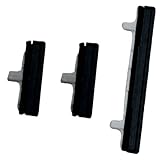
- About Quality:A+quality. Each item has been checked and in good condition before shipping.
- Compatible Models:The Power Volume Button Key Connector Replacement Fit For Samsung Galaxy Note 9.
- Applicability:Replace your worn-out or damaged Power Volume Button Key /Power(On Off)/Volume Button /Side Buttons Key with this high-quality replacement set.
- Easy Maintenance: Replacing the Power Volume Button Key is a hassle-free process. No need to spend extra money on professional repairs when you can do it yourself easily.
- Tips: If there is any quality problem with the goods , Please contact us ,We will provide you with good after-sales service.
Choose the right method for the phone’s condition
| Phone condition | Method | What to expect |
|---|---|---|
| Screen responds to touch | Quick settings Power icon, then Restart | Normal restart through the on-screen menu |
| Screen responds and Bixby Voice is available | Ask Bixby to “restart my phone” | Voice-command restart; setup and availability vary |
| Screen is frozen or the restart menu will not appear | Hold Side button and Volume down together | Force restart; Samsung says it may take up to 60 seconds in some cases |
Force-restart a frozen Galaxy
If the display is completely unresponsive, an on-screen option cannot help. Press and hold the Side button and Volume down together until the phone restarts. Keep holding if there is no immediate response; Samsung says the process can take up to 60 seconds in some cases. This is a force restart, not the normal Restart command in Quick settings.
Samsung’s guidance for a Galaxy phone that will not turn off also notes that a device secured with biometrics may ask for its backup PIN or password after reboot. If the phone still will not turn off after troubleshooting, Samsung recommends requesting service.
Rank #3

- This product are tested before shipping
- Compatible with Samsung Galaxy S20 / S20 Plus
- Disassembly instruction isn't include, you may can search it via Internet.
- Special skill and techniques required for proper installation,Please check both the model and picture before purchase.
- Packing : 1 set
Why the button name and long-press behavior differ
Some Galaxy devices have a dedicated Power key; many newer models use a multifunction Side button instead. Depending on the device and its settings, holding that button may open Bixby rather than the power menu. Samsung documents customizable Side button behavior, but the available controls differ by model, software, carrier, and region. Using the Quick settings Power icon avoids relying on the long-press assignment. Samsung’s regional restart guidance, last updated August 26, 2026, likewise notes that options vary by model, software, and carrier.
Independent reader supportYour contribution helps us test, update, and keep practical guides available for everyone.If restarting does not solve the problem
If the Side or Power button appears physically damaged, or the phone remains unresponsive after a force restart, the required repair depends on the exact Galaxy model. Avoid ordering a generic replacement button or part; contact Samsung support or request service for model-specific diagnosis. Samsung also provides steps for a Galaxy device that will not start or is stuck in a boot loop.
Quick Recap
Rank #4
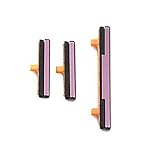
- 100% Brand New, OEM, High Quality
- This product are tested before shipping
- Compatible with Samsung Galaxy s9/ s9 plus
- Disassembly instruction isn't include, you may can search it via Internet.
Product prices and availability are accurate as of the date/time indicated and are subject to change. Any price and availability information displayed on Amazon at the time of purchase will apply.




