The Rapoo E9050L is a slim, rechargeable 78-key keyboard that can connect to three devices over Bluetooth and a fourth through its included 2.4 GHz USB receiver. Its compact size and quiet typing make it appealing for switching between a computer, tablet, and phone, but the typing angle is fixed and there is no place to store the receiver in the keyboard.
What the Rapoo E9050L offers
Rapoo describes the E9050L as a 78-key compact keyboard with chiclet-style scissor keys, an aluminum alloy frame and back panel, 12 multimedia keys, and USB-C charging. Its listed dimensions are 284 × 119 × 13 mm, and it weighs 292 g. Rapoo calls the profile 5.3 mm slim; the product’s overall listed thickness is 13 mm. Rapoo’s product specifications list support for Android, Chrome OS, iOS, macOS, and Windows.
As an Amazon Associate I earn from qualifying purchases.
The layout saves space compared with a full-size keyboard, so it is easier to carry or place alongside a laptop. That trade-off also means it is not a substitute for a full-size layout if you rely on a number pad or other keys omitted from a 78-key compact design.
Do these 3 things before closing this tab:
1Fix the driver behind crashes, sound loss and screen glitches2Repair Windows errors before they cause bigger problems3Scan for outdated or missing drivers - takes under a minuteHow device switching works
The E9050L supports Bluetooth 4.0 and 5.0, as well as a separate 2.4 GHz connection through the included USB receiver. Rapoo advertises switching among up to four devices overall; that does not mean four Bluetooth pairings. The independent review describes three Bluetooth device slots plus the receiver connection. A physical three-way switch selects Bluetooth, RF (the receiver), or off. Deepak Dhingra’s 91mobiles review, published September 30, 2026, explains the connection arrangement, while Rapoo’s US listing advertises the four-device total.
#1 Best Overall
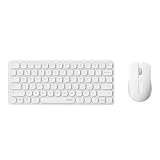
- 【Multi-Device and Multi-OS】Both keyboard and mouse are fully multi-device and multi-os friendly for powering through projects on 4 devices at the same time --- driver-free, plug and play.
- 【Reliable Wireless Connectivity】Featuring 2.4GHz/Bluetooth 5.0/4.0, this wireless keyboard and mouse combo open up new ways to type on your PC, tablet, phone or a second computer.
- 【Adjustable DPI】Includes optical 800/1000/1200/1600/2400 resolution mouse for silky prominent movement on different sized displays.
- 【Silent Click and Dual System Hotkey】The low-profile chiclet scissor keys provide comfortable, quiet typing experience for hours at your desk; Support Windows and Mac OS dual system shortcuts to 12 widely used functions keys like play/pause, volume+/- and more.
- 【Refined Details from Customer Voice】The latest version has added device and capitalization indicator lights for making it easier to find which device you are typing on, and eliminating the inconvenience caused by not knowing the uppercase or lowercase; The Bluetooth 5.0/4.0 is upgraded from Bluetooth 5.0/3.0 in order to extend battery life, what’s more, we’ve also added a battery indicator for better power management.
This setup is useful if your work moves among a computer, tablet, and phone: keep the Bluetooth devices paired, then switch between them, or use the receiver connection for a device with a suitable USB port. The receiver is a separate piece to carry, and the keyboard has no onboard storage slot for it.
Typing feel and ergonomic limits
Dhingra describes typing as comfortable and quiet, and says the compact keys did not feel cramped to him. Those are his impressions of the reviewed unit, not a guarantee that the layout or key feel will suit every typist. If you regularly work for long sessions, try to confirm that the compact spacing and key arrangement fit your habits.
Rank #2

- 【Compact Wireless Combo】Featuring a 99-key layout with number pad and arrow keys, a silent mouse with side buttons - enhancing your typing and browsing efficiency yet taking 20% less space.
- 【Multi-Device and Multi-OS】Pair with up to 4 devices on nearly any operating system (Windows, Mac OS, Linux) via Bluetooth 5.0/4.0 and the plug-and-play USB receiver. Open up new ways to type on your PC, tablet, phone, or a second computer.
- 【Fluid Typing Experience】Laptop-like profile with incurve rounded keys for your fingertips delivers a fast, fluid, precise and quiet typing experience.
- 【5-DPI Adjustable Silent Mouse】Provides good portability and ergonomics for small hands or fingertip grip, with 5 preset DPI (800/1000/1200/1600/2400) switchable for smooth tracking on different resolution monitors.
- 【Multimedia Keys】Support Windows and Mac OS dual system shortcuts to 12 widely used function keys like play/pause, volume+/- and more.
The typing angle cannot be adjusted. As Dhingra puts it, “The typing angle can’t be adjusted.” If you prefer a raised or customizable typing position, this is a meaningful limitation rather than a minor portability detail.
The Tool Desk
Outbyte Driver Updater FREEScan for outdated or missing drivers - takes under a minuteDriver Scan →Outbyte PC Repair FREERepair Windows errors before they cause bigger problemsFix Now →Charging and battery-life claims
The keyboard has a rechargeable 500 mAh battery and charges over USB-C, according to Rapoo. Its published runtime figures differ by source: the official product page says up to 240 hours in 2.4 GHz mode and up to 160 hours in Bluetooth mode, while the US store listing says up to 90 days, qualified by frequency of use. These are manufacturer claims, not independently verified results; Dhingra said he had not used the keyboard long enough to verify the maximum runtime.
Rank #3
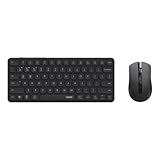
- 【Multi-Device and Multi-OS】Both keyboard and mouse are fully multi-device and multi-os friendly for powering through projects on 4 devices at the same time --- driver-free, plug and play.
- 【Reliable Wireless Connectivity】Featuring 2.4GHz/Bluetooth 5.0/4.0, this wireless keyboard and mouse combo open up new ways to type on your PC, tablet, phone or a second computer.
- 【Adjustable DPI】Includes optical 800/1000/1200/1600/2400 resolution mouse for silky prominent movement on different sized displays.
- 【Silent Click and Dual System Hotkey】The low-profile chiclet scissor keys provide comfortable, quiet typing experience for hours at your desk; Support Windows and Mac OS dual system shortcuts to 12 widely used functions keys like play/pause, volume+/- and more.
- 【Refined Details from Customer Voice】The latest version has added device and capitalization indicator lights for making it easier to find which device you are typing on, and eliminating the inconvenience caused by not knowing the uppercase or lowercase; The Bluetooth 5.0/4.0 is upgraded from Bluetooth 5.0/3.0 in order to extend battery life, what’s more, we’ve also added a battery indicator for better power management.
Price, warranty, and buying by region
Prices and seller terms are market-specific snapshots, not a single global offer. Rapoo’s US store displayed $24.99 and described a 24-month warranty and 30-day return policy; its online ordering was limited to the United States at the time reflected in the listing. Check the US listing for current availability and terms.
Rapoo India displayed ₹2,499 and a three-year warranty, with Amazon among its purchase options. Check the India listing for its current price and purchase routes. Dhingra’s September 30, 2026 review reported that the keyboard was listed online in India for Rs 2,250 when he wrote it; that dated figure is different from the price currently displayed on Rapoo India’s listing. Before buying, confirm the specific layout, color, stock, shipping, and warranty for your region.
Quick Recap
Best Value

- 【Multi-Device Wireless】Pair with up to 4 devices on nearly any operating system (Windows, Mac OS, Linux) via Bluetooth 5.0/4.0 and the plug-and-play USB receiver. Open up new ways to type on your PC, tablet, phone, or a second computer.
- 【Fluid Typing Experience】Laptop-like profile with incurve rounded keys for your fingertips delivers a fast, fluid, precise and quiet typing experience.
- 【99-Key Compact Layout】A compact keyboard with number pad and all the keys you need. The keys layout is optimized to work on Windows, Mac OS and more.
- 【Multimedia Keys】Support Windows and Mac OS dual system shortcuts to 12 widely used function keys like play/pause, volume+/- and more.
- 【Refined Details from Customer Voice】The latest version has added device and capitalization indicator lights for making it easier to find which device you are typing on, and eliminating the inconvenience caused by not knowing the uppercase or lowercase; The Bluetooth 5.0/4.0 is upgraded from Bluetooth 5.0/3.0 in order to extend battery life, what’s more, we’ve also replaced the alkaline batteries with name brand ones for prolonged use.
Rank #4

- 【Plug and Play】Featuring a reliable 2.4GHz wireless connection up to 33ft, this keyboard and mouse combo provides you a lag-free wireless convenience, comfortable typing experience, and smooth cursor control.
- 【Quiet Keyboard and Mouse】Reduces 90% of the distractive noise to improve your productivity. The low-profile, concave keys make your fingers immediately feel at home. The ambidextrous, compact mouse allows an easy navigation for both left- and right-handed users.
- 【Spill-Proof Design】Enjoy your cup of tea while browsing news or emails, the X2100 is well protected against a maximum of 200ml liquid spillage. *Tested under limited conditions, please do not immerse the keyboard in liquid.
- 【12 Multimedia & Extra Calculator Keys】Convenient and essential hot keys give you instant access to browser (forward, back, homepage), email, and media control (play, pause, skip, volume +/-, mute, etc). What’s more, we also add an extra calculator key to streamline your workflow to next level - waking up the calculator function with one-button click. *Please be noted the browser, email, and media control hotkeys are fully compatible with Windows only.
- 【Long Battery Life】You can go up to 12 months for the keyboard and mouse without the hassle of changing batteries - like other typical Rapoo products, this quiet wireless keyboard and mouse combo also adapts the latest low-power technology.
Who should consider the E9050L?
- A good fit: People who want a slim, portable keyboard, need to switch among several devices, and value quiet typing and a rechargeable USB-C connection.
- Think twice: Anyone who needs an adjustable typing angle, an onboard receiver-storage slot, or a full-size layout with a number pad.
- Check first: Confirm that your devices support the connection you plan to use—Bluetooth or a compatible USB receiver—and that the compact key layout suits your work.
Product prices and availability are accurate as of the date/time indicated and are subject to change. Any price and availability information displayed on Amazon at the time of purchase will apply.
What’s actually slowing this PC down?
Pick the symptom - the matching free tool is one click away.




