What’s actually slowing this PC down?
Pick the symptom - the matching free tool is one click away.
No: a PS4 has no documented alternate direct video output that bypasses HDMI. Its HDMI OUT port is the documented connection to a TV or monitor. Remote Play may let you use the console on another device if it was set up beforehand, but it is not a physical HDMI replacement. If cable and display checks do not restore the picture, the next step is repair diagnosis.
What can bypass the PS4 HDMI port?
Nothing provides a second direct video connection on the PS4 in Sony’s setup guidance. Sony instructs users to connect the console’s HDMI OUT port to the screen: How to set up your new PS4 console.

As an Amazon Associate I earn from qualifying purchases.
The PS4’s optical DIGITAL OUT port, on models that have one, carries audio—not video. Sony notes that optical output is absent on CUH-2000 series consoles. Neither that port nor an HDMI splitter, capture device, or HDMI-to-analog converter can produce video if the console’s HDMI output is not sending a signal. These devices can only receive or convert a signal that is already working.
Do these 3 things before closing this tab:
1Repair Windows errors before they cause bigger problems2Scan for outdated or missing drivers - takes under a minute3Clear out junk files and repair common Windows errorsTry the cable and screen checks first
A blank screen can come from the connection path rather than a damaged console port. Sony recommends connecting the PS4 directly to the screen: How to troubleshoot picture and sound issues with your PS4 console.
#1 Best Overall

- Compatibility: The console accessories only for Sony Playstation 4 PS4 HDMI port replacement(2PCS, Not for other model).Please make sure your model before purchase.
- Application: When there has problem with the HDMI port for Playstation 4, it may encounter is display problems. This includes flickering, distorted screens, broken screens, distorted colors, or unclear images. In addition, the display may not recognize the signal source or intermittently lose the signal, causing the screen to go black. This includes audio loss or deterioration of sound quality, because the HDMI cable also transmits audio signals. Our for PS4 interface connector which could better to solve these problem.
- Quality Guarantee: For PS4 HDMI port was made by good quality and produce by accurate machine, can restore the quality and size with your original HDMI port. All for PS4 socket connector have passed strictly QC double tested and 100% in good condition before shipment.
- Professional Tools: Comes with 2pcs HDMI port and set tools for PS4 interface connector replacement, professional repair tools helps to disassemble and replace for PS4 HDMI port more convenient.
- Suggestion Tips: For PS4 HDMI port replacement to replace need to weld and need the welding tools!If you do not have any installation experience, we suggest find the professional. If you need the installation guide for Sony PS4 HDMI Port socket interface replacement or have problem, please leave a message.
- Make sure both ends of the HDMI cable are fully seated. Confirm the TV or monitor is set to the input that the PS4 is connected to.
- Test with another known-good HDMI cable compatible with the PS4. This can help identify a faulty cable; it will not fix a damaged console port.
- Try a different HDMI input on the TV or monitor.
- Connect the PS4 straight to the screen. Temporarily remove any receiver, sound bar, switch, splitter, or capture device from the signal path.
If the picture returns after one of these changes, the issue was likely in the cable, screen input, or intermediary connection—not evidence of a bypass.
Can Remote Play work with a broken HDMI port?
Remote Play is a software-based way to stream and control a PS4 from a supported PC, Mac, or mobile device. It may be an option if you had already enabled Remote Play and activated the PS4 as your account’s primary console. Waking the PS4 from Rest Mode also depends on the relevant power settings, and some games and media cannot be streamed.
It is not a reliable first-time setup workaround for a console with no working display. If Remote Play was not configured before the HDMI problem, you may need a working screen to complete setup. Check Sony’s current Remote Play instructions for supported devices and requirements in your region.
When to arrange a repair
If the direct connection, a known-good cable, and another screen input do not restore the picture, use PlayStation Repairs for diagnosis. A damaged HDMI port or nearby circuitry requires repair; an adapter or replacement cable cannot bypass that damage.
Rank #3

- Compatibility: The console accessories only for Sony Playstation 4 Slim /PS4 Pro HDMI port replacement(2PCS, Not for other model).Please make sure your model before purchase.
- Application: When there has problem with the HDMI port for PS4 Slim, it may encounter is display problems. This includes flickering, distorted screens, broken screens, distorted colors, or unclear images. In addition, the display may not recognize the signal source or intermittently lose the signal, causing the screen to go black. This includes audio loss or deterioration of sound quality, because the HDMI cable also transmits audio signals. Our for PS4 Slim interface connector which could better to solve these problem.
- Quality Guarantee: For PS4 Pro HDMI port was made by good quality and produce by accurate machine, can restore the quality and size with your original HDMI port. All for PS4 Pro socket connector have passed strictly QC double tested and 100% in good condition before shipment.
- Professional Tools: Comes with 2pcs HDMI port and set tools for PS4 Slim interface connector replacement, professional repair tools helps to disassemble and replace for PS4 Pro HDMI port more convenient.
- Suggestion Tips: For PS4 Pro HDMI port replacement to replace need to weld and need the welding tools!If you do not have any installation experience, we suggest find the professional. If you need the installation guide for Sony PS4 Slim HDMI Port socket interface replacement or have problem, please leave a message.
If you are considering an independent repair provider, check that it has experience with PS4 consoles, ask what warranty it gives on the repair, and get the price in writing before authorizing work.
Quick Recap
Best Value

- Solder Wick Included: Each pack includes solder wick to aid in the smooth removal of your old or damaged HDMI port.
- Compatible with PS4: Compatible with PlayStation 4 Slim and for PS4 Pro console (for PS4 CUH-2XXX, CUH-7XXX series consoles)
- OEM-Quality: Brand new and high-quality HDMI port replacements directly from the OEM factory.
- Soldering Required: To install this HDMI port for PS4 Slim/Pro, soldering is required. Please refer to step-by-step video tutorials on YouTube, as the manual is not included.
- Comprehensive Set: Includes 2 HDMI ports for PS4 Slim/Pro, 5ft solder wick, 1 metal bit driver, 1 T8 bit, 1 PH00 bit, 1 metal tweezer, and 1 prying tool.
Rank #4
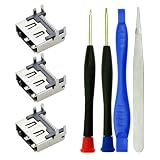
- Match: only for Playstation 4 PS4 HDMI port replacement The console accessories, Cant suit for PS4 Slim, PS4 PRO Consoles
- Function: Repair or replacement HDMI Port Replacement for Playstation4 PS4 Socket Jack Interface Connector for PS4 Console, if your port used not well or broken, like no video output fix, or for PS4 HDMI port broken fix, black screen, for PS4 HDMI port bent pins or for PS4 HDMI no signal, you can use this one to instead of it
- Package: 3pcs for PS4 HDMI port replacement. 2pcs screwdriver, 1pcs tweezer, 1pcs pry stick, 3pcs HDMI port can help you use a long time
- Quality: Be made of high quality material, make your HDMI Port Replacement for Playstation4 PS4 Socket Jack Interface Connector used like new machine
- Tips: For PS4 HDMI Socket Jack Interface Connector port replacement to replace need to Soldering iron tools! before replcement, pls view the guide steps or video from other professional website, then operate it.
Product prices and availability are accurate as of the date/time indicated and are subject to change. Any price and availability information displayed on Amazon at the time of purchase will apply.




