“Combo PS2 ports” is not an official Sony connector name. A PlayStation 2 has several separate connections, and which ones are present—and which accessories work—depends on the console’s SCPH model number and region. Identify the connector, then check the exact console and accessory models before buying or connecting anything.
Start with the console’s model number
Find the SCPH number printed on the console’s label. Sony’s accessory compatibility information is organized by model family, not by a universal promise that every PS2 connection accepts every peripheral. Regional versions and revisions can differ, so use the manual for your exact console and confirm the accessory’s model number.
As an Amazon Associate I earn from qualifying purchases.
Sony’s accessory compatibility chart is for Japan; its listed part numbers may not apply identically in every territory. The SCPH-90004 manual applies to that French-region model, not every PS2.
The Tool Desk
Outbyte PC Repair FREEClear out junk files and repair common Windows errorsFree Scan →Outbyte Driver Updater FREEFix the driver behind crashes, sound loss and screen glitchesFind Drivers →What the PS2 connections do
Front USB ports
USB is for supported peripherals, not a guarantee of general-purpose USB compatibility. Sony’s accessory chart lists a USB keyboard, USB mouse, and EyeToy USB camera across the model families shown. That does not establish support for arbitrary storage, audio devices, controllers, or every game. For a game-specific use, check that game’s documentation as well as the console’s manual.
#1 Best Overall

- 【High Stable Signal】: Our wired ps2 controller has a premium cable, making the connection between the wired controller and your ps2 console having more stable signal and without any delay.
- 【Plug and Play Wired PS2 Controller】: This controller is designed with cable, plug and play, without needing extra wireless receiver for connection, save your time at learning how to connect the controller and ps2 console.
- 【Ergonomic Design】:Our wired controller for PS2 is perfectly suitable for human beings palms, all the buttons are complied with your hands and make you not feel fatigue when you handhold the controller for a long time.
- 【Double Vibration Motors】: This PS2 controller is built in double vibration motors, every motions and each game steps,as if put yourself into a realistic game world and providing you with more comfortable and more exciting gaming experience.
- 【Compatible with PS2/PS2 Slim/PS1】: Our wired ps2 controller is compatible with PS2/PS2 Slim/PS1, and we provide 2pcs wired ps2 controllers for you, suitable for playing ps2 games together with your friends and family, relaxing your life now!
S400 i.LINK
Some earlier PS2 models have an S400 i.LINK connector, an IEEE 1394 interface. It is not USB: the connectors and interfaces are different, and a passive USB-to-i.LINK cable does not make a device compatible. Do not assume the port appears on every revision. Sony’s SCPH-90004 manual specifically lists devices using S400 i.LINK as incompatible with that console.
The connector’s presence alone does not establish which accessories or software support it. Do not treat i.LINK as a substitute for a network adapter.
Rank #2

- NOTE: THIS ITEM IS A THIRD PARTY PRODUCT. It is Burcica brand product
- Ergonomic Design Controller: The most classic shape P2 controller perfectly fit palms, all the buttons and controls make your hand very comfortable for long periods of gameplay. It must be a big surprise when your kids or your friends receive these beautiful controllers.
- Double Shock Remote: Our Wireless controller for P2 built in two electric motors makes each hit, crash and explosion is more excite and realistic, you will feel the rumble in the palm of your hand
- 8 Action buttons with pressure sensitivity w/ Twin analogue sticks and directional thumb-pad,2.4g Wireless Receiver Included ; Requires 2 batteries (not included),Optimized performance for every game,botton pattern random
- EXCELLENT SERVICE - If you have any questions, please do not hesitate to contact us. Please believe that we will put the customer experience first. We will provide you with the best solution.
Controller and memory-card slots
These slots serve controllers and memory cards, but compatibility still depends on the console model, the accessory, and—where relevant—the software. Sony’s compatibility chart identifies supported accessory types by model family; it does not prove that every third-party controller or every game will work.
Do these 3 things before closing this tab:
1Clear out junk files and repair common Windows errors2Fix the driver behind crashes, sound loss and screen glitches3Repair Windows errors before they cause bigger problemsAV MULTI OUT and DIGITAL OUT (OPTICAL)
AV MULTI OUT carries picture and sound to a compatible AV cable or display setup. DIGITAL OUT (OPTICAL), where present, is a separate audio connection. Choose a cable or receiver connection that matches both the console output and the television or audio equipment input; neither connector should be confused with USB or i.LINK.
Rank #3
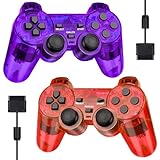
- Controller Service: It is GamingBoy brand Wired Controller, Only compatible for ps-2 - Compatible with Play Station 2 console. 180 days Money Back Guaranteed and permanent product update service. Contact us freely if any question.
- Ergonomic Design Controller:The classic shape controller for PS-2 perfectly fit palms, all the buttons and controls make your hand very comfortable for long periods of gameplay. The perfect gift for game lovers!
- High Stable Signal: This wired controller uses a higher quality premium cable, the connection between the controller and Ps-2 is more stable than other third party controllers, no signal input delay(Cable length 1.8M)
- Double Shock Enhanced Experience:As you walk, bump, hit, fight, or otherwise maneuver through the game, the two motors in the Ps-2 controller feed back vibrations of varying intensity to provide an immersive gaming experience.
- 2-Pack Plug and Play Ps-2 Controller: GamingBoy Clear Red and Clear Blue wired controllers are equipped with upgraded joysticks, 360-degree ultra-precise positioning, and plug-and-play functionality, with no additional software or adapters required.
Expansion bay
Some PS2 models have a rear expansion bay for specified accessories, including products Sony lists as a PlayStation BB Unit, Network Adaptor, and hard drive. Sony’s Japan chart marks these expansion-bay products incompatible with the 70000 and 90000 families. Check the chart and exact regional manual rather than assuming an expansion-bay accessory fits a slim console.
Choosing a compatible accessory
| What you want to do | What to check | Compatibility guidance |
|---|---|---|
| Connect USB peripherals | USB device type and software support | Sony lists a USB keyboard, USB mouse, and EyeToy USB camera; that is not evidence of universal USB support. |
| Use an i.LINK device | Whether the exact console has S400 i.LINK and whether the device/software supports it | The connector is IEEE 1394, not USB; Sony lists S400 i.LINK devices as incompatible with SCPH-90004. |
| Add controller ports | Multitap model number, console SCPH number, and region | Do not assume multitaps are interchangeable. Follow the exact console manual. |
| Connect to component video inputs | Component AV cable compatibility, TV inputs, and console video setting | Sony lists compatible component cable models, but check the model and regional cable before purchase. |
| Use an expansion-bay accessory | Console family and specified accessory model | Compatibility is model-dependent; Sony’s Japan chart excludes 70000/90000 families for the listed expansion-bay products. |
Using a component cable with a TV
For the SCPH-90004, Sony says to set Component Video Out to Y Cb/Pb Cr/Pr when connecting to component inputs. The manual’s setup sequence uses the supplied AV cable to make the setting before switching to the separately sold component AV cable. If the television accepts RGB only, the manual says to select RGB instead. Confirm the TV’s input type and the cable’s compatibility with your PS2 model.
Rank #4

- 【About Degulan Controller】It's A THIRD PARTY PRODUCT, this controller perfectly compatible with your Play 2.
- 【Plug and Play】Upgraded joysticks, 360-degree positioning with ultra-accuracy, Plug and Play without needing extra software or adapter.
- 【Double Shock Enhanced Experience】PS-2 double shock controller provides better vibration, has more realistic gaming experience, Ergonomic design, comfortable feel, fully enjoy the fun of game.
- 【Comfortable Control】Wireless controller for PS-2 more convenient to play-s games.wireless controller for Play 2 with sensitive control and giving you an excellent gaming experience.
- 【High Stable Signal】Degulan wireless controller compatible with Play 2 use sensitive core, connection between controller is no signal input delay.
Sony also warns that selecting 480p progressive output can result in no picture if the display or cable does not support it. If the screen goes blank after changing video output, reconnect using a supported connection and restore a mode the display accepts, following the manual for that console.
Check multitap model numbers carefully
Multitaps are a case where a connector that appears to fit is not enough. Sony’s Japan chart maps SCPH-70120 to the 70000 and 90000 families, and SCPH-10090 to the 10000, 30000, and 50000 families. For the French-region SCPH-90004, Sony states: “Only the multitap (for PlayStation®2) (SCPH-70120 E) (sold separately) can be used with this console.” The same manual warns that other multitap model numbers may damage the console. Use the exact regional manual rather than relying on a general chart.
Quick Recap
A practical compatibility check
- Read the console label. Record the full SCPH model number and identify its region.
- Identify the connection. Match the accessory to USB, S400 i.LINK, AV MULTI OUT, a controller or memory-card slot, or the expansion bay; these are not interchangeable.
- Check the accessory number. Compare its model number against the compatibility information for the console family and region.
- Check the use case. A listed peripheral may still depend on game or software support, which must be confirmed separately.
- For video, match the display. Confirm the cable type, TV input, and video-output setting; do not select progressive output unless the display and cable support it.
Product prices and availability are accurate as of the date/time indicated and are subject to change. Any price and availability information displayed on Amazon at the time of purchase will apply.




