Do these 3 things before closing this tab:
1Repair Windows errors before they cause bigger problems2Scan for outdated or missing drivers - takes under a minute3Clear out junk files and repair common Windows errorsProgressive scan displays all the lines in a video frame together. In labels such as 720p and 1080p, the “p” means progressive; the number indicates the scan-line count. The “i” in 1080i means interlaced, a different method of presenting those lines.
What progressive scan means
A progressive signal presents the even and odd scan lines together as one complete frame. Sony describes it this way: “Progressive scan video content displays both the even and odd scan lines (the entire video frame) on the TV at the same time.” Sony Support
As an Amazon Associate I earn from qualifying purchases.
Interlaced video presents those lines in two separate fields—one containing the even lines and the other the odd lines—which combine to make a frame. The letters identify the scanning method: “p” means progressive and “i” means interlaced.
The Tool Desk
Outbyte PC Repair FREEClear out junk files and repair common Windows errorsFree Scan →Outbyte Driver Updater FREEFix the driver behind crashes, sound loss and screen glitchesFind Drivers →What the number and letter in a TV format mean
The number refers to the scan-line count, while the suffix identifies how those lines are presented. Resolution and scan method are related parts of a video format, but they are not the same thing: the “p” does not by itself mean higher resolution.
#1 Best Overall

- 1080P UPCONVERSION: Enjoy your DVD collection with HDMI upconversion to 1080p for enhanced playback on compatible HD televisions.
- HDMI OUTPUT: Connect easily to a compatible TV using the built-in HDMI output for digital video and audio through a single connection.
- DOLBY DIGITAL AUDIO: Supports Dolby Digital audio for an enhanced home entertainment experience with compatible equipment.
- PROGRESSIVE SCAN: Progressive scan technology provides smooth video playback for movies, TV shows and other DVD content.
- SIMPLE HOME ENTERTAINMENT: Compact DVD player provides straightforward playback for your DVD collection and connects easily to compatible televisions.
| Format | Scan method | Example dimensions |
|---|---|---|
| 720p | Progressive | 1280 × 720 |
| 1080i | Interlaced | 1920 × 1080 |
| 1080p | Progressive | 1920 × 1080 |
These format examples and dimensions are listed by Sony Support. The comparison shows that 1080i and 1080p can have the same stated dimensions but use different scanning methods; it does not establish a universal picture-quality ranking.
Why scan type can matter on a TV
Flat-panel displays work with progressive images, so interlaced material may need to be deinterlaced before display. The result can depend on the source material, the TV’s processing, and the display itself; the suffix alone does not determine how good a picture will look. The ITU technical report discusses deinterlacing as technical context, not as a guide to current broadcast lineups or the input capabilities of a particular TV.
Rank #2
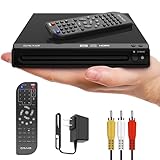
- KEY FEATURES: This compact DVD/CD player is DVD-R, DVD-RW, JPEG, CD-R, and CD-RW compatible. It features zoom and progressive scan. HDMI converts up to 1080p. Includes AV cable and a remote control (2 AAA batteries included). *Does NOT include HDMI cable*
- DVD PLAYER: This HDMI DVD Player is compact, the DVD remote control player makes watching a movie, playing music and viewing pictures from your favorite CD fun, turning any room into a mini home theater! The compact design saves space at 6.5 x 7.8 x 1.7 inches.
- Easy Operation - Includes a full-function remote with enhanced range, plus features like fast/slow playback, zoom, repeat, resume playback, JPEG slideshow, and parental control.
- COMMITMENT: Craig is committed to making quality products at a price you can afford. Our never-ending mission is to provide great affordable products to exceed your quality expectations.
- PERFORMANCE: For over 60 years, the Craig consumer brand continues to provide the latest and greatest technologies and most on-trend products at affordable prices, so that our consumers can enjoy the quality and performance that they expect.
Format support varies by model. If a TV displays an unexpected resolution or no picture, check the TV manual and source-device manual for supported signals and output settings. Sony’s signal guidance also recommends checking the device output and the TV’s supported signal.
Quick wins for a faster PC:
Repair Windows errors before they cause bigger problemsFix Now →Scan for outdated or missing drivers - takes under a minuteDriver Scan →DVD player example: when progressive output causes trouble
On some older DVD setups, the player’s progressive-output setting must match a mode the TV accepts. If the picture disappears after progressive mode is enabled, check the player’s output setting and the TV’s supported input modes. Sony’s DVD troubleshooting guidance includes disabling progressive mode as one possible step; the exact procedure depends on the equipment model.
Rank #3

- DVD player/4-head hi-fi VCR combination unit
- Progressive-scan DVD video output offers flicker-free images on high-definition or HD-ready TVs
- Record a program and watch a DVD simultaneously
- Dolby Digital and DTS surround sound outputs (for use with compatible AV receiver and speaker system)
- Plays DVD-Video, VHS tape, CD, audio CD-R and CD-RW, and video DVD-R
Progressive scan and frame rate are different
The suffix describes scan method, not how many frames or fields are presented per second. Labels such as 24p, 30p, and 60p combine a progressive scan type with a rate; 30i and 60i refer to interlaced formats and rates. Sony’s format explanation distinguishes these labels, so do not treat “p” alone as a frame-rate value.
Quick Recap
Best Value

- Powerful Mini DVD Player for TV: Take your home entertainment to the next level with Maximum Protection, Premium Features, Adaptability, and Multimedia Experience. Includes Breakpoint Memory to automatically resume disc where you left off, Playback Functions, and Anti-Shock Protection.
- Multi-Formats Playability: Our Mini DVD It’s Portable and adaptable, so you can play distinctive file-formats including CD/SVCD, MP3, WMA, DVD+-R/RW, DivX, DVD-R/-RW, DVD-Video for maximum viewing and listening pleasure.
- Enjoy various connections via HDMI/CD/AV Output, Compatible with your NTSC/PAL TV System and USB Port. Impecca Mini DVD Player it’s compatible with most Audio, Video, and Photo Formats to bring you the best home entertainment in outstanding quality.
- Upscale DVD to 1080P: Convert DVDs up to 1080P FULL HD without losing quality and watch Movies, Videos, Photos, and more of your favorite content in impeccable quality on TV or your computer via HDMI.
- Multi-Region Adaptability: Take your Mini DVD with you while you travel, go on vacation, visit friends and family, meetings, and much more! Thanks to its multi-region adaptability, you can play content anywhere you go.
Rank #4

- 720p/1080i Upscaling Video Output through HDMI Input
- 5 Disc DVD/CD Changer
- Dolby Digital and DTS 5.1 Channel Output
- Multi-Disc Resume, 40 discs
Product prices and availability are accurate as of the date/time indicated and are subject to change. Any price and availability information displayed on Amazon at the time of purchase will apply.




