Do these 3 things before closing this tab:
1Repair Windows errors before they cause bigger problems2Scan for outdated or missing drivers - takes under a minute3Clear out junk files and repair common Windows errorsYou can’t use Steam’s built-in Workshop subscription flow from the Epic Games version of Rocket League. An unofficial community loader documents a way to import Workshop map files for Free Play, but it changes a game map file and its current compatibility is unverified. Steam players have a native route: subscribe to a map in Steam Workshop, then open it in Rocket League under Extras > Workshop.
Why Epic Games has no built-in Workshop download button
Rocket League’s official Workshop integration is documented for the Steam PC version. Its December 7, 2016 version 1.25 notes say Steam downloads subscribed maps, which players can launch from Extras > Workshop. That flow depends on Steam; subscribing to an item does not make it available through the Epic Games launcher.
As an Amazon Associate I earn from qualifying purchases.
Epic’s support instructions explain how to install Rocket League through the Epic Games Launcher Store and Library, but do not document an equivalent map-subscription feature. So Epic users need an unofficial workaround if they want to try Steam Workshop maps.
Your options on PC
| Option | What it offers | Important limitation |
|---|---|---|
| Rocket League on Steam | Subscribe to a Workshop map; Steam downloads it, and the game opens it from Extras > Workshop. | This documented integration is for the Steam PC version. |
| Rocket League on Epic with a community loader | A public project describes importing a Workshop map and loading it in Free Play by replacing Labs – Underpass. | Unofficial. Current compatibility, map-download service availability, and safety have not been established. |
| Rocket League on Epic without a workaround | Install and launch the game through the Epic Games Launcher. | The reviewed Epic support material does not document a native Workshop map-subscription path. |
How the unofficial Epic workaround is documented
The following is the loader project’s published procedure, not official Epic support or independently verified instructions. Check the project’s current documentation before changing files; its steps may stop working after a game or tool update.
#1 Best Overall

- Winner or nominee of more than 150 “game of the year” awards
- High powered Hybrid of arcade style soccer and vehicular mayhem with easy to understand controls and physics driven competition
- Includes more than 100 billion possible customization combinations
- Offline season mode
- Find the Rocket League map you want in Steam Workshop.
- Use the third-party Workshop-download service linked from the loader project to obtain a zipped map archive. The service’s present availability and safety have not been established, so use only sources you trust.
- Save and name the archive in a folder for your maps.
- Open the community loader, locate your Epic Rocket League installation folder, and import the map folder.
- Select the map in the loader. The project says its method replaces Labs – Underpass.
- Launch Rocket League, open Free Play, and select Labs – Underpass to load the replacement map.
- If the replacement is unplayable or causes a problem, the project documents a Reset Game Files control to restore the original Underpass map.
Because this process downloads files from a third party and changes a game map file, keep a backup and follow the loader project’s current instructions. Do not assume the method applies to online matchmaking or to other map-loading tools.
What Easy Anti-Cheat means for maps and mods
In its April 28, 2026 announcement, Rocket League says Easy Anti-Cheat (EAC) is required for online play on PC. The same announcement says community mods do not run while EAC is enabled. When EAC is off, third-party mods may run in training, offline and LAN matches, and replay viewing.
Rank #2

- Extensive Battle-Car customizations with more than 100 billion possible combinations.
- Unlockable items and vehicles, stat tracking, leaderboards, and more
- Addictive 8-player online action with a variety of different team sizes and configurations
- Amazing 4-player splitscreen mode that can be played locally or taken online
- Rocket League Collector's Edition includes every item from the previously released DLC Packs: Supersonic Fury, Revenge of the Battle-Cars, and Chaos Run, plus 4 additional Battle-Cars
Rocket League also says Steam Workshop maps themselves can be played with EAC on or off, and recommends turning EAC off when running mods on top of that content. That statement does not confirm that every Epic loader, map, or game update works with every EAC setting. The community loader described here documents a Free Play workflow, not an online-play method.
What’s actually slowing this PC down?
Pick the symptom - the matching free tool is one click away.
Quick Recap
Best Value

- Includes every item from the previously-released DLC alongside four exclusive vehicles
- Fantastic Multiplayer: 4-Player Splitscreen, 8-Player Online, Ranked and Unranked play
- Game modes include Exhibition , Unfair Mode and a full Offline Season Mode
- Personalize your vehicle with hundreds of different items for more THAN 100 BILLION possible combinations!
- Includes Replay Viewer, customizable controls, Mutator game-variants (Ball Type, Speed, Boost Strength etc), and more!
Rank #4
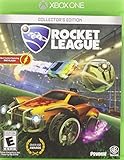
- Extensive Battle Car customizations with more than 100 billion possible combinations
- Unlockable items and vehicles, stat tracking, leader boards, and more
- Addictive 8 player online action with a variety of different team sizes and configurations
- Amazing 4 player split screen mode that can be played locally or taken online
- Rocket League Collector's Edition includes every item from the previously released DLC Packs: Supersonic Fury, Revenge of the Battle Cars, and Chaos Run, plus 4 additional Battle Cars
Rank #3

- Extensive Battle Car customizations with more than 100 billion possible combinations
- Unlockable items and vehicles, stat tracking, leader boards, and more
- Addictive 8 player online action with a variety of different team sizes and configurations
- Amazing 4 player split screen mode that can be played locally or taken online
- Rocket League Collector's Edition includes every item from the previously released DLC Packs: Supersonic Fury, Revenge of the Battle Cars, and Chaos Run, plus 4 additional Battle Cars
Sources
- Rocket League version 1.25 patch notes (December 7, 2016), documenting Steam Workshop support.
- Rocket League’s Easy Anti-Cheat announcement (April 28, 2026), covering online play, mods, and Workshop maps.
- Epic Games Support: installing Rocket League.
- Community loader documentation, describing its Epic map-import workaround.
Product prices and availability are accurate as of the date/time indicated and are subject to change. Any price and availability information displayed on Amazon at the time of purchase will apply.




