Quick wins for a faster PC:
Repair Windows errors before they cause bigger problemsFix Now →Fix the driver behind crashes, sound loss and screen glitchesFind Drivers →Clear out junk files and repair common Windows errorsFree Scan →Yes, a desktop PC can often run with its side panel removed if it remains stable and its components stay within their specified operating conditions. But leaving the case open is not a guaranteed cooling fix: it changes the designed airflow path and exposes parts to more dust and accidental contact. If temperatures improve substantially with the panel off, use that as a clue to diagnose the case rather than assuming it should stay open.
Will removing the side panel make a PC cooler?
It depends on the case, fan layout, component load, and room conditions. The panel affects how air moves through a case, so removing it can help a poorly ventilated or obstructed system—but it can also make little difference. In one home test, PC Gamer’s author reported negligible temperature changes; that result applies to that test, not every PC. PC Gamer’s discussion of the test does not establish a universal temperature change.
As an Amazon Associate I earn from qualifying purchases.
Compare temperatures with the panel on and off under the same workload and similar room conditions. A brief comparison can show whether the enclosure’s airflow is contributing to a problem, but there is no universal safe temperature limit for every component. Check the specifications for your CPU, graphics card, and other hardware.
What changes when the case is open?
- More exposure: The panel normally acts as a barrier. Without it, components are more exposed to dust, accidental contact, and objects entering the chassis.
- A different airflow path: Case fans and vents are arranged to move air through the enclosure. Removing the panel changes that path, so the result depends on the design and setup.
- Easier access: An open side can make inspection convenient, but access is not a substitute for a properly functioning cooling setup.
If temperatures improve with the panel off, check the airflow
A substantial improvement is a reason to inspect the case, not proof that the PC should run open permanently. Check these likely causes before deciding what to change:
#1 Best Overall

- BIGGER 1MM MESH HOLE: 50cm pc computer chassis and fans dust filter mesh cover with bigger 1mm hole not only prevent dust and hair from case but also not restrict airflow to ensure enough ventilation.
- DIY MULTIPLE SIZE: 50cm 19.68inch pc computer case dust filter mesh cover with 3m 118inch magnetic strip separately ,you can flexibly diy and build the size easily.
- WIDE APPLICATION: Designed for home pc computer chassis and fan dust filter,speaker grills and other electrical electronic products dust protection or some diy dustproof projects.It can be dust cover for gaming consoles,Xbox,Xbox Series X,Xbox One X and more.
- DUSTPROOF&VENTILATION: The mesh cover can be used instead of the side cover of pc case,effectively increase the ventilation effect and ensure clean to prolong device working life.
- DETAILED SPECIFICATION: Size:500x500mm(19.68x19.68inch) pvc material filter mesh with 0.45mm thickess 1mm mesh hole for better ventilation.
- Make sure front, side, top, and rear vents are not blocked by objects or dust.
- Check that case fans are connected, unobstructed, and operating as intended.
- Look for a placement problem. MAINGEAR recommends leaving open space around the front, sides, and top of its systems, and warns that carpet, beds, and blankets can obstruct airflow. Follow the guidance for your own computer or case; MAINGEAR’s airflow and cleaning guidance applies to its systems.
- If the airflow path is still inadequate, check whether the case supports compatible fans or has a restrictive design. Confirm fan size, position, and other compatibility details in the case documentation before buying parts.
Case designs differ in their panels and filters. For example, CORSAIR’s documentation describes optional panel inserts and dust filters for the FRAME 5000D, while its FRAME 4500X documentation describes removable filters. Those examples illustrate model-specific features, not a general recommendation to buy either case: FRAME 5000D documentation and FRAME 4500X documentation.
How to check the PC safely
- Check the manual first. Opening instructions vary by computer. Lenovo’s ThinkStation P5 service instructions, for example, say to turn off and disconnect that model and wait several minutes for it to cool before opening the cover. These are model-specific steps, not universal instructions. See Lenovo’s ThinkStation P5 side-panel instructions.
- For cleaning or opening, power down and unplug. MAINGEAR likewise advises powering down and unplugging before removing panels for cleaning. Follow the instructions for your exact system.
- Keep the test controlled. If you are checking temperatures, use the same workload with the panel on and off, and keep the computer in a stable, dry, clear location. Avoid touching internal components while the PC is running.
- Restore the panel after the check. If the panel-off test points to an airflow issue, address the vents, fans, placement, or case setup rather than treating the open configuration as the fix.
Cleaning cautions
Cleaning guidance is product-specific. MAINGEAR advises holding compressed-air cans upright, using short bursts, and avoiding continuous fan spin from compressed air; it warns that misuse can cause damage or hazards. CORSAIR says filters on the FRAME 4500X can be rinsed but must be fully dry before reinstallation. Follow your own manufacturer’s procedure rather than assuming one case’s instructions apply to another.
Quick Recap
Best Value

- After view MUSETEX item description,you will be pleasantly surprised by our configuration.Reasons:①Has 6 auto-adjustable speed PWM ARGB fans;②Computer cases Bestselers top10 are all old designs,none of which are as popular as our cases that have side opening door.No need to remove screws,can super easily open inner case to clean radiator and graphics card dust,also easy to put in different dolls.Friends will think your case is cool!
- 6 Highly Configurable PWM ARGB Fans Pre-installed- (1) Ensure your motherboard has a 3PIN rgb interface and use the motherboard lighting software to control the fans, each addressable ARGB fan can offer 16.8 million colors of special customizable lighting. (2) Adjustable speed PWM fans allow pc case for better silence and better cooling depending on demand. Also the fan with new upgraded bearings greatly extends the service life. Easy disassembly operation facilitates PC hardware assembly.
- Expensive Glass Side Door - Not only is it more stylish than other brands of gaming cases, but it also solves cooling problems much better. Tempered glass side panel with metal pull ring and magnets that can be opened at any time for 76% better cooling than non-side-opening mid-tower pc cases. Easily install internal PC components and place any hand puppet you like. Add to the fun!
- Large-space ATX mid-tower case - Meets the installation needs of over 95% of customers. Plenty of room to easily install the top 280 water drain without touching the memory sticks. Plenty of space for cable management in case, provides multiple HDD mounting slots, large storage capacity, maximum capacity 5*SSD+1*HDD/4*SSD+2*HDD.
- Meet the installation needs - the chassis provides a variety of graphics card installation methods. When the graphics card is inserted vertically, the design of the high-transparency glass door can show off your GPU very well. Compared with other chassis of the same type, the door can also be opened to increase the heat dissipation of the gaming cases. ability to protect the pc case hardware.
Rank #4

- Optional accessories for A3 m-ATX
- Replaces the side mesh panel for a seemless view of internal components in A3 m-ATXSpecifications
- Color: Black
- Produced with the highest grade materials
- Great for everyday use.
Rank #3
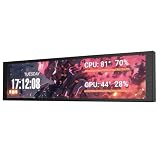
- PC CASE MONITOR AND SENSOR PANEL: The 9.2-inch V92 is a dedicated PC screen for case builds, showing CPU/GPU temperatures, usage, RAM, fan speeds, clocks, weather, and custom widgets. It is not a standard extended monitor.
- 1920 x 462 IPS LCD SCREEN FOR PC: This ultra-wide PC case LCD delivers bright, sharp visuals and wide viewing angles for easy reading through tempered glass. The slim aluminum body measures 242.4 x 63.1 x 12 mm.
- USB-C OR INTERNAL 9-PIN CONNECTION: Connect through an external USB port or an available motherboard USB 2.0 9-pin header. No HDMI or DisplayPort is required, keeping GPU video outputs free. Both USB cables are included.
- FREE STATION SPACE SOFTWARE, NO AIDA64 REQUIRED: Monitor system data and use free themes, plugins, JPG, GIF, MP4, weather, news, and stock widgets. Station Space must remain running. Windows 10/11 only; not compatible with macOS or Linux.
- FLEXIBLE CASE MOUNTING: Install the PC case display horizontally or vertically using the included case fan mounting bracket and rear threaded holes. Check the 9.54 x 2.48 x 0.47 in clearance before purchase for your ATX, micro-ATX, or ITX case.
Rank #2

- Effective Dust Protection for PC Longevity: This 400x300mm PVC mesh filter effectively blocks dust and debris from entering your computer case, protecting sensitive components like GPUs and CPUs from overheating. It is an essential accessory for maintaining a clean gaming PC or workstation.
- Flexible Magnetic Mounting System: Equipped with strong, flexible magnetic strips, this filter attaches securely to any steel or iron surface without the need for screws. It is perfect for modern PC cases with magnetic panels, allowing for quick installation and tool-free removal.
- Customizable DIY Design for Any Device: The 2-pack of large mesh sheets can be easily cut to size with household scissors, making it a versatile solution for custom SFF builds, speaker grills, game consoles, or even DIY electronics projects that require breathable dust protection.
- Optimized for High Airflow & Cooling: Designed with a fine mesh pattern, this filter balances superior dust filtration with minimal airflow restriction. It ensures your fans can still pull in cool air efficiently while keeping the internal environment of your case dust-free.
- Washable & Easy to Maintain: The durable PVC material is waterproof and easy to clean. Simply remove the magnetic filter, rinse it under water, and pat dry to restore its original performance, saving you time and money on compressed air cans.
Product prices and availability are accurate as of the date/time indicated and are subject to change. Any price and availability information displayed on Amazon at the time of purchase will apply.




