Free tools Windows power users keep installed
One-click scans. No signup required.
On many desktop PCs, the familiar port color codes identify analog audio jacks: green is usually headphone or front-speaker output, pink is microphone input, and light blue is line input. Some six-jack surround-sound panels also use black for rear speakers, orange for center/subwoofer, and silver for side speakers. These are clues, not universal rules—check the port label and the manual for your exact computer or motherboard.
What the common PC audio port colors mean
Intel lists these assignments for a common six-jack motherboard audio panel. They describe analog audio functions, not every connector found on a PC.
As an Amazon Associate I earn from qualifying purchases.
| Color | Common function |
|---|---|
| Green | Front-speaker or headphone output |
| Pink | Microphone input |
| Light blue | Line input |
| Black | Rear-speaker output |
| Orange | Center speaker/subwoofer output |
| Silver | Side-speaker output |
These assignments are described in Intel’s Gaming Motherboard Buying Guide. A basic PC may have fewer audio jacks, while another design may combine headphone and microphone functions in a single combo jack.
Crashes, No Sound, or Screen Glitches?
Random freezes, missing sound and display glitches usually trace back to one bad driver. Find and replace yours safely.Free scan · under a minuteWindows Errors? Fix Them Before They Spread
Repair common Windows errors and clear accumulated junk for a smoother, more stable PC - no reinstall needed.Free scan · no reinstallHow to identify the right port on your PC
- Look for an icon or printed label beside the jack, such as a headphone, microphone, or line-in symbol.
- Match the jack’s function to the cable: headphones and speakers need an output; a microphone needs an input. A line-in jack is for bringing audio into the computer from another device.
- If the label is unclear, find the exact PC or motherboard model and consult its manual. Lenovo’s ThinkStation P520 rear-view documentation uses connector functions to identify ports and notes that hardware may differ from illustrations.
Layouts vary even within a manufacturer’s product range. ASUS documents desktop layouts with pink microphone, lime line-out, and light-blue line-in ports, as well as front-panel headphone and audio combo jacks. Its desktop-computer port guide advises checking the manual for the specific model because specifications can vary by region and model.
#1 Best Overall
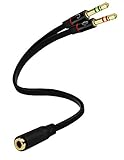
- Headset to PC Adapter with 3.5MM Speaker Mic Stereo Audio Y Adapter, Connect your Newer Headsets (Audio & Microphone) to a PC or Laptop for Use with VOIP Applications,such as Skype or Chat Programs, MSN Mesenger, Yahoo, Google Voice and Many More!
- 3.5MM Speaker and Headphone Splitter with Two Male Ports, One for Headphone Jack on your PC / Laptop, the Other for Mic Jack on your PC / Laptop.
- Gold Plated 3.5MM Audio Y Splitter Cable with Oxygen-Free Copper Provide Maximum's Conductivity and Durability, Compact Design for Maximum Portability - Great Solution to Have on Hand in your Laptop Bag.
- Universal Compatibility with Any PC Computer Laptop With 3.5MM (1/8") Jacks - Works With iPhone/Blackberry/Droid 3.5MM Stereo Earphones (Fits Standard 3.5MM AUX Ports)
- Dual 3 Position 3.5MM Jack, Ideal for Connecting Two Headsets on One Audio Source, Let you Enjoy your Cellphone Music Together with your Friend Easily.
Are PC port colors universal?
No. Intel says audio-port colors may vary by manufacturer, even while listing the common assignments above. Treat color as a quick guide and give more weight to the port’s label, the connector’s function, and the manual for your exact machine.
Color is not a complete legend for every socket on a computer. In particular, do not assume that a blue, red, yellow, or black USB port always has a particular speed or charging capability: the cited manufacturer documentation does not establish a universal USB color map. Check your computer or motherboard manual for the capabilities of its USB ports.
Rank #2

- 2 to 1 Mic Headphone Splitter: UGREEN Headphone Audio Splitter offers a simple way to connect headsets of 4-pole 3.5mm TRRS plug to PC or laptop with separate audio and mic jack, use with VOIP applications, such as Skype or chat programs, MSN Messenger, online gaming, classes online and teams meetings. For example, connect turtle beach recon 50 gaming headsets to PC via the headphone splitter for computer
- Hi-Fi Stereo Sound: This 3.5mm splitter with polished 24K Gold-plated connectors, oxygen-free copper wire ensures higher audio transmission without signal loss and noise. So the headset adapter remains original sound quality, offers better gaming and communication experience. Note: For functional microphone output, a 3.5mm CTIA-compliant TRRS cable is required. (OMTP/other standards will cause mic failure)
- Everlasting Durability: UGREEN Aux Splitter Cable is built to last. Aluminum alloy casing and gold-plated plugs significantly enhance the durability for a longer lifespan. Nylon braided jacket passes 10000+ bending tests and is solid enough to withstand twist, tug, and tangle
- Wide Compatibility: UGREEN PC headset adapter is suitable for most TRRS headsets, compatible with Turtle Beach XO1/PX24/Recon 50X/XO 7, Hyperx cloud 2, Razer Kraken X gaming headset, Bose headphones, PS4, Sennheiser HD 598 Cs wired headset, speaker, HP ProBook 450 G1, Lenovo Thinkpad T400 and more
- Slim and portable design, easy to carry around. Cable Length: 20cm/7.87 inch. NOTE: This headphone jack splitter is only compatible with CTIA standard headphones, incompatible with CTIA standard Apple Earbuds and Beats headphones. This adapter is a 2*3.5mm TRS male to 3.5mm TRRS female adapter, not a 3.5mm male to 2*3.5mm female adapter
Quick answer: which jack should you use?
- Headphones or front stereo speakers: usually green.
- Microphone: usually pink.
- Audio input from another device: usually light blue line-in.
- Surround speakers: on some six-jack panels, black is rear, orange is center/subwoofer, and silver is side.
These are common analog-audio conventions, not a guarantee for every PC. Confirm an uncertain jack using its label and model-specific manual.
Do these 3 things before closing this tab:
1Scan for outdated or missing drivers - takes under a minute2Repair Windows errors before they cause bigger problems3Fix the driver behind crashes, sound loss and screen glitchesQuick Recap
Best Value

- 👍【Use】This PC Y-Splitter is used for connecting a four-pin (4-pole) gaming headsets with CTIA TRRS audio jack standard (audio & microphone). This is compatible with Astro A10 A40, Turtle Beach, BENGOO, HyperX Cloud, SteelSeries, Razer Kraken, Sennheiser , Sades to PC with separate microphone and audio connectors.
- 👍【Also Known As】This PC adapter is also known as “3.5mm Audio Jack Y Cable Adapter 1 x 3.5mm Female to 2 x 3.5mm Male Headset Adapter Compatible for TRRS Gaming Headset to Double - Jacks PC”, Headset Adapter, 3.5mm Jack Adapter CTIA Headphone Splitter Mic and Audio Cable with Separate Microphone and Headphone Connector Compatible for Gaming Headset to PC - 8inch/20CM Black.
- 👍【Application】This is compatible with PlayStation 4 PS4, Xbox One, Switch or Smartphone headsets with a single 3.5mm TRRS 4Pole jack. Compatible with Turtle Beach, BENGOO, HyperX Cloud, SteelSeries, Razer Kraken, Sennheiser and Sades.
- 👍【Additional Uses】This splitter cable adapter works with VOIP applications.
Rank #4

- For wide-ranging use: The DuKabel 4-Position 3.5mm to dual 3.5mm Headset Splitter Adapter features one 3.5mm Female and two 3.5mm Male connectors, enabling you to connect a 4-position headset with Audio and Microphone input to your PC or Laptop. Perfect solution for online gaming or use with VOIP applications- Skype, MSN Messenger, Yahoo, Google Voice etc. (NOT for IOS Earphones or BEATS headset)
- Focus On Pure Essentials: 24K gold-plated contacts, pure metal housing, triple shielding jacket, strong nylon-braided exterior, secure-fit design, and oxygen-free copper wiring, every single detail we made uniquely is to ensure to present the best quality of 3.5mm Audio Splitter Audio Cable in the market. The sound quality provided by this cable is a thing of magnificence which translates to squeaky-clean sound quality and seamless transmission.
- Superb Performance: Connect a 4-position headset to a computer that has separate microphone and audio ports. Premium metallic housing which makes it easily survive everyday usage and gives it a more stylish and elegant appearance that goes great with your expensive gadgets. Unique step-down design provides a secure fit with phones or tables in nearly any type of cases.
- Strong Braided Exterior: Creates a durable design. It’s our first time to use fishing-wire-kind materials braiding with audio cables for maximum protection. The final result is wroth celebrating; crystal-like appearance, anti-slip grab design, yet gentle touch feeling. The jack itself has additional insulation which helps in the durability of the product during multiple plug-in and plug-out maneuvers and keeps the interference from other electrical devices in the car to minimum
- Buy With Confidence: We’re confident in our product so we would like to ask you to take a look at it. With an reasonable price and solid build quality, the DuKabel 3.5mm headphone adapter cable is something you should consider if you need a premium and durable adapter. Not Sure? Please feel free to contact our friendly customer service.
Rank #3
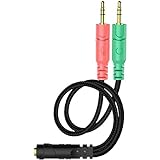
- 【Easy to Connect】: ENVEL 3.5mm headset splitter allows you to connect your stereo headset to a PC audio port and mic port at the same time. One green plug for audio of your desktop/PC, the other pink for microphone.
- 【Enjoy Great Sound Quality】: It is made of high-quality oxygen-free copper, which ensures that the sound will not be disturbed during transmission and minimizes loss.
- 【Durable and Sturdy】Well made braided wire protects the cable from all kinds of wear. Gold plating process, effectively prevent oxidation and scratches.
- 【Maximum Portability】: Plug and play, no matter single or dual plug your headphone is, this will make it work on your device. Take it in your bag.
- 【More Value】: You can connect your newest headsets (audio & microphone) to a PC or laptop for use with VOIP applications, such as Skype or chat programs, MSN Mesenger, Phone Call, Zoom, Facebook, Youtube, Yahoo, Google Voice etc.
Product prices and availability are accurate as of the date/time indicated and are subject to change. Any price and availability information displayed on Amazon at the time of purchase will apply.




