Recommended Free Tools
There is no universal schedule for when an Overwatch skin returns. Some older original Overwatch event skins were made permanently purchasable in the Hero Gallery; Mythic skins follow a separate shop system; and other event or collaboration cosmetics may only be offered during announced windows. To find out whether a particular skin is available now, check its in-game listing and the dated announcement for its event.
How Overwatch Shop rotations work
Blizzard described the Overwatch 2 Shop as featuring weekly cosmetic items, personalized “Just for You” offers, and rotating bundles in its 2022 overview of the Battle Pass and Shop. That explains the rotation model, but it does not establish a fixed return interval for any item—or guarantee that every Shop section follows the same schedule today.
| # | Preview | Product | Price | |
|---|---|---|---|---|
| 1 |

|
Overwatch Coins | 2,000 | XBOX Digital | $19.99 | Buy on Amazon |
| 2 |
|
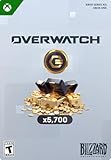
Overwatch Coins | 5,000 | XBOX Digital | $49.99 | Buy on Amazon |
| 3 |
|
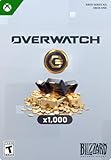
Overwatch Coins | 1,000 | XBOX Digital | $9.99 | Buy on Amazon |
| 4 |
![$25 XBOX Gift Card [Digital Code]](https://m.media-amazon.com/images/I/41Y0U46RO7L._SL160_.jpg)
|
$25 XBOX Gift Card [Digital Code] | $25.00 | Buy on Amazon |
As an Amazon Associate I earn from qualifying purchases.
A skin disappearing from a featured offer does not, by itself, show when or whether it will appear again. Blizzard’s announcements do not provide a universal return calendar for limited-time skins.
The Tool Desk
Outbyte PC Repair FREERepair Windows errors before they cause bigger problemsFix Now →Outbyte Driver Updater FREEScan for outdated or missing drivers - takes under a minuteDriver Scan →Can you still get old event skins?
Some can. In its Season 3 announcement, Blizzard said nearly all Epic and Legendary event hero skins from the original Overwatch—300 total—had been added to the Hero Gallery and would always be available for purchase with Overwatch Coins or Credits. The statement applies to the original-game skin set described in that announcement, not every later event or collaboration cosmetic. See Blizzard’s Season 3 announcement for the scope of that change.
#1 Best Overall
- OVERWATCH COINS BUNDLE — Receive 2,000 Overwatch Coins plus a 200 Coin bonus to customize your heroes and enhance your Overwatch experience.
- UNLOCK PREMIUM CONTENT — Use Overwatch Coins to purchase the Premium Battle Pass and a wide variety of in‑game cosmetic items, including skins, emotes, and more.
- BATTLE PASS TIER SKIPS — Premium Battle Pass owners can spend Overwatch Coins to unlock tiers instantly and gain immediate access to Legendary and Mythic content.
- HERO CUSTOMIZATION — Personalize your favorite heroes with cosmetics purchased using Overwatch Coins to stand out in every match.
- REQUIRES BASE GAME — Requires Overwatch to use this currency, with Coins applied directly in‑game after purchase.
For a specific older skin, look for it in the Hero Gallery. A historical announcement about permanent availability is not proof that every similarly named or later cosmetic belongs to that set.
How Mythic skin availability differs
Mythic skins use a separate shop and currency system. Blizzard’s Mythic Shop announcement described the featured Mythic as available during its season, then cycling out for the following two seasons. Previous Mythics could be offered in the Mythic Shop, but Blizzard said not every past Mythic would necessarily be available immediately.
Rank #2
- OVERWATCH COINS BUNDLE — Receive 5,000 Overwatch Coins plus a 700 Coin bonus to customize your heroes and enhance your Overwatch experience.
- UNLOCK PREMIUM CONTENT — Use Overwatch Coins to purchase the Premium Battle Pass and a wide variety of in‑game cosmetic items, including skins, emotes, and more.
- BATTLE PASS TIER SKIPS — Premium Battle Pass owners can spend Overwatch Coins to unlock tiers instantly and gain immediate access to Legendary and Mythic content.
- HERO CUSTOMIZATION — Personalize your favorite heroes with cosmetics purchased using Overwatch Coins to stand out in every match.
- REQUIRES BASE GAME — Requires Overwatch to use this currency, with Coins applied directly in‑game after purchase.
Mythic Prisms unlock Mythic skins and their customizations. Coins and Credits cannot be redeemed for Prisms, so a balance of those currencies does not substitute for the Mythic unlock currency. Because the timing description is from a 2024 policy announcement, check the current Mythic Shop rather than assuming its historical rotation describes today’s inventory. Blizzard also discussed Mythic availability in its April 2024 developer update.
Event and collaboration skins: check the dates
Some event rewards and Shop bundles have explicitly limited windows. For example, Blizzard’s Season 16 announcement and Overwatch 2 x NERF announcement describe event- or collaboration-specific offers. Use the dates and conditions in the announcement for the particular cosmetic: a limited window does not establish that the skin is permanently exclusive, nor does it guarantee a later return.
Rank #3
- OVERWATCH COINS BUNDLE — Receive 1,000 Overwatch Coins to customize your heroes and enhance your Overwatch experience.
- UNLOCK PREMIUM CONTENT — Use Overwatch Coins to purchase the Premium Battle Pass and a wide variety of in‑game cosmetic items, including skins, emotes, and more.
- BATTLE PASS TIER SKIPS — Premium Battle Pass owners can spend Overwatch Coins to unlock tiers instantly and gain immediate access to Legendary and Mythic content.
- HERO CUSTOMIZATION — Personalize your favorite heroes with cosmetics purchased using Overwatch Coins to stand out in every match.
- REQUIRES BASE GAME — Requires Overwatch to use this currency, with Coins applied directly in‑game after purchase.
Battle Pass progression and challenges are also distinct unlock routes from a Shop purchase. When comparing two skins, check the item’s stated route as well as its timing; the available route may be Coins or Credits, Mythic Prisms, Battle Pass progression, or an event challenge.
Independent reader supportYour contribution helps us test, update, and keep practical guides available for everyone.Personalized offers are not a return promise
Blizzard used Maximilien’s Vault as a past example of a temporary personalized shop: discounts were based on play preferences, and offers disappeared when that limited-time shop event closed. The Season 14 midseason announcement documents that example. It does not establish that the Vault is currently active or that a personalized offer will return.
Quick Recap
Rank #4
- THE PERFECT GAMING GIFT — Buy an XBOX Gift Card for yourself or a friend and let them choose the games, add‑ons, subscriptions, and accessories they want most.
- USE FOR GAMES & CONTENT — Redeem for thousands of digital XBOX games, from backward compatible classics to the latest new releases, plus DLC and in‑game currency.
- GAME PASS READY — Apply your balance toward XBOX Game Pass Ultimate to play new titles on day one* and access a library of hundreds of high‑quality console games.
- PRE‑ORDER & PRE‑INSTALL GAMES — Use your balance to pre‑order and pre‑download upcoming titles so you’re ready to play the moment they launch.
- NO FEES OR EXPIRATION — XBOX Gift Cards never expire and have no service fees, so your balance is ready whenever you are.
How to check whether a skin is available now
- Identify the category. Check whether the skin is listed in the Hero Gallery, the regular Shop, the Mythic Shop, a Battle Pass, or an event announcement.
- Read the item’s unlock details. Confirm the required currency, progression, challenge, or event participation. Coins and Credits are not interchangeable with Mythic Prisms.
- Check the current in-game listing. A past announcement can explain a policy or earlier offer, but it cannot confirm the live Shop inventory on October 7, 2026.
- Use the event’s own dates. If the skin is tied to a dated event or collaboration, rely on that announcement for its stated availability window; do not infer a return date from another skin’s rotation.
Product prices and availability are accurate as of the date/time indicated and are subject to change. Any price and availability information displayed on Amazon at the time of purchase will apply.




