Crashes, No Sound, or Screen Glitches?
Random freezes, missing sound and display glitches usually trace back to one bad driver. Find and replace yours safely.Free scan · under a minutePC Slower Than It Used to Be?
A free scan shows the junk files, broken settings and background clutter dragging Windows down - then fixes them in one click.Free scan · Windows 10 & 11Japanese media group Nikkei said an unauthorized party took over an employee’s Microsoft 365 account and used it on September 30 to send roughly 9,000 phishing emails. Recipients included journalistic sources. Nikkei also disclosed a separate, earlier breach of an employee’s Google Workspace account. It described the two as distinct incidents, and nothing reported so far links them.
What Nikkei disclosed
Nikkei announced both incidents on October 4, 2026, according to The Record from Recorded Future News (October 5). ITmedia Business Online’s report of the same day corroborates the main figures and the distinction between the two services. The Record links to two Nikkei notices, but those pages could not be retrieved. The details below therefore come from the two news reports, not from Nikkei’s own pages.

As an Amazon Associate I earn from qualifying purchases.
| Aspect | Microsoft 365 incident | Google Workspace incident |
|---|---|---|
| Account | One employee’s Microsoft 365 account | A separate employee’s Google Workspace account |
| Timeframe | Phishing sent September 30 | Unauthorized access began in late July; Nikkei reportedly learned of it in early August after a Google alert |
| Consequence | About 9,000 phishing emails sent to people inside and outside the company, with links to malicious websites | Information tied to 1,646 employees, business partners and others may have been exposed |
| Possible data exposure | Recipients’ names and email addresses, plus the contents of some emails | Nikkei said it did not include reader or journalistic-source information |
| Response reported | Password changed; no further unauthorized access detected; recipients contacted and asked to delete the emails; reported to Japan’s data-protection authority | Password changed; no later unauthorized logins and no evidence of misuse of the potentially exposed information |
Why journalistic sources matter here
The phishing went to people who had previously communicated with Nikkei employees, and journalistic sources were among them. Mail from a real, trusted account is far more convincing than a generic spoofed message. For sources, the added risk is that a lure arrives under the identity of someone they have dealt with. Nikkei’s own warning reflects that: “There may be an increase in emails impersonating Nikkei employees or our group companies,” the company said, as quoted by The Record.
Keep the scopes apart. The Google Workspace data was said not to include source information. Sources figured in the Microsoft 365 incident as recipients of the phishing. They are not described as having had their data stolen from a Nikkei system. The Microsoft 365 account’s email contents may have been exposed, and Nikkei was still working out how many people had personal information compromised.
#1 Best Overall

- POWERFUL SECURITY KEY: The YubiKey 5 is a versatile physical passkey that protects your digital life from phishing attacks. It ensures only you can access your accounts.
- WORKS WITH 1000+ ACCOUNTS: Compatible with popular accounts like Google, Microsoft, and Apple. A single YubiKey 5 secures 100+ of your favorite accounts, including email, password managers, and more.
- FAST & CONVENIENT LOGIN: Plug in your YubiKey 5 via USB and tap it to authenticate. No batteries, no internet connection, and no extra fees required.
- MOST SECURE PASSKEY: Supports FIDO2/WebAuthn, FIDO U2F, Yubico OTP, OATH-TOTP/HOTP, Smart card (PIV), and OpenPGP. That means it’s versatile, working almost anywhere you need it.
- BUILT TO LAST: Made from tough, waterproof, and crush-resistant materials. Manufactured in Sweden and programmed in the USA with the highest security standards.
What is not established
- No attacker has been identified, and the reports do not say whether the two incidents are connected.
- The reports do not say how either account was first accessed, or whether multifactor authentication was enabled.
- It is not stated whether any recipient clicked a malicious link, or whether any malware infection or misuse of data followed.
Treat claims about a specific threat actor, a credential-theft method or confirmed harm as unsupported for now.
Figures and how to read them
- About 9,000 emails: a Nikkei figure reported by The Record and ITmedia, covering messages sent on September 30.
- 1,646 people: the number potentially affected in the Google Workspace incident. This is a count of possible exposure, not confirmed misuse.
- More than 17,000 people: from a separate Nikkei Slack incident disclosed in November 2025, where names, email addresses or chat histories of employees and business partners may have been exposed, per The Record. It is background, not part of the October 2026 disclosures.
What recipients should do
These are general precautions, not steps from Nikkei beyond its request to delete the malicious emails.
Quick Recap
Rank #4

- KEYCHAIN WITH CHARM: Our circle keychains have just the right balance of fun and function, and hold your key collection together with style. Made from aluminum.
- PROFESSIONALLY PRINTED: Thousands of vivid prints to choose from
- IDENTIFY YOUR KEYS: Easily find your lost keys with our unique novelty prints
- GIFTABLE: A perfect addition to any gift set
- IDEAL FOR YOURSELF & A UNIQUE GIFT: Surprise your husband, brother, dad, grandpa, son, uncle or friend, or order one just for you! Our men's pajamas make a unique and thoughtful gift for Christmas, Father's Day, Mother's Day and birthdays, or just because!
Rank #2
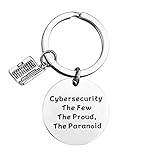
- Programmer Gift - Cybersecurity The Few The Proud, The Paranoid. Get this to have the best information security workers present. Computer programmer, computer coder, and anyone in IT tech!
- Material: Stainless Steel, it is lead free and nickel free, hypo allergenic, it doesn’t rust, change colour or tarnish.
- Measurement: 30mm(1.18"). TIPS:manual measuring permissible error.
- If you are a cybersecurity engineer and you love to work with computer science this will be a great gift for you to wear. People who like programming, hackers and hacking will like this fantastic IT security keychain.
- Velvet bag- Only the most elegant velvet jewelry pouches are used to package and ship our bangle. If you have any quality problems, please feel free to contact us and we will give you a proper solution until you satisfied.
- Delete any unexpected message that appears to come from Nikkei staff, especially one sent around September 30, and do not open its links.
- If you clicked, change the password of any account you entered credentials into, and enable multifactor authentication.
- Confirm unusual requests through a separate channel, such as a phone number you already hold.
- Expect follow-on impersonation attempts, as Nikkei warned.
Product prices and availability are accurate as of the date/time indicated and are subject to change. Any price and availability information displayed on Amazon at the time of purchase will apply.
Recommended Free Tools




