Microsoft 365 Family can be a low-cost way for several people to get OneDrive storage and Microsoft’s apps, but the claim that it is “the cheapest terabyte in tech” is not established by the available price evidence. In the US, it costs $129.99 per year or $12.99 per month and includes up to 1 TB of personal OneDrive storage for each of as many as six people. Whether that is good value depends on how many people use the plan and whether they want its other benefits.
How much does Microsoft 365 Family cost per person?
Microsoft’s US pricing page lists Family at $129.99 per year or $12.99 per month. The annual plan renews automatically unless canceled, and prices may change.

As an Amazon Associate I earn from qualifying purchases.
At the annual price, the arithmetic looks different depending on actual use. With one person, the cost is $129.99 for that person’s 1 TB allocation and the included bundle. If all six permitted people use their allocations, the price averages about $21.67 per person, or per allocated TB, for a year. Those are calculations from Microsoft’s listed price and plan capacity, not figures Microsoft publishes as statistics.
Does each person get 1 TB on Microsoft 365 Family?
Yes. Family supports up to six people, with each person receiving a separate OneDrive allocation of up to 1 TB. It is not a shared 6 TB pool that one member can use. The full 6 TB total is possible only when six people use their individual allocations.
#1 Best Overall

- Designed for Your Windows and Apple Devices | Install premium Office apps on your Windows laptop, desktop, MacBook or iMac. Works seamlessly across your devices for home, school, or personal productivity.
- Includes Word, Excel, PowerPoint & Outlook | Get premium versions of the essential Office apps that help you work, study, create, and stay organized.
- 1 TB Secure Cloud Storage | Store and access your documents, photos, and files from your Windows, Mac or mobile devices.
- Premium Tools Across Your Devices | Your subscription lets you work across all of your Windows, Mac, iPhone, iPad, and Android devices with apps that sync instantly through the cloud.
- Easy Digital Download with Microsoft Account | Product delivered electronically for quick setup. Sign in with your Microsoft account, redeem your code, and download your apps instantly to your Windows, Mac, iPhone, iPad, and Android devices.
Microsoft describes the sharing arrangement this way: “The owner of a Microsoft 365 Family, Premium and Pro subscription can share their benefits with up to five people.” Microsoft Support explains subscription sharing.
Is Family cheaper than Microsoft 365 Personal?
Not for one person who wants 1 TB. Microsoft lists Personal at $99.99 per year or $9.99 per month for one person and 1 TB; Family costs $129.99 annually for up to six people, each with a separate 1 TB allocation. Family’s higher annual price makes sense when more than one person uses it, or when the owner values the broader bundle.
Microsoft also lists a 100 GB Basic plan at $19.99 per year or $1.99 per month. That is a lower-cost option for someone who needs less storage, but it does not provide the same capacity or bundle as Personal or Family.
Free tools Windows power users keep installed
One-click scans. No signup required.
| US plan | Listed price | People and storage |
|---|---|---|
| Microsoft 365 Family | $129.99 per year or $12.99 per month | Up to six people; up to 1 TB each |
| Microsoft 365 Personal | $99.99 per year or $9.99 per month | One person; 1 TB |
| OneDrive Basic | $19.99 per year or $1.99 per month | 100 GB |
Prices and plan details are from Microsoft’s US OneDrive pricing pages: Family and Personal and Basic, current as of October 7, 2026.
Rank #3

- 10.5" PixelSense Display, 10-point multi-touchscreen, 1920 x 1280, 220PPI, 3:2 Aspect ratio, **Keyboard & Stylus NOT INCLUDED** Go-anywhere tablet with laptop productivity for the whole family. Starting at just 1.2 pounds,(4) with high-res 10.5” 220ppi touchscreen, adjustable Kickstand, Surface Pen, and Type Cover.
- 128GB SSD, 8GB LPDDR3, 10th Gen Intel Core i3-10100Y, 1.61GHz, Quad-core processor, Intel UHD Graphics 615, Windows 11 Home in S mode
- Rear Camera: 8MP, Front Camera: 5MP, 3500mAh Battery, Bluetooth 5, Connections: 1 x USB-C, 3.5 mm headphone jack, 1 x Surface Connect port, Surface Type Cover Port, MicroSDXC Card Reader. All-day battery life. Get up to 11 hours (1) of on-the-go power, plus Fast Charging to take you from low to full when you do need to plug in.
- The most portable Surface touchscreen 2-in-1. Perfect for your everyday tasks, homework, and play.
- You’re going to need Word, Excel, and PowerPoint. Don’t forget to add Microsoft 365
What else is included besides storage?
The plan bundles Microsoft apps and security features, including Word, Excel, PowerPoint, Outlook, OneNote, and Defender. That can make the cost easier to justify for a household that would otherwise pay for apps or wants those tools alongside cloud storage. Feature availability varies by platform and region.
Some Copilot and other AI benefits are limited to the subscription owner; they should not be treated as benefits available to every family member. Check Microsoft’s current plan details for the platform and region you use before relying on a particular feature.
Rank #4
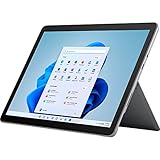
- The most portable Surface touchscreen 2-in-1. Perfect for your everyday tasks, homework, and play.
- Go-anywhere tablet with laptop productivity for the whole family. Starting at just 1.2 pounds,(4) with high-res 10.5” 220ppi touchscreen, adjustable Kickstand, Surface Pen, and Type Cover.
- All-day battery life. Get up to 11 hours (1) of on-the-go power, plus Fast Charging to take you from low to full when you do need to plug in.
- The new, more intuitive Windows. Work, play, and create in the way most natural to you with Windows 11.
- Plug in the accessories you use today with included USB-C port, headphone jack, Bluetooth 5.0, and MicroSDXC Card Reader.
Is Microsoft 365 Family the cheapest terabyte in tech?
That broad claim cannot be verified from Microsoft’s pricing alone. A fair market-wide comparison would need current prices for comparable plans across providers, consistent geography and billing periods, and details such as whether storage is pooled or assigned per person, how many people can use it, and whether desktop apps and security tools are included. The available figures establish a Microsoft-plan comparison, not a ranking across the technology market.
The Tool Desk
Outbyte PC Repair FREERepair Windows errors before they cause bigger problemsFix Now →Outbyte Driver Updater FREEScan for outdated or missing drivers - takes under a minuteDriver Scan →The more defensible takeaway is narrower: Family can be inexpensive per person when several people use its individual storage allocations and value the bundled software or security features. For one person seeking 1 TB, Microsoft’s own Personal plan has a lower listed annual price.
Quick Recap
Product prices and availability are accurate as of the date/time indicated and are subject to change. Any price and availability information displayed on Amazon at the time of purchase will apply.




