What’s actually slowing this PC down?
Pick the symptom - the matching free tool is one click away.
In everyday PC specifications, memory usually means RAM: the fast, temporary workspace a computer uses for apps and data in active use. Storage usually means an SSD or hard drive: the place where files, programs, and the operating system stay saved, including when the computer is off. RAM helps determine how smoothly a PC handles active work; storage helps determine how much it can keep locally.
What is the difference between memory and storage?
| Feature | Memory (RAM) | Storage (SSD or HDD) |
|---|---|---|
| Main job | Holds apps, data, and instructions the processor is using now. | Keeps files, installed programs, and the operating system for later use. |
| When power is off | Its contents are not retained. | Saved contents remain available. |
| Typical tradeoff | Fast access for active work; capacity affects how much can be handled at once. | Typically offers more capacity, but access is slower than RAM. |
| What capacity helps answer | How many apps and tasks can run smoothly together? | How many files, apps, and other data can be kept on the device? |
When you open an app or file, the computer loads the information it needs from storage into RAM so the processor can work with it quickly. This is why RAM and storage are related but not interchangeable: one is a temporary work area, the other is persistent space.
As an Amazon Associate I earn from qualifying purchases.
Is RAM memory or storage?
RAM is memory, not storage, in the usual PC-specification sense. It temporarily holds the information a computer needs while it is running. More RAM can help when you keep many applications or demanding tasks active, but the right amount depends on what you do and on the device.
The Tool Desk
Outbyte PC Repair FREERepair Windows errors before they cause bigger problemsFix Now →Outbyte Driver Updater FREEScan for outdated or missing drivers - takes under a minuteDriver Scan →RAM is volatile: restarting or shutting down clears its working contents. That does not normally erase files you saved to an SSD or hard drive.
#1 Best Overall

- Actual memory speed may vary depending on the system, CPU, motherboard, BIOS settings, and supported memory configuration. DDR4 3200MHz modules may operate at lower speeds such as 2933MHz or 2666MHz when supported by the host system. Please check your device specifications and compatibility before purchase.
- Adherence to JEDEC and compliance to RoHS with respect to environmental protection regulation, production and manufacturing
- All new generation product of DRAM module. Strict test and verification procedures are performed for products
- Lifetime warranty and Free technical support
- Installation video is attached in product image. ※Refer to the latest version on the official website. In case of discrepancies, the official website prevails.
What counts as computer storage?
An SSD (solid-state drive) or HDD (hard disk drive) is storage. These drives retain saved data across shutdowns. Microsoft Learn defines an SSD as “a hard drive that uses solid-state memory to store persistent data.” Microsoft Learn: Hard Drives and Partitions
SSD storage
SSDs use solid-state memory and are broadly smaller and faster than HDDs, according to Microsoft’s consumer comparison. The precise difference depends on the particular drive and workload, so that comparison is not a guarantee about every device. Microsoft Support: Choosing the right storage device for your PC
HDD storage
HDDs are also persistent storage. They can hold files and programs just as SSDs can; the broad distinction is that HDDs are generally slower than SSDs. Neither type is RAM.
Recommended Free Tools
Rank #2

- Complete DIY kit for upgrading your 2012-2015 27" iMac's hard drive with a high-performance OWC 6G Solid State Drive; No software hacks required
- Sequential Reads (Compressible Data): up to 532MB/s; Sequential Writes(Compressible Data): up to 467MB/s
- Compatible with 2012, 2013, 2014, and 2015 27-inch iMac
- Includes: OWC Mercury 6G SSD, AdaptaDrive 2.5" to 3.5" Drive Converter Bracket, OWC In-line Digital Thermal Sensor Cable, (2) OWC 2-1/4" Suction Cups, 27" iMac Adhesive tape set for proper display resealing, (4) Installation tools, Microfiber Screen Cleaning Cloth
- Backed by free DIY install videos and expert support; 3 Year OWC Limited Warranty
Why do computers need both?
Storage keeps your operating system, applications, and personal files when the computer is not in use. RAM gives the computer fast access to the portions it needs while you work. A PC with ample storage can still feel constrained if it lacks enough RAM for its workload; adding RAM does not create more room for saved photos or installed applications.
Performance also depends on the specific components and tasks. RAM is faster for active data, while storage speed affects tasks such as loading programs and files. SSDs are broadly faster than HDDs, but there is no single speed ratio that applies to every device.
Independent reader supportYour contribution helps us test, update, and keep practical guides available for everyone.Which capacity should you prioritize?
Choose RAM based on active work
Consider the applications you use at the same time and how demanding they are. More memory may reduce slowdowns when many tasks are open, but the useful amount varies by workload. Microsoft’s buying guide gives broad guidance of 8 GB to 16 GB or more of RAM; that is a general range, not a universal minimum or guarantee of performance.
Rank #3
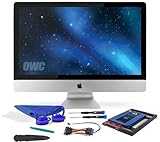
- Experience the extreme performance of an OWC SSD upgrade with this easy DIY SSD and hard drive replacement kit
- Add an SSD to your hard drive equipped iMac to experience faster booting, near instant application launches and data transfer speeds up over 500 MB/s
- Capacity: 2000GB Useable Capacity; Total Flash Memory Components: 2048GB; 48GB Allocated to real-time data redundancy and error correction Formatted Capacity: 1863GiB Form Factor: 2
- 5-inch 7mm Storage Interface: SATA 6
- 0 Gb/s Controller: Phison PS3112-S12 with 3% over-provisioning NAND Flash Components: Micron Synchronous Quad-Level Cell (QLC) 3D NAND Flash S
Choose storage based on what you keep locally
Estimate the space needed for your operating system, applications, documents, photos, video, and other files. Microsoft’s buying guide gives broad storage guidance from 256 GB to 1 TB or more and notes that people who keep more content in cloud storage may need less local capacity. Actual needs vary with the amount and type of content you keep on the computer.
These figures are buying guidance, not rules that fit every computer or user. Check the exact model’s specifications and the manufacturer’s recommendations before choosing a configuration.
Can you upgrade memory or storage?
Do not assume that a computer can accept an upgrade just because it has RAM or an SSD. Upgradeability and compatibility depend on the exact model. Before buying a component, check the manufacturer’s specifications for supported memory type and capacity, and for the drive interface and form factor. The general distinction between RAM and storage does not establish which parts fit a particular PC.
Does “memory” ever mean something else?
Yes. In broader technical usage, memory can refer to different technologies that hold data; flash memory, for example, is used in SSDs. But when a computer listing contrasts “memory” with “storage,” it usually means RAM versus an SSD or HDD. Read the surrounding specification or the manufacturer’s documentation if the label is ambiguous.
Quick Recap
Product prices and availability are accurate as of the date/time indicated and are subject to change. Any price and availability information displayed on Amazon at the time of purchase will apply.




