Do these 3 things before closing this tab:
1Scan for outdated or missing drivers - takes under a minute2Clear out junk files and repair common Windows errors3Fix the driver behind crashes, sound loss and screen glitchesTo show visual cues when Windows plays an audio notification, open Settings > Accessibility > Audio, expand Flash my screen during audio notifications, and choose whether the title bar, active window, or entire screen should flash.
Turn on a visual flash for audio notifications
- Open Audio settings. Select Start > Settings > Accessibility > Audio. Or press Windows+U to open Accessibility, then select Audio under Hearing. Microsoft documents both routes.
- Choose the flash area. Expand Flash my screen during audio notifications, then select one of the available screen areas.
The setting determines where Windows displays a visual cue when an audio notification occurs. Microsoft lists three choices in its hearing accessibility guidance.
As an Amazon Associate I earn from qualifying purchases.
Choose how much of the screen flashes
| Option | Area affected | Practical distinction |
|---|---|---|
| Flash the active window’s title bar | The title bar only | The narrowest cue, limited to the top of the current window. |
| Flash the active window | The current window | Covers more of the active window than the title-bar option. |
| Flash the entire screen | The full display | The broadest cue; a larger area is likely to be more noticeable, though Microsoft does not publish comparative visibility tests. |
Pick the smallest area that gives you a useful cue, or the entire screen if you want the flash to cover the widest area. The prominence distinction follows from the areas named by Microsoft; it is not a measured accessibility outcome.
Quick wins for a faster PC:
Scan for outdated or missing drivers - takes under a minuteDriver Scan →Clear out junk files and repair common Windows errorsFree Scan →What this setting does—and does not do
The flash is a visual alternative to an audio alert. It does not create captions for spoken dialogue. For captions of speech from audio or video, use Settings > Accessibility > Captions; Microsoft also documents the Windows+Ctrl+L shortcut for Live captions in its hearing guidance.
Quick Recap
Best Value
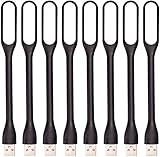
- 【Eye Care】6 pcs of energy-efficient LEDs, Soft light avoiding eye fatigue at night.
- 【Power Source】Powered by various USB devices, like laptop computer USB ports, power bank or phone chargers.
- 【Eco Friendly】lamps are made of environmental friendly silicone, plastic and metal; no harmful objects contained.
- 【Fashion Design】Flexible body, the lampshade is bendable and 360 degrees twisted and tilted, easy to adjust light direction.
- 【Portable】Slim and lightweight, easy to carry anywhere.
Rank #4

- Busylight is a 3 in 1 solution presence light that displays your availability status and provides a ring alert* for incoming calls and chats* (*UC Platform dependent)
- A Presence Indicator helps you avoid unnecessary interruptions. Green means you’re available. Red means you’re busy. There are more colors that display depending on your UC platform. It is an ideal do not disturb light to show you’re in a meeting or on a call. Brightness controls are built in the software.
- Free Busylight Software (REQUIRED) for Microsoft Teams, Skype for Business, Cisco Jabber, Webex, RingCentral, Zoom, Avaya One-X Communicator, Avaya IX Workplace and Various other UC Platforms
- The built-in Ringer helps you avoid missing calls and Chats (UC Platform dependent). 8 ringtones are available. Volume control and Mute options are built in the software
- Use the Free kuandoHUB software to control multiple UC Platforms (e.g. Teams, Zoom), manually control the light, plus more capabilities including integration with Microsoft Outlook so it automatically shows when you are in a meeting.
Rank #3

- 【Three Light Modes】This mini usb led rgb light has three modes. If you choose solid color fixed mode, the color and brightness stay the same. And if you choose 8 colors breath mode, the color and brightness will change by itself. The last mode is quite similar with the solid color fixed mode, but it will change brightness in one color.
- 【8 Colors Gradually Changing and Memory Function】When you insert this usb light, it will start with red color and gradually change colors. Colors don't change by itself? Don't worry, tap the button and change the color. When the color go through a cycle which means going back to red color, it will automatically change colors again. When the color that you choose lasts 10 seconds, it will remember this color, so next time when it turns on it will still keep this color.
- 【Fits Any Equiment With USB Ports】When you use it in car, it shines downward to light up your footwell area so they won't blind you at night. And it also works with any powered usb. Any usb ports are available.
- 【Easy To Operate】Double tap to change the light mode between solid and breath. In color changing situation, one tap will change the light into single color and another tap will change the color. After three taps,the light will turn off.
- 【Light Sensor and Consumption】When the sensor senses the strong light, it will turn off after 10 seconds by itself. And if it is in dark environment, it will turn on automatically. The output power of the light is just 0.1W.
Rank #2

- Busylight is a 3 in 1 solution presence light that displays your availability status and provides a ring alert* for incoming calls and chats* (*UC Platform dependent)
- A Presence Indicator helps you avoid unnecessary interruptions. Green means you’re available. Red means you’re busy. There are more colors that display depending on your UC platform. It is an ideal do not disturb light to show you’re in a meeting or on a call.
- Free Busylight Software (REQUIRED) for Microsoft Teams, Skype for Business, Cisco Jabber, Webex, RingCentral, Zoom, Avaya One-X Communicator, Avaya IX Workplace and Various other UC Platforms
- The built-in Ringer helps you avoid missing calls and Chats (UC Platform dependent). 8 ringtones are available.
- Use the Free kuandoHUB software to control multiple UC Platforms (e.g. Teams, Zoom), manually control the light, plus more capabilities including integration with Microsoft Outlook so it automatically shows when you are in a meeting.
#1 Best Overall
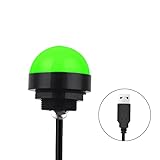
- Programmable USB three-color light ERP software secondary development three-color warning light semi-circular spherical signal indicator light
- Install the CH341 program on the computer to realize the conversion of serial port commands to USB interface output for the indicator light.
- After installing the CH341 program on the computer, specific serial port commands can be sent to control the operation of the light.
- It can be used on signal ports with USB 1.1 or above.
- Supported programs: VB, VC++, C#, JAVA.
Notification banners and Do not disturb are controlled separately under Settings > System > Notifications. Those settings can affect whether notifications appear or are silenced, but they do not replace the Accessibility > Audio flash choice. Microsoft notes that Focus sessions can also hide app flashing and badges on the taskbar; that is separate from this screen-flash dropdown. See Microsoft’s guides to notifications and Do not disturb and Focus.
Product prices and availability are accurate as of the date/time indicated and are subject to change. Any price and availability information displayed on Amazon at the time of purchase will apply.
Independent reader supportYour contribution helps us test, update, and keep practical guides available for everyone.



