Free tools Windows power users keep installed
One-click scans. No signup required.
LambdaTest offers several ways to capture and inspect WordPress pages, but a screenshot alone is not a visual regression test: to find changes, compare a new capture with a baseline. The available WordPress plugin listing describes dashboard-based full-page captures; LambdaTest’s Smart Visual UI tutorial describes baseline comparisons; developers can also write Playwright tests for WordPress Playground and save screenshots when tests fail.
What LambdaTest’s WordPress screenshot plugin does
The WordPress.com plugin listing describes taking full-page screenshots of published posts and pages from the WordPress admin dashboard, including while editing a post. It says captures can cover desktop and mobile browser configurations on cloud-hosted real browsers and operating systems. The listing also claims support for up to 25 browser and operating-system configurations at a time; verify the current limit and coverage in the live listing before relying on it. LambdaTest plugin listing


The listing’s maintenance information is dated: it reports version 3.0.3, last updated April 5, 2023, and tested up to WordPress 6.2.9. Those are listing facts, not confirmation that the plugin currently works with a newer WordPress release or is actively maintained. Check the live listing, test it on your own installation, and confirm that the pages and access conditions you need are supported.
Capture is not the same as visual regression testing
A screenshot lets you inspect how a page rendered at a particular viewport and browser configuration. To detect a change, you need a reference image—a baseline—and a new capture to compare against it. LambdaTest’s Smart Visual UI tutorial describes creating baseline images, adding comparison images, running comparisons, and reviewing detected issues. It describes differences such as changes to icons, padding, color, layout, text, and element position, with side-by-side or slider review. LambdaTest Smart Visual UI tutorial
What’s actually slowing this PC down?
Pick the symptom - the matching free tool is one click away.
#1 Best Overall
Comparison is a review aid, not proof that every difference is a defect. A content update may be expected, while a small shift can break a layout. Review flagged regions against the intended design and decide which changes are acceptable before updating a baseline.
Choose the workflow that fits your team
| Workflow | Best suited to | Check before adopting |
|---|---|---|
| LambdaTest WordPress plugin | WordPress users who want to start captures in the dashboard. | Current maintenance and WordPress compatibility, supported page access, and required browser/device coverage. The listing’s maintenance details are dated. Plugin listing |
| LambdaTest Smart Visual UI | Teams comparing new captures against known baselines. | How baselines are managed, how differences are reviewed, supported integrations, and current access and plan requirements. The tutorial explains the workflow, not present-day commercial terms. Tutorial |
| Screenshot API | Teams integrating capture into scripts or pipelines. | Authentication, available configurations, API limits, result retention, and price. The reference lists endpoints but does not establish those operational details. API reference |
| Playwright with WordPress Playground | Developers writing repeatable end-to-end tests. | Test maintenance, user journeys covered, screenshot-on-failure setup, and how closely the test environment represents the site being checked. WordPress Playwright guide |
Think about where the workflow runs (dashboard, hosted interface, API, or code), how much should be automated, which browsers and devices matter, and whether you need baseline comparison and review. Establish current compatibility and verified access and cost terms rather than inferring them from a feature page.
Automate WordPress checks with Playwright and Playground
For a developer-authored route, WordPress’s guide describes using Playwright with WordPress Playground and configuring screenshots to be saved when a test fails. Its example setting is screenshot: "only-on-failure", with results saved under test-results/. This is a separate testing workflow; it is not evidence that the LambdaTest plugin runs Playwright. Follow the guide’s setup for the current project and environment. WordPress Developer: Playwright
- Set up the WordPress Playground and Playwright test environment following the WordPress guide.
- Write tests for the user journeys and pages that matter, and run them in the environment you intend to validate.
- Configure the test runner for screenshot-on-failure with
screenshot: "only-on-failure". - Run the tests and inspect saved failure screenshots in
test-results/. Confirm that the test environment represents the site and content you need to check.
Or skip the browser setup
ScreenshotNeo is a website screenshot API and MCP server for developers. Its one-call API can capture a URL as PNG, JPEG, WebP, or PDF. Cookie and consent banners, newsletter popups, and chat widgets are removed before capture; each step can be turned off. Bot checks and CAPTCHAs, blank pages, timeouts, failed loads, and cache hits are not billed, with response headers identifying the page verdict and billing status. Its MCP server provides take_screenshot, get_page_info, and capture_pdf for AI agents and MCP clients.
Windows Errors? Fix Them Before They Spread
Repair common Windows errors and clear accumulated junk for a smoother, more stable PC - no reinstall needed.Free scan · no reinstallCrashes, No Sound, or Screen Glitches?
Random freezes, missing sound and display glitches usually trace back to one bad driver. Find and replace yours safely.Free scan · under a minuteFor a quick capture, replace the URL with a page you can access and use your API key. See the ScreenshotNeo API documentation for options and response handling.
curl -G "https://api.screenshotneo.com/v1/shot" -d access_key=YOUR_API_KEY --data-urlencode url=https://stripe.com -o shot.webpPython:
import requests
r = requests.get("https://api.screenshotneo.com/v1/shot", params={"access_key": "YOUR_API_KEY", "url": "https://stripe.com"}, timeout=90)
open("shot.webp", "wb").write(r.content)
Node.js:
const q = new URLSearchParams({ access_key: 'YOUR_API_KEY', url: 'https://stripe.com' });
const res = await fetch(`https://api.screenshotneo.com/v1/shot?${q}`);
ScreenshotNeo’s free plan includes 1,000 screenshots a month with no card; paid plans start at $5 for 3,000 screenshots. Sign up free for 1,000 screenshots a month, no card required.
Troubleshooting and verification
- The plugin does not appear to work with your WordPress version: the listing reports it was tested up to WordPress 6.2.9 and last updated April 5, 2023. Check the live listing and test on a staging site before using it for routine checks.
- A screenshot is missing or does not show the expected page: verify that the post or page is published or accessible in the state your workflow captures, and check the current plugin’s documented page and access support.
- A visual comparison reports changes you expected: inspect the flagged regions and determine whether the change is intended before accepting a new baseline. The documented comparison workflow identifies differences for review; it does not decide whether they are defects.
- You need scripted capture or pipeline integration: consult the current API reference for authentication and endpoint behavior, then verify limits, retention, and price with LambdaTest. The reference alone does not establish those terms.
- Playwright screenshots are not being saved: check that the test runner uses the documented screenshot-on-failure setting and inspect the configured
test-results/output. Use the WordPress guide for setup details.
Limits of the available product information
The LambdaTest API reference lists endpoints for discovering operating-system and browser combinations, devices, resolutions, screenshot details, zipped screenshots, profiles, and locations, as well as starting and stopping screenshot tests. It does not establish current account requirements, pricing, API limits, or result retention. LambdaTest Screenshot API reference
LambdaTest’s responsive-testing guide frames screenshot comparison across devices as visual regression testing and distinguishes it from checking visual layout and browser compatibility. A cross-device capture can help with those checks, but it does not by itself establish that a page works correctly across every browser or device. LambdaTest responsive testing guide
The Tool Desk
Outbyte Driver Updater FREEScan for outdated or missing drivers - takes under a minuteDriver Scan →Outbyte PC Repair FREERepair Windows errors before they cause bigger problemsFix Now →Quick Recap
Best Value
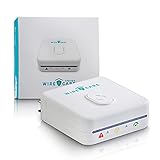
- 【See Hidden Wiring Problems in Seconds】 Most outlet issues are invisible. Plug in WireCare and instantly see your outlet’s status with a clear 3-color LED indicator, so you know which outlets are safe to use.
- 【Resistance Check Reveals Aging Outlets】 Over time, outlets loosen and wear out. WireCare’s resistance measurement helps you spot abnormal readings that may signal aging wires or worn contacts, so you can fix issues before they get worse.
- 【Simple DIY Check for Every Home or Rental】 No tools, no electrician required. Homeowners, renters, and landlords can quickly scan outlets in living rooms, bedrooms, kitchens and home offices to support safer everyday power use.
- 【Easy 3-Color Action Guide】 Green = normal use OK. Orange = caution, limit to light / low-power devices. Red = stop and consider repair or calling a licensed electrician. One glance tells you what to do next.
- 【Turn Testing into a Safety Routine】 Included color-coded stickers let you label test
Product prices and availability are accurate as of the date/time indicated and are subject to change. Any price and availability information displayed on Amazon at the time of purchase will apply.




