What’s actually slowing this PC down?
Pick the symptom - the matching free tool is one click away.
A red light on a Jabra headset has no single meaning. On most of the models Jabra documents, it relates to battery or charging: low battery, critically low battery, or simply “currently charging.” But which one depends on the model, which LED is lit, and whether it is solid or flashing. This guide shows documented examples and a method for reading your own headset.
Red light meanings at a glance
These are the meanings Jabra’s own documentation gives for specific models. Don’t assume they carry over to other Jabra headsets.
As an Amazon Associate I earn from qualifying purchases.
| Model | Indicator | Red behavior | What it means |
|---|---|---|---|
| Evolve 65 | Battery indicator, bottom of right earcup | Red | Low battery (green means full) |
| Evolve3 75 | Status LED | Solid red | Low battery |
| Evolve3 75 | Status LED | Flashing red | Critically low battery |
| EASYGO | Battery indicator | Red | Less than 30 minutes of talk time left |
| EASYGO | Battery indicator while charging | Solid red | Charging; turns solid green when charged, then goes off after five minutes |
| EASYCALL | Battery indicator | Red | Less than 30 minutes of talk time left |
| EASYCALL | Battery indicator while charging | Solid red | Charging; turns solid green when charged |
| VXi V300 | Headset LED | Red | Charging (blue means charged) |
The same color can therefore mean “plug me in soon” on one headset and “everything is normal, I’m charging” on another. The quick-start guides for EASYGO and EASYCALL are undated in the material available, so check the guide that came with your unit.
Model-by-model detail
Jabra Evolve 65
This headset has three separate indicators, and only one is about battery:
#1 Best Overall
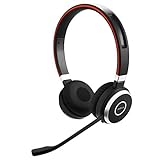
- INDUSTRY LEADING PERFORMANCE: Enjoy superior wireless connectivity with the Jabra Evolve 65 Wireless Headset; With a range of up to 30 meters per 100 feet, you can work away from your desk and still maintain the quality sound and service.Specific uses for product : Professional.Speaker frequency range: 70 hz - 20 kHz
- INCREASE AGENT FOCUS: Use this Jabra headset to overcome interruptions with an integrated busy light that acts as a do not disturb sign for colleagues; Plus, the advanced noise cancelling microphone allows for crystal clear calls and improved focus
- ALL DAY BATTERY: Get up to 14 hours of talk time with the Jabra Evolve 65; Or you can simply connect the USB and charge while using the office headset
- SUPERIOR CONNECTIVITY: Connect wirelessly via Bluetooth (USB dongle for PCs included) or directly using USB cable; Dual connectivity enables connection to your PC & 1 other Bluetooth device simultaneously, so you can take calls on your preferred device
- PLUG & PLAY: This pro headset is certified for Skype for Business for simple UC integration for plug and play right out of the box; It is also compatible with all of the most popular online voice call services
- Battery indicator (bottom of the right earcup): red for low battery, green for full battery.
- Bluetooth indicator: flashes blue in pairing mode.
- Busylight (around the Jabra button): can show amber when the busylight is on. This is not a battery warning.
If you see red, check the bottom of the right earcup first.
Jabra Evolve3 75
Jabra’s charging FAQ describes a color scale on the status LED:
Rank #2
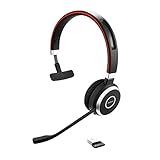
- INDUSTRY LEADING PERFORMANCE – Enjoy superior wireless connectivity with the Jabra Evolve 65 Wireless Headset. With a range of up to 150 meters/100 feet, you can work away from your desk and still maintain quality sound and service.
- INCREASE AGENT FOCUS – Use this Jabra headset to overcome interruptions with an integrated busylight that acts as a do-not-disturb sign for colleagues. Plus, the advanced noise cancelling microphone allows for crystal clear calls and improved focus
- ALL-DAY BATTERY – Get up to 14 hours of talk time with the Jabra Evolve 65, or simply connect the USB and charge while using this telephone headset. Plus, the leather-feel ear cushions and around-the-head design provide all-day comfort
- SUPERIOR CONNECTIVITY – Connect wirelessly via Bluetooth (USB dongle for PCs included) or directly using USB cable. Dual connectivity enables connection to your PC & 1 other Bluetooth device simultaneously, so you can take calls on your preferred device
- PLUG & PLAY: This pro headset is certified for MS Teams for simple UC integration for plug and play right out of the box; It is also compatible with all of the most popular online voice call services
- Solid green: full battery
- Solid yellow: medium battery
- Solid red: low battery
- Flashing red: critically low battery
Solid versus flashing matters here: flashing red is the more urgent state. Separately, the LED briefly flashes white when you correctly place the headset on the wireless charging pad and it begins charging. That white flash confirms placement and isn’t a fault. For wired charging, use the USB-C port on the left earcup.
Quick wins for a faster PC:
Repair Windows errors before they cause bigger problemsFix Now →Fix the driver behind crashes, sound loss and screen glitchesFind Drivers →Clear out junk files and repair common Windows errorsFree Scan →Jabra EASYGO and EASYCALL
On both, a red battery indicator means under 30 minutes of talk time remain. While charging, the indicator is solid red and changes to solid green when done. On EASYGO, the guide lists a charge time of roughly two hours, and the light turns off five minutes after it goes green. That 30-minute and two-hour guidance applies to those models only.
Rank #3

- INSTANT CONNECTIVITY: Evolve2 55 Stereo headset effortlessly connects to both your laptop and your smartphone so you can enjoy a seamless setup for work calls, music, and more
- CLOUD-LIKE COMFORT: This Jabra wireless headset features Air Comfort technology to ensure you feel light and comfortable all day, even during long meetings
- SILENCE THE BACKGROUND NOISE: Active Noise Cancellation lets you block out distractions and dive into your work or music
- HEAR AND BE HEARD: Crystal-clear call quality with two premium microphones that ensure your voice shines through these over-ear noise cancelling headphones
- TEAMWORK MADE EASY: Certified for Microsoft Teams, this Jabra headset ensures smooth and efficient collaboration with your team
Jabra VXi V300
The V300 reverses the usual expectation: its headset LED is red while charging and blue once charged. A red light here, on a charger, is normal.
How to decode your own headset
- Find the model name. Look on the headset, the packaging, your paired-device list, or your product registration. Jabra’s online manual library can be searched by product name.
- Identify which light it is. Note where it sits and whether the manual calls it battery, status, Bluetooth, mute, or busylight. A red mute light and a red battery light are different things.
- Note the pattern. Solid, flashing, pulsing, or a brief flash? Also note what the headset is doing: charging, powered on, pairing, or on a call.
- Apply that model’s guide only. If the guide says red means charging, it’s normal. If it says low battery, charge it using the method the guide recommends (for example USB-C on the Evolve3 75, or the wireless pad).
- If the light persists after charging and following the guide, go to the official support page for your exact model. Avoid resets or repairs unless that model’s support material calls for them.
Quick checks for common situations
- Red while plugged in: often just charging (EASYGO, EASYCALL, V300). Wait for the documented color change.
- Red when unplugged: usually a battery warning. Charge it.
- Flashing red on an Evolve3 75: critically low battery; charge promptly.
- Amber on an Evolve 65: busylight, not battery.
A note on charging cables
Jabra documents USB-C wired charging for the Evolve3 75, but connectors and requirements vary, and no cable compatibility applies across all Jabra headsets. Confirm your model’s charging connector before buying a replacement, and prefer the cable or charger Jabra specifies for it.
Quick Recap
Best Value

- HANDS-FREE — Roam while on a call with a wireless connection range of up to 30 meters/100 feet from your laptop, mobile phone and tablet. Plus, this hands-free headset lets you stay connected to 2 devices at once with its Dual Connectivity feature.
- MINIMIZE DISRUPTIONS — With up to 16 hours of talk time battery life or 24 hours of music time battery life, and an integrated red LED light to signal when you are on a call, this Jabra noise cancelling headset keeps interruptions to a minimum during online meetings and beyond.
- IDEAL FOR COLLABORATING — This Jabra headset is certified for Microsoft Teams with no additional configuration required. Additionally, the call control feature on this on-ear headphone, lets you adjust the volume or mute as desired.
- PREPARED FOR THE FUTURE — Download Jabra Direct app on your desktop to ensure your wireless, Bluetooth headphones always have the latest features. Thanks to the easy-to-use Direct Dashboard, staying up to date has never been easier.
- IN THE BOX — Headset, Link 390 Bluetooth adapter, carry pouch, user documents, USB-C to USB-A cable.
Rank #4

- PASSIVE NOISE CANCELLATION – Jabra Evolve2 65 wireless headphones feature superior passive noise cancellation thanks to the enhanced memory foam padding and new angled design that cancels 48% more of the noise around you
- GREAT SOUND FOR CALLS AND MUSIC – This business headset has powerful leak-tolerate 40mm speakers for rich, high definition audio for calls & music. Plus, the enhanced 3-microphone call technology means 23% less background conversation noise on your calls
- LONG-LASTING BATTERY LIFE – The Evolve2 65 Bluetooth wireless headset provides up to 37 hours of battery life on a single charge. With a 15-minute charge using the USB cable, you'll get up to 8 hours of use to keep up the pace with your busy schedule
- ALL-DAY COMFORT – When it comes to your wireless headset, true luxury is forgetting it’s there. Made with durable, premium materials, the soft memory foam cushions shape to your ears’ natural contours for incredible all-day comfort
- OPTIMIZED FOR MICROSOFT TEAMS – This Jabra headset works with all leading Unified Communications platforms and is optimized for Microsoft Teams as a plug-and-play experience. Includes the Jabra Link 380a (USB-A) Bluetooth adapter.
Product prices and availability are accurate as of the date/time indicated and are subject to change. Any price and availability information displayed on Amazon at the time of purchase will apply.
Recommended Free Tools




