What’s actually slowing this PC down?
Pick the symptom - the matching free tool is one click away.
An electronic viewfinder (EVF) is worth having if you often shoot in bright sunlight, prefer framing at eye level, follow moving subjects, or want to preview exposure and focus before taking a photo. If you mostly compose on the rear screen, need a flatter pocket camera, or prioritize battery life, the finder may add little for you. The answer depends on how you shoot—and on the particular camera’s finder, not just the fact that it has one.
What an electronic viewfinder does
An EVF is a small digital display you look into at the camera’s eyepiece. It shows a live image derived from the camera sensor and can display shooting information. Because it is showing the sensor’s view, an EVF can preview changes to settings such as ISO and exposure before you take the picture. Nikon explains the basic behavior in its electronic-viewfinder guide.
As an Amazon Associate I earn from qualifying purchases.
Exactly what the finder previews depends on the camera. Some models can show exposure, focus, depth of field, or white-balance effects; Fujifilm documents those functions for the X100VI. Treat them as model-specific features rather than assuming every compact camera’s EVF offers the same tools.
EVF vs. rear screen: which is more useful?
| What matters | Electronic viewfinder | Rear LCD |
|---|---|---|
| Bright outdoor framing | Eye-level viewing can be easier when sunlight makes the rear display difficult to see. | Panasonic notes that a camera monitor can be difficult to view in bright outdoor conditions. |
| Exposure and focus while composing | Can show the sensor-derived image and shooting data; preview options vary by model. | Also shows a live image; the available preview tools depend on the camera. |
| Handling and subject tracking | Eye-level viewing can help with following a moving subject and bringing the camera close to your face. | Supports flexible screen angles and, on some cameras, touch operation. Holding a camera away from your face may feel less steady. |
| Low- or high-angle shots | Requires looking through the eyepiece, which may be awkward at unusual camera heights. | A tilting or articulating screen can make low, high, or selfie-style framing easier. |
| Power | Uses electricity. Canon says EVF use usually draws more power than rear-screen Live View on most mirrorless cameras. | Also uses power. There is no universal battery-life comparison for every compact-camera model. |
| Size and comfort | The eyepiece and finder design can affect pocketability and comfort, especially with glasses; check the actual camera. | A camera without a finder may have a flatter design, though dimensions vary by model. |
The practical choice is not simply “finder or no finder.” Check whether the LCD articulates in the directions you need, whether the EVF is comfortable with your glasses, and whether the camera still fits how you carry it.
#1 Best Overall

- The Kamerar CVF-2 is compatible with most 3.0” and 3.2” camera LCD screens in a 16:9 aspect ratio, effectively blocking light to ensure clear, contrast-rich viewing even in bright sunlight.
- It offers 3x focusable magnification, providing a 300% magnified view of the camera’s LCD with sharp images from edge to edge.
- The eyecup can be used with either the left or right eye, including with eyeglasses. It blocks out excess light and provides a comfortable, stable viewing point.
- Installation is simple with two adjustable rubber bands that securely mount it to the camera screen without leaving any marks.
When an EVF is worth it
You often shoot in bright sunlight
If glare or strong sun makes the rear screen hard to see, looking through an EVF can make framing more dependable. Nikon and Panasonic both identify bright outdoor conditions as a reason to use a viewfinder. This is most valuable if outdoor shooting is routine rather than an occasional situation.
You prefer eye-level framing or follow moving subjects
An EVF gives you an eye-level view and can keep camera information in view while you compose. Panasonic describes eye-level viewing as useful for tracking moving subjects. That does not guarantee every finder will feel responsive: EVF size, clarity, eye relief, refresh behavior, and controls differ by camera.
Rank #2
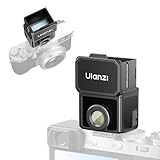
- 【Unlock Authentic Low-Angle】Break free from limited screens. With this waist-level viewfinder, frame shots effortlessly from low angles and capture authentic moments with built-in retro charm. Perfect for dynamic, candid photography.
- 【Clear, Fatigue-Free Viewing】The core of this waist-level viewfinder is a 3-element, 3-group high-transmission optical lens that minimizes distortion and artifacts. Enjoy a sharp preview so you can focus on creativity longer without eye strain.
- 【Switchable Framelines (35mm/50mm)】Experience immersive shooting through this waist-level viewfinder’s 28mm (full-frame) view. Switch between bright 35mm and 50mm framelines to preview your ideal composition like a pro.
- 【Universal Cold Shoe Mount】Fits most popular cameras via a versatile cold shoe adapter. Made from scratch-resistant ABS to keep your gear safe and secure.
- 【Magnetic Flip-Open Lens Hood】Snap on and flip open instantly. Blocks stray light for a pure, distraction-free view while adding a touch of classic style.
You adjust exposure or focus while composing
A sensor-based finder can show how settings affect the image before capture. If you use manual focus or change exposure frequently, inspect the exact implementation: look for useful magnification, focus peaking, a histogram, and exposure preview. Those features are not universal. Canon describes magnification and live information on supported EOS mirrorless models, while Fujifilm documents preview options on the X100VI.
When the rear screen may be enough
- You usually take casual photos using the LCD and rarely struggle to see it.
- You often compose from waist level, above your head, or at selfie distance, where screen articulation is more useful than an eyepiece.
- You want a flatter camera for everyday carry and the finder makes the model too bulky or uncomfortable for your use.
- You prioritize battery endurance and do not need eye-level framing. Both displays use power, and the actual difference depends on the camera and settings.
In these cases, an EVF is an option, not an automatic image-quality upgrade. Compare the finder’s practical benefit with the camera’s size, LCD design, controls, and cost.
Rank #3

- High Quality Material---The lens material is made of high‑quality optical glass with very high definition. The viewfinder displays the original picture. The picture seen through the viewfinder will not be deformed and the scene will not be displayed incompletely. The high‑quality rubber patch is soft, and the viewfinder makes you feel more comfortable when it touches the face.
- 3X Magnification Lens---Macro shooting observation, adjustable diopter, rubber eye setting can adjust the direction according to usage habits, magnification is 3 times. Can provide users with an excellent clear zoomed‑in view of shooting in daylight.
- Widely Compatible---There are 1/4in and 3/8in screw holes that can be mounted on the tripod and shoulder bracket, suitable for 3.0 and 3.2 inch LCD screen SLR cameras and mirrorless cameras.
- How to Use---1. Remove the fixing screws on the bottom plate; 2. Connect the bottom plate and the viewfinder with a fixing screw; 3. Connect the viewfinder to the camera with the 1/4in screw on the bottom plate.
- After Sale Service---We offer 24-hour customer service, any problems (whether it’s before or after buying the product) please feel free to contact us, we assure you a satisfied solution.
Does an EVF drain the battery faster?
Using an EVF consumes power. Canon says that on most mirrorless cameras, using the EVF usually draws more power than using rear-screen Live View, but that is not a universal rule or a compact-camera-specific battery figure. The actual effect depends on the camera and its settings; no comparable compact-camera battery-life measurement is established here. If endurance matters, check specifications or testing for the exact model rather than applying a general shots-per-charge penalty.
What about a hybrid optical and electronic finder?
A hybrid finder lets you choose between an optical viewfinder (OVF) and an EVF. The Fujifilm X100VI is one documented example: its EVF provides 100% frame coverage, while its OVF can show beyond the image frame. Because an optical finder looks through a separate window rather than through the lens, it can have parallax—the framing seen through the finder may not line up exactly with the image captured, especially at close distances. The EVF instead shows the sensor’s view. These details apply to the X100VI; hybrid designs differ by camera.
Rank #4

- 2.36MP XGA LCD Monitor
- Displays All Shooting Information
- High Eyepoint; Dioptric Adjustment: 3.0 to +1.0
- 90 Upward Tilt
- Adjust Brightness via Camera's Monitor Mounts on Camera's Accessory Shoe
Can you add an EVF to a compact camera?
Some cameras support detachable electronic finders, but compatibility is specific. Sony’s FDA-EV1MK attaches through the Multi Interface Shoe and is listed for supported Cyber-shot models, including the RX1, RX1R, RX1R II, RX100 II, HX50V, and HX60V. It is not a universal accessory. Sony lists its specifications as a 0.5-inch XGA OLED panel with approximately 2,359K dots, about 100% frame coverage, a 0–90-degree tilting eyepiece, and a weight of around 26 g. Confirm the exact body compatibility before buying; Sony’s product information is available on its FDA-EV1MK page.
Do these 3 things before closing this tab:
1Scan for outdated or missing drivers - takes under a minute2Repair Windows errors before they cause bigger problems3Fix the driver behind crashes, sound loss and screen glitchesQuick Recap
Best Value

- 【Unlock Authentic Low-Angle】Break free from limited screens. With this waist-level viewfinder, frame shots effortlessly from low angles and capture authentic moments with built-in retro charm. Perfect for dynamic, candid photography.
- 【Clear, Fatigue-Free Viewing】The core of this waist-level viewfinder is a 3-element, 3-group high-transmission optical lens that minimizes distortion and artifacts. Enjoy a sharp preview so you can focus on creativity longer without eye strain.
- 【Switchable Framelines (35mm/50mm)】Experience immersive shooting through this waist-level viewfinder’s 28mm (full-frame) view. Switch between bright 35mm and 50mm framelines to preview your ideal composition like a pro.
- 【Universal Cold Shoe Mount】Fits most popular cameras via a versatile cold shoe adapter. Made from scratch-resistant ABS to keep your gear safe and secure.
- 【Magnetic Flip-Open Lens Hood】Snap on and flip open instantly. Blocks stray light for a pure, distraction-free view while adding a touch of classic style.
How to decide before buying
- Identify the problem you want the finder to solve. Is the rear screen hard to see outdoors, or do you prefer composing at eye level? If neither is an issue, the EVF may not justify added size or cost.
- Try the actual finder. Check image size and clarity, eye relief, how it feels with glasses, and whether you can see the information you need without awkward eye or camera positioning.
- Check the features you will use. For manual focus or frequent exposure changes, confirm whether that model provides magnification, peaking, a histogram, and the kind of preview you want.
- Compare it with the LCD and your carrying needs. Test screen articulation and controls, then consider whether the finder changes pocketability or comfort for your everyday use.
- Verify the power and accessory details. Look at battery information for the exact model, and check the camera maker’s compatibility list if you are considering a detachable finder.
Product prices and availability are accurate as of the date/time indicated and are subject to change. Any price and availability information displayed on Amazon at the time of purchase will apply.




