Do these 3 things before closing this tab:
1Repair Windows errors before they cause bigger problems2Scan for outdated or missing drivers - takes under a minute3Clear out junk files and repair common Windows errorsThe IQUNIX EC75 is a wired 75% Hall Effect keyboard with adjustable actuation and Rapid Trigger, aimed at people who want gaming-focused input features in a layout that still keeps its function row and arrow keys. It can also handle everyday typing, but it has no wireless mode or numpad, and its headline speed figures are manufacturer specifications—not results from a controlled latency comparison.
What the IQUNIX EC75 offers
The Shadowblade configuration on IQUNIX’s product page uses Diamond Pro Hall Effect switches. Its 80-key, 75% layout is more compact than a full-size keyboard while retaining a function row and arrow/navigation keys. The trade-off is the absence of a dedicated number pad.
As an Amazon Associate I earn from qualifying purchases.
IQUNIX specifies a USB-C wired-only connection, an aluminum top with a PC bottom, a gasket structure, PBT keycaps, and a weight of 1,003 g. The listed dimensions are 318.5 × 136 × 28.6 mm, with 28.6 mm given as the front height. Three typing angles are listed: 2.8°, 6°, and 10°. The manufacturer also lists a one-year warranty. IQUNIX’s EC75 specifications identify these features; they are not independent measurements.
What adjustable actuation and Rapid Trigger do
Hall Effect switches detect a key’s position magnetically, allowing software to set when a press registers rather than relying on a single fixed actuation point. A shallower actuation setting can register a key earlier in its travel; a deeper one requires more movement. The EC75’s adjustable-actuation and Rapid Trigger controls are intended to let users tailor key response, particularly for repeated movement inputs in games.
#1 Best Overall

- Rapid Trigger Gaming Control — Unlike standard mechanical keyboards with fixed actuation, EC75 uses Hall Effect magnetic switches with 0.01mm Rapid Trigger, 8000Hz polling, and 0.125ms latency for fast reset, quicker re-actuation, and low-latency input. The 0.01–3.1mm adjustable actuation range lets you set shallow triggers for faster WASD movement control or deeper triggers to help reduce accidental presses during typing.
- 75% Layout for Gaming and Work — More practical than many 60% keyboards and more compact than a full-size keyboard, this 80-key 75% keyboard removes the numpad to give your mouse more room for gaming while keeping the function row, arrow keys, and navigation keys instead of relying on Fn layers for everyday controls. Three adjustable angles—2.8°, 6°, and 10°—support gaming, daily typing, coding, editing, and long work sessions.
- Advanced Control Tuned to You — Web-based software lets you go beyond Rapid Trigger with SOCD, DKS, MT, full key remapping, adjustable actuation, and RGB lighting presets. Save 3 onboard profiles and use 3 layers to switch between competitive games, daily typing, and custom layouts. Wired USB-C keeps input consistent for competitive gaming and fixed desktop setups.
- Diamond Pro Magnetic Switches — Designed for more than speed, these linear switches combine responsive gaming input with a smooth daily typing feel. 35±5gf initial force and 50±5gf bottom-out force create a light initial press with a firmer bottom-out feel, while 750GS max magnetic flux supports precise Hall Effect sensing. Factory self-lubrication and a 100M+ keystroke lifespan help keep each press smooth, consistent, and reliable over time.
- Solid Weighted Gasket Build — Tuned for a planted, cushioned feel instead of the light, hollow, or rigid feel of plastic gaming keyboards, EC75 combines a silicone gasket structure, single-piece CNC anodized aluminum top case, and Poron/PET/silicone layers to reduce hollow resonance and vibration for a fuller, more controlled typing sound. At approx. 2.21 lb / 1003 g, it helps reduce keyboard movement during typing, gaming, and long sessions.
IQUNIX advertises per-key actuation adjustment from 0.01 to 3.1 mm, 0.01 mm Rapid Trigger sensitivity, and 0.01 mm accuracy. It also lists Dynamic Keystroke, hot-swapping, N-key rollover, per-key RGB lighting, and full remapping. These are manufacturer-stated capabilities, not independent verification of precision or performance. The product page lists the specifications.
How to interpret the speed figures
IQUNIX lists 8,000 Hz polling, a 16,000 Hz scan rate, and a “0.125” latency figure. The product specification does not make the latency figure’s unit clear. These are manufacturer claims; the available review evidence does not establish a controlled latency comparison against other keyboards. A high polling or scan-rate number alone does not prove a perceptible advantage in play, so treat the figures as specifications rather than a guarantee of faster-feeling performance.
Rank #2

- CNC Aluminum Desktop Build — Choose Magi75 wireless mechanical keyboard if you want a more substantial alternative to plastic low-profile keyboards. The CNC aluminum unibody gives it a planted desk feel, while the layered sound-dampening structure helps reduce hollow resonance for a fuller, more grounded typing sound. Built for a stable desktop setup, not as an ultra-light travel board.
- 75% Low-Profile Productivity Layout — Designed for Mac, Windows, work, and casual gaming, this low-profile keyboard keeps the function row, arrow keys, and essential controls while saving more desk space than a full-size board. The 11mm / 0.43" front height supports a lower typing angle for long work sessions, writing, coding, editing, and clean desk setups.
- Smooth Switches, Creamy Sound — Custom low-profile switches feature 1.2mm pre-travel, 30–50gf force, and a 50M-keystroke lifespan for quick, smooth, and dependable input. Tuned for a creamy, refined typing sound with a fuller aluminum-case tone, Magi75 delivers a satisfying low-profile typing feel for productivity, creative work, and premium desk setups.
- Tri-Mode Wireless, 500H Battery — Use USB-C wired 1000Hz for a stable desk setup, 2.4GHz wireless 1000Hz for low-latency gaming, or Bluetooth 125Hz for laptops, tablets, and multi-device workflows. This wireless keyboard has a 4000mAh rechargeable battery that supports up to 500 hours with RGB off, reducing charging interruptions during work or gaming.
- VIA Control & Hot-Swap Design — Remap keys, create macros, and adjust RGB lighting through VIA with no coding required. Hot-swappable switches make future tuning, maintenance, and switch replacement easier, while Mac-ready support and extra Windows PBT keycaps help it fit both Mac and Windows workflows.
Gaming and typing impressions
MacSources describes the EC75 as suitable for both competitive games and everyday typing. Its reviewer used it in The Finals and Gears of War, reporting responsive movement and repeated inputs, while noting that the compact layout took adjustment. Those observations are one reviewer’s subjective experience, not a benchmark or a comparison with competing boards. The reviewer also found the typing feel comfortable after adapting to the layout. MacSources’ review details those impressions.
What’s actually slowing this PC down?
Pick the symptom - the matching free tool is one click away.
KBD.news highlights the aluminum top, the detailed PC bottom, hot-swappable Hall Effect switches with MX-compatible stems, and feature-rich proprietary software. It lists the PC bottom’s appearance and the lack of spare switches in the package as drawbacks. These are reviewer assessments rather than performance measurements. KBD.news published its review on August 26, 2026.
Rank #3

- [Ultra-Fast 8000Hz Polling Rate] Designed for serious gamers, the EZ60 gaming keyboard features a blazing 8000Hz polling rate—13x faster than standard mechanical keyboards. With ultra-low latency as low as 0.125ms, it delivers instant response and input precision for peak competitive performance.
- [Hall Effect Precision with Rapid Trigger] Equipped with magnetic switches, this hall effect creamy keyboard lets you fine-tune each key’s actuation range from 0.05–4.0mm, accurate to 0.05mm—perfect for dialing in your ideal typing and gaming feel. With Rapid Trigger, keys reset the moment you release pressure, enabling ultra-smooth repeated inputs ideal for FPS, rhythm, and action games.
- [Choose Your Magnetic Feel] Co-developed with Gateron, IQUNIX brings the latest in magnetic switch tech. Choose [Star Trail] for firmer 40gf actuation and full 4.0mm travel—ideal for snappy, controlled gameplay.
- [Compact Layouts Built for Focus] EZ60 offers a minimalist 60% keyboard layout, perfect for tight setups and clean desks.
- [CNC Aluminum Build & Premium Feel] Built as a premium CNC aluminum keyboard, EZ60 offers superior strength and precision.The gasket-mounted structure, double-shot PBT keycaps, and multi-layer Poron foam deliver a softer, more stable typing feel with lasting bounce. Built for intense daily use—both in gaming and typing. Easily customize lighting and keymaps with IQUNIX’s intuitive web-based configurator—no downloads needed.
Software and macOS setup
IQUNIX describes the EC75 software as web-based and lists Windows and macOS support. MacSources reports configuring key remaps, actuation, and Rapid Trigger through the web interface, and updating firmware on a Mac. The reviewer used Chrome because the interface did not work properly in Safari. Mac modifier keys also required manual setup because the keyboard lacks a dedicated Mac/Windows mode. MacSources’ software notes reflect that reviewer’s experience; they do not establish that every browser or setup will behave identically.
Independent reader supportYour contribution helps us test, update, and keep practical guides available for everyone.Price, package, and buying checks
Prices reported for the EC75 differ by source and date, so none should be treated as a guaranteed current price. IQUNIX’s product page displayed $159.99 USD when retrieved on October 4, 2026; MacSources reported $179.99 on Amazon and separately listed $167.39 as a price “as of 09/23/2026”; KBD.news reported $152 on the official site in its August 26, 2026 review. Check the live price, regional availability, stock, and exact variant before buying. IQUNIX’s listing, MacSources, and KBD.news are the sources for those dated snapshots.
Rank #4

- Officially Licensed Ghost in the Shell Gaming Keyboard — Built for players who want more than a standard gaming keyboard, the IQUNIX EV63 x Ghost in the Shell Hall Effect gaming keyboard combines competitive magnetic switch performance with cyberpunk sci-fi aesthetics, creating a high-performance control terminal for FPS gaming, desk setups, and sci-fi collectors.
- Pro-Level FPS Response — 0.01mm Rapid Trigger, 0.125ms low latency, and 8KHz polling work together for faster key registration, quicker release, and more predictable actuation. Tune actuation and reset behavior through the IQUNIX driver to match your FPS movement style, from fast stops and clean counter-strafing to quick peeks and high-frequency repeat inputs.
- HyperCore V3 Core Technology — HyperCore V3 firmware uses Smart Hall calibration and a 400% Hall voltage range to give this magnetic keyboard more signal room for precise magnetic sensing. The result is cleaner Hall signals, more stable inputs, and more consistent press-and-release control during rapid gameplay.
- Smart Switch Adaptation — Automatically detects and matches compatible magnetic switch types, with no manual selection required. If you want to customize beyond the stock setup, it helps keep actuation accurate and performance stable after switch swaps—giving you more freedom to tune this magnetic switch keyboard without compromising responsive gaming control.
- Linear Nova Magnetic Switches — Light 35±5gf operating force, 48±5gf end force, and 3.4±0.05mm total travel give this Hall Effect gaming keyboard a smooth, linear feel for precise WASD movement. Customizable magnetic actuation, factory-lubed internals, and contactless magnetic sensing help support lighter movement inputs, faster reset behavior, and more controlled rapid presses.
IQUNIX lists the box contents as the keyboard, dust brush, user manual, 1.5 m L-shaped paracord cable, and keycap/switch puller. KBD.news says spare switches are not included. Verify that a retailer’s listing is for the Shadowblade configuration with Diamond Pro switches if that is the version you intend to buy.
Outdated Drivers Are Slowing You Down
One free scan finds every outdated or missing driver and matches the right update for your exact hardware.Free scan · exact hardware matchPC Slower Than It Used to Be?
A free scan shows the junk files, broken settings and background clutter dragging Windows down - then fixes them in one click.Free scan · Windows 10 & 11Quick Recap
Best Value
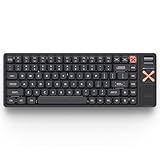
- 75% Low-Profile Mechanical Keyboard for Focused Productivity: Magi75 Pro is designed for focused productivity with a Pro-exclusive right-side multimedia control column. A smooth top-mounted volume wheel, dedicated media hotkeys, ambient RGB light strip, and magnetic dongle storage bring sound, lighting, and wireless access together, keeping everything you need within reach without distractions.
- Premium Aluminum Build with Ergonomic Comfort: CNC-milled from a single block of aircraft-grade aluminum, Magi75 Pro delivers a solid, stable unibody feel with zero flex and a clean, muted thock. The ultra-slim 0.43" (11mm) front height and low-profile keycaps keep wrists naturally aligned, reducing fatigue during long typing sessions at work or study.
- Creamy, Quiet Low-Profile Typing: Tuned low-profile mechanical switches deliver smooth, low-effort keystrokes that define a truly creamy feel. Sound remains refined and unobtrusive, with a soft, controlled thocky character that stays comfortable in shared workspaces. With 30–50gf actuation and a 1.2mm pre-travel, typing stays responsive and fatigue-free during long sessions.
- Seamless Wireless and Wired Connectivity: This wireless mechanical keyboard switches instantly between USB-C wired (1000Hz), 2.4GHz wireless (1000Hz), and Bluetooth (125Hz) for responsive, low-latency input across devices. The built-in 4000mAh battery delivers up to 500 hours of use, supporting uninterrupted workdays and extended gaming sessions without constant recharging.
- Smart Customization with Thoughtful Details: Remap keys, create macros, and fine-tune RGB lighting through VIA with no software lock-in. Native Mac and Windows layouts are supported out of the box, with extra PBT keycaps included for easy layout switching. Subtle aluminum accent keycaps add a refined finishing touch, completing a clean, Pro-grade setup.
Who should consider the EC75?
- It may suit you if you want Hall Effect actuation adjustment and Rapid Trigger, prefer a compact layout that retains function and arrow keys, and are comfortable with a wired board.
- Look elsewhere if you need wireless connectivity, a dedicated numpad, or a browser workflow that works reliably in Safari without manual Mac modifier setup.
- Compare before paying if your decision depends on a measured latency advantage or a price premium: the cited review impressions are not controlled comparisons, and reported prices vary by date and seller.
Product prices and availability are accurate as of the date/time indicated and are subject to change. Any price and availability information displayed on Amazon at the time of purchase will apply.




