Outdated Drivers Are Slowing You Down
One free scan finds every outdated or missing driver and matches the right update for your exact hardware.Free scan · exact hardware matchWindows Errors? Fix Them Before They Spread
Repair common Windows errors and clear accumulated junk for a smoother, more stable PC - no reinstall needed.Free scan · no reinstallIPED is open-source digital-forensics software that processes evidence into a searchable case and provides an interface for examining the results. Its workflow combines batch processing with indexing and analysis; it is not simply a file viewer. The project says it was implemented in Java, originated with digital-forensics experts from Brazil’s Federal Police in 2012, and was officially published in 2019. Those milestones are the project’s own account.
How IPED works
IPED’s workflow has two broad stages: process evidence into a case, then use the analysis application to search and review the processed items. The project describes command-line batch case creation alongside an integrated analysis interface. Processing can include hashing, signature analysis, categorization, expansion of containers, indexing, carving, OCR, filtering, and timeline analysis. Which functions run depends on the selected profile and release.
As an Amazon Associate I earn from qualifying purchases.
1. Process evidence into a case
The Beginner’s Start Guide illustrates supplying an evidence image and an output folder where IPED creates the case. The destination should be absent or empty. The guide also describes adding multiple images and appending an image to an existing case. Consult the guide for the exact commands supported by the release you install, since command syntax can change.
2. Search and review results
After processing, the guide says the analysis application can be launched from the output. The resulting case can be searched and examined using the available analysis features. Processing and analysis are distinct: creating the case prepares and indexes evidence; the analysis interface is where an examiner reviews what processing found.
#1 Best Overall

- Includes Tableau T356789iu Forensic Universal bridge, TC2-8-R2, TC4-8-R2, TC6-8, TC-USB3, TC7-9-9 and USB B Male to USB 19 Pin Header Cable
- The Tableau Forensic Universal Bridge is an integrated write-blocker that mounts in a drive bay of a forensic workstation and supports forensic acquisitions of SATA, USB 3.0, PCIe, SAS, FireWire 800, and IDE.
- Mounts in one 5.25” half-height drive bay
- Color LED indicators for “Write Block” or “Read/Write” mode visibility
- USB 3.0 host computer connection, Two SATA power connectors
What image formats does IPED support?
The project documents support for a range of disk-image and evidence formats. Its repository lists RAW/DD, E01, ISO9660, AFF, VHD, VMDK, EX01, VHDX, UDF, AD1, and UFDR. The Beginner’s Start Guide lists DD/RAW, E01, EX01, AFF, ISO, VHD, VHDX, VMDK, and AD1, and separately mentions UFDR reports. The project says it uses The Sleuth Kit library to decode disk images and filesystems.
These are documented formats, not a guarantee that every release accepts every input in the same way. Compatibility can depend on the release and evidence type, so check the documentation for the specific build and input before planning a case.
Rank #2

- Backlit Interface - Device status, device information, logical unit (LUN) select, and bridge information are easily accessible
- Supports USB 1.0/2.0/3.0, Flash Drives, Mass Storage Drives, and any "bulk storage" drive
- Kit Includes - TP2 Power Supply with US-Style power cord, TC-USB3 USB 3.0 (A to B) cable, 6 foot length, Soft-Sided bag and Quick Start Guide
- Hardware-Based USB 3.0 Write Blocker
What analysis capabilities are available?
The project lists MD5, SHA-1, SHA-256, SHA-512, and eDonkey hashing; PhotoDNA is noted as available to law enforcement. It also lists common hash-set formats and fast hash deduplication. Other documented capabilities include signature analysis, categorization, recursive expansion of containers, indexing file content and metadata, carving, OCR, encryption detection, filtering, and timeline analysis.
Quick wins for a faster PC:
Clear out junk files and repair common Windows errorsFree Scan →Scan for outdated or missing drivers - takes under a minuteDriver Scan →Repair Windows errors before they cause bigger problemsFix Now →These capabilities describe the project’s feature set, not a promise that every feature is active in every profile or release. IPED can assist with evidence processing and review, but using the software alone does not establish that an investigation’s integrity or admissibility requirements have been met.
Rank #3

- TX2 Forensic Imager Kit Includes: TX2 Forensic Imager, TP8 Power Supply, US Power Cord, (x4) TC4-8-R4 Unified SATA/SAS Signal and Power Cable (Molex), (x2) TC-PCIE4-8 PCIe Adapter Cable, 8", (x2) TCA-USB3-AC USB 3.0-A to USB 3.1-C Cable Adapter, Velcro Cable Ties (TPKG-VCT-5), Microfiber Cloth (TPKG-CLOTH), Quick Ref Guide
- LIGHTNING-FAST PROCESSING AND IMAGING: Powered by parallel hash verification and concurrent imaging, the TX2 is up to 3.8x faster than its predecessor. Capture and verify evidence in record time across multiple jobs.
- STREAMLINED RECONFIGURATION PROCESS: The TX2 makes it easy to pivot between tasks with a simplified reconfiguration process. Wipe, format, or encrypt all in one.
- UNLIMITED CONCURRENT OR CONSECUTIVE QUEUEING: The TX2's architecture is built for multitasking, allowing for unlimited concurrent or consecutive queueing. Stack jobs back-to-back or run several at once.
- OPTIMAL POWER ALLOCATION: The TX2 intelligently allocates power with dynamic resource assessment to maintain peak performance during heavy workloads. Its dynamic power management evaluates task demands in real time, ensuring every imaging job runs at optimal speed.
How profiles change processing
The User Manual distinguishes profiles that change the scope and purpose of processing. Choose based on what the case requires rather than assuming one profile is universally best or fastest.
| Profile | Documented purpose or behavior | Practical consideration |
|---|---|---|
| Default | The manual identifies it as a processing profile. | Check the release’s profile documentation for the exact feature set. |
| Forensic | Enables additional carving and unallocated-space processing. | Use when that additional processing is needed; the manual does not establish a universal runtime. |
| Fastmode | Intended for preview. | Do not treat a preview-oriented run as equivalent to a more complete processing scope. |
| Triage | Described as experimental. | The manual warns it may be unstable on resource-limited computers. |
| Other profiles | The manual describes additional profiles. | Consult the documentation for the installed version; behavior varies by profile. |
Timezone handling for FAT images
The Beginner’s Start Guide documents a timezone option for processing an image with a FAT filesystem when the relevant timezone differs from the host computer’s local timezone. If the operator does not specify a timezone, the local system timezone is applied. This is a configuration choice: the guide does not say IPED automatically identifies the evidence’s original timezone.
Rank #4
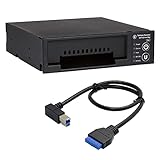
- Includes: Tableau T3iu Forensic SATA Drive Bay and 17" USB B to USB 19 Pin Header Cable
- The Tableau Forensic SATA Drive Bay is an integrated write-blocker that mounts in a drive bay of a forensic workstation and supports forensic acquisitions of 3.5” and 2.5” SATA hard drives.
- Mounts in one 5.25” half-height drive bay
- USB 3.0 host computer connection
- Read/write mode capability via internal DIP switch
Case storage and portability
IPED writes a case to an output folder, so storage needs depend on the evidence and workflow. The documentation also describes a portable-case option that stores relative evidence paths to support opening a case from another computer or mount point. In the documented workflow, the manual notes a same-drive constraint. Do not assume that this setup makes a case portable across every storage arrangement.
An external drive is optional, not an IPED requirement. Select storage according to case size, interface, security requirements, and handling policy; the documentation prescribes no particular capacity or model.
Best Value
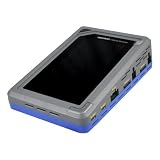
- TD4 Forensic Duplicator Kit includes: TD4 Forensic Duplicator, TP6 Power Supply, US Power Cord, (x3) TC4-8-R4 Unified SATA/SAS Signal and Power Cable (Molex), TC-PCIE4-8 PCIe Adapter Cable, 8" (Gen3 x4), TA-PCIE-PCIE4 Adapter (adapts between PCIe Gen2 and Gen3+), (x2) TCA-USB3-AC USB 3.0-A to USB 3.1-C Cable Adapter, Velcro Cable Ties (TPKG-VCT-5), Microfiber Cloth (TPKG-CLOTH), Quick Reference Guide
- Image data anywhere—native support for SATA, SAS,PCIe, and USB-C.
- Intuitive, seamless workflows—custom-built UI on color, touchscreen interface.
- Fast, efficient targeted acquisitions with local imaging capability.
- Wipe, format, and encrypt options for destination media.
Performance claims and system requirements
The project repository reports processing speeds of up to 400 GB per hour on modern hardware. This is a project-reported upper bound, not an independently verified standardized benchmark or a prediction for a particular computer, evidence set, or profile. The repository also reported 135 million items in a multi-case as of December 12, 2019; that is a dated project capacity statement, not a current performance benchmark.
The repository describes Windows and Linux testing. For building from source, it notes Java 11 and JavaFX, and warns that the master branch is under development, recommending release tags when a stable build is desired. These details do not establish the current stable release, binary runtime requirements, or a release-by-release compatibility matrix. Check the project’s release documentation before installing or building.
Quick Recap
Project documentation
- IPED project repository — project history, feature overview, formats, and release information.
- Beginner’s Start Guide — example processing workflow, format notes, and timezone option.
- User Manual — profiles and portable-case workflow.
Product prices and availability are accurate as of the date/time indicated and are subject to change. Any price and availability information displayed on Amazon at the time of purchase will apply.
What’s actually slowing this PC down?
Pick the symptom - the matching free tool is one click away.




