Update WordPress Core from Dashboard > Updates, after backing up both your site files and database and confirming you can restore them. Many capable sites install minor and security releases automatically; major feature releases generally require an administrator to select Update Now. If the one-click update cannot write files, check the cause or use WordPress’s documented manual procedure rather than changing permissions blindly.
What a WordPress Core update changes
WordPress Core is the software that powers the WordPress application. A Core update replaces or adds Core files and may also upgrade the database. Plugins, themes, and translations have separate updates, even though the Dashboard Updates screen brings these controls together. Direct edits to Core files can be overwritten during an update; use a child theme, plugin, or another appropriate customization method instead of modifying Core files directly.
As an Amazon Associate I earn from qualifying purchases.
The standard control point is Dashboard > Updates. The screen can start a one-click update or provide access to a manual package-based route. WordPress describes the automatic upgrade sequence as downloading and unpacking the release, verifying files, installing the update, and upgrading the database if needed. See the Dashboard Updates screen documentation.
Do these 3 things before closing this tab:
1Repair Windows errors before they cause bigger problems2Scan for outdated or missing drivers - takes under a minute3Clear out junk files and repair common Windows errorsHow to update WordPress Core
Before you start: make a restorable backup
Back up the site’s files and database, and make sure you know how to restore them. A backup that has never been checked may not be a usable recovery path. WordPress recommends backing up before an update; the recommendation applies whether you use the Dashboard or manual procedure. See WordPress’s Updating WordPress guide.
#1 Best Overall

- Lightweight and convenient: Lexar JumpDrive A30E (USB Type-A) boasts a slim, portable design for easy device compatibility; lightweight at 7.41 g
- Transfer speeds up to 100 MB/s: 10x faster than standard USB 2.0 drives; Based on internal testing, performance may vary depending upon the host device, interface, and usage conditions
- Wide compatibility: Compatible with tablets, laptops, Macs, and traditional Type-A devices, no software installation required; Reliably stores photos, videos & files
- Compact: Features a push-button retractor and a lanyard loop for on-the-go use
- Enhanced security: Lexar DataShield protects files, easily creates a password-protected safe with auto-encryption; Files deleted from the safe are securely erased and can't be recovered
Use the Dashboard for a one-click update
- Sign in to WordPress with an account that can manage updates.
- Open Dashboard > Updates.
- Review the Core update shown and select Update Now when you are ready.
- Wait for the process to finish before closing the page or making other changes.
- Confirm that WordPress reports success, then review the release changes and check important pages and functions on your site.
WordPress calls one-click updating the easiest route for most sites. If it is unsuitable or fails, use the official manual update procedure, which involves replacing Core files from a downloaded package. Avoid improvising by deleting files or mixing package contents; follow the full instructions for the manual route.
Dashboard or manual: which route fits?
| Route | Best suited to | What it depends on | Trade-off |
|---|---|---|---|
| Dashboard one-click update | Most site owners who want WordPress to handle the update. | The server configuration and file ownership must let WordPress write the updated files. | Quickest and simplest when the server permits it; less suitable if file writing or connectivity fails. |
| Manual package and file procedure | Owners who prefer hands-on control or cannot complete the one-click update. | The owner must follow WordPress’s package and file instructions carefully. | Offers more direct control but requires greater technical care. Back up first, as with the one-click route. |
Does WordPress update itself automatically?
WordPress documentation says that, since WordPress 3.7, most sites can apply minor and security Core updates in the background. This is conditional: the site must be able to perform one-click updates without FTP credentials, and host or site configuration can affect whether the background process runs. It is not a guarantee that every WordPress site updates itself. Major feature releases generally require an owner to select Update Now. Details are in the official update guidance.
Rank #2

- ULTIMATE RELIABILITY: Store and transfer important documents, presentations, music, videos and photos effortlessly with the DataStick Pro; this 1TB flash drive ensures your data remains secure, catering to both personal and professional needs
- USB 3.2 SPEED: Technology allows for up to 10x faster than standard USB 2.0 drives
- LONG-LASTING, CLASSIC & COMPACT DESIGN: The DataStick Pro features a lightweight aluminum casing, providing a sleek and sturdy design that's perfect for daily use and travel
- MULTI-DEVICE SUPPORT: Works seamlessly with most PC and Mac desktop and laptop computers equipped with USB 3.0 ports; additionally, it's compatible with adapters for USB-C ports
- BACKWARD COMPATIBILITY: The DataStick Pro is backward compatible with USB 2.0, making it versatile across older systems
For a release-specific example, WordPress.org announced WordPress 7.1.1 on September 17, 2026, as a maintenance and security release. Its announcement reported 17 Core bug fixes, 19 Block Editor bug fixes, and 11 security fixes, and recommended immediate updating. It also said supported sites would begin the background update process automatically. Those figures and that recommendation describe WordPress 7.1.1, not every release. See the WordPress 7.1.1 announcement.
What’s actually slowing this PC down?
Pick the symptom - the matching free tool is one click away.
Why WordPress asks for FTP credentials
The one-click updater needs permission to write files. File ownership and server configuration determine whether the web server can replace or create files with the expected ownership. If it cannot, WordPress may ask for FTP credentials as a way to connect and perform the update.
Rank #3

- [Package Offer]: 1 Pack USB 2.0 Flash Drive 128GB Available in Red Color.
- [Plug and Play]: No need to install any software, Just plug in and use it. The metal clip rotates 360° round the ABS plastic body which. The capless design can avoid lossing of cap, and providing efficient protection to the USB port.
- [Compatibilty and Interface]: Supports Windows 7 / 8 / 10 / Vista / XP / 2000 / ME / NT Linux and Mac OS. Compatible with USB 2.0 and below. High speed USB 2.0, LED Indicator - Transfer status at a glance.
- [Suitable for All Uses and Data]: Suitable for storing digital data for school, business or daily usage. Apply to data storage of music, photos, movies, software, and other files.
- [Warranty Policy]: 12-month warranty, our products are of good quality and we promise that any problem about the product within one year since you buy, it will be guaranteed for free.
This prompt does not by itself mean the site is broken. If you are unsure why it appears, ask your hosting provider how the site’s filesystem is configured or use WordPress’s documented manual method. Do not apply blanket advice to recursively change file ownership or permissions: arrangements vary, and making the web server the owner can create security risks on some shared hosting platforms. WordPress explains the considerations in its update documentation.
Independent reader supportYour contribution helps us test, update, and keep practical guides available for everyone.What to check if an update fails
First establish whether the update actually completed: check the version reported in WordPress and inspect the site, rather than assuming that an error message tells the whole story. The Dashboard Updates troubleshooting guidance identifies download connectivity and name-lookup failures as possible causes, and points to the .maintenance file as a possible reason for a persistent maintenance warning. Follow the full troubleshooting instructions; remove .maintenance only as directed, after checking that the update did not leave the site incomplete.
Rank #4
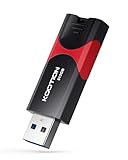
- High-Speed Transfer: With read speeds of up to 100 MB/s. Based on internal testing, performance may vary depending on the host device and user settings and configurations
- 512GB Huge Capacity: The zip drive has ultra-fast data transfer speed, supports any digital data, can transfer high-capacity 4K videos, HD photos, gaming data and more, letting you enjoy the instant large capacity at any time
- Plug and Play: Just plug and play, without any software installation.The USB stick can expand the capacity of the computer for file sharing, data transmission, and video playback when working or studying
- Safe & Retractable: Features a stylish push-pull design that is protects the USB port. The jump drive has a convenient loop at the end for easy portability, allowing you to safely store your precious memories
- Wide compatibility: The memory stick is compatible with multiple operating systems, including Windows 10/ 8/ 7/ Vista/ XP/ 2000/ 98/ ME/ NT Linux/ Mac OS, and compatible with 3.0 and below
- Update cannot write files or asks for credentials: check filesystem ownership and host configuration; use the official manual procedure if needed.
- Package download fails: check whether the server can connect and resolve the download host, and consult WordPress’s troubleshooting guidance.
- Maintenance warning remains: check the update state and follow the official directions concerning
.maintenance. - Site is incomplete or behaves unexpectedly: use your verified backup and restoration procedure if necessary, and ask your host or a qualified WordPress administrator for help rather than deleting files at random.
How current should your WordPress version be?
WordPress.org’s supported-versions guidance says only the latest major version is officially supported. Older major branches may receive security fixes as a courtesy, but such fixes are not guaranteed and have no fixed timeframe. Do not plan on an older branch receiving long-term support; check the supported versions guidance and current release information when deciding whether to update.
Recommended Free Tools
Core updates are separate from plugin and theme updates
Plugin and theme updates are not Core updates. Since WordPress 5.5, administrators can opt in to automatic updates for plugins and themes individually. WordPress says these scheduled jobs normally run twice daily, rely on WP-Cron, and send email notifications about successful or failed attempts. A host or plugin can disable the controls, and scheduling can fail; WordPress suggests checking Tools > Site Health for cron errors. See Plugin and themes auto-updates.
Automatic plugin and theme updates are a separate setting from Core’s background minor and security updates. Before enabling them, have a rollback option, such as a restorable backup of the database and files.
Quick Recap
Product prices and availability are accurate as of the date/time indicated and are subject to change. Any price and availability information displayed on Amazon at the time of purchase will apply.




