You cannot establish that a video is authentic—or AI-generated—by relying on a visual impression or a detector score alone. Before sharing or submitting a disputed clip, preserve the original and its source, document every transfer or conversion, look for independent corroboration, and involve counsel and a qualified digital-forensics examiner when the evidence could materially affect a case.
What can verification establish?
Verification is not a single test with a definitive real-or-fake answer. Different methods address different questions: where a file came from, whether it was edited or converted, whether it contains signs of synthetic manipulation, and whether the event it depicts is corroborated by other evidence. Those questions are related, but none automatically answers all the others.
As an Amazon Associate I earn from qualifying purchases.
A clip that looks internally consistent may still fail to establish that the depicted event happened as shown. Conversely, an unusual image or a detector flag does not, by itself, prove fabrication. Treat findings as evidence to document and evaluate, not as a verdict.
Do these 3 things before closing this tab:
1Repair Windows errors before they cause bigger problems2Scan for outdated or missing drivers - takes under a minute3Clear out junk files and repair common Windows errorsHow do I preserve a video for court?
Stop circulating the only copy. NIST describes secure acquisition, storage, and analysis as critical parts of digital forensics. The following workflow is practical evidence-handling guidance, not a claim that every item is a legal requirement. See NIST’s Digital Forensics overview.
#1 Best Overall
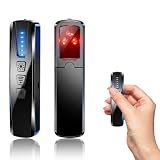
- AI-Powered Smart Signal Analysis – This camera detector, built in intelligent AI chip processes RF signals in real time, reducing background interference and false alarms for more reliable detection of hidden wireless cameras, audio bugs, and GPS trackers. The adjustable sensitivity dial lets you fine-tune scanning levels to match different environments – from busy hotels to quiet homes – so you get precise alerts without constant beeping.
- 4-in-1 Detection with 5-Level Sensitivity – As a reliable hidden camera detectors, it scans for wireless cameras, hidden pinhole lenses, GPS trackers, and magnetic field devices, giving you complete coverage against various surveillance threats. The 5-level adjustable sensitivity lets you dial in the right detection range for any setting – turn it up for weak signals in large spaces, or lower it in crowded areas to reduce interference. Works great at home, in hotel rooms, and while traveling, so you always know your privacy is protected.
- Easy Operation with 4 Modes – With a built-in GPS tracker detector, switch between wireless signal scanning, hidden camera finder, magnetic field detection, and flashlight – all in one compact device. Select between sound or vibration alerts for quiet, discreet scanning in any environment.
- Long Battery Life & Portable Design – Built-in 800mAh rechargeable battery provides up to 25 hours of continuous use. Fully charges in just 1.5 hours via USB. Small enough to carry anywhere – weighs next to nothing, so you can take it on every trip.
- Keep the original and its context. Preserve the native file if available, along with the phone, camera, source account, or download/export context from which it came. Do not edit, crop, annotate, re-encode, or repeatedly forward the preserved master. If the original device or account cannot be retained, record why and what was preserved instead.
- Make a separate working copy. Label it as a working copy and use it for inspection or analysis. Keep the master unchanged and record how the copy was made. Do not silently substitute a converted or enhanced version for the original.
- Start a handling log. For each transfer or processing step, record the date and time with timezone, the person, action, source and destination, filename, transfer method, and any conversion or processing. Keep relevant messages, links, and download records that show how the file was received.
- Retain related material. Preserve available adjacent footage, alternate camera views, associated audio, original messages, platform links, and contemporaneous records. If you have multiple versions, keep each one and document the differences.
- Store the material carefully. Restrict access to the preserved master and record who handles it. A separate storage drive can help retain a working copy, but storage equipment does not authenticate a video; do not undertake risky handling of contested evidence in place of professional advice.
NCSC court guidance identifies source, acquisition, custody, storage, and alterations as relevant lines of inquiry. The log above is a practical way to preserve facts that may help answer those questions, rather than a universal court-mandated form. See the NCSC bench card on unacknowledged AI-generated evidence.
How can I tell if a video is AI-generated?
Begin with the file’s history and independent evidence, not a checklist of visual glitches. Compression, edits, camera conditions, and other processing can affect how a clip looks. A visual inspection can identify questions worth investigating, but it cannot by itself establish who created a file or whether the scene occurred as depicted.
Check the source and versions
Identify who captured or obtained the video, when and where it was recorded or received, and which services or people handled it. Compare the available versions and note changes in duration, framing, audio, format, or other visible properties. Ask whether the source device or account, nearby footage, another camera angle, a witness, or a contemporaneous record can independently support the event.
Inspect metadata and credentials as clues
Record the ordinary file properties and metadata that are present, absent, or inconsistent. A timestamp or other metadata field is not self-authenticating: it should be interpreted in the context of how the file was created, transferred, and processed.
Rank #2

- 【6-in-1 AI Smart Protection with Triple-Alert System】 Go beyond basic hidden camera and bug detectors. This smart RF signal detector scans six threats: hidden cameras, WiFi bugs, GPS trackers, WiFi signals, magnetic fields, and Bluetooth spy devices. Ideal as a camera finder for travel and a privacy scanner for home.Its triple-alert system — flashing LEDs, strong vibration, and adjustable audio — ensures no threat goes unnoticed, even in noisy environments. Includes a flexible probe for tight spots and a gain antenna for stable signals.The privacy scanner for peace of mind.
- 【Specialized for Vehicle Security: flexible probe Magnetic GPS Tracker Detector】 Built with a high-precision magnetic sensor, this GPS tracker finder and bug detector quickly locates magnetic GPS trackers, GPS locators, and spy tracking devices hidden under vehicles, behind bumpers, or in personal items. Its flexible probe reaches tight spots like wheel wells and undercarriage gaps, so no hidden tracker goes undetected. Ideal for vehicle anti-spy sweeps, car bug sweeps. An essential car tracker finder for privacy protection.
- 【Lab-Certified Accuracy, Ultra-Wide Band & Lightning-Fast Scanning】 Co-developed with security experts and rigorously tested in FCC-certified laboratories. This RF detector and signal detector covers an ultra-wide frequency range from 1MHz to 10GHz, scans up to 2,000 times per second, and detects hidden camera, GPS tracker, wireless bug, and other spy threats from as close as 2 inches to as far as 50 feet. A professional bug sweeper and anti-spy device for thorough hidden device detection.
- 【Trusted by 500K+ Users Worldwide, The Choice of Professionals】 Join a global community of over 500,000 security-conscious individuals — including security experts, frequent business travelers, and government personnel. More than just a GPS tracker detector, bug detector, or RF signal detector, it’s an industry-recognized privacy shield and anti-spy sweeper designed to keep pace with evolving surveillance tactics. Your trusted partner for bug sweeps, hidden camera detection, and GPS locator finder needs.
- 【2-Year Warranty & Dedicated Support, A Confident Investment】 Backed by a full 2-year warranty on this professional-grade device. Receive prompt assistance from our dedicated support team, with responses guaranteed within 24 hours. We are committed to delivering long-term privacy security and ensuring your complete confidence with every purchase.
If a file includes C2PA Content Credentials, record the validation result and the provenance history the credential claims. C2PA Specifications 2.1 describe a standard for certifying media source and history, not a universal certificate that the scene depicted is true. Provenance can help explain a file’s history; it does not independently verify the real-world event. See the C2PA Specifications 2.1 and NIST’s overview of technical approaches to synthetic content.
Compare verification methods by the claim they test
| Method | What it can help assess | What it cannot establish alone | Useful checks |
|---|---|---|---|
| Source and file-history review | Where the file came from and what handling, editing, or conversion is documented. | Whether the depicted event actually happened as shown. | Preserve the original and context; document gaps, transfers, and version differences. NCSC’s bench card lists source, acquisition, custody, storage, and alteration among its questions. |
| Independent corroboration | Whether other sources support the event, timing, or circumstances. | Whether a particular file is unaltered or who created it. | Seek separate camera views, source records, witnesses, and contemporaneous material; assess whether the sources are genuinely independent. NCSC asks whether another data point or source can confirm authenticity. |
| Metadata or provenance credentials | Some information about a file’s recorded properties or claimed source and history. | The truth of the depicted scene, or a complete history when information is missing. | Record what is present and absent, how a credential validates, and what its claims cover. See the C2PA specification and NIST’s synthetic-content overview. |
| Automated detector | A tool-specific signal for a defined type of synthetic generation or manipulation. | A universal probability that a clip is authentic or fake, or proof that the real-world event occurred. | Check whether it was tested on the relevant media and manipulation types, including realistic compression and post-processing, and whether its error rates apply to those conditions. NIST’s Guardians of Forensic Evidence program identifies representative data, defined tasks, performance measures, and reassessment as evaluation concerns. |
| Qualified forensic examination | Analysis of acquisition, preservation, edits, or suspected manipulation using methods an examiner can explain. | An automatic guarantee of authenticity or admissibility. | Ask about validation, known limitations, repeatability, and whether the examiner can explain the method and findings. NCSC’s bench card raises questions about tools, metadata, handling, and qualified expert explanation. |
Can an AI detector prove a video is fake?
No detector result should be treated as proof on its own. NIST’s Guardians of Forensic Evidence paper identifies generalization, real-world usability, and robustness to compression and post-processing as challenges for analytic systems. A system’s result depends on the media and manipulation types it was evaluated on; a score from one tool is not a universal probability that a clip is authentic.
The reviewed NIST and court guidance does not establish a broadly applicable detector-accuracy statistic for authenticating courtroom video. NIST’s program discusses evaluation measures such as ROC curves and AUC, but those measures are not a ready-made accuracy claim for a particular consumer tool or clip.
The Tool Desk
Outbyte Driver Updater FREEFix the driver behind crashes, sound loss and screen glitchesFind Drivers →Outbyte PC Repair FREERepair Windows errors before they cause bigger problemsFix Now →If a detector is used, retain enough information for someone else to understand what was tested:
Rank #3

- Upgraded AI-Powered Detection: Military-grade technology detects hidden cameras, listening devices, and GPS trackers with precision. Enjoy peace of mind in hotels, offices, and even your own home. Stay one step ahead of hidden threats!
- Simple, Fast & Effective: Just turn it on, sweep the area, and let the audible alarm + LED alerts notify you of threats. No technical skills needed - Press, Search, Relax! Skip expensive private investigators - protect yourself in seconds.
- Compact & Travel-Ready: Lightweight, rechargeable, and pocket-sized for discreet, on-the-go security. Toss it in your bag, purse, or pocket - perfect for travel, work, and public spaces.
- Total Privacy Protection: Don’t gamble with your security. Safeguard against spying in hotel rooms, changing rooms, offices, cars, dorms, and more. Know for sure if you’re being watched, recorded, or tracked.
- Trusted by Experts & Customers: Designed with cybersecurity and counter-surveillance professionals. Join 300,000+ satisfied users who rely on our detectors for ultimate privacy & safety.
- Tool name and version, date of analysis, input file identifier or hash if available, settings, and output.
- The vendor’s stated test conditions, relevant media and manipulation types, and known limitations.
- Whether testing covered realistic compression or post-processing, and how false positives and false negatives behave under conditions like those affecting this file.
- Whether the analysis can be repeated and explained by a qualified examiner.
NIST’s Guardians of Forensic Evidence program emphasizes defined forensic tasks, representative datasets, post-processed media, performance measurement, and continuous reassessment. Those considerations are more useful than treating an unexplained score as a verdict.
When should I involve counsel and a forensic examiner?
Involve counsel before circulating or submitting a materially contested video, especially if the file may affect a significant factual dispute or has already been edited, converted, or passed through several services. Counsel can advise on the relevant jurisdiction, case facts, and handling decisions; this article is general information, not legal advice.
A qualified digital-forensics examiner can be asked to explain how the material was acquired and preserved, what analysis was performed, how the methods were validated, their known limits, and whether the work can be repeated. Court guidance identifies questions about forensic tools and methods, metadata, handling, and whether a qualified expert can explain verification processes. Those questions do not guarantee that a court will admit the evidence.
What’s actually slowing this PC down?
Pick the symptom - the matching free tool is one click away.
What does court guidance say about AI-generated evidence?
The TRI/NCSC AI Policy Consortium for Law & Courts published bench cards on April 1, 2025, for acknowledged and unacknowledged AI-generated evidence. The acknowledged-evidence card and unacknowledged-evidence card offer questions to help a trial court assess authenticity; they are guidance, not a universal statutory checklist or a guarantee of admission.
The U.S. Advisory Committee on Evidence Rules’ November 5, 2025 agenda book included discussion and draft language for a proposed Federal Rule of Evidence 901(c). The draft described a process in which, after an opponent presented evidence sufficient to support a finding of generative-AI fabrication and warrant inquiry, the proponent would need to demonstrate that the item was more likely than not authentic. That document is committee material, not by itself an adopted rule. The current federal rule, state law, and application to a specific case should be checked with counsel. The agenda book is available from the U.S. Advisory Committee on Evidence Rules.
Quick Recap
Product prices and availability are accurate as of the date/time indicated and are subject to change. Any price and availability information displayed on Amazon at the time of purchase will apply.




