Recommended Free Tools
Plan the recording around one viewer task, capture only the relevant interface, then edit and export for the place people will watch it. Before publishing, check that the screen and audio reveal no private information and that you have rights to everything included. This workflow works for product demos, tutorials, feature explainers, and short social videos.
1. Decide what the viewer should learn
Start with a single question: where is a feature, how does a task work, or what changes when a setting is enabled? Write a short outline in the order the viewer would perform the task. A recording that follows that sequence is easier to understand than an exploratory tour of the interface.
As an Amazon Associate I earn from qualifying purchases.
Keep unrelated clicks and dead ends out of the final cut unless you are deliberately explaining how to troubleshoot them. Show the result the viewer needs to understand, not every step you took to find it.
2. Prepare a clean, safe screen
- Use a demo account or prepared project where possible. Close unrelated tabs, chat windows, email, and notifications.
- Enlarge relevant interface text and position the app so the important controls and results stay visible.
- Remove personal, customer, account, or confidential information from the screen. Check the background and desktop as well as the app window.
- Confirm that the app permits recording. Apple notes that some iPhone apps may not allow their content to be recorded; Samsung likewise cautions that copyright protection can block capture of some photos, videos, apps, or websites.
For a desktop software capture, PTC’s brand guide recommends 16:9, accepts 1920×1080 (1080p) as a minimum, and aims for 3840×2160 (4K) when the monitor permits. These are PTC’s requirements for content used in its brand videos, not universal rules for every marketing channel. The same guide recommends Camtasia for software capture: PTC brand guide.
#1 Best Overall

- 📷【See Yourself in Real Time, Perfectly Framed】Stop guessing your pose. Watch your vlog selfie monitor screen as you film, adjust instantly, and always stay in frame—perfectfor TikTok videos, IG Lives, vlogs, cooking tutorials, makeup videos, and more.
- 📱【Stunning 4K 60fps IPS Screen】Film with confidence on a vivid IPS screen that mirrors your back camera in Ultra-HD 4K at 60fps. With 178° wide viewing angles, every detail, expression, and angle looks crisp. For the smoothest 4K preview, use the Blackmagic Camera App.
- ⏳【Real-Time 0.05s Latency, No More Blind Filming】Say goodbye to guesswork. This magnetic selfie screen shows your back camera with under 0.05s ultra-low latency, so your preview keeps up with every move. Perfect for fast-paced vlogging, dancing, cooking, and live streaming.
- 👍【Broad & Latest Compatibility】This Rollei M4 phone monitor screen is compatible with most iPhone (including iPhone 18 Pro &iPhone 18 Pro Max & iPhone 17 Series ) and Android devices. Please Note: This device is NOT compatible with iphone Duo & Google Pixel series phones. A free magnetic sheet ensures a firm fit for MagSafe and non-MagSafe cases.
- 🔊【Built-In Speaker for Instant Audio Check】This iphone monitor has a built-in high-fidelity speaker, so you can replay clips with sound right away—no need to wait until editing. Adjust brightness and switch aspect ratios on-screen to frame confidently in any light, indoors or out.
3. Record a clear take
Desktop software
Use the screen-recording method that fits your workflow, and frame the capture around the interface area the viewer needs to see. Record a short test first: check that the text is readable, the cursor is visible, and the narration or other audio is present only if you intend to include it.
iPhone
- Open Control Center and tap the Screen Recording control. Recording starts after a three-second countdown.
- To record your voice, press and hold the Screen Recording control, turn on Microphone, then start recording.
- Stop the recording when finished. The saved video appears in Photos.
Some apps may restrict screen recording. Apple’s steps and limitations are documented at Apple Support: Take a screen recording on iPhone.
Samsung Galaxy
Supported Galaxy devices include a built-in Screen recorder; availability and controls vary by model, software version, and region. Samsung Canada states that Android 10 with One UI 2.5 recordings are limited to one hour or 4 GB. On Android 11 with One UI 3.0 or later, it states there is no recording-time or file-size limit. Those limits are version-specific and do not guarantee that every device supports the feature. See Samsung Canada’s screen-recording guidance, updated 16 July 2026.
Quick wins for a faster PC:
Clear out junk files and repair common Windows errorsFree Scan →Fix the driver behind crashes, sound loss and screen glitchesFind Drivers →Rank #2
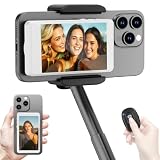
- 【Vlog Selfie Monitor Screen for iPhone & Android】Use your phone’s rear camera for selfies, vlogs, tutorials, TikTok, YouTube, and live streaming while viewing yourself on the wireless monitor screen. Compatible with most iPhone and Android phones that support screen mirroring. 【Not compatible with iPhone 17 series or Google Pixel devices】
- 【Wireless Back Camera Monitor, No App Needed for Preview】Connect through your phone’s built-in Screen Mirroring or Cast function. No extra app or cable is required for regular preview. The monitor mirrors your phone display, helping you use the rear camera for clearer selfie videos, product demos, makeup videos, fitness clips, and live streams
- 【Important iPhone 4K Recording Note】For smoother iPhone wireless mirroring, 1080p recording is recommended when using the native iPhone camera app. If you need 4K video recording while mirroring, use a third-party camera app such as Blackmagic Camera. 4K lag during native iPhone mirroring is related to iOS/native camera limitations, not a defect of the monitor
- 【Visual Preview Screen Only, No Built-In Speaker】This selfie monitor screen is designed for visual framing and rear camera preview only. It does not have a built-in speaker and cannot play audio while recording. Audio recording and playback depend on your phone, camera app, microphone, or other connected audio devices
- 【Bluetooth Remote, Magnetic Mount & Portable Design】The included Bluetooth remote lets you take photos or start/stop video from up to 33 ft away in supported camera apps. The magnetic mount attaches directly to bare iPhone 12–16 models. For iPhone 11 and earlier or Android phones, use the included metal ring. Thick cases may reduce magnetic hold
4. Edit for understanding
Trim setup, pauses, and mistakes that do not help the viewer. Use a cursor highlight, zoom, or short callout when it makes the relevant control easier to spot. Keep labels concise and readable on a phone, and make sure overlays do not hide the control or result being explained.
For a vertical social video made from a landscape desktop capture, reframe deliberately rather than shrinking the whole desktop until its text becomes unreadable. Crop around the active area or use a sequence of focused views, while keeping enough context for viewers to understand where they are in the interface. Platform controls can cover parts of a video; check the result in the destination app before publishing rather than assuming a universal safe zone.
5. Export for the destination
Choose the aspect ratio, resolution, and length for the intended platform. YouTube Help says Shorts can be uploaded as vertical videos, can be up to three minutes long, and have a maximum resolution of 1080p. A 4K master does not override that Shorts limit. Recheck YouTube’s current instructions before publishing because platform specifications can change: Get started creating YouTube Shorts.
Rank #3

- Real-time Rear Camera Monitor: Use the LUCKSKY selfie monitor screen iphone to instantly sync your phone’s rear camera view via the screen mirroring function (up to 4K at 60FPS). Say goodbye to blurry front camera shots and awkward rear camera angles — making content creation easier and more professional. Capture perfect selfies, vlogs, live broadcasts, and content for platforms like TikTok, Instagram, and YouTube anytime, anywhere.
- Easy Connection & Remote Shooting: Our LUCKSKY back camera monitor iphone connects to the phone through screen mirroring, allowing you to synchronize the rear camera's image in real time with smooth, delay-free video playback (within 33 feet). Equipped with a remote control button to connect via Bluetooth, you can remotely control shooting or recording without awkwardly reaching out or rushing to take selfies.
- 180° Rotation & 3-Level Brightness: Using screen rotation button, you can easily rotate the display 180°, eliminating the hassle of upside-down images and helping you capture perfect selfies. At the same time, the LUCKSKY vlog selfie monitor screen iphone features three adjustable brightness levels—high, medium, and low—to suit various lighting conditions. You can freely adjust the brightness according to ambient light, ensuring every frame is clear and well-lit.
- Wide Compatibility: Our back camera monitor iphone features built-in magnetic suction, allowing it to be directly attached to iPhone 12/13/14/15/16/17/18 and similar models. It also includes a magnetic sticker, which can be attached to a wide range of smartphones, such as iPhone 8/9/10/11/12, Samsung Galaxy, and more. The ultra-strong magnetic hold ensures stability and reliability during shooting, preventing accidental slips or drops. (Note: The screen mirroring function is only compatible with iOS 9.0 and above, and Android 2.0 and above.)
- Packing list: 1 × selfie monitor screen, 1 × Bluetooth Remote Control, 1 × Magnetic Sticker, 1 × Type-C Data Cable, 1 × User Manual. If you have any questions about this vlog back camera monitor iphone, feel free to contact us. We’ll provide the best solution, and our customer service team will respond within 24 hours.
YouTube’s creation flow supports adding a title of up to 100 characters, choosing privacy and audience settings, previewing, and saving a draft before upload. Preview the final video on a phone to check that interface details, captions, and callouts remain legible.
YouTube changed how Shorts views are counted on 31 March 2025: views include starts and replays without a minimum watch time, while the earlier metric is called “Engaged views” in Analytics. This is a YouTube analytics definition, not a measure that should be applied to other platforms.
Independent reader supportYour contribution helps us test, update, and keep practical guides available for everyone.6. Check privacy, audio, and rights
Review what the recording reveals
Watch the exported video from beginning to end before publishing. Look for account details, private messages, customer information, browser tabs, notifications, and anything visible briefly during a transition. Listen with headphones as well: confirm narration is intelligible and unrelated system sounds are absent.
Rank #4

- 【QHD 2.7K Video Camera】 This camcorder supports 2.7K video recording, up to 50MP photo resolution, and 16X digital zoom. The built-in LED fill light enhances your shoots in low-light and nighttime conditions. Suitable for various scenarios like sports events, family gatherings, football games, travel, weddings, YouTube videos, live streaming, and hiking, it lets you capture every exciting moment.
- 【Webcam Functionality】When connected to a computer, this video camera can function as a webcam. Perfect for live streaming, video calls with family and friends, or recording meetings and classes, it ensures a clear and high-quality connection. Capture stunning photos or videos and share them on YouTube with this vlogging camera.
- 【Long-duration & Recording While Charging】The QHD vlogging camera includes two high-capacity 1500mAh NP-40 lithium batteries, each providing over 140 minutes of continuous recording. It also supports recording while charging, ensuring you won't miss any important moments due to low battery, making it perfect for events like concerts, sports games, and vlogging.
- 【Multifunctional Camcorder】This versatile video camera features an LCD screen with 270° rotation, anti-shake, face detection, self-timer, continuous shooting, image stabilization, multiple scene modes, webcam functionality, USB 2.0, and more. Lightweight and portable, the camcorder is perfect for capturing beautiful moments anytime, anywhere, making it an excellent gift for family and friends.
- 【Supports Large Storage & Microphone】With the included 16GB memory card, you can start shooting right away without any additional purchases. The 2.7K camcorder supports up to 128GB of expandable storage and an external microphone (not included) for capturing clearer audio. It also supports tripod (not included) connections with a standard-sized mounting hole, catering to your diverse needs.
Audio capture deserves its own check. The W3C Screen Capture document, a Working Draft published 16 July 2026, notes that captured audio sources may differ from video sources and can expose information from system applications. It describes display capture through getDisplayMedia; it is a draft that may change, not a final standard. See W3C Screen Capture.
Clear the rights to included material
Use music, images, video, and third-party interface content only when you own it, have permission or a suitable licence, or can otherwise legally use it. A marketing or educational purpose, a short excerpt, or attribution alone does not automatically make copyrighted material lawful to use.
Windows Errors? Fix Them Before They Spread
Repair common Windows errors and clear accumulated junk for a smoother, more stable PC - no reinstall needed.Free scan · no reinstallCrashes, No Sound, or Screen Glitches?
Random freezes, missing sound and display glitches usually trace back to one bad driver. Find and replace yours safely.Free scan · under a minuteYouTube’s US fair-use guidance explains that courts weigh purpose and character, the nature of the copyrighted work, the amount used, and the effect on the work’s market. Courts decide fair use case by case, and YouTube’s copyright systems may still generate a claim. This is US-specific guidance, not a statement of the law everywhere: YouTube: Fair use on YouTube.
Best Value

- 4K DIGITAL CAMERA WITH AUTOFOCUS: The newest 4K digital camera for photography captures videos in 4K resolution and snaps ultra HD 48MP images. With Autofocus and 16X digital zoom, every detail is crisp, clear, and vibrant even captured from a distance.
- 180° FLIP SCREEN AND PORTABLE: Our 4k camera for photography offers a 3.0-inch IPS 180° flip screen, ideal for selfie enthusiasts and vlogging creation. Designed for travel and everyday use, this compact travel camera for pictures is built to last. Its small size and durable construction make it a reliable companion for capturing memories on the go.
- MULTIFUNCTIONAL PHOTOGRAPHY CAMERA: The 4K digital video camera features a date stamp, exposure compensation (-3.0 to +3.0), video pause and playback, time-lapse, slow-motion, giving your videos a creative edge. Additional features like a fill light, Anti-shake, 3 continuous shooting, smile & face detection, beauty face, self-timer, and various filters encourage you to stretch your creative boundaries.
- WEBCAM AND EASY TRANSFER: This 4K vlogging camera for YouTube doubles as a webcam, perfect for live streaming, video chats, and vlogging. You can connect the photo camera to your computer via an USB cable for easy file download, sharing your experiences with friends instantly. With 2 spare rechareable batteries, never worry about power shortage.
- A PERFECT GIFT WITH A HASSLE-FREE WARRANTY: User-friendly and versatile, this portable digital camera for teens is an ideal gift for beginners, amateurs, teens, and seniors, fulfilling daily shooting needs easily. Enjoy our worry-free 18-month replacement and refund warranty. Our prompt customer support team is ready to assist you in under 12 hours!
When a screen recording should become a live stream
A screen recording is a finished video file; a YouTube live stream is a separate publishing format. If your goal is to keep uploaded recordings playing as a YouTube channel stream, you can run that workflow yourself with a computer-based setup, or use a cloud service.
Or let it run in the cloud
StreamNeo keeps a YouTube channel live from uploaded videos: upload a recording or build a playlist, add your YouTube stream key, and go live. Nothing has to stay on at home; it loops from the cloud. Every slot handles the video as uploaded up to 4K 60fps at one flat price per slot, automatically recovers if YouTube drops the stream, and includes 10 GB storage per slot pooled across active slots. The first day is free with no card, one free day per account. Monthly is $9.99 per month. Start your free day with StreamNeo.
Quick Recap
Product prices and availability are accurate as of the date/time indicated and are subject to change. Any price and availability information displayed on Amazon at the time of purchase will apply.




