Quick wins for a faster PC:
Scan for outdated or missing drivers - takes under a minuteDriver Scan →Repair Windows errors before they cause bigger problemsFix Now →A QR code gives someone a quick route to your live stream: point it at the right event or channel page, add a clear reason to scan, and test it on a phone before sharing it. It is a convenient way to present a link—not a proven way to increase viewers. Pair it with the platform’s own promotion tools and make sure the placement follows that platform’s rules.
Choose the page a scan should open
First decide what the person scanning needs to see. Use the most specific destination that is available and useful:
As an Amazon Associate I earn from qualifying purchases.
- Upcoming stream or event page: Best when you are promoting one scheduled broadcast and the page is available before it starts. YouTube recommends sharing a stream link ahead of time and embedding it on a website. YouTube’s live-stream promotion guidance also recommends sharing the link at least 48 hours before going live.
- Channel page: Better when the code will remain in circulation or you want viewers to find your channel even after a particular event has ended. Make the surrounding copy clear that the destination is the channel, not necessarily a live broadcast at that moment.
- Event-information page: Useful when people need schedule, access, or other details before choosing where to watch. Label the code accordingly, such as “Scan for event details.”
Open the finished QR code with a phone and confirm that it reaches the intended page. Check again after printing or placing it, since a correct-looking code can still point to the wrong URL.
Make the code easy to scan
Use a clear call to action and preserve the margin
Tell people what they will get: “Scan to watch live,” “Scan for the stream schedule,” or “Scan for event details.” Keep that text outside the clear margin around the QR pattern. GS1 UK states: “The Quiet Zone around all four sides of the QR code is four times the size of the X-Dimension.” The X-dimension is the size of the smallest squares in the code. See GS1 UK’s QR-code design guidelines.
#1 Best Overall

- Pre-Printed mulit-colored QR Codes with a Free APP: Organize anything with 45 unique multi-colored, pre-printed QR labels, paired with our free mobile app to organize your storage or move. You can assign a title to each pre-printed label on the included free app, making organization a breeze. Just peel, stick, and scan to itemize boxes, add photos, and find your things instantly with a quick keyword search. Check our HD line of labels for high humidty/heat environments and tear/water resistance.
- Effortless Content Cataloging & Instant Find: Catalog your items with titles, descriptions, quantities, locations, and photos for ultimate clarity. Quickly locate anything by searching tote names, item titles, descriptions, keywords, or by scanning the label.
- Your Recovery Partner: Be prepared for the unexpected. With ToteScan, you can effortlessly export your inventory data, providing essential documentation for insurance claims and a smoother recovery process.
- Hands-Free Searching with Alexa: Just ask Alexa! Use the ToteScan Alexa skill with your Echo Dot to quickly find items in your totes, completely hands-free.
- Family & Team Ready: Easily share your common ToteScan account, perfect for seamless organization among family members or within a business team.
Size it for the real viewing distance
There is no single minimum print size that suits every QR code and setting: the amount of data in the code, print method, surface, lighting, and scanning distance all matter. Use strong contrast between the code and its background, do not crop or decorate it in a way that obscures the pattern, and keep a clear margin. For a printed sign, sticker, or flyer, vector artwork is a practical choice when available. A secondary QR printing guide explains these variables and was reviewed July 17, 2026.
Test the final version—not just a preview—at the distance people will scan from and under realistic lighting. If it will appear on a screen, check that the code is large and steady enough to scan in that viewing context. Do not assume a code that works close up will work on a distant poster or small display.
Place it where people can act on it
In person: signs, flyers, and handouts
Put a code where someone has time and a reason to scan it: event signage, a flyer, a handout, or a sticker used to promote a scheduled stream. Include the stream or event name, date and time where relevant, and the scan prompt. A QR code is a link presentation method; its placement and message should make the destination and timing understandable without requiring a scan first.
Rank #2

- CUSTOM QR CODE STICKERS: These personalized QR codes labels are designed for both business and personal use, making it easy to connect anyone to your website, social media pages, menus, or any digital content.
- DURABLE VINYL MATERIAL: These waterproof QR code stickers are made from high-quality vinyl that is UV, heat, and cold resistant, helping your QR code stay clear and vibrant over time without fading or peeling.
- CUSTOMIZATION OPTIONS: These personalized QR code labels features flexible customization, with sizes from 1 to 10 inch and quantities from 1 to 1000 pieces, making it easy to choose the right option to fit your needs.
- VERSATILE SURFACE USE: These QR code personalized sticker labels adhere reliably to a wide range of smooth surfaces, including packaging, boxes, windows, doors, cars, and retail displays, for a variety of uses.
- EASY APPLICATION: These custom QR code vinyl labels are easy to apply with a simple peel-and-stick process and a strong adhesive that helps avoid bubbles, giving you a clean and neat look on any surface.
Online: make the code scannable in context
A QR code on a webpage, social post, or video is useful only if the person can scan it in the way they are viewing that content. Consider whether the viewer has a second device available, whether the code remains visible long enough, and whether a direct clickable link would be simpler. The code can supplement a link; it should not replace a link where the platform allows one.
For Twitch, use its native sharing options for live channels, past broadcasts, and clips, or embed video or chat on a website where appropriate. Twitch describes these options in How to Share A Stream. TikTok LIVE creators can share a LIVE after starting it and add LIVE information to other social platforms; TikTok also recommends promoting schedules, clips, and events. See TikTok’s Share your LIVE guidance and its guidance on viewer interaction and engagement.
Pair the QR code with platform promotion
Use the QR code as one route into a larger promotion plan, not as a substitute for telling followers when and where to watch. For YouTube, the platform recommends sharing the stream link at least 48 hours before going live, connecting social accounts, embedding the URL on a website, creating a Live section, and using a teaser or trailer. It also suggests highlighting clips during a stream and making eligible public archives or highlights public. These are YouTube’s recommendations, not guarantees of reach or attendance. Read YouTube’s guidance for the platform’s full advice.
Rank #3
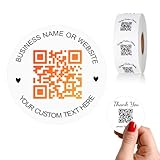
- 【CUSTOMIZABLE】Create personalized QR code stickers with your business name, website, or custom text, perfect for professional branding and marketing.
- 【High-Quality】Our custom QR code stickers are made from high-grade vinyl material, which is more durable, waterproof, eco-friends and aesthetically pleasing.
- 【Wide Application】These personalized round labels are suitable as small business promotion stickers, storefront vinyl sticker, follow book menu scan to pay and so on, ideal for business promotion, event marketing, product packaging, social media linking, and personal applications. The small round labels can offer a modern way to connect with your customers.
- 【Size and Quantity】The business promotion labels are available in six sizes (1.5, 2, 2.5, 3, 4, 5 inches) to fit various applications such as phones, notebooks, boxes, paper bags, desks, cars and wherever you want.Choose quantity from 5-1000pcs stickers to to suit your needs, whether business promotion or personal use.
- 【Guarantee for You】We are committed to providing you with high-quality assurance, in order to provide a better shopping experience, if the custom stickers has any quality problem or is damaged during transportation, please kindly contact with us, we will solve it for you within 24 hours.
Twitch says 70% of new viewers are coming to Twitch on mobile in a June 17, 2026 post about Dual Format and 2K streaming. That is Twitch’s own statement; the cited post excerpt does not explain its measurement method, and the figure does not show that QR codes increase viewership. Read Twitch’s post.
Check the rules of the platform where the code appears
A QR code can send a viewer away from the page where they found it, so check the platform’s policies before posting one. Twitch prohibits using its service to direct viewers to an alternative live-stream service, and its Community Guidelines explicitly include QR codes among the examples. The policy distinguishes simply noting that you are present elsewhere from actively encouraging viewers to leave for a concurrent stream. Read Twitch’s Community Guidelines before placing a code on a Twitch channel or stream.
Do not assume that a tactic allowed on one platform is allowed on another. Where a platform provides native sharing tools, use them alongside a QR code only if the code’s destination and placement comply with its current rules.
Rank #4
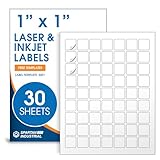
- Specifications: 1 X 1 inch blank label stickers, 30 sheets, 63 per sheet, 1890 total. Permanent adhesive. Not waterproof. Customized labels compatible with inkjet and laser printers. Includes template S001.
- Product and Inventory Labeling: Use for logo stickers, barcodes, QR codes, price tags, and small item identification. Label printer paper suitable for retail, packaging, inventory tracking, and product organization.
- Downloadable Templates: Use template S001 for printing labels in Microsoft Word, Canva, Google Docs, Adobe Illustrator, and PDF formats. 8.5 X 11 label paper for printer setups across business and organization needs.
- Matte Finish, Permanent Adhesion: Printable label paper with a non-yellowing matte surface supports clear text and scannable codes. Permanent adhesive sticks to cardboard, plastic, metal, glass, jars, bottles, and packaging.
- Printing Tips: To create personalized stickers, load sheets straight into the printer. Set paper type to Label Paper or Heavyweight and scale to 100% or Actual Size. Additional instructions included on packaging.
Use a redirect only if you can verify it
A direct link is straightforward. A redirect can be useful if you need to change the destination later, but the sources cited here do not establish that any redirect service is more reliable or suitable than another. If you use one, test the full scan-to-destination route on a phone and recheck it before an event or print run. Keep a record of the final destination so the code does not remain in circulation after a schedule or page changes.
Measure your own campaign without assuming a lift
The cited platform and design guidance does not provide a QR-specific audience increase, scan-to-view conversion benchmark, or controlled comparison of QR placements. If measurement is available to you, record scans and compare them with attendance or viewing for that particular campaign. Treat those numbers as your own results, not a forecast for future events or a general QR-code performance rate.
Outdated Drivers Are Slowing You Down
One free scan finds every outdated or missing driver and matches the right update for your exact hardware.Free scan · exact hardware matchPC Slower Than It Used to Be?
A free scan shows the junk files, broken settings and background clutter dragging Windows down - then fixes them in one click.Free scan · Windows 10 & 11Keep a YouTube stream running without a home computer
If the event leads viewers to a prerecorded video that should play as a continuous YouTube stream, StreamNeo is a separate option for keeping that stream online from the cloud. Upload a recording or build a playlist, add your YouTube stream key, and go live; the cloud continues the loop without requiring a computer or home connection to stay on. StreamNeo is for uploaded videos on YouTube, not camera broadcasts. Details are at StreamNeo.
Or let it run in the cloud
Upload your video or playlist, add the YouTube stream key once, and go live. Nothing has to stay on at home; video streams as uploaded, up to 4K 60fps, at one price per slot, with automatic recovery if YouTube drops the stream. The first day is free with no card. Monthly: $9.99 per month. Start your free day with StreamNeo.
Quick Recap
Product prices and availability are accurate as of the date/time indicated and are subject to change. Any price and availability information displayed on Amazon at the time of purchase will apply.




