Free tools Windows power users keep installed
One-click scans. No signup required.
You can use an old Android phone as a small server with Termux and PRoot-Distro, but that setup does not run Docker Engine or its dockerd daemon. It provides a Linux userland in which you can run some server software and work with OCI image contents. If you need a real Docker daemon, a separate community-documented route uses Debian in QEMU under Termux; it is more complex and its compatibility and reliability depend on the phone.
What “Docker server” means on Android
There are two different goals that are easy to conflate: running server applications on a phone, and running Docker Engine itself. Termux runs programs on Android using the Android host kernel; it is not a conventional Linux virtual machine. It also uses Android’s bionic C library rather than glibc, so software compatibility can differ from a standard Linux distribution. Termux’s documentation explains these differences.
As an Amazon Associate I earn from qualifying purchases.
The Tool Desk
Outbyte Driver Updater FREEFix the driver behind crashes, sound loss and screen glitchesFind Drivers →Outbyte PC Repair FREEClear out junk files and repair common Windows errorsFree Scan →For the simpler route, PRoot-Distro installs a Linux userland and can run commands from Docker/OCI image contents, as well as server applications such as Nginx, Nextcloud, and PostgreSQL. That is not the same as running Docker Engine: Docker’s daemon documentation describes dockerd as the process that provides the Docker daemon, while PRoot-Distro explicitly operates without it.
Choose the route that matches your requirement
| Route | What it gives you | Important trade-off |
|---|---|---|
| Termux + PRoot-Distro | A Linux userland for running compatible programs and server processes; it can also pull and run commands from OCI images. | No Docker daemon. PRoot-Distro documents missing kernel namespaces and cgroups, as well as limitations around service supervisors. It does not provide Docker Engine’s isolation or behavior. Source: PRoot-Distro documentation. |
| Termux + Debian in QEMU | A community project describes running Debian 12 in QEMU under Termux with a real Docker daemon. | This is a distinct, more demanding virtual-machine approach. The project-specific claim does not establish support across phones, performance, or reliable long-term operation. Source: community project. |
If your aim is to host an application or experiment with a Linux server process, start with PRoot-Distro. If your software requires Docker Engine, its daemon, or container behavior that depends on kernel namespaces or cgroups, the userland route does not meet that requirement. The QEMU project is a possible avenue to investigate, not a guarantee that Docker will work well on a particular device.
#1 Best Overall

- 【Hexa-Core Reliable Power】This powerful 10.1-inch industrial touchscreen PC, built on the RK3399 hexa-core platform with 4GB of RAM, ensures reliable and responsive performance. It is ideally suited to drive a variety of demanding applications, from industrial control systems to digital signage displays and public interactive kiosks
- 【HD IPS Precision Touch】Boasting a vivid 10.1-inch IPS display with a crisp 1280x800 resolution, this all-in-one computer offers wide viewing angles and excellent color reproduction. Its responsive G+G multi-touch screen enables intuitive control, making it a perfect fit for clear visual communication and interactive operations in retail POS, factory HMI, and self-service kiosks
- 【Full I/O Flexible Mounting】Designed for flexible integration, this unit offers comprehensive connectivity with Gigabit LAN, USB 3.0, HDMI 2.0 (supporting 4K@60Hz output), It also features dual-screen display support and a standard VESA mount, enabling versatile deployment in both control panel and digital signage setups
- 【Wide-Temp Fanless Durability】Designed for reliability around the clock, this fanless computer operates stably in temperatures from -10°C to 50°C and includes auto-start functionality. With Android 12 pre-installed, it serves as a durable and stable platform for demanding commercial and industrial automation environments
- 【All-Connect High-Speed Stable】This industrial computer offers a complete connectivity solution adaptable to diverse environments. It features enhanced Wi-Fi 5 reception, low-latency Bluetooth 4.0, and a Gigabit Ethernet port, guaranteeing seamless integration and uninterrupted data flow whether on wireless or wired networks
Set up a Linux userland with Termux and PRoot-Distro
The documented workflow is to install Termux from one of its listed distribution channels, install PRoot-Distro from Termux, install a Linux distribution, then log into it. Exact package availability and behavior can vary as Android and the projects change; use the installation instructions in the PRoot-Distro README for current commands and supported distributions.
- Install Termux. Get it through a distribution channel listed by the Termux project, rather than assuming that every app-store build is equivalent.
- Install PRoot-Distro in Termux. Follow the project’s current package-install instructions in the README.
- Install a distribution. Choose an available Linux distribution using PRoot-Distro’s documented commands. Ubuntu is one example covered by the project workflow.
- Log in to the distribution. Use PRoot-Distro’s login command, then install and configure the server software you intend to run using that distribution’s instructions.
PRoot-Distro documents use cases including Nginx, Nextcloud, and PostgreSQL, but that is not a promise that every application or image will work. Check the application’s prerequisites and test it in the userland before relying on it.
Rank #2

- 1. Geniatech Android tv box is designed for the most demanding customers and environnements. Features 2GB RAM and 8GB ROM, with HDMI (4K HEVC), ethernet, dual band WiFi.
- 2. The Mini PC is a upgrade version, comes with Amlogic S905X4 64 bit quad core ARM cortex-A55 processor and it has strong decoding ability, its shell is composed of a metal bottom shell and a plastic top shell with good heat dissipation performancecomes.
- 3. 4K2K Ultra HD playback / real time decoding, enjoy the incredible crispness and dramatic detail 4K2K Ultra HD and 1080p resolution, The device features various connectors, including HDMI, USB Host and the industrial widely used connector RS232. With RS232, can easily communicate with industrial machines and network equipment.
- 4. Wildly used in advertising sreen display, hotel intelligent interactive TV,IPTV DVB OTT integration,remote intelligent control (MDM), Network Video Calling,etc. Remote Device Management System (MDM), Support remote control of online devices, support remote management of content distribution, application deployment and service push.
- 5. Small yet very powerful and stable thanks to Android OS. It’s a reliable and affordable media playing device to run your Digital Signage. Videos and images still run smoothly on this version.
Understand the limits before exposing a service
PRoot-Distro’s restrictions affect more than whether a command starts. Its documented limitations include unavailable kernel namespaces and cgroups and a general inability to run service supervisors. Those are central to how ordinary Linux systems isolate processes and manage long-running services; their absence means a PRoot-Distro process should not be treated as a normal Docker container or a production-ready Docker host. See the project’s limitations and usage notes.
The project documents background sessions and port redirection. For example, it describes redirecting a privileged port such as 80 to a higher-numbered port. This can help make a development server reachable without binding directly to a privileged port, but starting a process in the background does not provide the supervision, restart behavior, or uptime guarantees of a properly managed server. Confirm the app is listening on the intended port and test access from the network where you plan to use it.
Rank #3
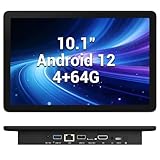
- 【Hexa-Core Reliable Power】This powerful 10.1-inch industrial touchscreen PC, built on the RK3399 hexa-core platform with 4GB of RAM, ensures reliable and responsive performance. It is ideally suited to drive a variety of demanding applications, from industrial control systems to digital signage displays and public interactive kiosks
- 【HD IPS Precision Touch】Boasting a vivid 10.1-inch IPS display with a crisp 1280x800 resolution, this all-in-one computer offers wide viewing angles and excellent color reproduction. Its responsive G+G multi-touch screen enables intuitive control, making it a perfect fit for clear visual communication and interactive operations in retail POS, factory HMI, and self-service kiosks
- 【Full I/O Flexible Mounting】Designed for flexible integration, this unit offers comprehensive connectivity with Gigabit LAN, USB 3.0, HDMI 2.0 (supporting 4K@60Hz output), It also features dual-screen display support and a standard VESA mount, enabling versatile deployment in both control panel and digital signage setups
- 【Wide-Temp Fanless Durability】Designed for reliability around the clock, this fanless computer operates stably in temperatures from -10°C to 50°C and includes auto-start functionality. With Android 12 pre-installed, it serves as a durable and stable platform for demanding commercial and industrial automation environments
- 【All-Connect High-Speed Stable】This industrial computer offers a complete connectivity solution adaptable to diverse environments. It features enhanced Wi-Fi 5 reception, low-latency Bluetooth 4.0, and a Gigabit Ethernet port, guaranteeing seamless integration and uninterrupted data flow whether on wireless or wired networks
When the QEMU route makes sense
A virtual machine is the more relevant option when you specifically need a real Docker daemon rather than a Linux userland that runs application processes. One public project describes Debian 12 running in QEMU under Termux with Docker. Because this is a project-specific implementation, do not assume it will be compatible with every Android phone or deliver dependable service continuously. The available project information does not establish broad device coverage, performance figures, or long-term reliability.
Before choosing this route, verify that the project’s instructions still match your Android version and device, and test the exact workload you intend to run. A VM adds another layer between Docker and the phone’s hardware, so it is a more involved setup than installing a userland. No controlled performance comparison is available to quantify the difference.
Quick Recap
Best Value

- Android 14 with GMS & powerful Qualcomm QCS6490 processor
- Qualcomm 6490 delivers up to 12 TOPS AI performance with efficient, low-power fused AI acceleration.
- Connectivity includes HDMI, USB 3.0, USB-C, Ethernet, Bluetooth, Wi-Fi, micro-SD and GPIO
- Secure to any counter or in a kiosk easily with the built-in 75 mm or 100 mm VESA mount
- Purpose-built to accommodate compact spaces, the Elo Backpack offers a small footprint in both size and weight.
Rank #4

- Compact and efficient: The Lenovo ThinkCentre M710q mini desktop PC is a compact and efficient mini desktop PC with reliable performance, plenty of memory, and efficient storage.
- Stable Processor - 6th Gen Intel Core i3-6100T, delivering reliable processing power for a variety of tasks including office productivity, web browsing and multimedia consumption.
- AMPLE CAPACITY - 8GB DDR4 RAM provides ample memory for seamless multitasking, smooth performance and runs multiple applications at the same time; 256GB solid state drive offers fast boot times, quick data access, and enough storage space for essential files, documents and applications.
- FLEXIBLE EXPANSION - USB Type-A, DisplayPort, RJ-45, headphone/microphone combo jack, ensuring easy connection to peripherals and accessories.
- Operating System: Windows 11 Pro - a powerful, secure, compatible and more manageable operating system that helps you better manage and protect your devices and data for greater productivity and security.
Practical decision checklist
- You want to try a Linux server app: use Termux with PRoot-Distro, and check that the app works without kernel features or service supervisors it may expect.
- You want to use an OCI image’s files or command: PRoot-Distro documents ways to pull and run image contents, but this does not create a Docker daemon or reproduce Docker’s isolation.
- You need
dockerdor Docker-specific isolation: PRoot-Distro is not the right route; investigate the Debian-in-QEMU project and validate it on your own phone. - You need dependable, continuously available service: the cited Android approaches do not establish production-grade uptime. Treat a phone setup as an experiment unless you can independently verify that it meets your reliability and maintenance needs.
Product prices and availability are accurate as of the date/time indicated and are subject to change. Any price and availability information displayed on Amazon at the time of purchase will apply.




