Recommended Free Tools
Set your air conditioner to the highest temperature that still feels comfortable while you’re home and awake, then raise it when you’re asleep or away. There is no single ideal setting for every household: 78°F is a reference point, not a rule. Fans can help you feel cooler at a higher setting, while persistent humidity usually calls for more than turning the thermostat lower.
What temperature should you set your AC to?
Start with a comfortable setting and adjust gradually. The U.S. Department of Energy (DOE) advises setting the thermostat as high as is comfortable when you’re home and awake, then raising it during sleep or when the home is empty. Its Energy Saver guidance does not prescribe one temperature for everyone; comfort, climate, equipment, and household needs differ.
As an Amazon Associate I earn from qualifying purchases.
DOE’s older summer guidance uses 78°F rather than 72°F to illustrate a possible reduction in cooling costs. It estimates that the change can save between 6% and 18% on a cooling bill, but this is an agency estimate—not a guaranteed result for an individual home. See DOE’s summer guidance for the original comparison.
What’s actually slowing this PC down?
Pick the symptom - the matching free tool is one click away.
Adjust the setting for sleep and time away
Raise the setpoint when nobody needs the same level of cooling, such as overnight or while the home is unoccupied. A programmable thermostat can apply different settings for home, sleep, and away periods automatically. If you buy one, check compatibility with your HVAC system before purchasing; DOE supports the scheduling use case, not any particular brand or model.
#1 Best Overall

- ENERGY STAR certified smart thermostat for home that helps you save energy and stay comfortable.Connectivity : Wi-Fi - 802.11b/g/n 2.4 GHz, 802.11a/n 5 GHz Wi-Fi., Wireless interconnect : Bluetooth Low Energy Please refer to the product description section below for all applicable legal disclaimers.Product note: You can also check your system’s compatibility before purchasing a Nest thermostat with our online Nest Compatibility Checker on the Google Nest support page
- The Nest Thermostat is designed to work without a C wire in most homes, but for some systems, including heating only, cooling only, zone controlled, and heat pump systems, you’ll need a C wire or other compatible power accessory
- Nest Thermostat turns itself down when you leave, so you don’t waste energy heating or cooling an empty home. Lock feature: No
- Programmable thermostat that lets you create an energy efficient schedule in the Google Home app on your Android or iPhone
- Remote control lets family members change the thermostat temperature from anywhere on a phone, laptop, or tablet[1]
Use fans to feel cooler, not to cool an empty room
Moving air helps people feel cooler, so a ceiling or room fan may let you use a higher AC setpoint without sacrificing comfort. DOE says a ceiling fan may allow a setting about 4°F higher; treat that as an approximate agency figure, not a promise for every room or occupant. As DOE puts it, “Fans cool people, not rooms.” Its guidance is available in the summer energy-saving article and home-cooling infographic.
Run fans only in occupied rooms and switch them off when people leave. A fan does not lower the room’s temperature, so running it in an empty space uses electricity without providing that comfort benefit.
Rank #2

- Save up to 23% every year on heating and cooling costs, adjusts to your set schedule to save energy when you’re gone and optimize comfort when you’re home. Compared to a hold of 72
- Compatible with 85% of systems, check your system’s compatibility with our online ecobee Compatibility Checker on the ecobee support page
- Change your temperature by easily tapping the color touchscreen or using the ecobee app. Plus, free software upgrades ensure you get the best out of your Smart Thermostat Essential, for years to come
- Automatically adjusts to your set schedule to save energy when you’re gone and optimize comfort when you’re home. Keep track of your energy consumption when you're on the go on the ecobee app
- Easy DIY install. No C Wire, no problem. Get the ecobee Power Extender Kit (PEK) for homes without a C-Wire and keep your walls looking nice with our trim kit – both sold separately
Should the AC fan be set to Auto or On?
For a typical residential system, use Auto for the thermostat’s fan setting. DOE recommends this for ordinary operation; continuous fan operation is an exception when an indoor-air-quality professional has configured it for health reasons. The recommendation appears in DOE’s 2022 Energy Saver guide.
The Tool Desk
Outbyte PC Repair FREEClear out junk files and repair common Windows errorsFree Scan →Outbyte Driver Updater FREEScan for outdated or missing drivers - takes under a minuteDriver Scan →Why can the house still feel humid?
Lowering the thermostat is not a reliable general fix for indoor humidity. DOE notes that in some conditions, occupants can feel too cold while humidity remains high. The appropriate control depends on the system and climate, so persistent dampness may warrant a system-specific assessment rather than progressively lowering the setpoint. DOE’s discussion of approaches for hot, humid climates is available in Advanced HVAC Humidity Control for Hot-Humid Climates.
Rank #3
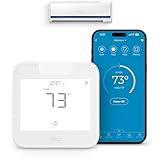
- Product Usage Instructions: Breez Max connects to a 2.4 GHz Wi-Fi network. It is compatible with any mini-split, window or portable unit that has an IR remote control. If your device doesn't work out of the box, please contact Cielo Customer Support to make it compatible. Breez Max has built-in temperature & humidity sensors that can be calibrated using the app. If the touch buttons don’t respond, press the temperature up & down buttons simultaneously to unlock the touch controls. For optimal placement and control, place Breez Max within 6-12 feet and in the line of sight of your air conditioner.
- AHR Product of the Year Smart Thermostat for Room Air Conditioners: Make your mini-split, window, or portable air conditioners smart (that come with an IR remote). Control your AC from anywhere using your phone or like a thermostat using on-device buttons with the award-winning smart thermostat for mini-splits.
- DIY Easy Set-Up: With an auto-detection algorithm for universal compatibility, Cielo Breez Max digital thermostat for mini split can detect any air conditioner brand and model automatically! The smart air conditioner controller is compatible with over 20,000 models of mini-splits, window, or portable units.
- Comfy Max: With the AI-based Comfy Max ensure your AC only runs when it needs to, preventing overcooling and overheating. With a true thermostat like experience, always keep your home comfy and guarantee energy savings.
- Weekly Scheduling & Presets: Set one-time or repeat schedules for your air conditioner based on your routine. Your schedules will continue running smoothly even if internet connectivity is lost. Enjoy a truly tailored experience with predefined comfort settings including Home, Away, and Sleep.
Keep the system working as intended
Clean or replace the filter
DOE’s 2022 guide advises cleaning or replacing AC filters monthly or as recommended for the equipment. Follow the unit’s instructions if they specify a different interval.
Choose a properly sized room AC
If you are setting a window or room air conditioner, its size matters as well as its thermostat setting. DOE warns that an oversized room unit can cycle on and off excessively, consume more energy, and remove less moisture. Consult DOE’s room air conditioner purchasing guidance, updated in December 2024, for sizing and efficiency considerations.
Quick Recap
Best Value

- ENERGY STAR certified smart thermostat for home that helps you save energy and stay comfortable.Control the temperature with your voice using smart home devices that work with Google Assistant or Alexa[3]Nest Renew makes it simple to support clean energy right from home; it works with your Nest Thermostat[5] to help you automatically prioritize your usage[6] to times when energy is cleaner or less expensive.Product note: You can also check your system’s compatibility before purchasing a Nest thermostat with our online Nest Compatibility Checker on the Google Nest support page
- The Nest Thermostat is designed to work without a C wire in most homes, but for some systems, including heating only, cooling only, zone controlled, and heat pump systems, you’ll need a C wire or other compatible power accessory. You can control your Nest Thermostat manually when there's no internet connection.
- Nest Thermostat turns itself down when you leave, so you don’t waste energy heating or cooling an empty home
- Programmable thermostat that lets you create an energy efficient schedule in the Google Home app on your Android or iPhone
- Remote control lets family members change the thermostat temperature from anywhere on a phone, laptop, or tablet[1]. | Control the temperature with your voice using smart home devices that work with Google Assistant or Alexa[3].
Rank #4

- ENERGY STAR certified smart thermostat for home that helps you save energy and stay comfortable.Product note: You can also check your system’s compatibility before purchasing a Nest thermostat with our online Nest Compatibility Checker on the Google Nest support page.Connectivity Protocol : Wi-Fi.Connectivity Protocol : Wi-Fi
- The Nest Thermostat is designed to work without a C wire in most homes, but for some systems, including heating only, cooling only, zone controlled, and heat pump systems, you’ll need a C wire or other compatible power accessory. Lock feature: No
- Nest Thermostat turns itself down when you leave, so you don’t waste energy heating or cooling an empty home; easily program an energy efficient schedule in the Google home app on your Android or iPhone
- Remote control lets family members change the thermostat temperature from anywhere on a phone, laptop, or tablet[1]
- Savings Finder looks for more ways your thermostat can help you save, and suggests tweaks to your schedule in the app; check with your energy provider to learn more about rebates and more ways to save on a Nest thermostat
Product prices and availability are accurate as of the date/time indicated and are subject to change. Any price and availability information displayed on Amazon at the time of purchase will apply.




