The Tool Desk
Outbyte Driver Updater FREEScan for outdated or missing drivers - takes under a minuteDriver Scan →Outbyte PC Repair FREEClear out junk files and repair common Windows errorsFree Scan →To set up a racing wheel for Gran Turismo 7, first confirm that your exact wheelbase works with your console—PS4 or PS5—then mount and connect it as its manufacturer instructs. Select the required console or game mode, start GT7, and use the pre-race Quick Menu’s Settings > Controller Settings to adjust steering sensitivity and check button assignments. Wheel compatibility and startup steps vary by model, so do not assume one wheel’s instructions apply to another.
1. Check whether your exact wheel works with your PS4 or PS5
Before connecting anything, identify the wheel’s exact model, wheelbase, pedals, and console. Gran Turismo 7 has wheel-specific button assignment information, while manufacturers define which console and operating modes their products support. Compatibility can depend on the wheelbase rather than the steering-wheel rim: Fanatec says PlayStation compatibility is built into selected wheelbases, not simply the rim attached to one. Check the GT7 wheel-assignment manual and the manufacturer’s current support page for your precise hardware.
As an Amazon Associate I earn from qualifying purchases.
Examples from official product information include the Thrustmaster T128 support listing, which names Gran Turismo 7, and PlayStation’s wheel overview, which lists product families such as the Fanatec Gran Turismo DD Pro, Thrustmaster T-GT II, T300RS GT Edition, T248, Logitech G923, and G29. These listings are not a guarantee that every version, bundle, or regional variant is compatible. Fanatec’s compatibility FAQ lists PlayStation-compatible bases including the Gran Turismo DD Pro and ClubSport DD+, and says its compatible bases are licensed for PS4 and PS5; verify the exact model and current availability in the Fanatec PlayStation Compatibility FAQ.
Do these 3 things before closing this tab:
1Clear out junk files and repair common Windows errors2Scan for outdated or missing drivers - takes under a minute3Repair Windows errors before they cause bigger problemsFor the most reliable answer, match all three: console generation, wheelbase model, and any required mode or firmware. If the wheel is absent from the game’s assignment list, do not infer that every wheel in a listed brand family behaves identically; consult the entry for your device in the GT7 options manual.
#1 Best Overall

- PlayStation compatible: Officially licensed for PS5 and PS4 consoles. Also works on Windows PC
- 5 Nm Direct Drive servo motor: Custom-designed in Germany for sim racing providing linear, consistent performance with patented FluxBarrier technology to improve motor efficiency and smoothness
- Passively cooled base: Housing is made from aluminum (passive heat sink, core structural component) with composite end caps
- Steering wheel designed by Polyphony Digital: Tactile rubber grip with OLED display and diffused RevLED strip, compact 280 mm diameter, optimized for the PlayStation interface
- Four 5-way directional sticks: Assigned to GT7's rapid-access adjustments for traction control, brake balance, torque split, and fuel mapping
2. Mount and connect the wheel according to its manual
Attach the pedals and secure the wheelbase to a desk, clamp, stand, or cockpit using the hardware and order specified by the manufacturer. Check that the mounting surface is stable and that the wheel can turn freely. Connect power, pedals, and USB as directed by that product’s manual; cable order and startup behavior are not universal.
A separate stand is optional, not a standard requirement for every setup. Check whether your wheel includes a table clamp and whether your desk can support it before buying additional mounting hardware. PlayStation’s wheel overview describes the GT DD Pro package as including a wheel, base, pedals, and table clamp, but included items can differ across products and bundles.
Rank #2

- Compatible with PlayStation 5, PlayStation 4, and PC .Use the HORI Device Manager app to download firmware, adjust settings and make up to 4 custom profiles
- Full-size racing wheel and pedals optimized for authentic racing simulation
- 270-degree turn radius with adjustable output options
- Mount security with sturdy clamp system
- Use the HORI Device Manager app to download firmware, adjust settings and make up to 4 custom profiles
3. Select the correct console or game mode
Some wheels require a specific mode for a particular console or game. Follow the product’s own instructions rather than choosing a mode based on another brand’s setup.
Quick wins for a faster PC:
Scan for outdated or missing drivers - takes under a minuteDriver Scan →Clear out junk files and repair common Windows errorsFree Scan →Fix the driver behind crashes, sound loss and screen glitchesFind Drivers →Example: Thrustmaster T598
Thrustmaster’s T598 guide specifies red PlayStation mode 2 for certain native PS5 games, including GT7. It specifies blue mode 1 for PS4, PS4 games running on PS5, and most PS5 games. These instructions are specific to the T598; they should not be applied to other Thrustmaster models or other manufacturers’ wheels. The T598 setup guide also covers its base, rim, and pedal settings, firmware, force-feedback profiles, and rotation angle. It says Auto rotation adjusts the angle to the game’s vehicle.
Rank #3

- With the return of classic cars, iconic tracks, and fan-favourite modes like GT Simulation and Sport Mode - Gran Turismo 7 is the complete Real Driving Simulator, 25 years in the making.
- Find your line. Whether you're a racer, collector, tuner, designer, photographer or arcade fan - immerse yourself in the facets of automotive culture that matter most to you.
- Connect and compete. Join an international community of drivers to share race strategies, tuning tips, livery designs and photos, before taking to the track to go head-to-head.
Use the initialization process in your wheel’s manual when starting the console and game. If the manual says the wheel calibrates on startup, keep its movement unobstructed and avoid touching controls during calibration as directed for that model.
4. Find GT7’s steering-wheel settings
- Start GT7 with the wheel connected and recognized by the console.
- Before a race, open the Quick Menu.
- Choose Settings > Controller Settings.
- Adjust steering-wheel sensitivity and review the displayed button assignments for your device.
These are the in-game controls identified in the GT7 driving options manual. Begin with a comfortable, conservative setting, then make small changes in a low-stakes session. Force feedback, vibration, rotation, and pedal behavior may also have wheel-specific controls outside this GT7 menu; check the manufacturer’s guide before changing those settings.
Rank #4
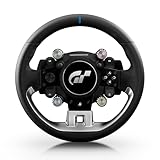
- Wheel rim officially licensed by Gran Turismo and Sony, designed in collaboration with Polyphony Digital
- Features the next-gen Quick Release, natively compatible with the T818 and T598 Direct Drive racing wheel bases
- Round wheel rim (11 inches / 28 cm in diameter) wrapped in fine, smooth-textured leather
- 4 rotary encoders with push-button functionality for a total of 12 controls
- 1 D-pad, 2 mini-sticks, 4 tact-switch action buttons
5. Test the wheel and tune it gradually
Try the setup in a practice session before relying on it in a race. Confirm that steering, pedals, and assigned buttons respond as expected. Change one setting at a time so you can tell what improved or worsened the feel. There is no single best sensitivity or force-feedback value established for every wheel, car, and player.
If vibration is unusually strong or loud on a Logitech G923, Gran Turismo’s compatibility notice advises reducing GT7’s Vibration Strength at Options > Controllers > Vibration Function. The notice says PS4 and PS5 updates released March 8, 2023 included connectivity repairs. Its recommendation concerns this documented G923 case, not a universal fix for all wheels. See the G923 compatibility notice.
Why is my wheel not working in Gran Turismo 7?
Check the likely causes in order, starting with compatibility and the model-specific setup rather than changing unrelated game options.
Quick Recap
- Confirm the console and exact hardware. Check the wheelbase model—not only the rim—against the manufacturer’s PS4 or PS5 compatibility information and GT7’s wheel-assignment manual.
- Check connections and mounting. Reseat power, USB, and pedal connections as instructed by the wheel maker. Make sure the wheel is mounted securely and can calibrate without obstruction.
- Verify the operating mode. Select the console or game mode required for that exact wheel and the way GT7 is being run, such as native PS5 versus a PS4 game on PS5.
- Check firmware and updates. Follow the manufacturer’s instructions for the wheel’s current firmware, and confirm that the console and game have the updates relevant to your issue.
- Inspect GT7’s controller settings. Open the pre-race Quick Menu and check Settings > Controller Settings for sensitivity and button assignments.
- Use model-specific support. If the problem remains, follow the manufacturer’s troubleshooting steps for the precise wheel and base rather than applying another model’s reset or cable sequence.
Product prices and availability are accurate as of the date/time indicated and are subject to change. Any price and availability information displayed on Amazon at the time of purchase will apply.




