Quick wins for a faster PC:
Scan for outdated or missing drivers - takes under a minuteDriver Scan →Clear out junk files and repair common Windows errorsFree Scan →Fix the driver behind crashes, sound loss and screen glitchesFind Drivers →You can overclock a graphics card safely only by treating it as gradual, reversible tuning—not by applying a universal clock offset or chasing the highest number. Record stock performance and temperatures, make one small adjustment at a time, test it in both a benchmark and your normal games or workloads, and revert at the first sign of instability. Keep the card’s built-in protections enabled.
Before you overclock: check the card, cooling and warranty
Overclocking results depend on the individual GPU, its cooler, available power limits, workload and the controls exposed by its software. A setting that works on one card—even one with the same GPU model—may not work on another. Find the exact graphics card model and board partner, install current drivers, and check that the card’s cooling is operating normally. Use the temperature and power limits for your specific card rather than adopting a number from another system.
As an Amazon Associate I earn from qualifying purchases.
Check the card maker’s warranty terms before changing settings. Policies differ by manufacturer, product and region. MSI warns that damage caused during overclocking is not covered by its warranty. AMD says its product warranty does not cover damage caused by overclocking, including when enabled through AMD hardware or software. Intel says overclocking through Intel Graphics Software does not void the warranty for Intel-branded desktop Arc cards, but also warns of possible damage, shorter lifespan and instability; owners of partner-branded Arc cards should check that maker’s terms. NVIDIA’s cited US warranty covers specified NVIDIA-branded GeForce products for three years from purchase, subject to product-specific terms; that does not establish coverage for partner cards or other regions.
Recommended Free Tools
For a desktop card, check case airflow before changing fan behavior. If airflow is inadequate, improving it may help cooling, but a case fan is not a required overclocking purchase. More fan speed can also add noise. Laptop GPU fan curves may be fixed by firmware, so options can be more limited; MSI advises using small boosts and monitoring both CPU and GPU temperatures.
#1 Best Overall
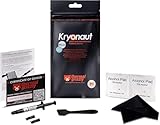
- Extremely high thermal conductivity of thermal paste 12.5KW achieved with even smaller particles is perfect for even the most demanding configurations and can also be used in industrial cooling systems
- Easy to use Thermal Compound Paste - Thanks to a specially constructed syringe and a spatula for spreading thermal grease, which is included. It guarantees a simple, pleasant, and precise distribution of the Kryonaut thermal paste on your processor or graphics card
- Long Action - Provides long-lasting effect, thanks to its characteristic and specialized structure, Thermal Grizzly Kryonaut does not dry out even at 80° Celsius degrees
- Surprising Effects - Already at the first use of this cpu paste solution, you may experience a drop in temperature, which will reduce the loudness of your equipment and improve the comfort of use
- Number 1 on the Market - Confirmed by many tests, most popular choice meets highest quality standards not only for standard computer users but also for Overclocking fans. This package contains a heatsink thermal paste spatula combo.
Choose a tuning tool and preserve a way back
Use a supported utility that exposes controls for your card. MSI describes Afterburner as a free utility with real-time monitoring and fan controls, and says it supports cards from all brands. The controls actually available still depend on the GPU and manufacturer. MSI advises downloading Afterburner only from MSI or Guru3D to avoid fake installers.
MSI’s OC Scanner can automate a scan, while manual tuning lets you change settings incrementally. Neither guarantees stability in your own games or workloads. Before applying any change, save a profile or locate the utility’s Reset control so you can restore default settings promptly.
Rank #2

- Computer motherboard cables--braided nylon sleeve, provide added durability and stability, resistant to wear and tear,cpu power supply cable
- Motherboard power supply cable--convenient to use, flexible and easy to connect, and it is a choice to replace worn or damaged one,cpu motherboard cables
- Motherboard extension cable--made of materials, reliable and durable to use, bring you a using experience,cpu extension cable
- Internal motherboard cables--the power cord has a fixed connection latch at both ends to prevent accidental disconnection,motherboard cable wire
- CPU power cable--provide strain relief on the connections of your computer case components,mainboard motherboard cable
Record a stock baseline before changing clocks
Choose a benchmark or repeatable in-game scene that you can run at the same graphics settings before and after tuning. Close work you cannot afford to lose, then record the baseline frame rate along with GPU core clock, memory clock, voltage and temperature. These measurements help distinguish a genuine performance change from normal variation, and show whether temperature, clock behavior or fan noise worsened.
The Tool Desk
Outbyte Driver Updater FREEScan for outdated or missing drivers - takes under a minuteDriver Scan →Outbyte PC Repair FREEClear out junk files and repair common Windows errorsFree Scan →Do not compare results from different scenes, settings or workloads as if they were directly equivalent. A higher clock reading alone is not proof of a useful overclock: the aim is better performance in the work you care about, without unacceptable heat, noise or instability.
Rank #3
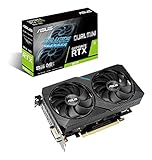
- OC Edition: Boost Clock 1680 MHz (OC Mode)/ 1650 MHz (Gaming Mode)
- NVIDIA TURING: ROG GeForce RTX graphics cards are powered by the Turing GPU architecture and the all-new RTX platform. This gives you up to 6X the performance of previous-generation graphics cards and brings the power of real-time ray tracing and AI to games.
- Coolest dual-fan GPU built for the Intel NUC 9 Extreme Kit and Intel NUC 9 Pro Kit. *
- A 2-slot Design maximizes compatibility and cooling efficiency for superior performance in small chassis
- Axial-tech fan design features a smaller fan hub that facilitates longer blades and a barrier ring that increases downward air pressure.
Increase one setting at a time
- Start with the core clock. Increase it by a small step, apply the change, and run a brief test while monitoring temperature, clock behavior and visual output. MSI’s manual guide uses 20–30 MHz core-clock increments as a starting procedure; these are not guaranteed safe targets for every card.
- Retest before proceeding. If the test appears stable, make another small core adjustment and test again. If it fails, reduce the last change or reset to defaults rather than continuing.
- Tune memory separately. Once core tuning is complete, adjust memory in small steps. MSI’s guide uses 50–100 MHz increments and suggests reducing memory by 10 MHz if glitches appear. Treat these as MSI’s procedural examples, not universal limits.
- Do not raise voltage blindly. A utility exposing a voltage control does not mean you should use it. Avoid blind voltage increases, BIOS flashing and attempts to bypass card protections.
Change only one control at a time. That makes it easier to identify which adjustment caused an artifact, crash, temperature increase or other unwanted behavior.
Independent reader supportYour contribution helps us test, update, and keep practical guides available for everyone.Test stability in benchmarks and real workloads
A short benchmark is an initial screen, not proof that an overclock is stable. MSI’s support procedure describes a 10-minute benchmark run as an initial check; that duration is not a guarantee for every card or workload. Watch for flickering, visual glitches, black screens, crashes or shutdowns, and monitor temperature, clocks, voltage, frame rate and fan behavior while the test runs.
Rank #4

- Passive heat sinks for Mosfests or RAM modules
- Material: Copper
- Dimensions: 6.5 x 6.5mm
Then test the games or compute workloads you actually use, at the same settings as the stock baseline. Different workloads stress a GPU differently, so a pass in one benchmark cannot establish stability everywhere. Check performance and temperature over a sustained session as well as during the initial test.
Crashes, No Sound, or Screen Glitches?
Random freezes, missing sound and display glitches usually trace back to one bad driver. Find and replace yours safely.Free scan · under a minuteWindows Errors? Fix Them Before They Spread
Repair common Windows errors and clear accumulated junk for a smoother, more stable PC - no reinstall needed.Free scan · no reinstallDo not treat FurMark as a routine substitute for real games. NVIDIA warns that FurMark and similar stress tests can draw far more power than real-world games. NVIDIA also warns that using software to disable over-temperature or over-current protections can permanently damage a graphics card and void the manufacturer’s warranty. Keep those protections enabled.
When to reduce the overclock or reset it
- If visual artifacts, flickering, a black screen, a crash or a shutdown occurs, reduce the last setting you changed and test again.
- If instability persists or you are unsure which change caused it, use the utility’s Reset control to return to defaults.
- If temperature, fan noise or performance is unacceptable, lower the setting even if a brief benchmark passed.
- If a setting seems stable at the apparent maximum, consider backing it off slightly for better long-term stability.
There is no single safe clock offset or temperature target that applies to every graphics card. Stop at the card’s model-specific limit or at the first sign that the result is unstable or unsuitable for your system.
What performance gain should you expect?
There is no general performance-gain figure established for GPU overclocking. MSI recommends comparing benchmark frame rates before and after adjustment, but the result varies with the individual card, cooling, power limits, workload and system. Use your own repeatable baseline to decide whether the change is worthwhile; do not assume a higher clock guarantees a noticeable improvement.
Quick Recap
Product prices and availability are accurate as of the date/time indicated and are subject to change. Any price and availability information displayed on Amazon at the time of purchase will apply.
Do these 3 things before closing this tab:
1Scan for outdated or missing drivers - takes under a minute2Repair Windows errors before they cause bigger problems3Fix the driver behind crashes, sound loss and screen glitches



