Windows Errors? Fix Them Before They Spread
Repair common Windows errors and clear accumulated junk for a smoother, more stable PC - no reinstall needed.Free scan · no reinstallCrashes, No Sound, or Screen Glitches?
Random freezes, missing sound and display glitches usually trace back to one bad driver. Find and replace yours safely.Free scan · under a minuteYou can run the current Uniswap web interface locally by following the instructions in the official apps/web README: use the Node.js version pinned in .nvmrc, install dependencies with Bun, then start the development server with bun web dev. That starts the frontend; it does not, by itself, configure the app for a testnet. The current setup instructions reviewed here do not specify a supported testnet or a testnet configuration procedure.
Run the current Uniswap web app locally
The official Uniswap/interface repository is a monorepo containing web, mobile-wallet, and extension projects. For the browser app, use the web-specific instructions in apps/web, rather than assuming that a repository-level command covers every app.
As an Amazon Associate I earn from qualifying purchases.
- Get the repository. The root README’s quick start uses
git clone [email protected]:Uniswap/interface.git. Use an appropriate GitHub access method for your setup. - Switch to the pinned Node.js version. From the repository, use
nvm useif you have nvm installed. The web README directs developers to the version specified in.nvmrc; do not assume a different Node version is equivalent. - Install dependencies with Bun. Run
bun installfrom the repository root. - Start the web development server. Run
bun web dev. The web README says the dev server defaults to port 3000.
The repository root also lists bun web start in its quick start, but the web-specific README’s development command is bun web dev. Follow the web README for local development. It describes a Vite-based app, including experimental Rolldown support, and Cloudflare Workers deployment and Hono.js edge functions; those details do not change the basic local startup sequence.
Keep the default port when possible
The web README warns that using a port other than 3000 may cause CORS errors with certain Uniswap Backend services. If you change the port and encounter backend request failures, try the default before treating the problem as a testnet or wallet issue.
#1 Best Overall

- Proven security at scale: Over 9 years and millions of cards issued with no known remote hacks, while military‑grade EAL6+ security keeps your private keys locked inside the chip. Your cryptocurrencies stay strongly protected from online attackers.
- Tap once to manage your entire crypto wallet across 90 blockchains - no USB cables or Bluetooth, no batteries, no setup. Access 14,100+ coins & tokens, DeFi, NFTs, and staking instantly from your phone
- Smart backup: Use your second Tangem Wallet as your Backup keys with end‑to‑end encryption; no more papers, pictures. If one card is lost, the remaining can still restore full access, with an optional seed phrase available for advanced users.
- Engineered to last up to 25 years: Waterproof (IP69K), shockproof and tested for extreme temperatures from −25°C to 50°C. A durable cold wallet with long‑term protection and independently audited security.
- Trusted by 6 million users worldwide - buy, sell, swap, stake, and spend cryptocurrency directly. The secure offline storage wallet designed for how people actually use crypto wallets
Local startup is not testnet configuration
Starting the frontend locally only establishes that you can run the web app. The current web README documents startup, but does not state which public testnet to use, how to select one, what configuration values are required, or which network contracts and services must be available. The repository’s root manifest contains chain-related code references, but those are not a user-facing setup guide.
So, if your goal is specifically to use Sepolia or another testnet, do not infer a working configuration from the local startup steps. The official current setup material cited here does not establish a supported testnet workflow. A chain name or environment variable found elsewhere in the codebase is not, by itself, proof of a documented or working end-to-end configuration.
Rank #2

- READY IN 3 MINUTES – Set up your ELLIPAL X Card crypto wallet on the offline Starter device, then tap to the ELLIPAL mobile App and start using it. This 100% offline crypto wallet is a no battery crypto wallet with no charging, no firmware updates, and no complicated setup.
- TURN ANY WALLET INTO A CARD – Already have a wallet? Import your recovery phrase from MetaMask, Trust Wallet, Ledger, Trezor, or any compatible seed phrase wallet. X Card works as a backup wallet and physical twin of your existing bitcoin wallet, ethereum wallet, NFT wallet, or altcoin wallet — no transfers, no new accounts, no starting over.
- BUILT ON AN EAL6+ SECURE CHIP – Designed as a secure crypto wallet and private key wallet, X Card generates and stores your private keys inside the EAL6+ secure chip. Your keys never reach your phone, the App, USB, Bluetooth, or the internet, making it a true no bluetooth hardware wallet and no USB crypto wallet.
- ONE APP, EVERYTHING CRYPTO – Manage more with one cold storage wallet. Buy, sell, swap, send, spend, and earn across 45+ blockchains and 10,000+ tokens. Use X Card as your cryptocurrency wallet, coins and tokens wallet, DeFi wallet, and staking wallet for everyday crypto management.
- TAP TO CRYPTO – Carry your crypto cold wallet on a card and secure every transaction with one NFC tap. ELLIPAL X Card combines the simplicity of a crypto wallet with the protection of a cold storage hardware wallet.
Do not apply the legacy V1 environment variables to the current app
The older, explicitly legacy Uniswap V1 frontend has a separate guide that uses REACT_APP_CHAIN_ID and REACT_APP_NETWORK_URL for its testnet setup. Those instructions describe that V1 codebase, not the current Uniswap/interface web app. The current web README does not confirm that these variables are supported there.
The Tool Desk
Outbyte PC Repair FREEClear out junk files and repair common Windows errorsFree Scan →Outbyte Driver Updater FREEScan for outdated or missing drivers - takes under a minuteDriver Scan →Use the V1 recipe only when you intentionally work with that legacy frontend. For the current app, first find a current, web-app-specific instruction from Uniswap Labs before setting network variables or assuming that a particular testnet is available. The repository’s local-development guidance was updated in 2025, which is another reason not to copy older setup snippets without checking their scope.
Rank #3

- Superior Security - Elevate the cold storage safety of your digital assets with Arculus's innovative 3-factor authentication system: biometric lock, 6-digit PIN, and the Arculus metal card with private key encryption for multiple layers of security.
- Effortless Transactions - Simplify your crypto management with the Arculus Cold Storage Wallet and Arculus App, to seamlessly send, swap, or receive assets with a simple tap to your mobile device.
- CC EAL6+ Secure Element Technology – Safeguard your keys on the Arculus Card through robust, certified encryption, protecting against unauthorized access.
- Supports 95% of the Cryptocurrency Market Cap, including Bitcoin (BTC), Ethereum (ETH), Tether (USDT), XRP (XRP), and Cardano (ADA), Litecoin (LTC), Polkadot (DOT), and other popular coins.
- Hassle-Free - The Arculus Cold Storage Wallet communicates with your phone using secure tap-to-transact NFC technology. No cords, no connections and no internet required for next-gen levels of security.
Why settings may differ between local and hosted Uniswap
The official Uniswap interface releases page says the interface stores settings such as imported tokens in browser localStorage. It also says settings are not remembered across different URLs and recommends an IPFS gateway that enforces origin separation or the hosted app. Consequently, the local development URL, an IPFS URL, and the hosted interface can have separate browser-stored settings; importing a token or changing a preference in one origin does not guarantee it will appear in another.
Quick Recap
Best Value
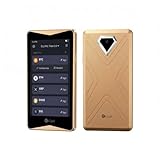
- 100% Offline Crypto Wallet with Air-Gapped Tech: The ELLIPAL Titan 2.0 features fully air-gapped technology, making it a 100% offline crypto wallet that is completely isolated from the internet. With absolutely no WiFi, no Bluetooth, and no network cables, it ensures your private keys always remain safe and sound. You can create and recover your accounts entirely offline, signing transactions securely via simple QR code scans. Since this ultra-secure cold wallet never connects to any network, your cryptocurrency will never suffer from any network-level cyberattacks.
- Clear Signing Transparency with Your Hardware Wallet: Take absolute control of your funds with a massive 4-inch Touchscreen. The ELLIPAL Titan 2.0 lays out every single transaction in plain, readable words: exactly who you are paying, how much you are sending, and what smart contracts you are authorizing. It double-checks every detail between your phone and the crypto hardware wallet before anything is signed. This completely eliminates blind signing, giving you absolute peace of mind with your trusted hardware wallet.
- Multi-Asset Crypto Cold Wallet: Manage all your portfolio effortlessly within a single crypto cold wallet. Pair the Titan 2.0 with the intuitive ELLIPAL App to buy, sell, swap, send, and earn rewards across 45+ coins and more than 10,000 tokens all on one platform. It is a seamless and convenient crypto wallet for your digital asset management.
- 8 Years of Zero Breaches & Trusted Secure Crypto Wallet: Invest in a highly recommended, secure crypto wallet backed by an unblemished 8-year track record of zero security breaches. Proudly Forbes Recommended and trusted by over 1 million users across more than 140 countries, this robust cold storage wallet provides enterprise-grade physical and digital security, ensuring your life savings are perfectly protected against evolving Web3 threats and physical tampering.
- Up to 5 Accounts in One Cold Storage Hardware Wallet: Maximize your storage efficiency with a versatile cold storage hardware wallet that supports up to 5 completely separate accounts on a single device. You can perfectly isolate and organize your daily spending, long-term savings, active trading, and even family funds without the need for multiple devices. It is the ultimate companion for your long-term crypto journey.
Rank #4

- EAL5+ CERTIFIED SECURE ELEMENT + FINGERPRINT PROTECTION — Your private keys stay encrypted offline on a certified EAL5+ chip, the same security tier used in EMV bank cards. Built by DCENT, securing crypto since 2018. Fingerprint authentication adds a second layer no PIN-only wallet can match.
- 10,000+ ASSETS NATIVE ON 100+ BLOCKCHAINS — Hold Bitcoin, Ethereum, XRP, Solana, Cardano, popular stablecoins (USDT, USDC), and NFTs in one wallet. No third-party apps, no fragmented setup — every supported asset works straight out of the box.
- TAP-TO-SIGN MOBILE EXPERIENCE — Pair your wallet with the DCENT mobile app over Bluetooth. Manage tokens, review transactions, and access in-app swap features directly from your phone — no cables, no desktop required.
- WEB3 & dAPP ACCESS VIA METAMASK — Connect to MetaMask and other browser extension wallets to manage NFTs, claim airdrops, and access dApps. A large screen and intuitive 4-button interface keep every transaction clearly visible before you sign.
- SEAMLESS FIRMWARE UPDATES & 30-DAY MONEY-BACK GUARANTEE — Apply security updates without resetting your wallet or migrating funds. Backed by Amazon's 30-day money-back guarantee — your purchase is risk-free.
What to check when the app does not behave as expected
- Startup fails: confirm that your active Node.js version matches the repository’s
.nvmrc, that dependencies were installed withbun install, and that you are running the web command from the repository. - Backend requests fail after changing ports: return to port 3000 and retry, because the web README flags possible CORS errors on alternate ports.
- You need a specific testnet: do not treat successful local startup as confirmation of testnet support. The current setup instructions cited here do not provide the required network procedure.
- Settings seem missing: check whether you are viewing the same URL origin where the settings were saved; browser storage is origin-specific.
Product prices and availability are accurate as of the date/time indicated and are subject to change. Any price and availability information displayed on Amazon at the time of purchase will apply.




