PC Slower Than It Used to Be?
A free scan shows the junk files, broken settings and background clutter dragging Windows down - then fixes them in one click.Free scan · Windows 10 & 11Outdated Drivers Are Slowing You Down
One free scan finds every outdated or missing driver and matches the right update for your exact hardware.Free scan · exact hardware matchReduce sensor errors by identifying what is wrong before changing how the data is processed. Calibrate repeatable bias and alignment errors, synchronize sensor clocks and coordinate frames before fusion, measure processing delay, and use filtering only when its added latency is acceptable. Then monitor sensor health, preserve uncertainty in downstream estimates, and define a validated response for degraded inputs.
Start by identifying the error, not by adding a filter
A reading can be wrong in several different ways, and the remedy depends on the mechanism. A stable offset is not random noise; a correctly calibrated sensor can still produce a poor fused estimate if its timestamps or spatial transform are wrong. Record a baseline against a known reference, then classify the discrepancy before deciding how to correct it.
Record a usable baseline
For each sensor, document its model, installation geometry, environment, temperature, power conditions, software version, timestamps, and relevant uncertainty. Compare measurements with an appropriate known reference, and note whether the discrepancy repeats, varies randomly, changes over time, or appears only after sensor streams are combined or processed.
Match the symptom to the error class
| Error class | What to investigate | Relevant response |
|---|---|---|
| Bias or scale-factor error | A repeatable offset or proportional measurement error | Calibrate against a suitable reference; investigate temperature, power stability, and warm-up where relevant. |
| Misalignment | A sensor or its mounting does not match the assumed geometry | Check physical mounting and calibrate the relevant alignment or spatial transform. |
| Drift | Measurements change over time or after environmental or mechanical change | Monitor for change and recheck calibration when evidence warrants it. |
| Random noise | Readings scatter around a stable value without a repeatable offset | Consider filtering or averaging, accounting for their effect on latency. |
| Time or fusion mismatch | Individual readings look plausible, but a combined estimate does not | Validate timestamps, clock offsets, and spatial transforms across the sensors. |
| Compute-induced delay | Data arrive too late or with variable delay at estimation or control | Measure end-to-end timing and manage task deadlines and fusion timing. |
These categories can coexist. For example, a system may have a calibration error and a timestamp mismatch at the same time; correcting one does not establish that the other is fixed.
What’s actually slowing this PC down?
Pick the symptom - the matching free tool is one click away.
#1 Best Overall

- 【Highly customizable voice commands】Supports 110+ preset commands. Users can edit command content online and generate firmware burning through web pages. It supports multi-language commands, which is convenient and efficient to operate and meet the needs of global products.The burning software only supports Windows.
- 【Professional-level voice processing】Built-in CI1302 chip, equipped with neural network processor, integrated echo cancellation and environmental noise reduction technology, the measured recognition accuracy is as high as 99%, effectively suppressing environmental noise and echo interference, ensuring stable operation in complex scenarios.
- 【Fully compatible development support】Provides STM32, ESP32, Ard-uin-o, Raspberry-Pi, Jetson Nano, Jetson Orin and other development board materials, supports ROS1/ROS2 system SDK, and meets the development needs of multiple scenarios such as smart hardware, robots, and homes.
- 【Plug and play interface design】Onboard IIC, serial port, Type-C interface, with a variety of connection cables (PH2.0 to DuPont cable, double-head cable, Type-C cable), adapt to single-chip microcomputer, embedded master control, and quickly realize hardware docking. Slot design, flexible installation.
- 【AI tech accelerates innovation】Yahboom provides development data solutions and technical support services. Through open source software and hardware design and low-power solutions, this product provides developers with full support from prototype to mass production, helping the smart hardware industry move towards a new era of human-computer interaction. Modify the command word page account: 15338857526, password: Yahboom123.
Calibrate systematic errors and verify sensor geometry
Systematic errors include bias, scale-factor error, misalignment, and drift. Calibration can address systematic terms; filtering or averaging is instead used to reduce random noise. The IEEE Robotics and Automation Society’s Sensors and Sensing in Robotics page summarizes the distinction: “Use calibration to remove systematic errors; use filtering/averaging to reduce random noise.”
Check the physical installation as well as the calibration
Calibration is meaningful only for the sensor and setup being used. Verify that the sensor is mounted as assumed and that its position and orientation relative to other sensors match the transforms used by the software. If temperature, power stability, or warm-up affects the sensor, record those conditions and account for them in the calibration process rather than treating their effects as generic noise.
Recheck after changes that can invalidate calibration
Vibration, maintenance, a mounting change, or a different operating environment can alter calibration—especially the spatial relationship between sensors. A camera–IMU monitoring study provides an example of checking whether extrinsic calibration remains valid; it does not establish a universal monitoring threshold or recalibration schedule. Use evidence from the actual installation to decide when to inspect or recalibrate.
Rank #2

- HuskyLens is an easy-to-use AI machine vision sensor. It can learn to detect objects, faces, lines, colors and tags just by clicking.
- One-Click-Learn: HuskyLens is designed to be smart. Built-in algorithms allow HuskyLens to learn new things just by a single click.
- Machine-Learning-Enabled: Equipped with advanced machine learning technology, HuskyLens is capable of recognizing faces and objects, which is far more beyond ordinary sensors.
- Onboard Screen: HuskyLens carries a 2.0 inch IPS screen, therefore you don't need to use a PC in parameters tuning. Enjoy the convenience it brings, what you see is what you get!
- Extreme Performance: HuskyLens adopts a new generation AI specialized chip Kendryte K210, contributing to 1,000 times faster performance compared to STM32H743 when running neural network algorithm.
Synchronize clocks and coordinate frames before sensor fusion
For a fused estimate to describe one physical situation, the contributing measurements must agree in time and geometry. A timestamp mismatch can pair measurements from different moments; a bad spatial transform can make correctly timed measurements appear to contradict one another. The IEEE IROS 2013 paper on sensor synchronization states: “Consequently, the time synchronization of sensors is a crucial aspect of building a robotic system.”
Validate time alignment
Check how timestamps are produced, whether sensor clocks share a time base, and whether offsets or delays are accounted for before measurements are combined. Inspect alignment under the system’s real operating conditions; nominal sensor specifications alone do not show that a deployed pipeline delivers synchronized data to the estimator.
Validate spatial transforms
Confirm that each sensor’s coordinate frame and its transform into the robot’s common frame reflect the installed hardware. When an application depends on multiple sensors, validate clock alignment and spatial transforms as a coupled system: a good transform cannot compensate for measurements taken at different times, and synchronized measurements cannot fix incorrect geometry.
Rank #3
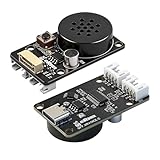
- CI1302 AI Chip with 98-99% Recognition Accuracy——Powered by CI1302 neural processor with echo cancellation and deep learning noise reduction, delivering 98-99% recognition accuracy. On-board coprocessor offloads voice processing from your main controller for faster response
- 5-Meter Long-Range Recognition & 2MB Storage——Supports 5-meter voice recognition for flexible robot and smart home placement. 2MB onboard storage holds firmware and voice data, enabling rich interactions without external memory
- 100+ Customizable Commands & Offline Operation——Supports 100+ preloaded commands with full customization via online tool—edit keywords, generate firmware, and update through web interface. No internet needed after setup. Supports Chinese & English
- IIC & UART Interfaces for Wide Compatibility——Features IIC and UART for seamless integration with Arduino, Raspberry Pi, ESP32, and other popular development boards. Supports ROS1/ROS2. Type-C port enables easy firmware burning and power connection
- Complete Module Kit & What You Get——Includes 1 x XR-Voice AI Module, connection cables, and detailed tutorial. Ideal for voice-controlled robots, smart home devices, and interactive AI systems. Real-time command execution out of the box
Treat vendor timing figures as specific claims
NVIDIA’s Holoscan Sensor Bridge article describes PTP-based synchronization as capable of achieving within 1 microsecond and often exceeding 100-nanosecond precision. Those figures are NVIDIA’s stated capability for its described setup, not a guarantee for every PTP deployment, sensor, clock, or network. Verify the actual performance of the hardware and configuration in use.
Measure processing delay as part of sensing quality
Sensor data can be accurate when captured and still be too old or inconsistently timed by the time it reaches estimation or control. Measure end-to-end data age and jitter through the deployed pipeline, including critical processing tasks and sensor fusion, rather than relying only on nominal sensor rates.
Recommended Free Tools
An IEEE/RSJ IROS 2022 study examined nine state-of-the-art SLAM systems and reported timing-induced degradation associated with delayed critical tasks or desynchronized sensor fusion. Its scope is those systems and methods; it does not establish one universal timing budget. The study discusses selective fusion and temporal-budget optimization as mitigations. In practice, set and validate deadlines for the robot’s actual workload and operating domain.
Rank #4

- 4-in-1 Environmental Monitoring: Measures temperature (-40850.5), humidity (0-100%RH3%), pressure (300-1100hPa0.6hPa) and VOC gas variation for comprehensive environmental analysis
- Dual Interface Communication: Features both I2C and SPI interfaces with address switch (0x77) for multi-device chaining and flexible connectivity options
- Industrial-Grade Design: Equipped with onboard RT9193-33 voltage regulator, supporting both 3.3V and 5V input for reliable performance
- Multi-Platform Support: Includes demo codes and example programs compatible with Arduino, Raspberry Pi, ESP32, and Raspberry Pi Pico development boards
- Smart Gas Sensing: Detects VOC and VSC changes in the environment (IAQ calculation requires Bosch BSEC library)
Use filtering for random noise only when the delay is acceptable
Averaging can reduce random scatter, but it trades responsiveness for smoother readings. The IEEE Robotics and Automation Society gives the illustrative model that averaging M independent readings with single-reading standard deviation σ reduces standard deviation to approximately σ/√M. This relationship assumes independent samples; correlated readings do not necessarily provide that reduction, and a larger averaging window increases latency.
Choose a filter based on both the noise behavior and how quickly the system must react. Check the resulting delay at the estimator and controller, not just the apparent smoothness of a sensor trace. A filter cannot correct a stable bias, wrong mounting geometry, clock mismatch, or late computation.
Independent reader supportYour contribution helps us test, update, and keep practical guides available for everyone.Keep uncertainty visible and define degraded-mode behavior
Pass uncertainty to downstream components
Do not reduce a sensor or perception result to only its most-likely value when later components need to reason about confidence. Research on trajectory forecasting warns that discarding upstream perception uncertainty can make downstream predictions overconfident. Preserve and pass uncertainty in a form the receiving components can use.
The Tool Desk
Outbyte PC Repair FREERepair Windows errors before they cause bigger problemsFix Now →Outbyte Driver Updater FREEScan for outdated or missing drivers - takes under a minuteDriver Scan →Best Value

- 1Tops computing power, efficient image processing capabilities: The K210 vision module is equipped with an efficient AI chip, a 2 million pixel OV2640 camera, and a built-in 2.0-inch LCD capacitive touch screen. It can process image data at a very fast speed while consuming low power, supporting various application scenarios such as face feature recognition, barcode recognition, object detection, color recognition, and visual line tracking.
- Simplified AI vision development learning: The Smart Vision Sensor uses MicroPython programming, with CanMV as the development environment. According to Yahboom's tutorials, users can skip the complex process of deploying visual algorithms and only need to record 5 images to complete autonomous model training, lowering the learning and use threshold of AI technology.
- Multi-controller compatibility: The K210 vision recognition module is equipped with a serial interface and can be used with various controllers such as STM32, RaspberryPi Pico, Ard-uino, BBC-V2, MSPM0, etc. Users can easily output visual recognition results to an external controller through the serial port, without the need to delve into complex visual algorithms, making it easy to create creative AI projects.Identify multiple colors simultaneously
- Open source code: The program source code of the Smart AI Lens Kit is completely open source, not a closed-source product that can only be used without further development. This enables users to more easily develop and customize their own visual application programs. In addition to powerful AI recognition functions, we also provide rich development materials to facilitate users to learn and develop their own AI projects.
- Diverse application scenarios: The compact K210 vision module can be widely used in electronic competitions, efficient experimental teaching, robot extensions or personal DIY projects, and even widely used in various fields such as smart homes, industrial automation, etc., providing users with more possibilities and innovation space.
Specify what happens when inputs are unreliable
Use sensor-health checks and out-of-distribution indicators to detect when inputs no longer fit validated assumptions. NVIDIA describes flagging out-of-distribution conditions and moving to a safe operating state in its Halos system; this is one vendor’s design, not a universal safety guarantee. Depending on the robot and its hazard analysis, a validated response might alert, slow, stop, or switch to a fallback mode. Test the chosen response for the intended operating domain rather than assuming any one action is safe everywhere.
Use a repeatable deployment checklist
- Establish a reference baseline. Record the sensor, mounting, environment, temperature, power, software version, timestamps, and uncertainty alongside measurements compared with a known reference.
- Classify the discrepancy. Separate repeatable bias, scale, alignment, or drift from random scatter, timing mismatch, and processing delay.
- Correct systematic and geometric errors. Calibrate the relevant terms and verify physical mounting; for fused sensors, validate time offsets and spatial transforms together.
- Measure the live pipeline. Check data age, jitter, fusion timing, and critical processing deadlines where estimates and control actually consume the data.
- Apply filtering selectively. Use it to address random scatter only after weighing response delay and the assumptions behind the chosen method.
- Monitor change and uncertainty. Recheck when hardware or operating conditions change, and keep uncertainty available to downstream estimation and planning.
- Validate degraded-mode logic. Confirm that health checks and fallback behavior work for the robot’s hazards and operating domain.
There is no universal calibration interval, timing budget, or single best correction method established for every physical AI system. Choose and validate the approach for the specific sensors, installation, workload, environment, and risks.
Quick Recap
Product prices and availability are accurate as of the date/time indicated and are subject to change. Any price and availability information displayed on Amazon at the time of purchase will apply.




