Quick wins for a faster PC:
Scan for outdated or missing drivers - takes under a minuteDriver Scan →Repair Windows errors before they cause bigger problemsFix Now →Fix the driver behind crashes, sound loss and screen glitchesFind Drivers →To put music on a SanDisk MP3 player, connect it to a computer by USB, open the player’s Music folder, and copy or drag compatible music files into it. The documented process transfers files from a computer; it does not establish a universal way to download subscription-streaming tracks directly onto the player.
Before transferring, check the player and music files
Find the exact model name printed on the player. SanDisk models do not all support the same audio formats, USB modes, or removable cards. Also check that the music is a file you can transfer and that it is not protected by DRM that prevents playback on the device.
As an Amazon Associate I earn from qualifying purchases.
SanDisk’s Apple Music and iTunes instructions say that the Clip Sport, Clip Sport Plus, Clip Sport Go, Clip Jam, Clip Zip, Fuze+ and Connect support DRM-free AAC/M4A files. The same instructions say AAC/M4A files must be converted to MP3 for the Fuze, Clip, Clip+, e200 series, c200 series and other listed older models. Check your own model before converting a library: converting files does not remove restrictions from DRM-protected tracks. SanDisk’s Apple Music and iTunes transfer instructions provide the model-specific guidance.
Outdated Drivers Are Slowing You Down
One free scan finds every outdated or missing driver and matches the right update for your exact hardware.Free scan · exact hardware matchWindows Errors? Fix Them Before They Spread
Repair common Windows errors and clear accumulated junk for a smoother, more stable PC - no reinstall needed.Free scan · no reinstallTransfer music using Windows File Explorer
- Connect the player to the computer with a USB connection and wait for it to appear.
- Open File Explorer and navigate to the folder containing your music.
- Open the SanDisk player in File Explorer, then open its Music folder.
- Drag the selected files into the Music folder, or copy the files and paste them there.
- Wait for the copy to finish before disconnecting the player.
SanDisk documents a separate Windows Media Player sync option for the Clip Sport Go: select music, add it to the Sync List, and start syncing. That route is model-specific; the basic file-copy workflow is the general method described in SanDisk’s Windows transfer guidance.
#1 Best Overall

- 🏃【Portable Back Clip MP3 Player with Bluetooth 5.3】 Enjoy smooth and steady audio streaming with Bluetooth 5.3. Bluetooth MP3 player easily pairs with wireless headphones or speakers for a seamless music experience ,choose between sequential play, shuffle repeat, single song repeat, or all song repeat modes. Clip-on MP3 music with Bluetooth is perfect for music lovers. [NOTE] MP3 player is a Bluetooth transmitter, not a receiver; it cannot be paired with mobile phones.
- 🏂【64GB + 128GB Internal Memory, Physical Buttons, 1.5-inch TFT Color Screen】 MP3 Player With 64GB internal memory and the ability to expand the micro SD card up to 128GB, mini MP3 player with Bluetooth offers plenty of space for songs and audiobooks - take thousands of songs wherever you go. mp3 player with a 1.5-inch TFT color screen, clear and beautiful display, low power consumption, better energy efficiency, 7 buttons, you can freely select the menu and adjust the volume, etc.
- 🏇【FM Radio & Voice Recorder】This MP3 player brings you seamless audio enjoyment. Built-in FM radio lets you access plenty of radio stations freely. It enables radio recording to save favorite broadcasts and memorable moments. Besides, the independent voice recorder function allows you to easily record thoughts, meeting notes and inspirations whenever needed.
- 🧗♂️【HiFi Sound Quality and Long Battery Life】Bluetooth MP3 player with high-quality chip, supporting MP3/WMA/APE/FLAC/WAV/DRM/ACELP formats, lossless sound quality, with professional intelligent noise cancellation master control chip, can shield noise and protect sound. The Bluetooth MP3 player has a battery life of 20 hours and a 1.5-hour fast charging function. Whether you're exercising, commuting, or relaxing, this small MP3 player with Bluetooth lets you enjoy your music anytime, anywhere.
- 🚵♀️【Powerful Multi-Function Player, 28 Languages】 A compact and multi-functional MP3 player that combines music, recording, FM radio, folders, settings, Bluetooth, calendar, video, eBook, stopwatch, time saver, shutdown, AB repeater, text sync, etc. It's a perfect gift for the elderly, father, mother, or friends. Ideal for running, horseback riding, hiking, and other sports. The built-in languages are English, German, and 28 other languages, meeting the needs of people in most countries.
Transfer music using macOS
- Connect the player to the Mac by USB.
- Open the player when it appears on the desktop, then open its Music folder.
- Drag compatible music files from the Mac or music library into the folder.
- Wait for copying to finish before disconnecting.
SanDisk’s Apple Music and iTunes directions also describe selecting music in the library and dragging it into the player’s Music folder. Whether and how the device appears can depend on the model and its USB mode. SanDisk’s Clip Sport Go instructions show the file-drag method for that model.
Which audio formats work?
Format support depends on the player family and sometimes its firmware. SanDisk lists MP3, DRM-free WMA, AAC/M4A and WAV among supported formats, but that does not mean every model plays all of them. Its current file-type article lists MP3 bitrates from 8 to 320 kbps and AAC from 16 to 320 kbps; these are compatibility ranges, not recommendations for audio quality. Check the article against your exact model before converting files or choosing a format.
Rank #2

- 【Know Before You Buy】No Built-in Storage. TF card is not included, and users must supply one for operation. The MP3 player does not support connecting to mobile phones or car audio systems via Bluetooth
- 【Define your style & Built to Move】The Yoton MP3 Player is your perfect gym and running companion. Clipping securely to your bag or workout gear, the lightweight design ensures your music and style go everywhere you do
- 【Shuffle & Rich, Hi-Fi Sound Quality】Immerse yourself in crystal-clear audio. Powered by an advanced decoding chip, it faithfully reproduces the depth and detail in your music, across all genres. Shuffle setting path: in the interface of playing music, click on the upper left corner of the button (with three horizontal lines), click on Repeat, select Shuffle
- 【Spacious Tunes Hub】 With support for up to 64GB microSD card ( TF card is not included), the Yoton MP3 Player is your pocket-sized music hub. Curate the perfect soundtrack for every moment.
- 【Stable & Effortless Bluetooth 5.2】Pair seamlessly and enjoy skip-free audio. The latest Bluetooth technology ensures a reliable connection to your wireless headphones or speakers
SanDisk lists FLAC and Ogg Vorbis support for the Clip Sport, Clip Zip, Clip+, Clip with the latest firmware, Fuze with the latest firmware, and Fuze+. Ogg Vorbis is separately listed as unsupported on the Clip Sport Plus, Voice and Go. These examples illustrate why a format supported by one SanDisk player should not be assumed to work on another. See SanDisk’s format and bitrate guidance for the model qualifications.
The Tool Desk
Outbyte PC Repair FREERepair Windows errors before they cause bigger problemsFix Now →Outbyte Driver Updater FREEFix the driver behind crashes, sound loss and screen glitchesFind Drivers →If the computer does not show the player
- Check the USB connection. Make sure the player is connected and that the cable supports data transfer, not just charging.
- Check the USB mode, if your model offers a choice. SanDisk describes MTP and MSC modes: MTP is supported on Windows, while MSC is supported on Windows and macOS. Not every model offers both, so consult its manual before changing a setting.
- Identify the model. If the player remains unavailable, use the model name printed on the device to find its manual and the appropriate connection instructions.
SanDisk’s MTP and MSC connection-mode article explains the operating-system differences. There is no single connector or setting that can be assumed for every SanDisk MP3 player.
Rank #3

- 【Clip Design & Pedometer】The mini clip enables AGPTEK mp3 to be firmly sandwiched in the sports apparel; After turn to Pedometer Mode, AGPTEK MP3 Player record the data when running. Small and portable at 2.36 inch long and a weight of just 1.06 oz, means you won't even notice it's there! Ideal for sport.
- 【Bluetooth 5.3 Technology 】 AGPTEK MP3 player adopts upgraded Bluetooth 5.3 has better compatibility, stable signal and reduces the power consumption of the music player. You can pair the Bluetooth MP3 Player with your Bluetooth wireless headphones (Tips:Unable to connect to cellphone and car via Bluetooth,you could use Audio Line to connect)
- 【64GB Large Memory & Up To 128GB Expansion】64GB large internal memory, store more lossless music. Can even be used as a U disk. If you are still afraid of not enough memory, you can also use a maximum 128GB TF card for expansion. 【Tip: The file size of a single transfer should not exceed 3GB to ensure the transfer speed and stability.】
- 【Hi-Fi Lossless Sound Quality】With a professional digital noise reduction chip, AGPTEK Bluetooth MP3 player can reduce noises to give you the most original sound quality and ensure a high-quality audio experience. earphones supports the music format MP3,WMA,APE,FLAC,WAV,DRM,ACELP,Bluetooth Supports the music format MP3,WMA,WAVE,FLAC,APE,M4A,AAC.
- 【Multi-function MP3 player】AGPTEK Multifunctional MP3 player with music play, video play, voice record, FM radio, Pedometer Mode, photo Browsing, E-book(Support TXT Format Only) A-B repeat, alarm clock, calendar, file folders, time screen-saver etc. It's a great gift for children, old people or your friends!
Can you use a memory card?
A card is optional and only applies to models whose documentation specifies card support. The Clip Sport manual says an optional microSD card can appear as a second removable disk. The Clip Jam manual specifies microSDHC for additional storage and says music can be loaded to the card in the same way as to the player. Check the exact model and card type before buying a card; internal storage works for the basic transfer process. See the Clip Sport manual, Chapter 4, and the Clip Jam manual.
Independent reader supportYour contribution helps us test, update, and keep practical guides available for everyone.What to know about streaming downloads and support
The instructions above cover transferring local music files from a computer. They do not establish a general way to move offline downloads from a streaming subscription to a SanDisk player. A track appearing in an app’s offline library should not be treated as a transferable file unless the service provides it as a compatible file you are entitled to copy.
Rank #4

- 【Define your style & Built to Move】Weighing a mere 28g, the Yoton MP3 Player is your gym and running companion. Clipping securely to your bag or workout gear, the lightweight design ensures your music and style go everywhere you do
- 【Shuffle & Rich, Hi-Fi Sound Quality】Immerse yourself in crystal-clear audio. Powered by an advanced decoding chip, it faithfully reproduces the depth and detail in your music, across all genres. Shuffle setting path: in the interface of playing music, click on the upper left corner of the button (with three horizontal lines), click on Repeat, select Shuffle
- 【Spacious Tunes Hub】 With expandable storage via TF card (up to 64GB, holds roughly 4000 songs), the Yoton MP3 Player is your pocket-sized music hub. Curate the perfect soundtrack for every moment
- 【Stable & Effortless Bluetooth 5.2】Pair seamlessly and enjoy skip-free audio. The latest Bluetooth technology ensures a reliable connection to your wireless headphones or speakers
- 【 More Than Just Music】Packed with useful features like FM Radio, Voice Recorder, Pedometer, and an Alarm Clock, this versatile player seamlessly integrates into your entire day
SanDisk Support pages for MP3 players currently display the notice, “MP3 Players have reached their end of support life cycle.” The relevant articles were updated in May or June 2026 and accessed October 7, 2026. This notice concerns the support lifecycle; by itself, it does not mean a player cannot function or that every manual and support document is unavailable.
Quick Recap
Best Value
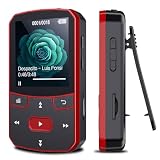
- 📶[Portable MP3 Player with Bluetooth 5.3] Seamless connect to Bluetooth headphones or speakers for a tangle-free listening experience. Enjoy multiple playback modes. Sequential play for album enthusiasts, playlist loop for continuous enjoyment, single-track repeat for your favorite hits, and shuffle mode for an unpredictable mix. Whether for workouts, commutes, or leisure, this small MP3 player with Bluetooth ensures your music is always at your fingertips.
- 💽[Large Memory 64GB + 128GB, Long Battery Life, 1.5H Fast Charging] 64GB internal memory & support up to 128GB micro SD card expansion, this mini MP3 player with Bluetooth offers ample space for songs & audiobooks. 20 hours playback time & quick recharging, no worry about low battery. AUX interface for easily connect to external speaker or car audio system, provide versatile music playback options, whether at home gatherings or outdoor activities
- 📂[HiFi MP3 Player with Multi-format Playback] Enjoy crystal-clear, high-fidelity sound that brings your music to life with this portable Bluetooth MP3 player, whether you're relaxing at home or on the go. Supports MP3, WMA, WAV, FLAC, ACELP, APE and more audio formats, and allows easy switching between single-folder and multi-folder playback. The clip on mp3 player with Bluetooth is perfect for gym workouts, outdoor running, or daily walks
- 🎈[Lightweight, Compact, Bluetooth MP3 Player with Clip Jam] Crafted from ABS material, weighing weighs 1 oz & measuring 2.56*1.42*0.66 in. Compact size saves space without compromising on clear sound quality and ease of use. Designed with a clip, the wireless MP3 player mp3 player clip jam securely attaches to clothing, whether you're jogging, cycling, hiking or daily routines, letting you focus on favorite music without worrying about its safety and stability.
- 👑[Easy to Download Music from Computer, Versatile MP3 Player] Support multiple audio formats such as MP3, WMA, APE, FLAC, WAV, M4A, DRM, ACELP, OGG. Simply connect via USB for quick & hassle-free music transfer. Multifunction in one compact device, shuffle video audio playback, voice recording, FM radio, A-B repeat, bookmarks, file folder, alarm clock, etc. A great gift for seniors, father, mother or friends. Ideal exercise companion for running, riding, cycling, climbing, etc
Product prices and availability are accurate as of the date/time indicated and are subject to change. Any price and availability information displayed on Amazon at the time of purchase will apply.




