The Tool Desk
Outbyte Driver Updater FREEFix the driver behind crashes, sound loss and screen glitchesFind Drivers →Outbyte PC Repair FREERepair Windows errors before they cause bigger problemsFix Now →Protect driver privacy by defining a specific operational purpose before collecting data, using the least intrusive system that can meet it, and assessing privacy risks before deployment. Tell drivers and passengers what is monitored and when, limit access and retention, and let workers inspect and challenge consequential AI-generated scores or inferences. Vehicle location, telematics, camera footage, audio, and identifiable inferences can all be personal data; the rules and required consultation depend on where the fleet operates.
Start with the purpose, not the technology
Write down the concrete need the system is meant to address—for example, dispatching vehicles or investigating a defined safety incident. Then identify exactly what information that purpose requires and whether a less intrusive method would work. A fleet platform’s ability to collect a signal does not, by itself, justify collecting it.
As an Amazon Associate I earn from qualifying purchases.
Ireland’s Data Protection Commission says: “Vehicle tracking should not be used for the general monitoring of staff.” Its Employer Vehicle Tracking guidance also treats location linked to an identifiable employee as personal data and warns that tracking can carry high privacy risk. This is Irish guidance, not a universal statement of every country’s law.
Document the purpose, the applicable lawful basis, the data collected, who will use it, and why alternatives are insufficient. Revisit that justification if a vendor adds a new sensor, the business starts using the data for performance management, or the system begins making predictions that were not part of the original purpose.
#1 Best Overall

- Real-Time GPS Tracker Device for Vehicles — Ideal for personal use or fleet management, this car GPS tracker provides up-to-the-minute location updates. Our car tracking device also provides unlimited trip history, including a detailed route history
- Driving Insights — Our OBD tracker for cars monitors speed, acceleration, hard braking, idle time, and more. This versatile family and fleet GPS tracker for cars also helps improve road safety by sending alerts in response to unsafe driving practices
- Vehicle Health — Unlike other vehicle tracking devices, our car tracker device continuously monitors diagnostic engine data, alerting you to potential maintenance issues, so you can avoid downtime and keep fleet and family vehicles in peak condition
- Geo-Fencing & Accident Detection — Set up geo-fences to receive notifications when your vehicle enters or exits designated areas; Equipped with advanced sensors and software, this vehicle tracker device instantly detects impacts and sends SMS alerts
- Easy To Install & Low Monthly Subscription — Our OBD GPS tracker for vehicles plugs directly into OBD2 ports and works on most vehicles 1996 and newer; $9.65 monthly subscription required - no hidden activation or return fees - cancel anytime
Match each monitoring method to its privacy impact
Different inputs expose different details about workers and other people. Use the following comparison when deciding what to enable; it is not a claim that every fleet system collects every category.
| Monitoring input or output | What it can reveal | Privacy-focused decision |
|---|---|---|
| Vehicle location or telematics | Where a vehicle is and, depending on the system, details about its use. When associated with a driver, the information can identify or relate to that worker. | Collect only what the stated operational purpose needs, restrict when tracking is active, and provide an effective way to stop off-duty tracking where feasible for vehicles available for private use. |
| Outward-facing video | Images of pedestrians, passengers, other motorists, and places around the vehicle. | Explain when recording occurs, what triggers it, who can access footage, and how footage is retained and retrieved. |
| Inward-facing video | Images of drivers and passengers inside the vehicle. | Justify the need for cabin recording specifically; do not assume that a safety purpose automatically justifies continuous recording. |
| Audio | Conversations involving workers or passengers. | Keep audio off by default. The UK ICO’s vehicle-surveillance checklist says continuous activation should be justified and documented, and audio should be limited to exceptional circumstances. |
| AI scores, predictions, or inferences | Evaluations or predictions about an identifiable driver, potentially used in decisions about their work. | Explain what the output means and how it is used; validate it before relying on it, use human review as a practical safeguard, and give workers a way to see and challenge relevant results. |
These categories can overlap. For example, a system may combine location and telematics to produce a driver score, or use video to capture people who are not employees. Include those combined effects—not just each sensor in isolation—in the privacy assessment.
Assess risk before turning on high-impact monitoring
Complete a privacy risk assessment before deployment. Under the GDPR, a data protection impact assessment (DPIA) is required when processing is likely to result in high risk to people’s rights and freedoms. The European Commission’s GDPR overview gives extensive automated evaluation or profiling as an example of processing that can meet that threshold. UK ICO worker-monitoring guidance identifies driver-behavior monitoring, camera or audio use, and analytics that infer, predict, or decide about drivers as situations warranting a DPIA.
Quick wins for a faster PC:
Fix the driver behind crashes, sound loss and screen glitchesFind Drivers →Clear out junk files and repair common Windows errorsFree Scan →Rank #2

- [NO MONTHLY FEE — 4G SIM & DATA INCLUDED] Pay once and track without a recurring subscription or activation fee. The built-in 4G SIM and data are included, so you can view vehicle location and activity in the TrackEase app or web dashboard. Coverage depends on local cellular availability.
- [PLUG-AND-PLAY OBD POWER — NO CHARGING] Plug the tracker into a compatible vehicle’s OBD-II port—no wiring, tools, or battery charging required. It draws power from the vehicle and enters sleep mode after the engine is turned off for simple, set-it-and-forget-it tracking.
- [REAL-TIME LOCATION & 180-DAY TRIP HISTORY] See live vehicle location with updates every 5 seconds while moving, then review up to 180 days of routes, stops, mileage, and driving activity in the iOS, Android, or web app.
- [CUSTOM SAFETY & SECURITY ALERTS] Receive push notifications for speeding, vehicle movement, geofence entry or exit, and device disconnection. Use configurable alerts to monitor teen drivers, family vehicles, company cars, or potential theft.
- [MULTI-VEHICLE MANAGEMENT & GLOBAL COVERAGE] Manage multiple VITALGLOW trackers from one account and keep each vehicle’s map, alerts, and trip history organized in one dashboard. Supported 4G service is available in 170+ countries and regions, including the U.S., Canada, and Mexico.
Assess the full processing operation, including the people affected, not only the fleet manager’s intended use. Consider drivers, passengers, pedestrians, and other people captured by cameras. Record the purpose and necessity, the likelihood and severity of potential harms, planned safeguards, and any risk that remains. If a DPIA identifies high residual risks that cannot be mitigated, the European Commission says the controller must consult the supervisory authority before proceeding.
The ICO’s vehicle-surveillance guidance says it is under review following the UK Data (Use and Access) Act. Check the current version of applicable ICO guidance and local law before relying on it.
Make private use and recording conditions clear
Tell drivers and passengers what the system records, why it records it, when monitoring is active, who controls the information, who can see it, how long it is kept, and where to direct questions or rights requests. Explain camera triggers and footage use in terms people can understand, rather than relying on a general notice that a vehicle is monitored.
Rank #3

- [No Subscriptions] – Avoid adding another subscription you might forget about. We are the only company that offers a car GPS tracker with with no subscriptions, activation or hidden fees ever.
- [Effortless Setup] – Plug and Play 4G GPS OBD tracker that installs in 3 minutes or less. Start tracking fast with our user-friendly mobile app. Track a fleet of multiple devices using a single screen.
- [Ultimate Tracking Precision] – Real-time location tracking with instant alerts, customizable geofencing, and incredibly long battery life. For vehicles, personal items, and loved ones.
- [Unbounded Tracking] - Works in 170+ countries including US, Canada and Mexico. Our car trackers for your vehicle can be moved to another vehicle without incurring a fee.
- [Car Theft Prevention Device] - Our hidden car tracker device serves as the ultimate deterrent
For a company vehicle available for personal use, build a practical off-duty control into the arrangement where feasible. The ICO says employers will rarely be able to justify monitoring during private use when a work vehicle is available for personal use; its example uses a driver-controlled way to disable tracking outside working hours. Consider how the control works in practice and explain its limits to the driver.
Passengers and people outside the vehicle may not be employees and may have little opportunity to avoid capture. Account for them in the risk assessment and notices, and limit recording to what the purpose requires. For audio, the ICO checklist recommends keeping it switched off by default; continuous activation needs specific justification and documentation.
Set rules for access, retention, and AI results
Restrict access and control disclosures
Give access only to people whose roles require it, and define who can retrieve footage, handle rights requests, or disclose information. A vendor’s access should also be governed by the fleet operator’s documented purpose and controls. Make sure the process for locating and responding to relevant records is workable before a request or incident arises.
Rank #4
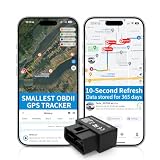
- 【5-day Free Trial】After the trial, continue subscription for $6.49/month with a 1-year plan ($77.88 total) or $8.99 month-to-month. SIM & data included.
- 【Plug & Play OBD2 GPS Tracker】Installs in seconds by plugging into your car’s OBDII port. Compact and lightweight (1.53" x 1.77" x 0.87", 1.2 oz), it’s a discreet hidden GPS tracker that won’t interfere with legroom or drain your car battery.
- 【Track Speed and Driver Behavior】Receive instant alerts for speeding, geo-fence breach, vehicle crashes, hard braking or rapid acceleration. Speeding threshold is customizable. Ideal teen driver GPS or elderly vehicle tracker.
- 【10-Second Real time, No Extra Charge】The fast refresh provides fleet manager or parents with accurate and real time location. Color-coded routes show speed changes visually.
- 【12-month Data History】All tracking data is securely stored with full confidentiality, allowing you to review up to 1 year of trip history.
Keep data only for a stated need
Set a retention schedule tied to the purpose and any specific legal duties that apply. Review it, delete data according to the schedule, and do not keep information “just in case.” There is no single retention period established here for all fleet data: the appropriate period depends on the purpose and applicable obligations.
Make outputs understandable and contestable
Explain to workers how scores or inferences are generated at a useful level and what decisions they may affect. Do not treat an automated inference as established fact without checking its accuracy and context. As a practical safeguard, provide human review before consequential use and a clear route for a worker to see and challenge relevant monitoring results through the applicable performance, grievance, or disciplinary process. The ICO specifically recommends that workers be able to see and challenge relevant results.
Recommended Free Tools
Check the rules where the fleet operates
Privacy and employment obligations are jurisdiction-specific. The UK ICO materials cited here are UK guidance, and the Data Protection Commission material is Irish guidance. The Netherlands’ data protection authority states that staff tracking includes GPS systems in cars and trucks and describes a works-council approval requirement for planned employee-tracking systems there. That is a Dutch rule, not a rule to apply automatically elsewhere. Check local privacy, employment, and worker-representation requirements before rollout.
Best Value

- Idling Reporting and Speeding Alerts: Know when your vehicles are idling and wasting fuel, and get real-time alerts when the vehicle exceeds the posted speed limit.
- Accurate Location Tracking for All Vehicles: See your fleet at a glance on the live map, and view past trips with trip history reports with our real time GPS tracker for vehicles made after 1996. Compatible with Electric, Hybrid, and Diesel.
- Simple Transparent Pricing: Low monthly subscription required at only $15 per month per car tracking device, which includes cell service, secure data, mobile app, and the complete feature set with no hidden activation fees or contracts.
- Fleet Health and Vehicle Maintenance: The OBD GPS tracker device pulls engine diagnostic codes and reports fuel consumption data directly in the app. Get alerted when a fleet tracker detects low fuel or engine codes and view them in-app with ease.
- Real-time Alerts Built for You: Our vehicle GPS tracker sends real-time driving alerts for speeding, harsh braking, and sudden acceleration. Create geo-fences and know exactly when a vehicle enters or exits a given location, city, or service area.
The European Commission’s vehicle-data guidance, published on 12 September 2025, concerns Data Act obligations for automotive-sector stakeholders. The Commission warns against automatically extending that guidance beyond the sector it addresses; it should not be treated as a substitute for assessing employee-monitoring and privacy obligations.
Use this deployment checklist
- Define the purpose. Identify the operational need, the lawful basis relevant to the jurisdiction, and the people whose data may be collected.
- Choose the minimum collection. Compare location, behavior data, video, audio, and AI outputs against the purpose. Record why less intrusive alternatives would not suffice.
- Assess risk before launch. Determine whether a DPIA is required; assess likely harms to drivers, passengers, and bystanders, and plan safeguards before processing begins.
- Set monitoring boundaries. Specify when collection is active, how private use is handled, and which controls can stop off-duty tracking where feasible.
- Give clear notice. Explain what is collected, why, when, by whom, how long it is kept, and how people can raise questions or rights requests.
- Configure privacy safeguards. Keep unnecessary functions off, including in-cabin audio by default; limit access; define a retention schedule; and establish deletion and footage-retrieval procedures.
- Govern AI outputs. Explain how scores or inferences are used, validate them, provide appropriate human review, and give workers a route to inspect and challenge relevant results.
- Confirm local requirements. Check current guidance, employment rules, privacy obligations, and any worker or works-council consultation or approval requirements in every jurisdiction where the system will operate.
Before procurement, compare proposed systems against the same criteria: purpose served; types of data collected; active hours and private-use controls; individual scoring or prediction; notice and worker access; retention and deletion; security and permissions; passenger and bystander exposure; contestability; and local consultation requirements. Prefer the least intrusive option that meets the documented need.
Quick Recap
Product prices and availability are accurate as of the date/time indicated and are subject to change. Any price and availability information displayed on Amazon at the time of purchase will apply.
What’s actually slowing this PC down?
Pick the symptom - the matching free tool is one click away.




