What’s actually slowing this PC down?
Pick the symptom - the matching free tool is one click away.
Shopify automatically optimizes image delivery through its storefront CDN, so you generally do not need to manually compress images before uploading. The biggest improvements you control are choosing a good source image, matching its format and framing to its use, adding useful alt text, and measuring your storefront before adding an optimization app.
What Shopify optimizes for you
Shopify says its storefront image CDN can resize and compress images and select a supported delivery format. Upload the best-quality source you have; Shopify’s image guidance says images do not need to be manually compressed before upload. Delivery can vary with browser support, so do not assume every visitor receives the same file format or that the uploaded original is itself compressed in the admin.
As an Amazon Associate I earn from qualifying purchases.
This automatic delivery does not decide whether the source image is well-framed, whether a theme crops out the subject, or whether the image has descriptive alt text. Those are the main publishing decisions to make yourself. Shopify’s image guidance explains formats, delivery, and theme image behavior.
Quick wins for a faster PC:
Clear out junk files and repair common Windows errorsFree Scan →Fix the driver behind crashes, sound loss and screen glitchesFind Drivers →Choose a suitable image format
| Image use | Good starting format | Why |
|---|---|---|
| Product photography, banners, slideshows | JPEG | Shopify recommends JPEG for photographic images. |
| Logos, icons, line drawings, flat graphics, or transparency | PNG | PNG suits flat artwork and can preserve transparency. |
| Animated image | GIF, where appropriate | Shopify lists GIF among supported image formats; animated GIFs may be delivered as animated WebP to supported browsers. |
Shopify’s image guidance also lists progressive JPEG, HEIC, and WebP. Supported browsers may receive WebP or AVIF, but the actual delivered format depends in part on browser support. SVG has limitations for transformations such as resizing and cropping, so it may not behave like a raster image in every storefront placement. See Shopify’s product media types documentation for supported media details.
#1 Best Overall

- PRODUCT PHOTOGRAPHY, MADE SIMPLE. Create clean, consistent product photos with 20 realistic backgrounds for food and drinks, jewelry, beauty products, handmade items, toys, figures and collectibles. Switch backgrounds in seconds. Spend less time editing so you can focus on product photography and content creation.
- COMPLETE TABLETOP PHOTO STUDIO KIT. Includes a 2.6 mm thick foldable photo backdrop board, 10 double-sided product photography backdrops with 20 realistic background patterns, L-brackets and a carry bag. The compact 16.5 × 11.7 in tabletop photography kit sets up in about a minute and provides a stable 90° shooting setup for desks, home studios and small workspaces.
- MORE WAYS TO SHOOT WITH ONE KIT. Use realistic wood, stone, concrete and neutral background styles for small product and tabletop photography, product flat lays, front-view shots, storefront images, product catalogs, short-form videos and social media content.
- Designed for Amazon, Etsy and Shopify sellers, food bloggers, UGC creators, content creators, product photographers and small businesses creating ecommerce listings, product photos, product videos and content for Instagram, TikTok, Pinterest and other social media platforms.
- MATTE, WIPE-CLEAN & EASY TO STORE. Made from 0.25 mm / 230G laminated photography paper, the smooth matte surface helps reduce glare and lays flatter than thin paper for cleaner product photos. The wipe-clean coating makes everyday food, beauty and small product shoots easier, while the foldable board and included carry bag simplify storage.
Set image dimensions and aspect ratios deliberately
Shopify’s stated upload allowance for product and collection images is up to 5000 × 5000 pixels or 25 megapixels, with a file size under 20 MB. For square product images, Shopify says 2048 × 2048 pixels usually displays best. These are platform guidance and limits—not a requirement to upload every image at that exact size.
Think about the largest place the image will appear, such as a product detail view, as well as smaller placements like collection cards. Shopify generates image sizes for different storefront locations. For collection grids designed with aligned rows, consistent aspect ratios across product images help the layout look orderly; the theme and layout determine how those images are ultimately displayed.
Rank #2
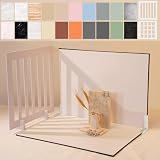
- Make Product Photography Easier. Create clean, consistent product photos for food and drinks, beauty and skincare, jewelry, crafts and other small products using 20 realistic background styles. Spend less time editing so you can focus on product photography and content creation.
- Everything You Need for Tabletop Photography. Includes a sturdy foldable backdrop board, 10 double-sided backdrop sheets with 20 realistic background patterns, 2 shadow props, L-brackets and a carry bag. The compact 16.5 × 11.7 inch tabletop kit is designed for desktops, home studios and small workspaces.
- More Styles from One Kit. Create food, jewelry and beauty photography, product flat lays, storefront images, short-form videos and social media content using realistic marble, wood, concrete and neutral background styles with shadow props. One kit helps keep a consistent look across product photos and content.
- Built for Modern Product Creators. Designed for Amazon, Etsy and Shopify sellers, content creators, product photographers and growing brands creating photos and videos for online stores and social media. Great for your small business
- Durable Matte Surface. Made from 0.25 mm / 230G laminated photography paper with a smooth matte finish that wipes clean easily and helps reduce glare for everyday food and product photography. Friendly customer support whenever you need it.
Check the relevant theme settings when the displayed result differs from the source. The theme can control sizing and cropping independently of the uploaded dimensions. Shopify’s current product-media guidance is at Product media types.
Recommended Free Tools
Keep theme crops from hiding the subject
A banner, slideshow, or full-width section may crop an image to fill its display area. Before changing the source file, inspect that section’s settings: some themes offer image-fit controls or can adapt the section to the first image. Exact controls and ideal dimensions vary by theme and theme version.
- Check the section shape. Compare the source image’s aspect ratio with the banner or section display area.
- Adjust the section setting if available. Use the theme editor’s image or crop controls rather than repeatedly uploading arbitrary sizes.
- Choose a closer source ratio when necessary. A source image shaped more like the target section may reduce unwanted trimming.
- Set a focal point if the theme supports it. Position the important subject so it stays visible in the crop.
- Review desktop and mobile. A subject that fits a wide desktop crop can be lost on a tall mobile screen, or vice versa.
Shopify documents theme image loading, cropping, and focal-point behavior in Uploading images.
Rank #3
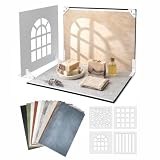
- 16.5 x 11.7 Inch Product Photography Kit - Includes 11 double-sided laminated backdrop sheets with 22 background designs, a foldable 2.6 mm photo backdrop board, L-brackets, 4 shadow props and a carry bag. Create clean tabletop scenes for product photos, flat lays and content creation.
- Designed for Creators and Small Brand - Perfect for content creators, UGC creators, Food bloggers, Etsy sellers and small businesses. Ideal for food photography, product content, jewelry, skincare and handmade product photography and UGC videos
- 4 Product Photography Props for Styled Shadow Effects - Includes 4 shadow props that create leaf, stripe, window and grid shadow patterns. Add depth, atmosphere and visual interest to product photos, short-form videos, flat lays and social media content.
- 22 Colors ,Texures and Surfaces - Features wood, marble, stone, solid-color and neutral background designs to match different products and brand styles. Easily switch looks without buying multiple photography surfaces.
- Quick Setup and Durable Materials - The foldable photo backdrop board and L-brackets create a stable 90° tabletop scene in minutes. The durable 230G laminated backdrop sheets help reduce glare, resist curling, wipe clean easily and are built for repeated use. Everything stores neatly in the included carry bag after shooting.
Add concise, meaningful alt text
Alt text communicates relevant image content to people who cannot see the image. Shopify recommends 125 characters or fewer for media alt text and states a 512-character maximum. Describe what matters in the image’s context; do not fill the description with keywords.
Product media
- In Shopify admin, open the product.
- Select the relevant media item.
- Add descriptive alt text in its media controls and save.
Theme images
For images managed in a theme, use the image controls in the theme editor. Shopify provides the steps and accessibility guidance in Adding alternative text to your theme images. Product-media instructions are at Adding alt text to media.
The Tool Desk
Outbyte PC Repair FREEClear out junk files and repair common Windows errorsFree Scan →Outbyte Driver Updater FREEScan for outdated or missing drivers - takes under a minuteDriver Scan →Rank #4
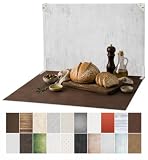
- 【MORE ROOM & 20 STYLES FOR FOOD & PRODUCT PHOTOGRAPHY】: The 23 × 17.5 in shooting area gives you more room to arrange plates, ingredients, props and small to medium products. The kit includes 10 double-sided food photography backdrops with 20 realistic patterns, so you can switch styles in seconds and create more looks with one kit.
- 【MADE FOR FOOD BLOGGERS, CREATORS & ONLINE SELLERS】: Create food and drink photography, bakery and dessert shots, product flat lays, jewelry and cosmetic photos, handmade product images, UGC videos and social media content. Designed for food bloggers, content creators, UGC creators, product photographers, Amazon, Etsy and Shopify sellers, handmade brands and small businesses.
- 【REALISTIC TEXTURES, MATTE & WIPE-CLEAN】: Unlike thin paper that curls or reflective vinyl that can create glare, these 0.25 mm / 230G laminated photography paper backdrops lay flatter and feature a matte surface and high-definition printing for clear, realistic textures. The water-resistant, wipe-clean surface makes it easier to remove light spills, crumbs and food or cosmetic marks after shoots. Note: edges are not waterproof; do not soak in water.
- 【STABLE 90° SETUP IN ABOUT A MINUTE】: The 3 mm thick foldable photo backdrop board and L-brackets create a stable 90° setup for tabletop photography, front-view shots and styled food scenes. Set up in about a minute, switch between tabletop and flat lay shooting, then fold the board flat for compact storage.
- 【ONE KIT FOR ECOMMERCE & SOCIAL CONTENT】: Create ecommerce listings, storefront images, product catalogs, UGC content, Reels, Shorts and social media posts for Amazon, Etsy, Shopify, Instagram, TikTok, Pinterest, Facebook and YouTube. The included carry bag simplifies storage, with friendly customer support whenever you need help.
Measure storefront performance before installing an app
Shopify identifies Largest Contentful Paint (LCP), Cumulative Layout Shift (CLS), and Interaction to Next Paint (INP) as core performance measures. It describes an LCP of 2.5 seconds or less as good; that is a metric threshold, not a promise that changing images will produce a particular speed improvement.
- Check the affected storefront pages with PageSpeed Insights and note the relevant performance metrics.
- Review the images on the slow page: their size, how many are shown, and whether large images are necessary in the initial view.
- Compare results across devices or connection conditions where practical; one page measurement does not explain every visitor’s experience.
- Inspect theme code, apps, and third-party scripts as well as images. Shopify identifies these as possible performance factors.
- Only consider an image-optimization app if you have identified a specific need the CDN and theme workflow do not address. Evaluate whether the app itself changes storefront performance.
Shopify’s guidance on measurement and troubleshooting is in Improving your online store performance and its overview of web performance. Image optimization alone does not establish a particular improvement in speed, conversions, or search rankings.
Best Value

- 【VERSATILE BACKGROUNDS FOR MORE TYPES OF PRODUCTS】: The larger 23 × 17.5 in shooting area gives you more room to arrange small to medium products and props, while 10 double-sided product photography backdrops provide 20 realistic patterns. Switch backgrounds in seconds to create different visual looks with one versatile kit instead of buying multiple individual backdrops.
- 【FOR FOOD, BEAUTY, JEWELRY & MORE】: Create photos of food and drinks, jewelry, beauty products, handmade items, collectibles and other small to medium products. Designed for content creators, UGC creators, product photographers, online sellers and small businesses.
- 【REALISTIC TEXTURES, MATTE & WIPE-CLEAN】: Unlike thin paper that curls or reflective vinyl that can create glare, these 0.25 mm / 230G laminated photography paper backdrops lay flatter and combine a matte surface with high-definition printing for clear, realistic textures. The water-resistant, wipe-clean surface makes light spills, crumbs and everyday marks easier to remove. Note: edges are not waterproof; do not soak in water.
- 【STABLE 90° SETUP, READY IN ABOUT A MINUTE】: The 2.6 mm thick foldable photo backdrop board and L-brackets create a stable 90° setup for tabletop photography, front-view shots and small studio photography. Get ready to shoot in about a minute, switch between tabletop and flat lay shooting, then fold the board flat for compact storage.
- 【ONE KIT FOR ECOMMERCE & SOCIAL CONTENT】: Create ecommerce listings, storefront images, product catalogs, UGC videos, product demos, Reels, Shorts and social media posts for Amazon, Etsy, Shopify, Instagram, TikTok, Pinterest, Facebook and YouTube. The included carry bag simplifies storage, with friendly customer support whenever you need help.
Or skip the browser setup
If you need a clean screenshot of a Shopify storefront page to review how its images render, ScreenshotNeo is a website screenshot API and MCP server. Here is a one-call cURL example; replace the target URL with your storefront page and use your API key:
curl -G "https://api.screenshotneo.com/v1/shot" -d access_key=YOUR_API_KEY --data-urlencode url=https://stripe.com -o shot.webp
See the ScreenshotNeo API documentation for request options. Before capture, it accepts cookie or consent banners and removes 60+ known consent platforms, newsletter popups, and chat widgets; those steps can each be turned off. Bot checks or CAPTCHAs, blank pages, timeouts, failed loads, and cache hits cost nothing, and response headers report the page verdict and billing status. Its MCP server gives AI agents tools for screenshots, page information, and PDF capture. The free plan includes 1,000 screenshots a month with no card; paid plans start at $5 for 3,000 screenshots.
Sign up for ScreenshotNeo’s free plan to try it without a card.
Frequently Asked Questions
Does Shopify automatically convert images to WebP?
Shopify may deliver WebP or AVIF to supported browsers, but the format depends in part on browser support; you should not assume every visitor receives WebP.
Is an image-optimization app required for a Shopify store?
Not by default. First use Shopify’s CDN and theme controls, then measure the page and consider an app only if you have a specific unmet need.
Free tools Windows power users keep installed
One-click scans. No signup required.
Quick Recap
Product prices and availability are accurate as of the date/time indicated and are subject to change. Any price and availability information displayed on Amazon at the time of purchase will apply.




