To find out whether an AI tool saves your team time, compare equivalent tasks completed with and without it, measure each task through a finished and usable result, and check quality and rework alongside duration. A quick first draft is not a time saving if people spend the difference reviewing, correcting, or repairing it later.
Define the workflow before choosing a metric
“AI productivity” is too broad to measure on its own. Start with a bounded workflow and state what counts as one completed task. Record the task type, participating users, AI tool and version, and relevant working conditions. The right metrics depend on how and where the AI system is used, as NIST explains in its AI measurement and evaluation guidance.


As an Amazon Associate I earn from qualifying purchases.
For example, measuring “writing” as a single category may combine short internal summaries, customer emails, and detailed reports—tasks with different effort and quality requirements. A useful task definition makes clear which work is included and what qualifies as done.
Crashes, No Sound, or Screen Glitches?
Random freezes, missing sound and display glitches usually trace back to one bad driver. Find and replace yours safely.Free scan · under a minuteWindows Errors? Fix Them Before They Spread
Repair common Windows errors and clear accumulated junk for a smoother, more stable PC - no reinstall needed.Free scan · no reinstallCompare equivalent work fairly
Set up a comparison between AI-assisted and non-AI versions of the same kind of task. Randomly assigning comparable tasks or participants can help reduce bias when practical. If random assignment is not feasible, use matched tasks or a phased rollout, and record differences that could affect the result.
- Task mix: Note whether one group handled more difficult, longer, or unusual tasks.
- User experience: Record relevant differences in experience with the task or AI tool.
- Workload and conditions: Note factors such as interruptions, time pressure, or changes in process that could affect completion time.
- Comparison method: State how work was assigned or matched and when measurements were collected.
These are practical design choices, not a single experiment prescribed by NIST. NIST’s Measure playbook and its 2025 ARIA Pilot Evaluation Report emphasize context, validity, and the need to account for factors that can distort an assessment. ARIA distinguishes model testing, red teaming, and field testing; a workplace comparison should be clear about which real-world conditions it captures.
Measure the task through a usable finish
Choose one consistent definition of time—such as active work time or elapsed time—and apply it to both workflows. For the AI-assisted path, include prompting, checking, editing, corrections, and any rework needed before the result is usable. Apply the same finish line to the non-AI path.
Do not treat a fast initial response as the completed task. If AI produces a draft quickly but a person must spend additional time fixing errors or completing missing work, that review and repair time belongs in the measurement. This end-to-end definition is a practical way to evaluate finished work; it is not a universal timing protocol mandated by the cited sources.
What’s actually slowing this PC down?
Pick the symptom - the matching free tool is one click away.
Pair duration with quality and rework
Set the quality test before looking at results. Depending on the workflow, that might be a shared rubric, an acceptance criterion, or a record of whether the output met the normal standard without further correction. Track correction and rework when they matter to the task.
Report time and quality together. A shorter completion time is not enough to establish improvement if the work is less accurate, fails acceptance, or creates additional downstream effort. NIST’s Measure playbook stresses that indicators should validly measure the concept being claimed and warns that confounding factors can produce misleading relationships.
Report what the comparison can—and cannot—show
Make the scope visible: name the task population, sample, tool and version, measurement period, comparison method, and the time, quality, and rework results. Describe uncertainty rather than presenting a small or narrow comparison as a guarantee. Statistical models can help evaluators interpret variation and task difficulty in benchmark settings, as discussed in NIST’s 2026 article on statistical models for AI evaluation.
Rank #4
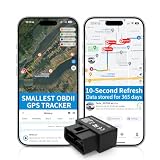
- 【5-day Free Trial】After the trial, continue subscription for $6.49/month with a 1-year plan ($77.88 total) or $8.99 month-to-month. SIM & data included.
- 【Plug & Play OBD2 GPS Tracker】Installs in seconds by plugging into your car’s OBDII port. Compact and lightweight (1.53" x 1.77" x 0.87", 1.2 oz), it’s a discreet hidden GPS tracker that won’t interfere with legroom or drain your car battery.
- 【Track Speed and Driver Behavior】Receive instant alerts for speeding, geo-fence breach, vehicle crashes, hard braking or rapid acceleration. Speeding threshold is customizable. Ideal teen driver GPS or elderly vehicle tracker.
- 【10-Second Real time, No Extra Charge】The fast refresh provides fleet manager or parents with accurate and real time location. Color-coded routes show speed changes visually.
- 【12-month Data History】All tracking data is securely stored with full confidentiality, allowing you to review up to 1 year of trip history.
A concise reporting format is: “For [defined task group] during [period], AI-assisted tasks took [measured time] versus [comparison time], with [quality and rework result] under [comparison method].” Fill in those fields with observed team data; the format is a reporting aid, not a claim about any particular team.
Free tools Windows power users keep installed
One-click scans. No signup required.
What published results can tell you
A professional-writing experiment
Noy and Zhang’s 2023 randomized experiment on ChatGPT and midlevel professional writing tasks found a 40% decrease in average task time and an 18% increase in output quality. Those figures describe that experiment and its task setting; they are not a forecast for other tasks, tools, or teams. See the study’s abstract.
Microsoft Copilot studies
Microsoft Research’s AI and Productivity Report – First Edition presents task completion speed relative to comparison-group baselines and includes self-reported quality findings. Read its results study by study: tasks and comparison groups differ, so the report should not be reduced to one universal estimate of team productivity.
No universal team-saving percentage
The cited studies do not establish a single percentage of time that teams generally save with AI. Their findings are useful evidence about defined settings, not substitutes for measuring your own workflow.
Quick Recap
Product prices and availability are accurate as of the date/time indicated and are subject to change. Any price and availability information displayed on Amazon at the time of purchase will apply.




