Recommended Free Tools
To make a custom Vim operation that works with motions such as iw or }, map a key to set Vim’s 'operatorfunc' option and return g@. Vim then waits for a motion, calls your function with the selected range type, and marks the range from '[ to ']. Use an operator-pending mapping instead if you want to add a new way to select text for existing operators such as delete or yank.
Choose what you are extending: an operation or a motion
A custom operator performs an action on a range that the user supplies with a motion. For example, the user can invoke your operation and follow it with iw to act on the inner word, or } to act through the next paragraph boundary. Vim’s g@{motion} mechanism connects that motion to a function selected through 'operatorfunc'. The function receives the range shape and can work on the marks Vim sets for it. See the Vim Reference Manual, “Mapping an operator”.
A custom motion does the opposite: it defines which text is selected, leaving the action to an existing operator. Vim’s operator-pending mappings are intended for this case. The distinction determines which approach to use:
| Goal | Approach | What the user gets |
|---|---|---|
| Apply a new transformation or inspection to a range chosen with an existing motion | 'operatorfunc' and g@ |
A new operation that composes with built-in motions and text objects |
| Let existing operators act on a new kind of range | Operator-pending mapping with :omap |
A new motion-like selector usable with commands such as delete or yank |
If users need to see or adjust a selection before acting, a Visual-mode entry point may be more suitable. Visual mode takes more keystrokes and has limited redo functionality, according to Vim’s motion documentation.
What’s actually slowing this PC down?
Pick the symptom - the matching free tool is one click away.
#1 Best Overall

- VI VIM EDITOR KEYBOARD STICKER
- VI VIM EDITOR KEYBOARD SHORTCUT
- Hight quality keyboard sticker!
- Keyboard Stickers are made with typographical method on high-quality Matt Vinyl
- Size of individual small sticker is 11/5 x 13 mm
How the g@ operator callback works
- A mapping sets
'operatorfunc'to the function that will handle the operation. - The mapping returns
g@, which puts Vim in operator-pending mode and prompts for a motion. - When the motion completes, Vim calls the configured function with one argument describing the range:
"char","line", or"block". - Vim sets the
'[and']marks at the start and last character of the operated range. The callback can use those marks to identify what to inspect or change.
This is the key advantage over hard-coding a range: the user chooses the motion, and your callback receives the resulting range. g@ requires a Vim build compiled with +eval; check :version if the mapping does not work. The manual documents the mechanism and callback argument in map.txt.
Build a Normal-mode operator
Use an expression mapping to set up the callback and return g@. The following is a teaching skeleton rather than a complete text transformation: fill in the callback’s range handling and operation for your use case.
Rank #2

- 【Large Mouse Pad】Our extra-large mouse pad 31.4×11.8×0.07 inch(800×300×2 mm) is perfect for use as a desk mat, keyboard and mouse pad, or keyboard mat, offering you unparalleled comfort and support during long gaming sessions or work days.
- 【Shortcut Rference to VIM】Extensive compilation of commonly used command lines for VIM.This quick reference guide is designed to reduce programming time on VIM.Perfect for beginners and experienced programmer.
- 【Highly durable design】-The small office&gaming mouse pad is designed with high stretch silk precision locking edges to avoid loose threads on the cloth. Ensure Prolonged Use Without Deformation And Degumming.
- 【 Non-slip Rubber Base】-Dense shading and anti-slip natural rubber base can firmly grip the desktop. Premium soft material for your comfort and mouse-control.
- 【Ultra Smooth Surface】 Mouse Pad Designed With Superfine Fiber Braided Material, Smooth Surface Will Provide Smooth Mouse Control And Pinpoint Accuracy. Optimized For Fast Movement While Maintaining Excellent Speed And Control During Your Work Or Game.
function! TransformOperator(type) abort
  " The operated range is marked by '[ and '].
  " a:type is 'char', 'line', or 'block'.
  " Implement behavior for each range shape you support.
endfunction

function! StartTransformOperator() abort
  let &operatorfunc = 'TransformOperator'
  return 'g@'
endfunction

nnoremap <expr> <Leader>t StartTransformOperator()
With this mapping, pressing <Leader>t starts the operator; the next motion determines its range. For example, a user can follow it with iw. The callback must not assume every motion yields the same range shape: its a:type argument distinguishes characterwise, linewise, and blockwise operation.
Nonrecursive mappings such as nnoremap prevent the mapping’s own keys from unexpectedly expanding through other mappings. For modern Vim, the reference manual’s CountSpaces example uses function() and expression mappings to bind a function reference and optional context. Expression mappings can also preserve a prefix count or register when the operation needs them. See the official mapping example for the fuller pattern.
Do these 3 things before closing this tab:
1Clear out junk files and repair common Windows errors2Fix the driver behind crashes, sound loss and screen glitches3Repair Windows errors before they cause bigger problemsRank #3

- Large Size: 800 x 300 mm + 2mm thickness adapt to all surfaces
- Non-Slip Base: The mouse pad has a non-slip base to ensure it stays in place on your desk, preventing it from sliding during use.
- Durable Stitched Edge: The circle edge stitching prevents the top layer from fraying and ensures the mousepad for long time use.
- Versatile Use: Not only suitable for office and everyday use, but also perfect for gamers and designers alike. It can also be a special gift for your family and friends.
Add a Visual-mode entry point when useful
To let a user select text first and then invoke the operation on that selection, define a separate Visual-mode expression mapping. The Vim reference’s CountSpaces example uses both nnoremap <expr> and xnoremap <expr> for Normal- and Visual-mode entry. A Visual mapping should set up the same callback deliberately; ensure the callback handles the range type and marks supplied for that invocation rather than treating every selection as characterwise.
Visual selection is useful when a user needs to inspect or refine the range before applying the operation. Choose it as an additional interface, not as a substitute for motion support when composition with commands such as iw is the goal. Vim’s discussion of operator and Visual ranges is in motion.txt.
Rank #4

- Multi-Device Connectivity: Effortlessly connect and switch between up to 3 devices (Android, iOS, Windows) with ease, perfect for multitaskers who need to move between devices quickly for seamless workflow and productivity
- Comfortable and Responsive Typing: Features 12 customizable shortcut keys and a 1.3mm low travel distance to provide a comfortable, quiet, and responsive typing experience, making it ideal for both casual use and long work sessions
- Ultra-Slim and Lightweight Design: With a slim profile and a lightweight design of just 180g, this keyboard is perfect for on-the-go professionals or those who need a portable keyboard for their tablet, laptop, or mobile device
- Long Battery Life: Enjoy up to 60 hours of continuous use on a single charge with the rechargeable battery, allowing you to work, create, and type for extended periods without the need for constant recharging or battery swaps
- Flexible Connectivity Options: Choose between Bluetooth or USB-C for secure, reliable, and quick connectivity with your devices, ensuring you have the flexibility to use it in any workspace, whether at home, in the office, or on the go
Handle range shape and editor state deliberately
Characterwise, linewise, and blockwise ranges
Use the callback’s explicit type to decide how the operation should behave. Characterwise and linewise ranges have different boundaries, and a blockwise range needs an intentional implementation if you choose to support it. Do not infer the type from the motion’s appearance or treat all ranges as a single ordinary string.
Marks and motion boundaries
Treat '[ and '] as the authoritative range markers. Motion type and inclusivity affect which text belongs to the range; translating the marks into a Visual selection or editing with commands requires attention to those semantics. Vim’s motion reference explains operator and motion range behavior.
Best Value
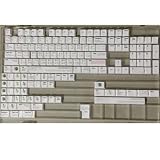
- Cherry profile keycaps offer a sculpted shape that conforms to finger contours, providing a comfortable and familiar typing angle favored by many enthusiasts.
- The dye-sublimation printing technique infuses legends directly into the PBT material, creating sharp, long-lasting markings that resist wear from frequent use.
- Features a VIM editor-inspired theme with distinct color accents and text legends, appealing to programmers and users familiar with this popular coding environment.
- Made from white PBT plastic that offers a textured feel and maintains its color over time, resisting the shiny appearance that can develop on other materials.
- This comprehensive 131-key set includes specialized keys like 1.75U and 2U shifts, ensuring compatibility with a wide range of keyboard layouts from full-size to compact designs.
Restore state on success and failure
If your callback changes options, registers, or Visual marks, save the prior values and restore them even if the operation encounters an error. The reference’s CountSpaces example saves and restores settings including 'clipboard', 'selection', and 'virtualedit', as well as the unnamed register and Visual marks, using try/finally. It also adjusts selection and clipboard behavior while processing to avoid boundary and register side effects. The safeguards your own operator needs depend on what it changes, but the callback should not leave the user’s editor state altered unintentionally. See map.txt.
Dot-repeat
Do not assume a short callback skeleton will repeat correctly with .. Repeat behavior depends on how the setup and callback are designed. Vim’s current reference example tracks dot_command state and notes that expression mappings avoid command-line enter/leave autocommands; use that documented design as a starting point if repeatability is a requirement, rather than promising repeat support without implementing it.
Use :omap for a custom motion
If your goal is to create a new selector that works with built-in operators, define an operator-pending mapping instead of a transformation callback. For example, Vim’s User Manual shows :omap <F7> a{, making <F7> select a brace-delimited block once an operator is pending. Existing operators can then use that range. The example and operator-pending mapping guidance appear in Vim User Manual, usr_40.txt.
Quick Recap
Product prices and availability are accurate as of the date/time indicated and are subject to change. Any price and availability information displayed on Amazon at the time of purchase will apply.
Free tools Windows power users keep installed
One-click scans. No signup required.




