Outdated Drivers Are Slowing You Down
One free scan finds every outdated or missing driver and matches the right update for your exact hardware.Free scan · exact hardware matchPC Slower Than It Used to Be?
A free scan shows the junk files, broken settings and background clutter dragging Windows down - then fixes them in one click.Free scan · Windows 10 & 11WiFi jamming disrupts wireless communication by intentionally creating interference, and that makes it illegal in many countries and harmful in real-world environments. Blocking WiFi can interfere with homes, schools, businesses, medical devices, emergency communications, and other systems that people rely on every day.
The nRF24L01 is a low-cost 2.4 GHz radio module made for short-range data communication between devices, not for attacking networks. While it operates in the same general frequency range as WiFi, it does not function like a WiFi adapter and should not be used to cause interference or deny service to others.
As an Amazon Associate I earn from qualifying purchases.
A safer and more useful path is to study radio fundamentals, spectrum sharing, interference, and wireless security in controlled, legal lab setups. With the right approach, the nRF24L01 can be used for ethical experiments such as sensor links, packet demos, and learning how wireless systems behave without harming nearby networks.
Recommended Free Tools
Why WiFi Jamming Is Illegal and Dangerous
WiFi jamming is the intentional disruption of radio communications in the 2.4 GHz or 5 GHz bands by transmitting noise, malformed traffic, or high-volume interference. In many countries, deliberate interference with licensed or unlicensed radio services is prohibited by telecommunications law. In the United States, the FCC bans the marketing, sale, possession for sale, importation, and use of jamming devices. Similar restrictions exist under Ofcom in the United Kingdom, ISED in Canada, ACMA in Australia, and national regulators across the European Union. Even where WiFi itself uses unlicensed spectrum, “unlicensed” does not mean “unregulated”; users are still required to operate devices within power limits and without intentionally disrupting others.
#1 Best Overall

- 【NRF24L01+PA+LNA 】NRF24L01 + is a single chip for worldwide 2.4 - 2.5 GHz ISM band.Add a high-power PA and LNA chips, band-pass filters and other professional full bidirectional Module,Compatible with A rduino.
- 【Quality】On-board AMS1117-3.3 chip,with Auto-acknowledge and auto-retransmit function.Is module has 5V tolerant inputs, support up to six channels of data reception ans allows for direct connection of SPI pins to the A rduino.
- 【low voltage】Add base and reduce wiring,Small power on SMD LED indicator; On-board 3.3V voltage regulator accepts your A rduino +5V supply and provides 3.3V for the attached "NRF24L01+" module.
- 【High stability+1100m】NRF24L01+ has 125 selectable channels (frequencies) +PA+LNA, this group module not susceptible to interference from other devices, greatly Uploader High stability of the work.
- 【Widly Applications】Our NRF24L01+PA+LNA module can be wildly used to remote control,smart grid, smart home etc. Good idea for your DIY Project.
The legal consequences can be serious. Regulators may issue large fines, seize equipment, and refer cases for criminal prosecution when interference affects public communications or commercial services. A jammer used in an apartment, school, office, hotel, or public venue does not stop neatly at the walls of that room. Radio energy spreads unpredictably through floors, windows, vehicles, and neighboring buildings. A device intended to interrupt one router may also disrupt nearby homes, payment terminals, inventory scanners, medical devices, security cameras, or emergency communications that depend on network connectivity.
Real-world harms caused by WiFi jamming
- Safety systems can fail: alarms, cameras, access control systems, and monitoring devices may lose connectivity during a disruption.
- Emergency response can be delayed: voice-over-WiFi calling, messaging, dispatch systems, or location services may become unreliable.
- Businesses can lose service: point-of-sale terminals, warehouse scanners, kiosks, and guest networks may stop working.
- Neighbors are affected: interference does not respect property lines, leases, classroom walls, or office boundaries.
- Diagnostics become harder: intentional interference can mask legitimate network faults and create misleading symptoms.
Jamming is also an ethics problem, not just a technical one. Wireless networks are shared infrastructure. Phones, laptops, smart home devices, industrial sensors, and accessibility tools all depend on predictable access to spectrum. Intentionally denying that access is similar to cutting a network cable in a shared building, except the impact can be broader and less visible. People nearby may not know their devices are being interfered with; they may only see dropped calls, stalled uploads, broken video meetings, or disconnected equipment.
There is a major difference between studying interference in a controlled lab and interfering with live networks. Lawful RF education uses low-power, properly configured devices, shielding where appropriate, and test setups that do not affect other people’s communications. A safe learning path focuses on measuring signal strength, channel congestion, packet loss, antenna placement, and spectrum occupancy. These topics teach the same wireless fundamentals without crossing into deliberate disruption. For anyone interested in the nRF24L01 or WiFi security, the responsible approach is to build isolated communication demos, observe how 2.4 GHz devices coexist, and use approved troubleshooting tools to improve reliability rather than degrade it.
What’s actually slowing this PC down?
Pick the symptom - the matching free tool is one click away.
What the nRF24L01 Is Designed to Do
The nRF24L01 is a low-cost 2.4 GHz radio transceiver made for short-range digital communication between devices, not for disrupting networks. It is commonly used in hobby electronics, sensors, remote controls, robotics, wireless keyboards, basic telemetry links, and microcontroller projects. A transceiver can both transmit and receive data, which makes the module useful for building simple two-way links between boards such as Arduino, ESP32, Raspberry Pi Pico, STM32, or other embedded systems.
At the radio level, the nRF24L01 operates in the same general 2.4 GHz ISM band used by WiFi, Bluetooth, Zigbee, cordless peripherals, and many consumer devices. However, sharing a band does not mean all devices speak the same protocol. WiFi uses IEEE 802.11 signaling, channel widths, packet structures, timing rules, authentication layers, and medium access behavior that the nRF24L01 does not implement. The nRF24L01 has its own packet format and configuration model, so it cannot act as a normal WiFi adapter, join a WiFi network, capture WiFi traffic like a monitor-mode card, or authenticate to an access point.
Typical nRF24L01 capabilities
- Short packet communication: It sends compact payloads between paired or grouped embedded devices.
- Configurable RF channels: It can be set to different frequency positions within the 2.4 GHz ISM band for its own links.
- Low power operation: It is suitable for battery-powered sensors and small controllers when configured carefully.
- Automatic acknowledgments: It can confirm packet delivery on supported links and retry failed transmissions.
- Multiple data pipes: A receiver can listen for traffic from several configured transmitters in a small network.
Its design center is reliable low-data-rate communication, not high-throughput networking. A typical project might send temperature readings from a remote sensor to a base station, steering commands from a handheld controller to a robot, or status messages between two microcontrollers. These are lawful and educational uses when operated within local radio rules, power limits, and good engineering practice. The module is especially valuable for learning about addressing, packet loss, retransmission, antenna placement, power supply noise, and range testing in a controlled setting.
Rank #2
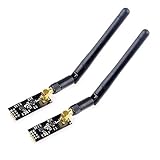
- High-performance wireless data transmission chip NRF24L01 +, an increase of high-power PA and LNA chips, RF switches, band-pass filters and other professional full bidirectional RF power amplifier, making the effective communication distance has been greatly expanded.
- NRF24L01P + PA + LNA wireless module works in the license-free 2.4G ISM band, can be point-to-point applications can also form a star network.
- In the RF part of a large number of optimized matching debugging, making the highest transmission efficiency, the smallest harmonic, making NRF24L01P + PA + LNA wireless module to external radio equipment to achieve the lowest radio frequency interference, but also not susceptible to interference from other devices, extremely large Improve the stability of the work.
- NRF24L01P + PA + LNA wireless module is highly integrated, the size of only 41mm * 15.5mm, easy to embed in any space-stressed products.
- Customers only need to add one MCU to control NRF24L01P + PA + LNA through SPI port ,Wireless module to complete ultra-long-range wireless data transmission system design.Do not need to worry about R & D of RF part, drastically reduce R & D expense and shorten R & D cycle.
The nRF24L01 also has clear limitations. It cannot decode WiFi management frames, measure WiFi encryption strength, perform standard WiFi scans, or replace a proper wireless network adapter. Some online claims blur the difference between interference and legitimate communication, but a device being able to emit radio energy in the 2.4 GHz band does not make it an appropriate or lawful tool for attacking nearby networks. Treat the module as a small embedded radio for point-to-point or small-node experiments, and keep testing inside your own lab setup with devices you own or have permission to use.
The Tool Desk
Outbyte Driver Updater FREEFix the driver behind crashes, sound loss and screen glitchesFind Drivers →Outbyte PC Repair FREEClear out junk files and repair common Windows errorsFree Scan →How 2.4 GHz Interference Affects Wireless Networks
The 2.4 GHz band is shared by many everyday devices, so wireless networks in this range can be affected by congestion even when no one is doing anything malicious. WiFi, Bluetooth, Zigbee, cordless peripherals, baby monitors, microwave ovens, wireless cameras, and hobby radio modules may all operate near the same frequencies. These devices do not all speak the same protocol, but their radio energy can still raise the noise floor, collide with transmissions, or force WiFi equipment to retry packets more often.
WiFi in the 2.4 GHz band is divided into overlapping channels. In many regions, channels 1, 6, and 11 are commonly used because they are spaced far enough apart to reduce overlap. When several nearby routers use the same or overlapping channels, clients may experience lower throughput, higher latency, unstable video calls, delayed game traffic, or dropped connections. The network might still show a strong signal icon because signal strength and signal quality are different measurements: a laptop can hear the access point loudly while also hearing a lot of competing radio traffic.
Common sources of 2.4 GHz interference
- Neighboring WiFi networks: apartment buildings, offices, and dorms often have many access points competing for airtime.
- Bluetooth devices: headphones, keyboards, game controllers, and speakers hop across parts of the 2.4 GHz band and can add short bursts of interference.
- Microwave ovens: poor shielding or close proximity can create noticeable interference, especially around kitchen areas.
- IoT and smart-home devices: Zigbee sensors, smart bulbs, and low-cost wireless gadgets can add background traffic.
- USB 3.0 noise: poorly shielded cables or hubs near a WiFi adapter may degrade 2.4 GHz reception.
The effect of interference is usually seen as reduced reliability rather than a clean on-or-off failure. WiFi uses mechanisms such as carrier sensing, acknowledgements, retransmissions, and adaptive data rates to keep communication working. When the channel is busy or noisy, devices wait longer before transmitting, resend frames that were not acknowledged, or fall back to slower modulation rates that are easier to decode. This keeps the connection alive, but it consumes airtime and lowers the speed available to everyone sharing that channel.
An nRF24L01 also operates in the 2.4 GHz ISM band, but it is not a WiFi radio and does not create valid 802.11 frames. In normal use, it sends narrowband packet traffic for simple embedded links such as sensor nodes, remote controls, or microcontroller-to-microcontroller demos. If misconfigured or used irresponsibly, any transmitter can contribute to local interference, but that is different from understanding, decoding, or participating in WiFi communication. For lawful learning, the safer path is to measure your own environment with WiFi analyzer tools, choose cleaner channels, move devices away from noise sources, prefer 5 GHz or 6 GHz where available, and test only inside a controlled lab with equipment you own or have permission to assess.
Free tools Windows power users keep installed
One-click scans. No signup required.
Legal Ways to Learn RF and Wireless Security
You can learn a great deal about radio frequency systems and WiFi security without transmitting disruptive signals or interfering with other people’s networks. The safest path is to work in controlled environments, use low-power devices as intended, and focus on observation, measurement, protocol understanding, and defensive testing. In practice, that means studying how radios share spectrum, how packets are structured, how antennas affect range, and how encryption and authentication protect wireless links.
Rank #3

- E01-ML01DP5 is a 2.4G wireless module that is a commonly used nRF24L01+PA+LNA RF module with an SPI interface, suitable for various application scenarios
- Under ideal conditions, the communication distance can reach 25km; Professional RF shielding cover, anti-interference and anti-static
- 125 communication channels to meet the application requirements of multi-point communication, grouping, frequency hopping, etc; Connect to MCU through SPI interface, with a speed of 0-10Mbps
- Supports 2.0-3.6V power supply, with power supply greater than 3.3V ensuring optimal performance; Supports 2Mbps, 1Mbps, and 250kbps air rates; Maximum transmission power 100mW
- Reserve 4 fixing holes for module welding and fixation; SMA-K external thread inner hole, convenient for connecting coaxial cables or external antennas
A good starting point is a receive-focused setup. A software-defined radio receiver, such as an RTL-SDR, lets you observe parts of the radio spectrum without transmitting. You can inspect signal strength, bandwidth, modulation patterns, and nearby sources of interference. For WiFi-specific learning, a spare access point, a spare client device, and your own isolated test network are enough to explore channel selection, signal quality, roaming behavior, WPA2/WPA3 settings, and congestion. Keep experiments inside your property, use your own equipment, and avoid connecting to or testing networks you do not own or administer.
Safe topics to study
- RF fundamentals: frequency, wavelength, bandwidth, noise floor, signal-to-noise ratio, attenuation, and antenna orientation.
- 2.4 GHz behavior: channel overlap, coexistence with Bluetooth and other devices, multipath reflections, and range limitations.
- WiFi configuration: SSID design, channel planning, transmit power settings, WPA2/WPA3 security, and guest network isolation.
- Packet analysis: management frames, beacons, association, authentication, DHCP, DNS, and normal client traffic flows on networks you control.
- Security hygiene: strong passphrases, firmware updates, disabling WPS, segmenting IoT devices, and monitoring unknown clients.
For hands-on wireless security, build a small lab that cannot affect neighbors or public infrastructure. Use an inexpensive router that is not connected to sensitive systems, a laptop or single-board computer, and one or two test clients. Place the equipment away from windows if possible, lower transmit power where the router supports it, and choose channels that minimize overlap with nearby networks. If you are in an apartment or dense area, consider using a shielded test enclosure or cabled attenuators for more advanced RF experiments.
| Learning goal | Lawful approach | Avoid |
|---|---|---|
| Understand spectrum activity | Use a receive-only SDR or WiFi analyzer to observe signal levels | Generating noise or interference across channels |
| Practice WiFi hardening | Configure WPA3, strong passwords, guest networks, and firmware updates | Testing against networks without permission |
| Analyze packets | Capture traffic from your own lab network | Collecting traffic from third-party users |
| Learn embedded RF | Use nRF24L01 modules for short-range sensor messages | Attempting to disrupt WiFi or other services |
Training platforms and certifications can also provide structure. Look for courses that cover networking fundamentals, wireless standards, ethical hacking rules of engagement, and incident response. In any assessment, written authorization matters: it should define the systems in scope, the time window, allowed tools, and prohibited actions. This protects both the tester and the network owner, and it keeps the work focused on improving reliability and security rather than causing outages.
Do these 3 things before closing this tab:
1Fix the driver behind crashes, sound loss and screen glitches2Clear out junk files and repair common Windows errors3Scan for outdated or missing drivers - takes under a minuteBuilding a Safe nRF24L01 Communication Demo
A safe nRF24L01 project should demonstrate short-range, permission-based communication between your own devices, not disruption of other networks. The best beginner lab is a simple point-to-point link: one microcontroller sends a small sensor reading or button state, and another receives it and displays the result. This teaches real RF concepts such as addressing, channels, packet loss, antennas, power supply stability, and range limits without attempting to interfere with WiFi, Bluetooth, keyboards, cameras, or nearby equipment.
The nRF24L01 operates in the 2.4 GHz ISM band, so it shares spectrum with many everyday devices. For a responsible demo, keep transmit power low, test at close range, and use only a channel selected for your own experiment. Modules should be powered from a stable 3.3 V supply, since many unreliable “RF problems” are actually caused by voltage dips, weak wiring, or missing decoupling capacitors. A small capacitor across the module’s power pins, short jumper wires, and a fixed test distance can make results much more consistent.
Safe demo goals
- Send a temperature or light sensor value from one board to another at a modest update rate, such as once per second.
- Control an LED by pressing a button on a second board, showing two-way communication and acknowledgements.
- Measure packet reliability by counting sent packets, received packets, and missed acknowledgements.
- Compare placement and antennas by moving the modules a few meters apart and recording how orientation affects reception.
- Observe channel selection by testing several nRF24L01 channels and choosing the one with the most reliable link in your own lab space.
A useful structure is to give each node a clear role. The transmitter can read a sensor, add a packet counter, and send that small payload to a receiver address. The receiver can print the value to a serial monitor, update an OLED display, or change an LED pattern. If you enable acknowledgements, the transmitter can also report whether each message was confirmed. This turns the project into a measurement exercise rather than a high-power transmitter experiment.
Rank #4

- HiLetgo 4pcs NRF24L01+ Wireless Transceiver Module
- Multi-frequency: 125 frequency points
- Low operating voltage : 1.9 ~ 3.6V low voltage operation
| Component | Safe purpose |
|---|---|
| Two Arduino-compatible boards | Run the transmitter and receiver sketches for a closed lab link. |
| Two nRF24L01 modules | Exchange small packets using assigned addresses and a chosen channel. |
| 3.3 V power source | Prevents module instability and avoids overvoltage damage. |
| Capacitors near power pins | Reduces brownouts and random connection failures. |
| Button, LED, or sensor | Provides harmless data for testing communication behavior. |
Keep the experiment documented: record the channel, data rate, transmit power setting, distance, antenna orientation, and packet success rate. If you notice problems with your home WiFi while testing, stop, lower the power, increase distance from the router, or change the nRF24L01 channel. The goal is to understand coexistence and reliability, not to overpower other devices. By building a controlled communication demo, you gain practical RF skills that transfer directly to legitimate IoT, telemetry, robotics, and wireless sensor projects.
Defensive WiFi Testing and Troubleshooting Tools
Defensive WiFi testing is about improving reliability and security on networks you own or are explicitly authorized to assess. Instead of attempting to disrupt wireless service, the goal is to measure signal quality, identify congestion, verify encryption settings, locate misconfigured access points, and document sources of interference. This kind of work is common in homes, schools, offices, warehouses, and labs where stable connectivity matters for laptops, phones, cameras, sensors, and point-of-sale systems.
A good starting point is a WiFi analyzer that shows nearby networks, channel usage, received signal strength, and security modes. On 2.4 GHz, channels overlap heavily, so seeing many access points crowded around channels 1, 6, and 11 can explain slow speeds or unstable connections. On 5 GHz and 6 GHz, there is usually more room, but range, wall attenuation, DFS channel behavior, and client compatibility still need to be checked. These tools help you make lawful changes such as moving an access point, reducing transmit power, changing channel width, or selecting a cleaner channel.
Useful categories of defensive tools
- WiFi analyzer apps: Show SSIDs, channels, signal strength, band usage, and encryption types. They are useful for quick surveys and basic channel planning.
- Router and access point dashboards: Provide client counts, roaming data, retry rates, channel utilization, firmware status, and logs for authentication failures.
- Packet capture tools: Let authorized testers inspect management frames, association attempts, DHCP behavior, DNS requests, and roaming events without disrupting service.
- Spectrum analyzers: Detect non-WiFi energy in the 2.4 GHz band, such as microwave ovens, Bluetooth-heavy areas, wireless cameras, cordless devices, or faulty electronics.
- Throughput and latency testers: Measure real user experience by testing bandwidth, jitter, packet loss, and response time between clients and local or internet endpoints.
For security checks, focus on configuration rather than attack. Confirm that WPA2-Personal with AES or WPA3-Personal is enabled, default router passwords have been changed, WPS is disabled when not needed, guest networks are isolated from private devices, and firmware is current. In business environments, WPA2-Enterprise or WPA3-Enterprise with proper certificate validation can reduce the risk of credential theft from rogue access points. Inventorying authorized SSIDs also makes it easier to spot accidental hotspots, misnamed extenders, or unauthorized equipment connected to the network.
| Task | Safe tool type | What to look for |
|---|---|---|
| Find weak coverage | WiFi analyzer or site survey app | Low signal strength, dead zones, poor roaming areas |
| Diagnose congestion | Access point dashboard | High channel utilization, excessive retries, overloaded APs |
| Check interference | Spectrum analyzer | Non-WiFi transmitters or continuous noise in the band |
| Validate security | Router settings and authorized audit tools | Strong encryption, disabled WPS, updated firmware |
If you are experimenting with an nRF24L01, keep it in a controlled lab setup with low power, short range, and simple device-to-device messaging. Use it to learn packet structure, addressing, acknowledgments, retransmissions, and how crowded 2.4 GHz environments affect legitimate low-power links. Pair that learning with defensive WiFi tools, and you get practical RF knowledge without harming other people’s networks or crossing legal boundaries.
Frequently Asked Questions
Can I legally build a WiFi jammer with an nRF24L01 for testing at home?
In most countries, intentionally jamming WiFi or other radio communications is illegal even if you do it at home or claim it is only for testing. WiFi uses shared spectrum, and interference can affect neighbors, emergency devices, security systems, medical equipment, and business networks. A safer legal option is to build a low-power nRF24L01 communication demo or test WiFi performance using approved tools that do not disrupt other users.
Best Value

- It can be wildly used to wireless remote control, somatosensory devices, RFID, NFC, smart grid, smart home, wireless audio etc.
- 5PCS NRF24L01 8 Pin Socket Breakout Adapter Board: On-board AMS1117-3.3 chip, a simple socket breakout board which is for 8-Pin NRF24L01 wireless module
- 5PCS NRF24L01+PA+LNA RF Transceiver Module with SMA Antenna: Built-in 2.4Ghz antenna: available software to set the address, only received local address when output data(Provide interrupt instruction), can be directly connected to a variety of microcontrollers
- RF24L01+ Breakout Adapter: Small power on SMD LED indicator, On-board 3.3V voltage regulator, which accepts +5V power supply input and provides 3.3V for the attached "nRF24L01+" module.
- The packing list includes: 5 * NRF24L01+PA+LNA Wireless Transceiver RF Transceiver Module; 5* SMA Antenna 2.4G 1100m; 5 * NRF24L01+ Breakout Adapter
Can an nRF24L01 actually jam WiFi networks?
The nRF24L01 is a 2.4 GHz transceiver designed for short-range data communication between devices, not for WiFi jamming. It does not speak the 802.11 WiFi protocol, and its power output and bandwidth are limited compared with real WiFi equipment. While any 2.4 GHz transmitter can contribute to interference under some conditions, using it to intentionally disrupt networks is unlawful and unsafe.
What should I do if I think someone is jamming my WiFi?
First, rule out normal causes such as router placement, channel congestion, microwave ovens, Bluetooth devices, or faulty hardware. Use your router’s admin page, a WiFi analyzer app, or a spectrum analyzer to look for unusual noise, channel overlap, and signal drops over time. If you suspect deliberate interference, document the times and symptoms, change channels or move to 5 GHz/6 GHz if available, and contact your ISP or the relevant communications regulator.
How can I learn about RF and wireless security without breaking the law?
You can study radio fundamentals using receive-only SDR projects, licensed amateur radio activities, or low-power microcontroller links with modules like the nRF24L01. For WiFi security, use your own router and devices in a closed lab, focusing on password strength, firmware updates, WPA2/WPA3 settings, guest networks, and monitoring. Many legal labs teach packet analysis, signal strength mapping, and network hardening without causing interference.
What is a safe project to build with an nRF24L01 instead of a jammer?
A good beginner project is a two-node wireless sensor link, such as sending temperature, button, or motion data from one microcontroller to another. Keep the transmit power low, use proper addressing, and test at short range so the project stays contained. This teaches core RF concepts like channels, packet loss, antennas, range, retries, and interference without attempting to disrupt anyone’s network.
Bottom Line
Building or using a WiFi jammer is illegal, disruptive, and harmful because it interferes with communications other people may rely on. The nRF24L01 is a useful 2.4 GHz learning module, but it is not a lawful tool for blocking WiFi networks or testing interference outside tightly controlled, compliant environments.
If you want to explore RF, focus on ethical projects: spectrum observation, antenna basics, packet experiments with your own devices, and defensive WiFi testing in a private lab. Your next step should be to study local radio regulations, use shielded or low-power setups, and practice wireless security in ways that improve reliability instead of breaking it.
Quick Recap
Product prices and availability are accurate as of the date/time indicated and are subject to change. Any price and availability information displayed on Amazon at the time of purchase will apply.




