To make a rugged smartwatch battery last longer, first check the power settings and manual for your exact model, then reduce optional display use, notifications, background activity, music, or connectivity you do not need. For GPS activities, choose a lower-power recording mode only if its tracking trade-offs work for you. There is no universal battery-saving switch, and power modes can disable features.
Start with your exact watch model
Battery controls and menu names differ among watches, even within one manufacturer’s lineup. Garmin says Power Manager—called Battery Manager on some models—and available Battery Saver controls vary by model; its support page explains that Power Manager helps manage and extend battery life: Garmin Support: How to Use Power Manager on Garmin Watches. Find your model’s manual or support page before following any button sequence, and note which features a power mode will turn off.
As an Amazon Associate I earn from qualifying purchases.
If your watch shows battery use by feature or app, review that first. It can help distinguish a general change in battery life from a recent increase in one particular activity.
PC Slower Than It Used to Be?
A free scan shows the junk files, broken settings and background clutter dragging Windows down - then fixes them in one click.Free scan · Windows 10 & 11Outdated Drivers Are Slowing You Down
One free scan finds every outdated or missing driver and matches the right update for your exact hardware.Free scan · exact hardware matchReduce optional everyday drain
Change only settings your model provides, and keep the features you rely on. Garmin identifies display intensity, music, and Connect IQ apps, watch faces, widgets, and data fields as possible contributors to faster drain. Its guidance is available at Garmin Support: Tips to Improve Battery Life.
#1 Best Overall

- Make a bold statement with this rugged midsize 45 mm GPS smartwatch, featuring up to 16 days of battery life
- 10 ATM water-rated and engineered to MIL-STD-810 for thermal and shock resistance
- Know your body better with health monitoring features, including wrist-based heart rate, advanced sleep monitoring, Pulse Ox and more (this is not a medical device, and data presented is intended to be a close estimation of metrics tracked; Pulse Ox not available in all countries)
- Navigate confidently with a 3-axis compass, barometric altimeter and multi-GNSS support
- Stay connected with smart notifications and Connect IQ Store integration, which allows you to download new apps and watch faces (when paired with your compatible smartphone)
- Display: Lower brightness or shorten the display-on period if those controls are available. If your watch has an always-on display, turn it off when you do not need it. Samsung notes that Always On Display consumes battery: Samsung Support: Extend battery life on your Samsung smart watch.
- Apps and watch faces: Remove or pause recently added apps, watch faces, widgets, or data fields that you do not use. An elaborate face or frequent updates may add work on models that support them.
- Notifications and syncing: Disable alerts you do not need and limit background synchronization or wireless connections where your watch offers those controls. Samsung recommends reducing unneeded notifications; the available options vary by model.
- Music and sensors: Avoid watch-based music playback or optional continuous sensor features when you do not need them for the day or activity. Do not disable health monitoring that you depend on without considering the consequences for your needs.
These are options to evaluate, not settings available on every rugged watch. Samsung’s power-saving guidance describes limits to brightness, background activity, wireless connections, and performance; consult Samsung Support for supported Galaxy Watch controls.
Choose GPS settings for the outing
GPS and activity recording can use substantially more power than ordinary smartwatch use. Before leaving, inspect the activity’s power mode and GPS configuration. Garmin Power Modes can change system, activity, and GPS settings; its Max Battery preset uses UltraTrac on supported models. Lower-power tracking can mean less frequent location recording or other changed behavior, so choose it only when that level of track detail and navigation is acceptable. See Garmin’s Power Manager guidance for model-specific details.
Do not assume the most restrictive mode is right for every trip. If you need more precise location data or continuous navigation, retain the GPS settings those tasks require and conserve power elsewhere.
Recommended Free Tools
Rank #2

- Make a bold statement with this rugged GPS smartwatch, featuring a 0.9” display with solar charging lens and unlimited battery life with solar charging (assumes all-day wear with 3 hours per day outside in 50,000 lux conditions)
- Engineered with a supertough 45 mm fiber-reinforced polymer case and metal-reinforced bezel
- Built-in LED flashlight with variable intensities and strobe modes gives you greater visibility in the outdoors and provides convenient illumination when you need it
- Know your body better with health monitoring features, including wrist-based heart rate, advanced sleep monitoring, Pulse Ox and more (this is not a medical device, and data presented is intended to be a close estimation of metrics tracked; Pulse Ox not available in all countries)
- Navigate confidently with a 3-axis compass, barometric altimeter and multi-band GPS with SatIQ technology, which delivers superior positioning while also optimizing battery life
Use battery-saving modes with their trade-offs in mind
A battery-saving mode can help when you need the watch to last, but it may limit the very features that make it useful. Garmin says Battery Saver or Power Modes may disable features. Samsung describes reduced brightness, background activity, wireless connections, or performance in its power-saving guidance. Apple’s Low Power Mode also limits selected functions and connections, but Apple Watch instructions apply to Apple Watch rather than serving as universal directions for rugged watches; see Apple Support: Use Low Power Mode on your Apple Watch.
Check the mode’s description on your watch, especially before an activity. Confirm whether it affects GPS, notifications, sensors, connectivity, or other functions you need, and restore your preferred settings afterward if necessary.
Troubleshoot a sudden change in battery life
If the battery started draining faster than usual, look for a recent change before turning off features indiscriminately.
Rank #3

- ULTRA-BRIGHT AMOLED DISPLAY: With peak brightness of 2,000 nits, the Amazfit smart watch delivers easy reading of maps and workout data in any light. Night mode and Glove Mode enhance visibility for clear viewing
- DURABILITY FOR EXTREME CONDITIONS: This rugged smart watch, engineered with a 316L stainless steel bezel, withstands temperatures from -22F to 158F, and is water-resistant to 328 feet and can be used for freediving to a depth of 147 Feet
- EXTENDED BATTERY LIFE: The Amazfit T Rex 3 offers over 3 weeks of power with typical use or up to 180 hours in GPS mode, providing long-lasting performance for hiking trips or outdoor activities
- PRECISION NAVIGATION TOOLS: The smart watch for men and women provides free global maps with dual-band positioning. Six satellite systems offer fast, accurate GPS connections and precise turn-by-turn navigation
- EXPANSIVE FITNESS TRACKING: This fitness watch offers 170plus workout modes and AI-generated training plans, providing real-time updates to guide your fitness journey from hiking to surfing
- Review battery usage, if your model provides it, and note which app or function appears active.
- Check recently installed apps, watch faces, widgets, or data fields, along with recent software or phone-app updates.
- Look for changes in brightness, always-on display, music use, notifications, GPS settings, or background syncing.
- Restart or update the watch only as its manufacturer recommends, then use the model’s official troubleshooting guidance if the drain continues.
Garmin specifically identifies display intensity, music, and Connect IQ items among possible battery drains in its battery-life tips. A newly active app or a changed setting may be a more useful lead than switching permanently to a mode that removes features you need.
Compare published battery estimates carefully
Battery specifications are meaningful only when you compare like with like: smartwatch use against smartwatch use, or GPS activity against GPS activity. For instance, Garmin lists the Instinct 2X Solar at 40 days in smartwatch mode and 60 hours in GPS mode. Its product page also gives different estimates for other modes, including all-satellite, multiband, max-battery GPS, expedition, and battery-saver modes: Garmin Instinct 2X Solar specifications.
Those are Garmin estimates, not independent test results or guarantees for an individual wearer. Garmin’s smartwatch-mode solar estimate assumes all-day wear with three hours per day outside in 50,000 lux; its GPS solar estimate assumes use in 50,000 lux. Actual results depend on settings, use, and the light the watch receives. The product page also specifies a Garmin proprietary plug charger, so check charger compatibility for the exact model rather than assuming a generic cable will fit.
Rank #4
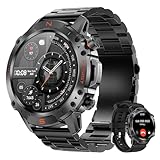
- 1.43" AMOLED & EXTREME RUGGED BUILD: The 1.43" AMOLED Always-On Display is protected by premium drop-resistant glass, ensuring vibrant colors and crystal-clear visibility even in direct sunlight. Engineered with a high-strength Zinc Alloy frame, this rugged smartwatch is highly scratch-resistant and built to endure harsh conditions—with hardware tested to withstand extreme cold and severe heat. It is a highly reliable choice for both intense outdoor environments and daily professional wear.
- NO BATTERY ANXIETY - 2H TO 100% & 15 DAYS USE: Power up quickly with the magnetic fast charger and enjoy up to 15 days of daily use or 35 days of standby. Engineered for stable connectivity and durable long-term performance, this watch stays reliable even in demanding environments. Fully compatible with Android 5.0+ and iOS 9.0+, it is an essential partner for business travel and outdoor adventures—no daily charging required.
- 5ATM WATERPROOF & 178+ SPORTS MODES: Track every move with 178+ sports modes, from treadmill runs and yoga sessions to mountain hikes or cycling adventures. The 5ATM waterproof rating lets you swim, surf, or brave the rain without worry. Steps, distance, and calories are recorded in real-time, giving you a clear view of your progress and helping you stay on top of your fitness goals—indoors or outdoors.
- BLUETOOTH CALLS & INSTANT NOTIFICATIONS: Answer calls or check messages instantly without touching your phone. The built-in high-fidelity speaker and microphone make Bluetooth calls crystal clear, whether you’re cycling through city streets, hiking on a trail, or driving. Real-time SMS and app notifications—including major social and messaging apps—keep you connected while keeping your hands free, so you never miss important alerts during busy or active days.
- 24/7 WELLNESS TRACKING & SLEEP ANALYSIS: Stay in tune with your body 24/7 with continuous Heart Rate and SpO2 tracking. Built-in stress monitoring and guided breathing exercises help you stay calm during long workdays or after intense workouts. Advanced sleep stage tracking (Deep, Light, REM) shows exactly how well you’re resting, so you can wake up refreshed and ready to tackle the day. (Non-medical use—designed for everyday wellness and recovery)
When a different watch makes sense
If your current watch still cannot meet your needs after you have checked its settings and usage, compare replacement models against the way you actually wear and use them. Look at estimated battery life in smartwatch and GPS modes, display behavior, sensor and health-tracking needs, phone or cellular connectivity, size and fit, and charger compatibility. For solar models, read the illumination and usage assumptions behind each estimate rather than treating “solar” as unlimited battery life in all conditions.
The Instinct 2X Solar is one model to consider if its listed modes, fit, sensors, and connectivity suit you; its specifications are not a prediction of what your current watch could achieve or a replacement part for it. Match any charger or replacement component to the exact watch model.
What’s actually slowing this PC down?
Pick the symptom - the matching free tool is one click away.
Quick Recap
Product prices and availability are accurate as of the date/time indicated and are subject to change. Any price and availability information displayed on Amazon at the time of purchase will apply.




