What’s actually slowing this PC down?
Pick the symptom - the matching free tool is one click away.
To make Gmail look less crowded, hide its left navigation menu and right-side app panel. These controls change what appears on screen; they do not delete messages or labels or disable the apps. Whether the simpler view suits you depends on how often you use those shortcuts.
What the two settings change
The left navigation menu contains shortcuts such as Inbox, Starred, Sent, Drafts, and labels. The right-side panel provides quick access to Google apps such as Calendar, Keep, Tasks, and Contacts. Hiding either panel gives the mail view more room; hiding both creates a more mail-focused screen. The visual difference may be most noticeable on a small laptop display, but it is a matter of preference rather than a measured productivity improvement.
As an Amazon Associate I earn from qualifying purchases.
Hide or show the left navigation menu
- In Gmail on a computer, click the Menu button at the top left to hide the left-hand menu.
- Click the same button again whenever you want the menu back.
This changes the menu’s visibility, not the messages, labels, or account features represented there. See Google’s Gmail inbox layout guidance for computers.
Hide or show the right-side panel
The right-side panel is a separate part of Gmail’s interface from the left navigation menu. Gmail’s personalization controls let you show or hide this panel, which can contain Calendar, Keep, Tasks, and Contacts. Availability and the options shown can vary by account and configuration. Consult Google’s Personalize your inbox guide for the current control.
#1 Best Overall

- 🎁【Multi-Functional Office Organization】Get your work area in order with the OPNICE Desk Organizer! Featuring 4 spacious trays, a vertical file organizer, 2 convenient hanging pen holders, and a sliding drawer, you can store all your office supplies, classify and organize them, and keep your desktop tidy
- 🎁【Easy Installation】Say goodbye to complicated assembly instructions and frustrating tools! Our desk organizers and accessories can be set up in just one minute without the need for any tools, allowing you to enjoy a hassle-free experience from start to finish
- 🎁【Maximize Your Space】Our clever use of space and multi-functional storage creates a workspace that maximizes your productivity. A neat workspace can improve your mood, work efficiency, and ultimately, your happiness
- 🎁【Premium Quality】Crafted from high-quality industrial-strength steel wire mesh and reinforced with a solid steel frame, our desk file organizer is built to last. You can trust that it will withstand the test of time and keep your workspace organized for years to come
- 🎁【Desktop Decor】Our desk organizer not only keeps your workspace organized but also adds a touch of elegance to your office or home decor. With its classic black metal color, it complements any style and showcases your professional and clean work style. Choose OPNICE desk organizers and accessories for a workspace that looks and feels great
Hiding the panel removes those apps from immediate view in Gmail; it does not remove or disable the apps themselves.
Which panels should you hide?
| Choice | What you gain | What you give up |
|---|---|---|
| Hide the left menu | A less crowded mail view with more room for messages. | Immediate access to navigation shortcuts such as Starred, Sent, Drafts, and labels. |
| Hide the right-side panel | A simpler screen focused on email. | Immediate access to apps such as Calendar, Keep, Tasks, and Contacts from the panel. |
| Hide both | The most stripped-back mail view of these options. | Both sets of visible shortcuts; you may need to reveal a panel when you want its controls. |
If you regularly rely on either set of shortcuts, keep that panel visible. Otherwise, try hiding it and restore it whenever the added space no longer feels worth the extra step. The effect varies with screen size and workflow; it is not an objectively better layout for everyone.
Quick Recap
Rank #4

- 📂【Save Space】: The office organizer fully utilizes the vertical space of the desktop, creates the largest possible storage space, accommodates various office desk accessories, and saves space.
- 📂【Improve Work Efficiency】:The file organizer includes 4 trays, a magazine rack, 2 pen holders and a sliding drawer, helps you quickly identify the contents of each compartment, doubles your work speed, keeps you busy and more creative throughout the day.
- 📂【High Quality Material】: The file organizer is made of durable metal mesh and solid steel, which has better stability and durability, and the outer layer is epoxy coated, which is rust-resistant and highly durable, ensuring a long service life.
- 📂【Easy to Assemble】: Easy to assemble the desktop organization within 4 minutes after watching the reading the installation manual, no extra tools required, super easy to assemble, don't worry about any problems!
- 📂【Happy Purchase】: We offer a 100-day return policy. If you have any questions, please feel free to contact us, we will help you within 24 hours.
Rank #3
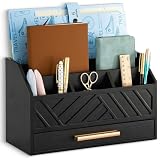
- EXQUISITE APPEARANCE: This black desk organizer has a modern and elegant appearance design, which can help you and your family eliminate the troubles of daily clutter, and has applied for a design patent. It can help you create a designated workspace that is both functional and aesthetically pleasing
- CHIC AND PRACTICAL DESIGN: No assembly required! This file organizer combines practicality and stylish, making it perfect for those who want to add a trendy touch and elegant atmosphere to their workspace. It is ideal for individuals who are looking for office desk organizers and storage solutions or cute desk accessories to brighten up their office
- STURDY AND DURABLE: Made of natural solid wood, this contemporary desk organizer features quality construction and design for durability. Superb craftsmanship, excellent touch feeling makes it be a perfect gift choice. The most important thing, This black office desk accessories can also be used to store cosmetics and decorate the house, placed in the bedroom, bathroom, living room and other places
- DRAWER INCLUDED: The middle section of the mail organizer has a drawer that can be easily pulled out for additional storage for keys, pens, stamps, paper clips and more! The packaging also includes non-slip feet. This desk organizer is perfect for keeping your desk essentials close at hand, so you can focus on your work and be more productive
- SPACE SAVING: With 6 compartments, this office organizer and accessories provide you with ample classified storage space for all your office supplies, such as pens, pencils, scissors, folders and stationery. Help you save more desk space, stay away from cluttered desks and stay organized
Rank #2

- 【Unique Desk Decor】: The monitor stand has a classic rose gold coating, adding elegance and modernity to your office while being sturdy and practical. allowing you to work in a cozy and tidy environment with greater comfort and efficiency.
- 【Improved Work Efficiency】: The monitor riser comes with a sliding drawer and two pen holders. It accommodates various office desk items, saving space. It helps you quickly identify the contents of each compartment, doubling your work speed.
- 【Reduced Fatigue】: Elevate your monitor to a comfortable viewing height, relieving pressure on your neck, shoulders, and back, and enhancing comfort and creativity throughout the day.
- 【Wide Compatibility】: Monitor Riser / Stand for printer, computer, laptop, notebook. with a ventilation design to prevent overheating. Non-slip rubber pads provide stability during work.
- 【Happy Purchase】: Enjoy a 100-day return policy. Contact us with any questions, and we'll provide assistance within 24 hours.(USPTO Patent Application Number: 65268496)
Product prices and availability are accurate as of the date/time indicated and are subject to change. Any price and availability information displayed on Amazon at the time of purchase will apply.
The Tool Desk
Outbyte PC Repair FREERepair Windows errors before they cause bigger problemsFix Now →Outbyte Driver Updater FREEScan for outdated or missing drivers - takes under a minuteDriver Scan →



