What’s actually slowing this PC down?
Pick the symptom - the matching free tool is one click away.
To see which scheduled requests can wake a Windows 11 PC, open Command Prompt or Windows Terminal and run powercfg /waketimers. The command enumerates active wake timers and may show the requesting process, a scheduled task, and an expiration time.
List active wake timers
- Open Start, search for Command Prompt or Terminal, and open it. An administrator prompt is not specified as a requirement for this read-only listing.
- Enter
powercfg /waketimersand press Enter. - Review any results for the requester, scheduled task name, and expiration time. The details shown can vary; not every result necessarily contains the same fields.
Microsoft describes /waketimers as enumerating active wake timers: Powercfg command-line options.
As an Amazon Associate I earn from qualifying purchases.
Understand what the results mean
An active wake timer is a scheduled request that can wake a system when its hardware and system-wide wake-on-timer policy allow it. Scheduled work such as installing updates is one example. If the output names a task, inspect it before changing anything so you can determine whether it is expected.
Microsoft documents the wake-timer policy values as No (disabled), Yes (enabled), and Important (internal system timers only). The setting is hidden, so you may not find a corresponding toggle in Windows Settings. The documentation covers Windows Vista and later and was last updated July 3, 2019: Allow wake timers.
#1 Best Overall

- Smart Timer Modes & Auto Shut-Off: Three presets (4H/8H/12H) with one-click setup and a color-coded indicator (Green/Blue/Red). Lights power off automatically after the countdown, cutting wasted energy overnight or after store hours
- 4-Level Dimming Control: Choose four fixed brightness levels (25%/50%/75%/100%), from a soft night glow to full showcase brightness
- Built for Homes, Dorms & Storefronts: Bedrooms — set a soft glow that switches off after you fall asleep; game rooms — dial in the mood without rewiring; shop windows — signs shut off on their own after closing
- Important Note on the Auto On/Off Cycle: If your neon light has a built-in dimmer, this timer can switch it off but not back on — the light's memory function interrupts the circuit, so press its power button once to restart each cycle
- Plug-and-Play 5V Compatibility: Standard USB-A connector fits wall adapters and power banks. Ideal for 5V USB neon signs, LED strip light, USB desk lamps, string light, night light, LED fairy light and USB fans (dimmer adjusts fan speed)
If a task is listed
Open Task Scheduler and locate the named task to review what it does and whether its settings allow it to wake the computer. Avoid disabling an unfamiliar task until you understand its purpose. Microsoft’s troubleshooting guidance describes task-based wake requests and Task Scheduler maintenance logs, but its concrete interface example is from Windows 8; it does not establish identical labels or tasks on every Windows 11 PC: Computer wakes up unexpectedly.
Choose the command for the question you have
| Question | Command | What it reports |
|---|---|---|
| Is there an active scheduled wake request? | powercfg /waketimers |
Active wake timers at the time you run it. |
| What woke the PC from its last sleep transition? | powercfg /lastwake |
Information about the previous wake source. |
| Which devices are configured to wake the PC? | powercfg /devicequery wake_armed |
Devices currently armed to wake the system. |
These commands answer different questions. If /waketimers returns no active timers, that means none were enumerated at that moment; it does not rule out other wake mechanisms. For a PC that has already woken unexpectedly, use /lastwake as well.
Rank #2
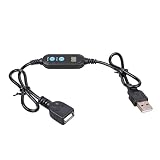
- ADJUSTABLE TIMER: Set the auto shut-off timer anywhere from 1 to 24 hours to control when your USB devices power off automatically.
- WIDE COMPATIBILITY: Works with USB fans, neon signs, LED lights, phone chargers, and other 5V USB-powered devices for versatile use.
- DIGITAL CONTROL: Easy-to-use digital interface lets you program precise shut-off times, helping you manage device usage with confidence.
- MALE TO FEMALE DESIGN: The male to female USB connector allows for seamless inline installation between your power source and USB device.
- COMPACT & PRACTICAL: Sleek black cable design fits discreetly into any setup, making it ideal for home, office, or bedside use.
Where Windows 11 sleep settings fit
Ordinary screen and sleep timeout controls are under Settings > System > Power & battery. Those controls adjust when the display turns off or the PC sleeps; they do not provide the active-timer listing. Use powercfg /waketimers to inspect active requests.
Outdated Drivers Are Slowing You Down
One free scan finds every outdated or missing driver and matches the right update for your exact hardware.Free scan · exact hardware matchPC Slower Than It Used to Be?
A free scan shows the junk files, broken settings and background clutter dragging Windows down - then fixes them in one click.Free scan · Windows 10 & 11Quick Recap
Best Value
- Precise Timing Control: Features an adjustable countdown timer from 1 hour to 24 hours. Easily set the duration with simple button clicks to automate your USB-powered devices effortlessly.
- Universal 5V Compatibility: Ideal for various 5V USB devices, including desk fans, LED light strips, neon signs, and growth lamps. Seamlessly extends your power reach while adding smart control.
- Safe Auto Shut-Off: Protect your electronics from overcharging and save energy. The automatic power-off function is perfect for phone charging and prevents small appliances from overheating.
- User-Friendly LED Display: The integrated digital display shows remaining time or set intervals clearly. Simple male-to-female USB interface allows for plug-and-play setup in seconds.
- Compact & Durable Design: Built with high-quality materials for stable power transmission. Its portable size makes it a reliable companion for home, office, or travel use.
Rank #4

- USB 5V adjustable timer power-off switching control cable, countdown timer for 5 minutes to 24 hours and 55 minutes, timer power-off switching wire.
- Equipped with digital display screen, time progress can be viewed in real-time, making it more intuitived.
- Supports 5V2A, plug and play, with a total cable length of 140cm, not data transmission function.
- Small in size design, easy to carry and use.
- Suitable for USB fan, blowers, USB water pumps, USB lights, fish tanks, data cable and more.
Rank #3

- 【Smart Timer & Auto Shut-Off】Features three preset timer modes (4H/8H/12H). One click sets the countdown with color-coded indicator (Green/Blue/Red). The light turns off automatically after the set duration, helping to save energy and prevent unnecessary power usage.
- 【Adjustable Dimming & 4-Level Brightness】This cable provides two dimming modes. You can select from four fixed brightness levels (25%, 50%, 75%, 100%), or hold the button to activate a smooth scrolling mode that gradually changes the light intensity.
- 【Important Note About the Auto On/Off Cycle】If your neon light has a built-in dimmer, this timer cable can automatically turn the light off, but cannot turn it back on. The dimmer's memory function interrupts the circuit, requiring a manual press of the light's power button after each cycle.
- 【Plug-and-Play & 5V Compatibility】Equipped with a standard USB-A connector, this cable is designed for 5V low-voltage devices like neon signs and LED lights.
- 【Flexible Clear Cable & Discreet Design】The 16-inch transparent cable remains unobtrusive, blending into your decor while offering reliable connectivity. Suitable for both home and commercial environments.
Product prices and availability are accurate as of the date/time indicated and are subject to change. Any price and availability information displayed on Amazon at the time of purchase will apply.




