Enter a Hotels.com coupon code during checkout, after choosing your stay. On the U.S. coupon page, the offer applies only when you select Pay Now; stays that collect payment only at the property are not eligible. Before booking, check that the code applies to your market, dates, and property, then confirm the updated total.
How to apply a Hotels.com coupon code on the website
- Search Hotels.com for your destination and dates, then choose a property and room.
- Continue to reserve. If the property offers a choice of when to pay, select Pay Now. Hotels.com’s U.S. coupon instructions say bookings that collect payment only at the property are ineligible for coupons.
- At checkout, select Apply a coupon, enter the code, and apply it.
- Check that the coupon changed the price and review the final total before submitting the booking.
Where to enter a coupon in the Hotels.com app
After choosing a stay, continue through checkout and look below the payment details, before the personal-information section. Tap Apply a coupon, enter the code, and tap apply. Confirm the resulting total before completing the reservation.
As an Amazon Associate I earn from qualifying purchases.
What to check if a coupon does not work
- Payment choice: Confirm the booking is set to Pay Now. A stay payable only at the property does not qualify under Hotels.com’s U.S. coupon instructions.
- Code and offer terms: Check the spelling and the offer’s stated expiration dates, eligible property, market, and other restrictions. A code should not be assumed to work for every hotel or travel date.
- Market: Make sure the promotion is intended for the country or market where you are booking. A promotion advertised for India or Singapore does not establish eligibility for a U.S. reservation.
- Checkout total: Verify that the discount appears before you submit the reservation. If it does not, compare the displayed terms with your selected stay rather than assuming the code will be honored.
Compare a coupon with other Hotels.com savings
A coupon is not the only possible way to lower a booking’s cost. Compare the actual checkout total, including taxes and fees, and check the conditions that apply to each offer.
Recommended Free Tools
| Option | Who or what may qualify | What to check |
|---|---|---|
| Coupon | Eligible Pay Now bookings under the offer’s terms. | Market, dates, property, payment choice, and any redemption or combination restrictions. |
| Member Prices | Signed-in One Key members and app users, on selected hotels and dates. | Sign-in or app requirements and the price for your specific stay. |
| One Key / Save Your Way | Eligible bookings, according to the choices and rules shown for the offer. | Whether a coupon can be combined with a rewards choice; combination rules depend on the offer. |
| Additional hotels on the same trip | Selected additional hotels after an initial booking; Hotels.com lists stays within 1,000 miles and within three days as criteria. | Availability varies by property and destination. Hotels.com says no coupon is needed for this savings option. |
For each option, compare the final price after taxes and fees, eligible property and dates, any Pay Now requirement, whether sign-in or app use is needed, and restrictions on combining or redeeming savings.
Quick Recap
Best Value

- 13 File Pockets for Coupon, Photo, Recipe, Receipt, Index Cards, Check, Cash organizer
- Fashion and Functional piece of organizer for everyone and everything.
- Constructed with Paisley Pattern Faux Leather. Preprint month, alphabet, and blank tabs included.
- Front flap with elastic string design to maximize the capacity and easy access
- 7x4.75". Easy care - Wipe up spots with a damp cloth.
Rank #4

- Valtiner Document Organizer: 25 pocket expanding file folder sizes are 6.9 x 4.5 x 26.4 inches, This coupon organizer small has a large capacity storage compartment, which can easily meet your ticket storage needs for a year
- Compact and Portable: A6 expandable Accordian folder is designed to store coupons, receipts, or cash, file folder organizer fits easily in your bag or briefcase, allowing you to carry invoices, tax documents, bills, tickets, and other small items
- Multifunctional: The bill organizer with portable and elastic cord design not only can be used as a money organizer for cash but the paper organizer can also be unfolded and stood upright on the desk and used as a file organizer for desk
- Quick Access: The portable file organizer is closed at the bottom, allowing you to store tickets, bills, etc. in the correct slot. Small file organizer can help you quickly find the files you need by following the included tabs
- Wide Range of Uses: Whether you're at home, in the office, or on the go, a wallet organizer is an ideal tool for storing and categorizing all your small items, a cash organizer allows you to keep track of expenses, income, and receipts easily
Rank #3

- 2 Pack 13 Pockets accordion file organizer, colored labels for easy subdivision and indexing
- Accordion file organizer made from high-quality Polypropylene, non-toxic, waterproof and tear-resistant. Not easy to break or deform
- The folder size is 10.2 x 5.1 x 0.8 inches, the surface is black, with good concealment and dirt resistance
- Flap and elastic button closure design, for added security, secure to prevent inside papers from falling out
- Suitable for daily file archiving and storage, such as tax documents, contracts, bills, statements, name cards, receipts, checks, etc
Rank #2

- Adjustable Wrist Strap for On-the-Go Convenience: Comes with an adjustable wrist strap, making it easy to carry while shopping or running errands—free your hands and keep your organizer always within reach.
- Compact & Portable for Everyday Use: Sized at 8.1 x 5.1 inches, this lightweight wallet fits easily into your bag or can be carried by hand—perfect for everyday errands and travel.
- Designed for Receipts & Coupons Organization: Keep your receipts, coupons, and bills neatly organized in one place. Ideal for grocery shopping, store visits, and daily expense tracking—no more lost or messy paper slips.
- 12 Pockets for Easy Sorting: Equipped with 12 compartments to sort receipts, coupons, cash, and notes by category—helping you stay organized and manage your budget more efficiently.
- Secure Zipper Closure Keeps Everything in Place: The smooth zipper design helps keep your receipts and important papers secure, preventing items from falling out during busy shopping trips.
#1 Best Overall
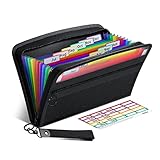
- Receipt Coupon Organizer - ThinkTex Small Folder with 12 Pockets. Exclusive size 11*6'' for receipts, coupons. Perfect monthly organizer
- 12 REAL POCKETS - Sealed bottom makes papers stay in the proper slot, No need worry the papers slide into the other compartments from the bottom
- QUICK ACCESS - Bright colorful tabs with monthly labels, just take a glance and locate. The tabs is clear and easy to read
- RELIABLE ZIPPER - Zip it up and nothing will fall out, extra wristband makes carrying easier
- LITTLE THINGS MAKE LIFE EASIER - No more big and heavy accordion folders, easy to put in glove box, purse. Have a smallish, portable filer to hold all receipts instead of many envelopes. One of the most valuable items you didn't know before one purchase
Product prices and availability are accurate as of the date/time indicated and are subject to change. Any price and availability information displayed on Amazon at the time of purchase will apply.
Independent reader supportYour contribution helps us test, update, and keep practical guides available for everyone.



