To dump a game cartridge, use a cartridge reader explicitly compatible with its console and cartridge type, then follow that reader’s current instructions to copy the game data—and, if supported, save data—to a computer or SD card. A cartridge reader is not universal: a device for Game Boy cartridges, for example, does not thereby support NES, SNES, N64, Switch, or other formats.
Owning the physical cartridge does not automatically answer whether making a digital copy or bypassing an access control is lawful. The legal overview below is U.S.-focused, with a Canadian example; rules differ by country and by the technology involved.
As an Amazon Associate I earn from qualifying purchases.
What a cartridge dump includes
A cartridge reader accesses data stored on a game cartridge and transfers it to a computer or, with some devices, an SD card. Depending on the reader and cartridge, you may be able to copy the game program (often called a ROM), save data, or both. Those are separate capabilities: check that the particular device supports the cartridge and the kind of data you want to copy.
The Tool Desk
Outbyte PC Repair FREERepair Windows errors before they cause bigger problemsFix Now →Outbyte Driver Updater FREEFix the driver behind crashes, sound loss and screen glitchesFind Drivers →A dump is a copy of copyrighted game data, not permission to download, share, sell, or distribute that data. Keeping a copy private is prudent, but privacy does not settle every copyright or anti-circumvention question.
#1 Best Overall

- MULTIPLE FUNCTIONS: Support for GBFlash GB, support for GBA cartridge reader based on the support for insidegadgets open source project support for GBxCart-RW. The single chip support for CH579 is adopted as the main control chip, and the analog chip is driven through the virtual serial port and connected to the PC, thereby maximizing the transmit speed of USB 2.0. You can back up game , back up or restore game saves, and write to supported burn cards
- MULTIPLE SAVE TYPES: Game card burner supports multiple save types, including support for SRAM, support for Flash and support for EEPROM of support for Gameboy Advance cartridges, providing a fluent gaming experience and automatically detecting save types
- COMPATIBLE WITH MULTIPLE GAME CARTRIDGES: USB game card burner is compatible with support for Gameboy, support for Gameboy Color, and support for Gameboy Advance cartridges, ensuring a rich retro gaming experience
- SUPPORT FIRMWARE UPDATE: The game card burner reader can be easily updated to the latest firmware using the on board FUCN key and the USB C interface
- FAST TRANSMIT: The game card reader adopts USB 2.0 high speed transmit, with a maximum speed of up to three times that of support for GBxCart RW
Choose a reader for the exact cartridge
Start with the system and cartridge family printed on the hardware or identified in reliable documentation. Compare readers by supported cartridge families, save backup and restore support, computer versus SD-card workflow, adapter needs, setup effort, and cartridge-specific handling instructions.
| Option | Documented support | ROM and save features | Workflow and setup |
|---|---|---|---|
| GBxCart RW | Game Boy, Game Boy Color, and Game Boy Advance cartridges, according to its manufacturer. | Manufacturer documentation describes ROM and save backup and restore. | Computer-connected reader; consult the current manual for software and voltage settings. |
| Open Source Cartridge Reader (OSCR) | Project documentation covers multiple platforms and adapter configurations, including NES/Famicom, SNES/Super Famicom, N64, Game Boy Color, GBA, and Sega systems. | Capabilities depend on the system, adapter, and configuration; check the project documentation for the exact cartridge. | Can use a standalone SD-card workflow. It is modular, so building or configuring the reader and selecting the right adapter may be required. |
| Other readers listed by FlashGBX | FlashGBX lists GBxCart RW, Joey Jr, and GBFlash as compatible readers. | Not stated here for each reader; verify the chosen device’s documentation. | Not stated here for each reader; verify the device’s current instructions and software support. |
These examples do not establish compatibility with every cartridge, including unofficial cartridges. For multi-system collections, a modular project can offer broader platform coverage but may involve more configuration than a reader intended for one cartridge family.
Rank #2
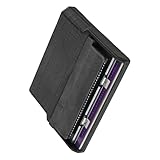
- Various storage types to read and write to meet different requirements
- Support directly control content using computer file manager as easy as using a USB drive
- Write your game on a rewritable cartridge for game testing
- This allows you to back up the cartridge game to your local PC and protect your progress
- This allows you to view pictures directly on your computer. Managing and editing of game images is very important
Voltage and handling are cartridge-specific
The GBxCart RW manual specifies 3.3V for GBA mode and 5V for GB/GBC modes. Do not infer the right voltage or handling procedure from another reader or cartridge family. The OSCR documentation also describes voltage selection and recommends powering off before inserting or removing a cartridge. Follow the exact device’s current manual rather than treating those instructions as universal.
How to make a dump
There is no single safe recipe for every cartridge reader: adapters, software, voltage, file handling, and supported systems vary. Use the device maker’s or project’s current instructions for each step.
Rank #3

- [High Speed Rom Backup & Restore] Experience game rom backups and restores with our usb 2.0 game card burner reader. featuring the advanced c h 579 main control chip and virtual serial port technology, this device maximizes usb 2.0 transfer speeds, allowing you to quickly back up or restore your favorite game and saves. perfect for preserving your classic game collections with ease.
- [Secure Data Protection] Your game saves are safe with our independent save chip technology, designed to prevent data loss and ensure the integrity of your files. with transfer speeds three times faster than gbxcart rw, this tool to handle your valuable game data efficiently and securely.
- [Multi Save Type Support] Enjoy seamless compatibility with various save types including flash, and eeprom for gameboy advance cartridges. our smart burner automatically detects the save type, ensuring a smooth and error-free gaming experience. relive your childhood memories without worrying about save file corruption or loss.
- [Easy Firmware Updates] Stay with the latest features and improvements thanks to the onboard fucn key and usb c interface. updating your device's firmware is a breeze, ensuring you always have access to the best performance and compatibility for your gaming needs.
- [Wide Compatibility] Compatible with gameboy, gameboy color, and gameboy advance cartridges, this versatile burner reader is a must-have for retro gaming enthusiasts. whether you're backing up rare titles or writing to burn cards, this tool delivers exceptional performance across all supported platforms.
- Identify the cartridge. Confirm its console family and cartridge type; do not rely only on the connector’s appearance.
- Verify reader compatibility. Check the manufacturer’s or project’s supported-cartridge list for that exact family and any required adapter. Confirm whether the reader can access save data if that is your goal.
- Read the current documentation. Check the manual and software notes for connection steps, voltage, and any system-specific setup.
- Prepare the cartridge as directed. Inspect and clean contacts only as the device maker recommends. Follow instructions about powering off before insertion or removal.
- Connect and read using the documented workflow. Use the reader’s supported software or SD-card process to copy the ROM and, if supported, save data. Do not assume another device’s procedure, file format, or settings apply.
- Store the files securely. Keep any copy private and do not upload, sell, or share copyrighted game data.
Newer systems may use encryption or other access controls. That can make both the technical process and the legal analysis more complicated than reading data from an older cartridge; a reader’s physical compatibility does not mean it can bypass every restriction.
Independent reader supportYour contribution helps us test, update, and keep practical guides available for everyone.What the law says—and what cartridge ownership does not settle
United States: copyright and access controls are distinct issues
The U.S. Copyright Office explains: “Section 1201 is a provision of the copyright law (title 17), that prohibits circumvention of technological protection measures employed by or on behalf of copyright owners to control access to their works.” Owning the cartridge does not, by itself, establish a general right to bypass such a measure or make a ROM copy.
Rank #4

- 【Compatible model】Compatible with Nintendo Switch console only, NOT for Switch OLED,NOT for Switch Lite.
- 【Highest Quality】All our parts replacement will be inspected before packaging to ensure that the parts you receive are in good condition.
- 【Easy to Repair by Yourself】It come with complete repair kit,you can repair it by yourself in a few minutes. Bring your Nintendo Switch Console back to life. No need to go to the After-sales Center, No need to buy a new Switch.
- 【24-hour quick reply】We provide 24-hour quick reply,If you are not 100% satisfied with our product,please fell free to contact us via Amazon and will be our pleasure to serve you.
- 【What you Get】1 x Game Card Reader with Headphone Jack, 4 x Longest black "Y" screws, 1 x Metal 5 inch Bit Driver, 2 x Precision Bits(1 x Phillips #000,1 x Tri-point Y00), 1 x Metal ESD Tweezers, 1 x Spudger, 1 x Opening Pick, 1 x iParto microfiber Cleaning Cloth, 1 x Brush.
The Copyright Office’s video-game exemptions are limited to specified circumstances. Its current rulemaking materials describe qualifying preservation work by eligible libraries, archives, or museums, and local gameplay access for a lawfully acquired game that depends on an external authentication server the copyright owner has ceased providing. Those are bounded exemptions, not a general personal-backup exemption for every consumer who owns a cartridge. The current rulemaking page states that renewed exemptions remain in force from October 2027 through October 2030; dates and rules can change, so check the current official materials.
PC Slower Than It Used to Be?
A free scan shows the junk files, broken settings and background clutter dragging Windows down - then fixes them in one click.Free scan · Windows 10 & 11Outdated Drivers Are Slowing You Down
One free scan finds every outdated or missing driver and matches the right update for your exact hardware.Free scan · exact hardware matchOther countries may use different rules
Canada’s Copyright Act section 30.6 sets out limited provisions for computer-program compatibility and backup. Its backup provision includes a condition that the copy be destroyed after the person ceases to own or be licensed to use the program. That is a specific statutory example, not a blanket right to copy any game or bypass copy protection, and it should not be applied to other countries.
Best Value
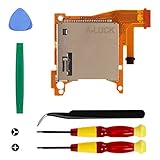
- Replacement game cartridge card reader slot compatible with Nintendo Switch Lite
- Fixing the issues: unrecognized game cartridges, illegible games
- NO soldering required when disassembly and assembly, our package comes with the required tools, please install the parts carefully and find professionals videos on youtube to fix
- A economical way to fix the damaged Switch Game Card Reader and Headphone Jack, make it look like the new one
- Great quality replacement part, we carefully select and verify the Game Card Reader parts to ensure the impeccable quality and perfect working order to meet your requirements
If you are outside the United States, check the law where you live. If the legal answer matters to a decision about copying or access controls, consult a qualified local source; the rules can depend on the jurisdiction, cartridge, and technology.
Quick Recap
Product prices and availability are accurate as of the date/time indicated and are subject to change. Any price and availability information displayed on Amazon at the time of purchase will apply.




