PC Slower Than It Used to Be?
A free scan shows the junk files, broken settings and background clutter dragging Windows down - then fixes them in one click.Free scan · Windows 10 & 11Crashes, No Sound, or Screen Glitches?
Random freezes, missing sound and display glitches usually trace back to one bad driver. Find and replace yours safely.Free scan · under a minuteTo document a GST Portal task, follow the current GSTN manual for that exact function and tax period, then capture a concise sequence from the starting page through each meaningful change to the final result. Caption what the user does and what the screen confirms. Before sharing, remove credentials, OTPs and unnecessary personal or business information. For a return, make clear whether the screen shows a draft, a submitted return or a filed return.
Find the right GST Portal instructions first
GSTN directs users to its help page for manuals and FAQs with screenshots covering functions such as payments, return filing, refund applications, appeals, offline tools, ITC forms and ledgers. Start with the manual for the exact task rather than treating a generic screenshot sequence as a universal set of portal steps. Portal labels and workflows can change, and the applicable period or return type may affect what the user sees. GST Portal help and the GSTN Welcome Kit are useful starting points.
As an Amazon Associate I earn from qualifying purchases.
For GSTR-1, the official FAQ describes it as the monthly or quarterly statement of outward supplies for eligible registered taxpayers. It identifies three preparation routes: enter data online, use the Returns Offline Tool, or use third-party application software through a GST Suvidha Provider (GSP). The FAQ lists an active GSTIN for the period and valid login credentials among the prerequisites; signing may require a valid DSC or access to the authorized signatory’s registered mobile for EVC. Consult the current instructions to check which requirements apply to the taxpayer and period. GSTR-1 FAQ.
Free tools Windows power users keep installed
One-click scans. No signup required.
The screenshots should document the route actually used. Do not imply that online entry, the offline tool and ASP software use identical screens or suit every taxpayer.
#1 Best Overall

- Kaisi 20 pcs opening pry tools kit for smart phone,laptop,computer tablet,electronics, apple watch, iPad, iPod, Macbook, computer, LCD screen, battery and more disassembly and repair
- Professional grade stainless steel construction spudger tool kit ensures repeated use
- Includes 7 plastic nylon pry tools and 2 steel pry tools, two ESD tweezers
- Includes 1 protective film tools and three screwdriver, 1 magic cloth,cleaning cloths are great for cleaning the screen of mobile phone and laptop after replacement.
- Easy to replacement the screen cover, fit for any plastic cover case such as smartphone / tablets etc
Plan a useful screenshot sequence
This sequence is a practical documentation template, not a formal GSTN screenshot standard. Adapt it to the current portal and the task’s official manual.
- Identify the task and period. State the portal function, form and tax period in the guide. Include a dashboard or menu screenshot only if it helps readers locate the task.
- Show the starting point. Capture the relevant task or form before data is entered or changed. Keep passwords, OTPs and unnecessary identity information out of the frame.
- Capture consequential transitions. Add a screenshot after an action that changes the workflow, such as saving a section, generating a summary, reviewing a draft or moving to a filing step. Skip duplicate screens that show no meaningful difference.
- Document the review. Show the draft or consolidated summary and instruct readers to compare it with their own source records before proceeding. A sample is an illustration, not tax advice or a substitute for checking entries.
- Show completion when relevant. For a filing workflow, capture the final status or success message. The GSTR-1 FAQ says successful filing generates an Application Reference Number (ARN) and the status becomes filed. In a public example, conceal the ARN unless its disclosure is authorized.
- Caption every image. Number the image, give it a short action label, describe what changed and state what the reader should confirm. Identify illustrative screens that may differ by return type or current portal version.
Distinguish draft, submitted and filed states
A screenshot should not suggest that a return has been filed if it only shows a draft, review page or intermediate step. Label each screen according to what the portal actually confirms. For GSTR-1, the official FAQ identifies the ARN and Filed status as indicators of successful filing. A high-level official workflow description also points to checking the consolidated summary, selecting the authorized signatory, filing with DSC or EVC, and confirming Filed status and the ARN. Verify the precise buttons and order in the current manual before publishing a click-by-click guide: the exact labels and screen sequence are not established here. GSTR-1 FAQ.
Rank #2
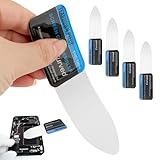
- 【Product Material】Disassembly Screen Opener Tools Constructed from durable stainless steel that resists bending and maintains shape during repeated use.
- 【Product Design】0.1mm ultra-thin pry tool, perfect for prying open and opening phones and computers; lightweight and portable; simple to use and highly practical.
- 【Product Uses】This ultra-thin pry tool is suitable for replacing batteries, touchscreens, LCD screens, back covers, spare parts, etc. Especially suitable for curved screen replacement.
- 【Product Dimensions】The ultra-thin pry tool is 0.1mm thick, with overall dimensions of 123 x 35mm / 4.84 x 1.38 inches.
- 【Product Features】The compact design makes it easy to store and carry, while maintaining professional-grade functionality. The smooth, polished edges will not scratch or damage your phone.
Protect taxpayer and business information
GSTN’s Welcome Kit says: “You are strongly advised not to share your GST Portal credentials (Username and Password) with anyone.” Do not put credentials in a screenshot, and do not share them with a photographer, editor or helper. The official login manual describes credential entry and OTP authentication, so take particular care around login screens. GST Portal login manual.
- Never publish passwords or OTPs. Also check browser tabs, notifications, autofill suggestions and adjacent windows for accidental exposure.
- Hide GSTINs, PANs, phone numbers, email addresses, bank details, customer names, invoice numbers, amounts and other identifiers unless you have clear authorization and a genuine need to show them.
- Use fabricated data or a test environment if one is available for the task. Do not assume or claim the GST Portal has a demo mode without verifying it.
- Redact a copy before publication, then inspect the exported image at full size. Use opaque redaction that cannot be reversed by removing an editing layer.
- If originals must be retained as evidence, keep them in an access-controlled location and publish only the minimized, redacted copy.
These minimization and redaction steps are practical privacy guidance, not a formal GSTN screenshot-retention or editing standard. The cited GSTN materials do not establish a public standard for redaction, annotation or retention.
Rank #3

- 0.1mm ultra thin opening card, excellent for prying and opening task.
- Non-slip silicone handle for comfortable grip and better control.
- Polished and smooth edge, will not damage or scratch your phone.
- A nice tool to open LCD screen, back cover housing and battery.
- Material: Stainless steel + Silicone; Size: 123 x 35 mm( L*W)
Capture and prepare the images for readers
Keep the evidence sequence easy to follow
Use one image for each meaningful state rather than capturing every click. Keep screenshots in workflow order and use consistent numbering in the image labels and surrounding instructions. A reader should be able to tell which task, form and period the sequence describes without relying on the screenshot alone.
Review before publication
Check every image at full size after export. Confirm that labels and status indicators are legible, that no identifying values remain visible, and that redactions are opaque. If the portal layout has changed since the screenshots were taken, update the images or clearly label them as illustrative rather than presenting them as current instructions.
Rank #4
- Durable Material: Stainless steel material, hard and durable, can be used repeatedly; Ultra-thin design, easier to pry the screen; Light weight, easy to carry; Easy to use and practical. Very thin opening picks.
- 0.1mm Ultra-thin Design: Thin prying tool for opening electronic devices. The screen disassembler pry tool is essential to open any parts for tablet, or smartphone sealed with adhesive. Quick and convenient opens the phone.
- Comfortable Grip: Anti slip silicone handle, comfortable grip, better control. The sharp one can disassemble a small crack easily to guard the screen;Flat skid pallets facilitate shelling and maintain shell opening. A good tool for opening the LCD screen, back cover shell, and battery.
- Multi Functional & Professional: The 0.1mm ultra-thin opening card is very suitable for prying open tasks. The screen opener pry tool can open most mobile phone screens without damage to your phones. Can be used for prying, sliding, separating.
- Essential Tool: This tool was specially designed to give maximum leverage to prize apart most devices including mobile phones, which can pry open the screen without damaging the screen. It also can be used to open all types of screens/ tablets/ PC.
Or skip the browser setup
If you want to capture public workflow reference pages without manually setting up a browser, ScreenshotNeo is a website screenshot API and MCP server. A single GET request can return a screenshot or PDF; use the documentation for parameters and response details: ScreenshotNeo docs.
curl -G "https://api.screenshotneo.com/v1/shot" -d access_key=YOUR_API_KEY --data-urlencode url=https://tutorial.gst.gov.in/userguide/login.htm -o shot.webpScreenshotNeo accepts cookie or consent banners and removes known consent platforms, newsletter popups and chat widgets before capture; each step can be turned off. Bot checks, blank pages, timeouts, failed loads and cache hits are not billed, and the response identifies the page verdict and billing status. Its MCP server provides take_screenshot, get_page_info and capture_pdf for AI agents. The Free plan includes 1,000 shots a month without a card; paid plans start at $5 for 3,000 shots.
Sign up for ScreenshotNeo’s free plan to get 1,000 screenshots a month with no card.
Best Value

- PentalobeScrewdriver Set: p5 Pentalobe screwdriver,PH000 Phillips Screwdriver, Pentalobe T5 Pentalobe T6 Screwdrivers Repair Tool Kit for Apple MacBook Mac Retina Pro Air,T5 for Macbook air & pro repair, it can remove fan screws, including SSD or hard disk replacement. The improved T5 has curved corner tip, which are different from the previous straight corner tip, It will not damage the screws and is more durable
- SAFETY: for your personal equipments : fix by yourself with this professional-grade repair kits to protect privacy from strangers; you needn't to ask help from friends or wait for repairing technician or look for a repair center. This electronics repair tools kits can not only save your money and time but protects your personal privacy
- High-quality Handy MATERIAL: Magnetic durable stainless steel tip which is is stable and not easy to stripping and deforming; Plastic handle with rubberized grip; Anti-static ESD tweezers with strong corrosion resistance are used, the tip is not easy to strip and deform. You will found that it's so high performance after compared with ifixit tool kit
- MULTIFUNCTION: disassembly, pry opening, take apart macbook, phone, tablet, computer, pc to replace screen, battery or camera lens, clean the dirt inside with electronics tool set; Portable and fit in pocket/backpack – great for home, office, school, business trip, travel
- MULTIPURPOSE: repair kit set for different digital products, such as Mobile Phones (iPhone6/6s/7/7plus/iphone 8,xs, max, Samsung, LG, HUAWEI, Google, HTC), Computer, PC, laptop, desktop (HP, ASUS, Lenovo, Apple Macbook), Table, iPad, SLR cameras, Game Console (PS4, Xbox, Nintendo), game handle/joystick and other electronic devices. A Great GIFT for IT technician, technical engineer, hacker, electronics enthusiast, fixer, hobbyist, DIYer, student, housewife, ect
Frequently Asked Questions
Where can I find GST Portal manuals with screenshots?
GSTN points users to the GST Portal help page, which includes manuals and FAQs covering portal functions such as returns, payments and refunds. Start with the manual for your specific task and period.
Can a screenshot guide replace checking my GST entries?
No. A guide can show where to act and what the portal displays, but taxpayers should compare their own entries with source records and applicable guidance.
The Tool Desk
Outbyte Driver Updater FREEScan for outdated or missing drivers - takes under a minuteDriver Scan →Outbyte PC Repair FREERepair Windows errors before they cause bigger problemsFix Now →Quick Recap
Product prices and availability are accurate as of the date/time indicated and are subject to change. Any price and availability information displayed on Amazon at the time of purchase will apply.




