The Tool Desk
Outbyte PC Repair FREERepair Windows errors before they cause bigger problemsFix Now →Outbyte Driver Updater FREEScan for outdated or missing drivers - takes under a minuteDriver Scan →Use a no-code website monitor: enter the news page’s direct URL, choose the whole page or the specific area you care about, set what counts as a meaningful change, and choose how often it should check. Review the monitor’s preview before relying on alerts. A scheduled check can catch a change only after it runs; it is not instant observation.
Set up a no-code visual monitor
- Enter the exact page URL. Use the news homepage or the direct URL of the section page you want to watch. Starting with a direct link helps the monitor open the page you actually care about. Visualping’s setup guide describes this workflow.
- Check the preview. Make sure the page loaded and that the intended content is visible. If it appears before the page has finished loading, configure a wait time. Some pages require an interaction or scrolling before the relevant area appears; use the monitor’s available actions if needed.
- Choose what to watch. Select the full page for broad layout changes, or a stable region such as the masthead, a banner, or one panel if that is all that matters. Visualping’s news-monitoring page describes full-page and selected-area monitoring.
- Set the change criteria. For appearance, specify the visual element or layout that matters. For example: “Alert me when the top banner image or masthead layout changes.” If you care about new headlines rather than appearance, choose text-focused monitoring where available. Visualping also describes visual and code change monitoring. Its “Any important changes” option is intended to focus on core content and ignore some minor or expected updates; it may not eliminate every irrelevant alert. See its setup guide and noise-reduction guide.
- Choose a check schedule. Match the interval to how quickly you need to notice a change. A monitor detects a change only when it checks the page. More frequent checks may depend on the service plan and use more of its allowance. See Visualping’s explanation of monitoring schedules.
- Review alerts and refine. Compare the new snapshot with the previous one. If ordinary page activity keeps triggering alerts, narrow the region or make the change criteria more specific. Visualping says its alerts can include visual comparisons, added or removed text, and AI summaries on its news-monitoring page.
Choose visual or text monitoring
These methods answer different questions. Visual monitoring is the fit for a changed banner, masthead, page layout, or other visible design. Text monitoring is more useful for detecting a new headline or changed wording. A full-page visual comparison may alert on both important redesigns and incidental movement; selecting a stable region can reduce noise when only one part of the page matters.
Control noise on fast-changing news pages
News pages can change for reasons unrelated to the layout or story you care about. Ads, timestamps, rotating headlines, cookie notices, and popups may all alter a snapshot. Visualping’s guide to reducing false positives identifies expected changes such as cookie popups, weather, and timestamps as possible sources of noise, and warns that alerting on any change can create more false alerts.
As an Amazon Associate I earn from qualifying purchases.
Quick wins for a faster PC:
Clear out junk files and repair common Windows errorsFree Scan →Fix the driver behind crashes, sound loss and screen glitchesFind Drivers →Repair Windows errors before they cause bigger problemsFix Now →- Confirm in the preview that the target region is visible and stable enough to monitor.
- Use a selected region instead of the whole page when only the masthead, banner, or a specific panel matters.
- Use specific criteria instead of asking to be alerted about any change.
- If the page is still loading when captured, add a wait time and verify the next preview.
Understand schedules and computer availability
A scheduled service compares the page when its check runs, then can alert you to a qualifying difference. The interval sets how long a change might go unnoticed; scheduled monitoring should not be described as real-time unless the chosen service and plan support that claim. Visualping says higher-frequency checks are plan-dependent. Its monitoring-mode guidance distinguishes cloud monitors, which can run while your computer is off, from local monitoring, which requires Chrome to remain open.
Evaluate the options on your exact page
Visualping’s official materials describe visual, text, and code change detection, whole-page or selected-area setup, scheduled checks, before-and-after comparisons, and cloud and local monitoring modes. Wachete’s official pages describe no-code URL setup, whole-page or selected-area monitoring, dynamic-site support, geographic checks, the ability to ignore frequently changing areas, and alert options. See Wachete’s feature page and its setup guide.
#1 Best Overall
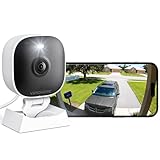
- 【Easy Setup Whole-Home Security Cameras】Ready to use right out of the box!This home security camera system lets you set up your home camera as a reliable outside camera for home security on your porch or as a camera for room in the nursery in just few minutes, delivering full-house protection instantly,2-year warranty, pls feel free to contact us with any questions.Note: For outdoor monitoring, mount cameras outdoors, Inside the window-Glare affects the shooting results.
- 【2K HD & Color Night Vision】Whether you’re watching pets play by day or clearly distinguishing if backyard movement is a cat or a stranger under moonlight, these 2k cameras for home security deliver ultra-clear 2K resolution and full-color night vision. Both our indoor cameras for home security and outdoor home surveillance cameras capture every critical detail—no blur, no missed moments. Need help with your camera for home security? Call +1(978)757-4977 for professional consulting to set up and optimize your VSMAHOME camera. Note: Working hours: Mon-Fri 9:00 am-18:00 pm (ET)
- 【IP66 Weatherproof Durability】Engineered for endurance, these cameras for home security deliver unwavering performance in any condition. From heavy rain to intense sun, they stand guard reliably around the clock.We recommend installing these outdoor cameras for home security under eaves or similar sheltered spots to maximize their lifespan. They are built not only to handle harsh outdoor climates with ease but also to remain fully functional even if accidentally splashed with water indoors.As a core part of your home security camera system, these outdoor cameras for home security serve as a trustworthy, year-round shield for your home.
- 【Dual Storage Solution: Local and Cloud】Choose cloud storage to automatically back up important events, or insert a memory card up to 128GB (not included) for continuous 24/7 recording. This flexible home security camera system ensures that all critical moments captured by your home surveillance cameras—whether it's your pet's mischievous moments or suspicious activity at your doorstep at night—can be easily retrieved and replayed.Cameras for Home Security.indoor outdoor camera,house cameras with audio and video,cameras for home security outdoor.
- 【Two-Way Talk & Motion Alerts】When your outdoor home security camera detects a delivery person at your doorstep, it instantly notifies you via your phone. You can directly speak through this home camera with audio and video and say, "Please leave the package at the door." Or, when your baby is crying, use the camera for room to soothe them with a gentle voice, as if you were right there by their side.cameras for home security,security camera,home security camera system,outdoor camera,home camera,outside camera.indoor camera.
Wachete’s cited feature information does not establish that its output provides the same kind of screenshot comparison as Visualping. Check whether the alert and comparison format suits your purpose, along with the page rendering, schedule, alert channels, history, and filtering controls. Neither service’s cited materials guarantee that every Indian news site, paywall, dynamic page, or anti-bot-protected page will render correctly. Test the exact URL and region first; no India-specific service comparison or reliability test is established here.
Or skip the browser setup
For a one-off screenshot rather than a scheduled change alert, ScreenshotNeo offers a website screenshot API and MCP server. One GET request can return an image or PDF; that is a capture, not a replacement for a scheduled monitoring service. The call below saves a screenshot of the news page:
Windows Errors? Fix Them Before They Spread
Repair common Windows errors and clear accumulated junk for a smoother, more stable PC - no reinstall needed.Free scan · no reinstallOutdated Drivers Are Slowing You Down
One free scan finds every outdated or missing driver and matches the right update for your exact hardware.Free scan · exact hardware matchRank #2

- Compatible with Nintendo-Switch (NOT Nintendo-Switch 2)
- Ideal for dash cams and home monitoring systems
- Designed for high endurance so you can record for up to 10,000 hours with no worries (Actual hours of video saved less. Full HD (1920x1080) video only; total hours less for 4K UHD (3840 x 2160) video.)
- Built for and tested in harsh conditions; temperature proof, water proof, shock proof, humidity proof and magnet proof (Card only. See product packaging and official SanDisk website for more information and limitations.)
- Save more videos with capacities up to 128GB (1GB = 1,000,000,000 bytes. Actual user storage less.)
curl -G "https://api.screenshotneo.com/v1/shot" -d access_key=YOUR_API_KEY --data-urlencode url=https://www.thehindu.com/ -o shot.webp
See the ScreenshotNeo API documentation for request options. ScreenshotNeo removes cookie and consent banners, newsletter popups, and chat widgets before capture; bot checks, blank pages, failed loads, and cache hits are not billed. Its MCP server lets AI agents take screenshots. The free plan includes 1,000 screenshots a month with no card; paid plans start at $5 for 3,000. Learn more at ScreenshotNeo, or sign up for 1,000 free screenshots a month, with no card.
Independent reader supportYour contribution helps us test, update, and keep practical guides available for everyone.Frequently Asked Questions
Do I have to keep my computer on for a monitor to run?
Not for a cloud monitor. Visualping says its local monitoring mode requires Chrome to stay open.
Rank #3

- Affordable & Compact: The Tikee mini+ is an economical, high-quality timelapse solution, an ideal compromise for small projects or limited budgets. Compact and lightweight, Tikee mini+ is easy to install, making it perfect for projects requiring quick and easy set-up.
- Wide angle / 4K resolution / Brightness sensor: Equipped with a high-sensitivity Sony sensor, Tikee mini+ offers superior image quality with 4K resolution and an extended field of view (DFOV 149° / HFOV 124°). Thanks to the brightness sensor, you can take pictures only when the light is bright enough.
- Indoor / Outdoor: Thanks to its shorter focusing distance, Tikee mini+ captures details at close range, ideal for indoor shooting and equally effective outdoors.
- Weatherproof IP66: IP66 certified, Tikee mini+ is designed to withstand extreme weather conditions, ensuring reliable performance from -10°C to +50°C.
- 4G/LTE, WiFi, GPS, Video Live Stream*: Thanks to 4G/LTE, WiFi and GPS connectivity, manage your shooting sequences remotely, automatically send your photos to the secure cloud, and access images wherever you are. Launch a live streaming video session in HD resolution (1280 x 960), and instantly clarify any situation on location.
Will a monitor work on every Indian news site?
Compatibility is not guaranteed for every site or page. Test the exact URL and the area you intend to watch before depending on alerts.
What’s actually slowing this PC down?
Pick the symptom - the matching free tool is one click away.
Quick Recap
Best Value

- Compatible with Nintendo-Switch (NOT Nintendo-Switch 2)
- Ideal for dash cams and home monitoring systems
- Designed for high endurance so you can record for up to 40,000 hours with no worries (Actual hours of video saved less. Full HD (1920x1080) video only; total hours less for 4K UHD (3840 x 2160) video.)
- Built for and tested in harsh conditions; temperature proof, water proof, shock proof, humidity proof and magnet proof (Card only. See product packaging and official SanDisk website for more information and limitations.)
- Save more videos with capacities up to 512GB (1GB = 1,000,000,000 bytes. Actual user storage less.)
Rank #4

- Crystal Clear 2K Resolution & 3MP Clarity: Experience superior image quality with 2K Quad HD resolution, capturing sharp details day and night for enhanced security monitoring and peace of mind.
- Smart Detection: Smart technology distinguishes between motion and people, sending accurate alerts to your phone and reducing false notifications triggered by irrelevant movement.
- Customizable View Angle & Water Resistant: Monitor every corner effortlessly with 360° horizontally and 180° vertically of the manually adjusted camera lens, ensuring no blind spots and maximum area surveillance from a single device. Waterproof grade IP65, suitable for indoor and outdoor use.
- Two-Way Talk & Flexible Connectivity: Communicate clearly through the built-in microphone and speaker using the two-way audio feature. Connects easily via 2.4GHz Wi-Fi6 and features Bluetooth Low Energy (BLE) for simplified initial setup.
- Local Storage & No Monthly Fees: Store your footage locally with an SD card (sold separately) and enjoy all functions without any subscription fees. AWS Cloud storage options are also available.
Product prices and availability are accurate as of the date/time indicated and are subject to change. Any price and availability information displayed on Amazon at the time of purchase will apply.




