What’s actually slowing this PC down?
Pick the symptom - the matching free tool is one click away.
If your TV has HDMI but no coax antenna input, connect the antenna to an external digital TV tuner or converter box, then connect the box’s HDMI output to the TV. The antenna still uses coax to reach the tuner; HDMI carries the tuned picture and sound to the television. If you mean you cannot use coax anywhere in the setup, the documented method here does not solve that: it still requires coax between the antenna and tuner.
First check whether the TV really lacks an antenna input
Look along the back and sides of the TV, and check its manual. An antenna input may be labeled “ANT,” “ANT/CABLE,” “RF,” or “Antenna,” and it may be tucked away on a side panel or a separate connection box. If the TV has an antenna input and a built-in tuner, connect the antenna there and scan for channels. TCL’s antenna setup instructions describe scanning the TV’s antenna input for active channels.
As an Amazon Associate I earn from qualifying purchases.
Some antennas use 300-ohm twin-lead wire rather than 75-ohm coax. For a compatible 75-ohm antenna input, a 300-to-75-ohm adapter may be needed. This adapter only matches the antenna wiring to the input; it does not tune broadcast channels or convert an antenna signal to HDMI. TCL explains the adapter requirement.
Connect the antenna through an external tuner
Use this arrangement when the TV has an HDMI input but no antenna input. The tuner receives the over-the-air signal, selects channels, and sends its output to the TV. Philips documents connecting an antenna to a set-top box and connecting that box to the TV over HDMI; Xumo’s connection guide also covers an antenna and external devices.
#1 Best Overall

- Baluns Transformers: Converts transform 75-ohm coaxial connector cable wire to 300-ohm twin-lead.
- Ultra-High Quality: The surface is electroplated with real Gold, Improves transmission speed, reduces loss, reduces interference, resist oxidation and improves conductivity.
- Simply and Easy: With this adapter, you can make your own homemade antenna. Supports bandwidth 5-900MHz frequency HD TV UHF VHF FM antenna.
- Universal Compatibility: This matching transformer comes with Male "F " connector, Widely work with Radio, HiFI, AV Receiver, TV Antenna, and Mini system: Sangean Cambridge Audio One Pure Evoke Tivoli Audio Demon Roberts Sony Marantz Yamaha Hitachi hi-fi DAB Radio, etc
- 100% GUARANTEE! All Ancable products come with 103% No Questions Asked Guarantee for either a replacement or refund. We care about only putting out high-quality products that satisfy your needs.
- Check compatibility. Confirm the TV accepts HDMI and that the tuner supports the broadcast standard used in your region. Standards and device models vary, so check the manuals for the exact TV and tuner.
- Connect the antenna to the tuner. Attach its coax lead to the tuner’s antenna input, often labeled “ANT IN” or similar. Do not connect the antenna to an HDMI port.
- Connect the tuner to the TV. Run an HDMI cable from the tuner’s HDMI output to an HDMI input on the TV.
- Select the correct TV input. Use the TV’s input or source control to choose the HDMI port used by the tuner.
- Scan for channels on the tuner. Follow the tuner’s manual for its channel-scan procedure. When the antenna is connected directly to a TV, channel scanning is done through the TV; an external tuner may have its own scan menu. TCL’s instructions cover scanning a TV antenna input.
Choose the setup that matches your ports
| TV and antenna situation | Where the tuner is | Connection | What to verify |
|---|---|---|---|
| TV has an antenna input and built-in tuner | In the TV | Antenna to TV antenna input; scan for channels | Input label and antenna wiring; use a 300-to-75-ohm adapter if required for twin-lead antenna wire and a 75-ohm input. TCL |
| TV has HDMI but no antenna input | External tuner or converter box | Antenna to tuner by coax; tuner to TV by HDMI | TV accepts HDMI and tuner supports the local broadcast standard. Philips; Xumo |
Do not confuse an antenna tuner with an RF modulator
An RF modulator solves a different problem: it adapts the audio/video output of another device for a TV that has only an antenna input. It does not replace the tuner needed to receive antenna broadcasts on a TV without an antenna input. A Magnavox manual notes that picture quality may be poorer when using an RF modulator. See the Magnavox MDR513H manual.
Quick Recap
Rank #4

- Excellently transform 75 ohm coaxial connector cable wire to 300 ohm twin lead.
- Screw-threaded F-type female connector jack match male connector plug cable wire antenna.
- Compatible with HF UHF VHF TV Satellite Aerial FM AM Antenna etc.
- Well-made gold plated 75 ohm to 300 ohm matching transformer converter adapter.
- Package contents: Pack of 2 UHF/VHF/FM Matching Transformer.
Rank #3
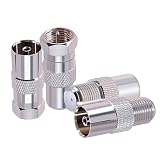
- Connector Type: F to TV connector kit. Impedance 75 ohm, low-loss, Small, lightweight and portable. All connectors are made equal and held to strict standards.
- Stable And Efficient: The F to TV connectors is made of copper and nickel plated to ensure it's durability and recycling usage.
- Widely Used: This TV to F adapter suitable for USB TV antenna, FM radio antenna, TV tuner, CATV, VCR, DVD, HD-TV, DTV, satellite receiver, cable box, RG6 cable, LTE Filter, Digital HD TV reception and other audio video equipment etc. The F to TV connector can be use to convert TV to satellite set-top boxes or convert set-top to antenna.
- Package Includes: 4 pcs F to TV connector (1 pc of F female to TV pal female, 1 pc of F male to TV pal female, 1 pc of F male to TV pal male, 1 pc of F female to TV pal male )
- Fast & Easy Install: The fm antenna adapter is designed for easy installation. Users can easily connect devices with F to TV connectors to standard cables without the need for complex tools, saving time and effort
Rank #2
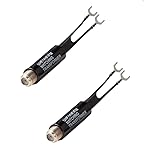
- 2 Pack TV Antenna Balun Connector 300 ohm to 75 ohm Adapter Coax FM UHF VHF Transformer Radio Converter F Female
If the setup does not work
- No antenna input visible? Check the side panels and any separate connection box, then consult the TV manual before buying another device.
- No picture from the external tuner? Verify that the tuner’s HDMI output is connected to the TV and that the TV is set to that same HDMI input.
- No channels found? Check that the antenna is connected to the tuner’s antenna input and run the tuner’s scan procedure. Confirm that the tuner supports the broadcast standard used in your region.
- Considering a simple adapter? A coax or impedance adapter cannot perform the tuner’s job or turn an antenna signal into HDMI. The 300-to-75-ohm adapter described by TCL is only for the twin-lead-to-75-ohm-input connection.
- TV has no compatible video input? There is no universal connection established for every TV and tuner. Check both manuals; a converter chain may be needed, and compatibility depends on the devices.
Product prices and availability are accurate as of the date/time indicated and are subject to change. Any price and availability information displayed on Amazon at the time of purchase will apply.




