Yes. Android phones support mouse connections over Bluetooth or USB, and iPhone can use Bluetooth or USB pointer devices through AssistiveTouch. The exact steps and any adapter you need depend on your phone’s model, operating system, port and mouse.
Choose Bluetooth or a wired USB connection
| Connection | What to expect |
|---|---|
| Bluetooth | No cable or port adapter is needed, but you must put the mouse in pairing mode and connect it in the phone’s settings. The mouse also needs power. [Google’s Android Bluetooth instructions] |
| Wired USB | A USB mouse or wireless receiver connects through the phone’s port, sometimes with an adapter. Android supports USB mice, but the connector and device-specific steps vary. Apple specifies an adapter when connecting a USB-A pointer device to an iPhone with Lightning or USB-C. [Google Android accessibility help; Apple pointer-device instructions] |
Neither route guarantees that every mouse or feature will work with every phone. Check the instructions for your specific phone and accessory if the mouse is not recognized.
As an Amazon Associate I earn from qualifying purchases.
Connect a mouse to an Android phone
Pair over Bluetooth
- Put the mouse into Bluetooth pairing or discovery mode. Use its manual if you are unsure how; the method varies by mouse.
- On your phone, open Bluetooth settings and choose Pair new device or the equivalent option for available devices. Menu labels differ by manufacturer and Android version.
- Tap the mouse’s name when it appears and follow any prompts on the phone.
Google documents both Bluetooth and USB mouse connections for Android and advises consulting the device’s own instructions for specific details. Its Bluetooth help also notes that some devices may require manufacturer-specific steps. [Android accessibility help; Android Bluetooth help]
Crashes, No Sound, or Screen Glitches?
Random freezes, missing sound and display glitches usually trace back to one bad driver. Find and replace yours safely.Free scan · under a minuteWindows Errors? Fix Them Before They Spread
Repair common Windows errors and clear accumulated junk for a smoother, more stable PC - no reinstall needed.Free scan · no reinstallConnect over USB
Check the mouse plug or wireless receiver against your phone’s port. If they do not match, you may need a compatible adapter. Android’s general support guidance confirms USB mouse support but does not specify one adapter that works for every phone, so consult your phone manufacturer’s instructions for the right connection.
#1 Best Overall
![JSAUX USB C to USB 3.0 Adapter [2 Pack], USB C Male to USB Female OTG Cable Adapter Compatible with MacBook Pro/Air, iPhone 18 Pro Max/iPhone Duo/Air/17/16/15 Series, Samsung Galaxy S26/S25/S24/S23](https://m.media-amazon.com/images/I/41Q9tgu65+L._SL160_.jpg)
- USB OTG(On The Go): Plug in and use computer peripherals, such as flash drive, keyboard, hub, mouse and more, makes your USB C devices compatible with USB drives and any other USB devices that support OTG. Not compatible with video output.
- USB 3.0 Super Speed Transfer: Full USB 3.0 super speed data transfer up to 5Gbps, 10x faster than USB 2.0; Transfer files, HD movies and songs to your USB C devices in seconds
- Nylon Tangle-free Design: Tangle-free nylon braided design, premium nylon braided cable adds additional durability and tangle free
- Aluminum Body: Made out of sturdy aluminum alloy, innovative engineering ensures durability and a long life span
- What you get: We provide this 2 USB C adapters. If you have any questions,we will resolve your issue within 24 hours; Compatible with all USB C devices, Compatible with iPhone 18 Pro, iPhone 18 Pro Max, iPhone Duo, Samsung Galaxy S26/S25/S24/S23, MacBook Pro/Air, LG G6 G5 V20 and more.
Connect a mouse to an iPhone
On iPhone, use AssistiveTouch to configure an external pointer device. Apple’s current guide gives this route:
- Open Settings > Accessibility > Touch > AssistiveTouch.
- Turn on AssistiveTouch.
- Open Pointer Devices and follow the options to connect your mouse.
With a pointer device connected, you can click items on the screen and navigate the AssistiveTouch menu. [Apple iPhone AssistiveTouch guide]
Rank #2

- Wide Compatibility: USB C to USB 3.0 Adapter compatible with all usb type c port devices including for Samsung Galaxy S26 Ultra S26 Plus S26 S25 Edge S25 Ultra S25 Plus S25 S24 S23 S22 S21 S20 S10 A36 A35 A34 A33 A55 A54 A53 A50 A16 A15 A14 A13 A10 A03S.USB OTG cable for android phone compatible with iPhone 17 Air 17 Pro Max16E 16 Pro Max 16 Plus 16 15 Pro Max,Google Pixel 10 Pro XL Fold 10A 9A 9 Pro XL Fold 8A 7A 6A 9 8 7 Pro, Moto G 5G 2025 2024 G Stylus G Power.
- Plug and Play USB OTG Cable(On The Go): USB C to USB 3.0 adapter cable plug in and use computer peripherals, such as flash drive, keyboard, hub, mouse and more, makes your usb c devices compatible with USB drives and any other USB devices that support OTG. Not compatible with video output.
- Super Speed Transfer USB OTG Adapter:OTG cable for android has usb 3.0 ultra high speed data transfer up to 480MB/s data transfer speed, transfer files, HD movies and songs to usb-c devices in seconds. Every detail is guaranteed to ensure the fast transfer of high-definition digital audio and high-definition video signals.
- Durable USB-C to USB Adapter:Crafted from sturdy tpe plastic shell, this usb c male to usb female otg cable combines innovative engineering with robust construction for exceptional durability and a long lifespan.OTG adapter for android wire core is made of tinned copper for fast and smooth data transmission, Provides you with a smooth transmission experience. The high-quality PVC cable ensures flexibility and resilience, making this durable USB-C to USB adapter ideal for daily use.
- What You Get: 1Pack USB C to USB 3.0 Adapter.Reliable and friendly customer service, any problem you can contact with us, response within 24 hours.
For a wired iPhone mouse
Connect a wired pointer device through the iPhone’s Lightning or USB-C port. A USB-A mouse or receiver needs an adapter for either of those iPhone ports; make sure the adapter matches your phone’s connector. [Apple pointer-device instructions]
Recommended Free Tools
If the mouse does not appear or respond
- Bluetooth mouse missing from the list: Check that it is in discovery mode and has power. If it is connected to another device, disconnect or unpair it there, then try pairing again.
- USB mouse not recognized: Confirm that the plug or receiver and phone port are compatible, and that any adapter fits both. On Android, check the phone manufacturer’s device instructions; supported details can vary.
- iPhone pointer controls not available: Verify that AssistiveTouch is on, then look under Pointer Devices for the connection controls.
- Some buttons or functions do not work: Basic mouse connection does not establish support for every extra feature. Check the phone and mouse documentation for the specific function.
Which connection should you use?
Choose Bluetooth if you want to avoid a cable and your mouse can pair with the phone. Choose USB if you prefer a wired connection or have a compatible receiver, and can connect it to the phone’s port. For either option, the deciding factors are the phone’s connector, the mouse’s connection method and the compatibility guidance for those specific devices.
Quick Recap
Best Value
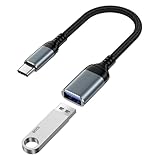
- 【USB to USB C OTG Adapter】usb to usb c adapter allows your smartphone, tablet, or laptop to read and transmit videos and images from USB flash drive. usb c to usb adapter combines flash drives, keyboards, hubs, mouse, external hard drives and other USB devices that enable OTG. usb female to usb c male cable enables you to sync, charge, and transmit data from your camera for iphone 17 pro max. Totally works for type c to usb adapter cables and OTG adapter enabled devices, usb a to c adapter offering seamless transfer of files and increased data storage.
- 【USB 3.0 High Speed Data Transfer】usbc to usb adapter achieve 5Gbps ultra-fast USB 3.0 speeds, 10X fast USB3.0 transmission. otg adapter for instant file transfers, HD videos, and music to USB-C devices. usb a to usb c adapter makes it easy to check out photos, listen to music, usb to c adapter transform files from flash drives and cameras, edit documents with a keyboard and mouse, enjoy games by linking a game controller, charge for iphone 17 air from another devices, and usb a female to usb c male used as a flight display by join an android device.
- 【Wide Compatibility】usb to usb c adapter for iphone 17e and laptops link with USB C Thunderbolt 3 is compatible with iPhone 17e/17/Air/17 Pro/17 Pro Max, iPhone 16e/16 Pro Max/16 Pro/16 Plus/16, iPhone 15 Pro/15 Pro Max/15 Plus/15; iPad Pro, iPad Air, iPad mini; Macbook Air 2023 /2022 /2020; MacBook Pro 2023 /2022 /2021 /2020; Samsung Galaxy S26 Ultra S26+ S26 S25 FE S25 Edge/S25 Ultra/S25/S25+/S24 FE/S23/S22/S21/S20 A17 A16 5G A37 A57 A27 A36 A56 A26 A07 A55 A35 A15 A54 A14 A25 A15,Z Flip 8 7 6 5,Z Fold 8 7 6 5; Google Pixel 11/11 Pro/11 Pro XL/11 Pro Fold/10a/10/10 Pro/10 Pro XL/10 Pro Fold,9a,9 Pro Fold,9 Pro XL,9 Pro,9,8a,8 Pro,8,7,6 etc.
- 【Plug and Play】usb to usb c OTG adapter is plug & play, no network, no drivers, no setup, no extra power needed. Just plug usb to usb c dongle for iphone 17 pro, Go to [Files], find the flash drives "Browse", open the folder. usb female to usb c male adapter seamlessly connects USB-C devices to a wide range of legacy USB peripherals, including flash drives, keyboards, mice, and hubs. usb c otg adapter ensures full backward compatibility with USB-A flash drives.
- 【Durable & Versatile】corrosion-resistant nickel-plated usbc to usb adapter ensures optimal signal clarity while preventing wear. otg adapter for android made of heavy-duty braided nylon otg cable offers exceptional durability for iphone 17/air frequent use, usb to type c adapter resisting fraying and tension damage. usb c female to usb male adapter with aerospace-grade aluminum casing effectively dissipates heat during charging/transfers, adaptador usb a tipo c providing galaxy s25 edge superior safety versus plastic alternatives.
Rank #4

- OTG Adapter for Android: OTG Cable for Android USB to USB C Android Adapter Replacement for Samsung Galaxy S9/S10/S20/S21/S21+ Note 10/10+/20 Ultra, S23 S22, USB 3.0 Female On The Go
Rank #3

- 【Please Note】 1.This product is a USB to Lightning adapter; 2. Supports iOS 13 or later only; 3. After connecting USB peripherals, please view and manage photos, videos, documents, and other files through the “Files” App on your device; 4. Due to the connector design, thick or full-coverage phone cases may prevent proper insertion. Please remove the case if needed to ensure a stable connection
- 【Universal Compatibility】: The usb to lightning Adapter is compatible with a wide range of devices, including iPhone 14/14 Pro/14 Pro Max/14 Plus/13/13 Pro/13 Pro Max/13 Mini/12/12 mini/12 Pro/12 Pro Max/11/11 Pro/11 Pro Max/XS Max/XS/XR/X/SE 2/8 Plus/8/7 Plus/7/6s/6 Plus, iPad Pro 10.5"/iPad Pro 9.7"/iPad Mini(2019)/iPad Mini 3/iPad Mini 2/iPad Air and other Lightning Port IOS versions
- 【Super High Speed】: This USB to iPhone Adapter offers a fast transfer speed of 40MB/s-60MB/s. It enables quick transfers of standard photo formats, including JPEG, RAW, and 4K video formats, allowing you to move large volumes of photos and files in seconds, saving you time and improving efficiency
- 【Plug & Play】: No drivers or apps required—simply plug the USB camera adapter into your iphone and start transferring instantly. Easily share photos and videos to social media without using a PC. Fast, simple, and convenient
- 【Widely Used】: This Apple Lightning to USB adapter supports a wide range of USB devices, including cameras, USB flash drives, card readers, MIDI keyboards, mouse, USB hubs, and more. Thumb-sized and ultra-portable, it features a lightweight, anti-scratch aluminum alloy body, making it ideal for use at home, in the office, or on the go
Product prices and availability are accurate as of the date/time indicated and are subject to change. Any price and availability information displayed on Amazon at the time of purchase will apply.




