What’s actually slowing this PC down?
Pick the symptom - the matching free tool is one click away.
For the original Sony LinkBuds WF-L900, use a soft, dry cloth—not wet wipes or solvents—and make sure the earbuds are completely dry before charging. Comfort comes down to fitting each earbud’s supporter under the ear groove and choosing the right size for each ear. These steps are specific to WF-L900; LinkBuds Open WF-L910 has different care instructions.
Check which LinkBuds model you have
This guide covers the original open-ring LinkBuds WF-L900. Check the model number on the product or its support page before cleaning: the newer LinkBuds Open WF-L910 uses a different procedure. Sony’s WF-L910 instructions should not be applied to WF-L900.
As an Amazon Associate I earn from qualifying purchases.
Clean WF-L900 with a soft, dry cloth
-
Take the earbuds out of the charging case. Gently wipe surface moisture with a soft, dry cloth. A clean microfiber cloth is one suitable option; Sony does not require a particular brand or dedicated cleaning kit.
Do these 3 things before closing this tab:
1Fix the driver behind crashes, sound loss and screen glitches2Clear out junk files and repair common Windows errors3Scan for outdated or missing drivers - takes under a minuteSpecial offer. See more information about Outbyte and uninstall instructions. Please review EULA and Privacy policy. -
If the charging ports are dirty, clean them with a soft, dry cloth, as Sony’s WF-L900 Help Guide directs.
#1 Best Overall
 Create idea 5 Pairs Silicone Ear Tips Compatible with Sony LinkBuds WF-L900 Earphones Ear Hooks Earbud Cap Non-Slip Earbuds Wingtips Accessories XS S M L XL 5 Sizes White
- COMPATIBILITY : Compatible with Sony LinkBuds WF-L900.
- MATERIAL : Made of high-quality silicone material, soft and durable, comfortable to wear.
- SPARES : Replacement set of 5 pairs silicone tips for lost or damaged ear bud covers,easy to install and snap into place
- SIZES : Each set comes with earphone tips in sizes XS, S, M, L and XL;
- NOTE : Please check the individual requirements of your headphones when removing your old ear tips.
-
Avoid wet wipes and solvents on the WF-L900’s surface finish. Sony’s model-specific care guidance warns against wet wipes, thinner, benzene and alcohol, including alcohol-containing wipes. Do not use a liquid cleaner or assume instructions for another LinkBuds model apply.
If WF-L900 gets wet, dry it before charging
The charging case is not water resistant, and Sony says the headset is not intended for use in water. Moisture at the charging ports can interfere with charging, so do not put wet earbuds in the case or charge them while damp.
Rank #2
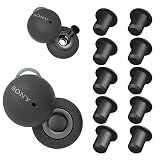
- Perfectly Only Compatible for Sony Linkbuds.
- High quality soft comfortable silicone, durable, flexible, removable and replaceable and washable.
- Sound isolating: Unique design reduces ambient noise and sound leak for high-intensity listening. Help to improve the sound of original earbuds.
- It can be fixed in the earbuds a long time without falling off.
- Package included: Reducing Noise Accessories *5 pair.
-
Wipe the earbuds dry with a soft, dry cloth.
-
Hold the sound output part facing downward and gently tap it about 10 times against a dry cloth. Then hold the microphone hole facing downward and gently tap it about 10 times as well.
PC Slower Than It Used to Be?
A free scan shows the junk files, broken settings and background clutter dragging Windows down - then fixes them in one click.Free scan · Windows 10 & 11Outdated Drivers Are Slowing You Down
One free scan finds every outdated or missing driver and matches the right update for your exact hardware.Free scan · exact hardware matchSpecial offer. See more information about Outbyte and uninstall instructions. Please review EULA and Privacy policy. -
Leave the earbuds to dry at room temperature before using or charging them. Follow Sony’s WF-L900 drying and moisture instructions; do not use heat to speed the process.
Rank #3
 Create idea 5 Pairs Silicone Ear Tips Compatible with Sony LinkBuds WF-L900 Earphones Ear Hooks Earbud Cap Non-Slip Earbuds Wingtips Accessories XS S M L XL 5 Sizes Black
- COMPATIBILITY: Compatible with Sony LinkBuds WF-L900.
- MATERIAL: Made of high-quality silicone material, soft and durable, comfortable to wear.
- SPARES: Replacement set of 5 pairs silicone tips for lost or damaged ear bud covers,easy to install and snap into place
- SIZES: Each set comes with earphone tips in sizes XS, S, M, L and XL;
- NOTE: Please check the individual requirements of your headphones when removing your old ear tips.
Adjust the supporters for a secure, comfortable fit
The fitting supporters should sit under the ear grooves. A supporter that slips or presses uncomfortably may be the wrong size; do not force the earbud into place. Sony’s WF-L900 fitting guidance recommends trying different sizes. The best size can differ between ears, so assess each side separately.
Change a supporter and check the fit
-
Raise the supporter gently to remove it.
-
Align the supporter’s protrusion with the earbud’s cutout, then attach it fully.
Rank #4
 ALXCD Eartips Compatible with Sony LinkBuds S Earbuds WFLS900N/B, S/M/L 3 Sizes 3 Pairs Soft Silicone Ear Tips Earbuds Replacement Tips, Compatible with LinkBuds S, Black sml
- Compatible with SONY LinkBuds S Earbuds WFLS900N/B
- High quality soft silicone eartips , sound isolating design reduces ambient noise for high-intensity listening
- Package Includes 3 Pairs Ear Tips
-
Position the supporter under the ear groove. If the earbud slips, try another size; if the groove feels pressed or painful, try a smaller one.
Special offer. See more information about Outbyte and uninstall instructions. Please review EULA and Privacy policy. -
Move your head and check that the fully attached supporter stays stable. Sony’s replacement and fitting instructions explain how to check supporter attachment and fit.
Quick Recap
Bestseller No. 2Best Value
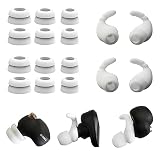 Double Flange Ear Tips & Ear Hook for Sony WF-1000XM5/XM4/C500/Linkbuds S
- Compatible with Sony WF-1000XM5, XM4 & Similar Models - These double flange ear tips provide a perfect seal for WF-1000XM5 and WF-1000XM4. Also fits other models like WF-C500 and LinkBuds S with compatible nozzles.
- Designed for WF-1000XM5 Ear Tips Performance - The double flange design on these WF-1000XM5 ear tips creates a superior sound isolating seal, delivering enhanced bass and clarity for an immersive listening experience.
- Secure Fit with Included WF-1000XM5 Earhooks - The kit includes a pair of soft universal earhooks, perfect for adding a secure, anti-slip fit to your WF-1000XM5 or other earbuds during activity.
- Complete Upgrade Kit for Your Earbuds - A full replacement kit with soft, washable silicone tips and earhooks. It’s the ideal set of spare parts to replace lost or worn original tips.
- All-Day Comfort for WF-1000XM5 & More - Engineered for all-day comfortable wear, ensuring a pain-free fit whether you’re using them with your WF-1000XM5, WF-C500, or other compatible earbuds.
Product prices and availability are accurate as of the date/time indicated and are subject to change. Any price and availability information displayed on Amazon at the time of purchase will apply.




