Windows Errors? Fix Them Before They Spread
Repair common Windows errors and clear accumulated junk for a smoother, more stable PC - no reinstall needed.Free scan · no reinstallOutdated Drivers Are Slowing You Down
One free scan finds every outdated or missing driver and matches the right update for your exact hardware.Free scan · exact hardware matchTo keep a portable evaporative air cooler fresh, unplug it before maintenance, change its tank water regularly, let the cooling media dry after use, and clean or replace parts only as the model’s manual directs. A practical baseline is to refresh the water at least weekly and run fan-only mode for about 15 minutes after cooling; these are Honeywell recommendations, not universal requirements for every model.
After each cooling session: dry the cooling media
When you finish using evaporative cooling, switch to fan-only mode for about 15 minutes. Honeywell recommends this to dry its honeycomb media and help limit dampness and odor-related growth. Portacool gives similar advice for its Cyclone series: turn off the pump about 15 minutes before switching off the fan. That series-specific guidance should not be assumed to apply to every cooler; use your model’s controls and manual.
As an Amazon Associate I earn from qualifying purchases.
Weekly routine: refresh the tank water
Turn the cooler off and unplug it before draining or cleaning. Honeywell recommends draining and refilling the CS10PE tank at least weekly; its support FAQ also describes a weekly water-care routine. Fresh water and regular cleaning help limit mineral deposits.
- Switch off the cooler and unplug it from the electrical outlet.
- Drain the tank using the method specified in the manual.
- For the Honeywell CS10PE, remove the detachable tank carefully, taking care not to bend the pump tubes. Rinse it, clean it with dish detergent or a damp cloth, and rinse thoroughly.
- Refill with clean water and reinstall the tank and any removed parts as directed.
Tank access and approved cleaning methods vary by model. Do not pour water or cleaning solution into parts that the manual does not identify as washable.
#1 Best Overall

- Personal Air Cooler for Indoor & Outdoor Spaces: Switch to an eco-friendly solution with Ontel Arctic Air Pure Chill 2.0. Featuring Hydro-Chill Technology and cooling control with dual cooling jets, it helps cool and humidify the air around you..Voltage : 120 volts
- Space-Saving Portable Design: The compact, sleek design allows you to place the swamp cooler on your office desk, nightstand, coffee table, or kitchen counter. It is lightweight, so you can easily carry it around the house or while travelling.
- Energy Efficient Cooling Device: The Arctic Air Pure Chill cooler operates on 8-10 watts of power to minimize energy consumption. The multi-directional air vents allow you to adjust the direction of airflow, making it perfect for any room or office.
- Easy to Use Cooler: Pour water in the top-fill tank, plug it in and enjoy refreshing cooler air all night long. Runs for up to 10 hours* so you don’t have to worry about frequent refilling. *Depending on speed setting, room temperature & humidity levels.
- Convenient Controls - The personal air cooling unit is equipped with easy-to-use touch controls to switch between the 4 speed settings, and built-in LED nightlight with 7 fun color options - everything you need to operate your cooler, in one place
Clean the media, filter, and grille safely
Dust, minerals in the water, and how often the cooler runs affect how often parts need cleaning. Honeywell’s CS10PE guide says to rinse its honeycomb cooling media and carbon dust filter under fresh water. The FAQ also suggests using a soft brush to loosen buildup when the media is dry. Not every cooler has a carbon filter, and other models may use different media, so check the manual before removing or washing anything.
- Unplug the cooler before accessing its media or filter.
- Use only the rinsing or brushing method approved for your model; avoid assuming a part can be scrubbed or soaked.
- Let cleaned parts dry as directed, then reinstall them correctly.
- Secure the rear grille before operating the cooler. Honeywell’s CS10PE manual warns against running the unit with the rear grille absent or loose because of serious injury or electrical-shock risk.
Manage hard-water scale without guessing
Hard water can leave mineral or calcium deposits. Honeywell recommends regular draining, refilling, and cleaning to help control buildup. Its support FAQ describes a short vinegar cleaning cycle followed by cycles with fresh water, but that is not permission to use vinegar in every cooler. Check your own manual before using vinegar, descaling products, or other treatments; an unapproved additive could damage components.
Portacool markets a Hard Water Treatment for certain evaporative cooler media. That is a brand-specific option, not evidence that the treatment is suitable for other manufacturers’ coolers. Before using any additive, confirm that the cooler manual permits it and that the product is intended for your model or cooler family.
What’s actually slowing this PC down?
Pick the symptom - the matching free tool is one click away.
Rank #2

- ❄【MULTI-FUNCTION AIR CONDITIONER】3S COOLING - The portable air conditioner is equipped with 2000r/h high-speed motor plus dual ultrasonic atomizers, which can reduce the surrounding temperature to 86F-68F in just 3 seconds to provide you with strong, It cools down my room quickly. (Note: The cooling speed depends on the speed settings, the level of room temperature and humidity)
- 🍃【3 WIND SPEEDS & 3 COOL MIST & 4 TIMERS】This portable air conditioners with 🌀 3 wind speeds can be adjusted, press to activate and hold for 3 seconds to off. ❄️The personal ac unit air conditioners with 3 cool mist, adjust the cool mist speed to second gear/third gear in turn. ⏲️4 automatic timing (2/4/6/8H), you can choose the most suitable mode to enjoy your leisure time, sleeping, or working time and save energy.
- 📱【PANEL CONTROL & REMOTE CONTROL】Our portable air conditioners features a control panel and remote for easy operation. While relaxing on the sofa, simply press the remote button to control the unit with ease. The mini air conditioner can be powered by power bank, laptop, car charger, or adapter (≥5V 2A). this portable ac delivers cool comfort anywhere – home, office, camping, or car.
- 💧 【40OZ EXTRA-LARGE TANK】This portable ac boasts a 40oz tank – double the capacity. Add tap water + ice cubes for 10 hours of continuous cooling. Less refills, more chill. Perfect for all-night sleep or all-day work. When water runs out, the unit automatically switches to Natural Breeze Mode, so there's no risk of damage to the portable ac.
- 🔔【QUIET OPERATION <40dB】The portable small air conditioners adopt upgraded turbine motor, real-tested noise level below 40dB – quieter than a refrigerator (45dB). This air cooler super ultra-quiet when it works, doesn’t bother you whether you’re working or sleeping. Say goodbye to noisy cooling fans – enjoy cool air in total peace. Compact size-Weighs only 3lbs, size 8.3"×4.7"×11.5".
When to replace honeycomb media
Honeywell recommends replacing its honeycomb media about every 3–6 months depending on use and maintenance, or sooner if the fibers deteriorate or dirt cannot be removed. This is manufacturer guidance for Honeywell media, not a universal service interval. Inspect the media and follow your cooler’s replacement instructions rather than relying on a calendar alone.
Before ordering replacement media, match the exact cooler model. Dimensions, attachment methods, and compatible parts can differ even among products described as honeycomb pads. Use the model number and manual to verify compatibility.
Independent reader supportYour contribution helps us test, update, and keep practical guides available for everyone.Prepare the cooler for seasonal storage
For the Honeywell CS10PE, the guide recommends fan-only drying for about 1–2 hours before storage; the time depends on ambient humidity. Then follow the model’s instructions to drain, clean, dry, and store the unit.
Rank #3
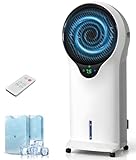
- 【Wide-Area Airflow & Efficient Cooling】- Powered by high-efficiency evaporative cooling technology, this swamp cooler delivers an impressive airflow speed of up to 29 ft/s, quickly pushing out trapped hot air and replacing it with a refreshing, cool breeze. With 360° adjustable airflow direction, it ensures wider and more even air distribution, making it ideal for living rooms, home offices, and open indoor spaces.
- 【3-in-1 Versatile Cooling Control】- This evaporative air cooler combines the functions of a fan, humidifier, and cooling system into one, delivering flexible cooling solutions for hot and dry weather. Featuring 3 fan speeds (Low / Medium / High) and 3 airflow modes (Normal / Natural / Sleep), it allows you to easily customize airflow and comfort based on your personal preference.
- 【Energy-Efficient & Safety Protection】- Designed for energy efficiency and everyday safety, this swamp cooler air conditioner runs on just 110W of power, helping save on electricity bills compared to traditional AC systems. Built-in low-water protection triggers an audible alert when water levels are low and automatically switches the unit to fan-only mode, preventing abnormal operation while maintaining continuous airflow for safe and reliable cooling.
- 【Relax with Long-Lasting Cool Comfort】- With the 5.5L water tank, enjoy continuous, refreshing airflow without frequent refills. This cooling fan that blows cold air is designed for worry-free comfort—the water pump automatically retracts when removed, and the removable tank and cooling pad make cleaning effortless, you can sit back, relax, and feel the cool breeze all day.
- 【Easy Control & Portable Cooling】- Enjoy refreshing airflow anytime with this portable swamp cooler, controllable via remote or onboard buttons. The 7.5-hour timer adjusts in 0.5-hour increments for flexible use. Equipped with smooth-rolling caster wheels and a built-in handle, it can be effortlessly moved from room to room, delivering cool comfort wherever you need it.
- Run fan-only mode for about 1–2 hours, as directed for the CS10PE, to dry internal parts.
- Switch the cooler off and unplug it.
- Drain all water and wipe the tank.
- Rinse removable media and any included filter, then let the parts dry fully.
- Cover the cooler, coil the cord, and store it in a dry place away from direct sunlight and extreme heat, cold, or damp conditions.
Check the manual for continuous-water-supply features and the correct draining procedure; the CS10PE steps may not suit a different design.
The Tool Desk
Outbyte PC Repair FREERepair Windows errors before they cause bigger problemsFix Now →Outbyte Driver Updater FREEScan for outdated or missing drivers - takes under a minuteDriver Scan →Portable air cooler maintenance at a glance
| When | Task | Guidance and scope |
|---|---|---|
| After cooling | Run fan-only mode to dry the media | About 15 minutes per Honeywell’s support FAQ; Portacool gives similar pump-off timing for its Cyclone series. |
| At least weekly | Drain and refill the tank | Honeywell recommendation for the CS10PE and its broader FAQ routine. |
| As needed | Clean media and filter | Use the method in the model manual; Honeywell’s CS10PE guide permits fresh-water rinsing of its media and carbon filter. |
| When worn or uncleanable | Replace honeycomb media | Honeywell says about 3–6 months depending on use and care, or sooner if deteriorated or dirt cannot be removed. |
| Before seasonal storage | Dry, drain, clean, and store | Honeywell CS10PE guide: fan-only drying for about 1–2 hours, with duration depending on ambient humidity. |
These intervals are manufacturer operating recommendations, not results from an independently measured study. The cited manufacturer guidance was accessed October 4, 2026; publication dates were not stated.
Safety reminder
Honeywell’s CS10PE Safety & Maintenance Guide says: “Always switch OFF the Air Cooler and unplug it from the electrical source before cleaning or maintenance.” Follow your own unit’s instructions for removal, cleaning, and reassembly.
Quick Recap
Product prices and availability are accurate as of the date/time indicated and are subject to change. Any price and availability information displayed on Amazon at the time of purchase will apply.




