PC Slower Than It Used to Be?
A free scan shows the junk files, broken settings and background clutter dragging Windows down - then fixes them in one click.Free scan · Windows 10 & 11Crashes, No Sound, or Screen Glitches?
Random freezes, missing sound and display glitches usually trace back to one bad driver. Find and replace yours safely.Free scan · under a minuteChoose payroll software by mapping your current payroll workflow and near-term growth, then checking each provider against the same requirements. Prioritize accurate tax workflows in every jurisdiction where you operate, total cost as headcount grows, fit with your accounting and timekeeping systems, and the support your team will actually need. The right choice depends on your business—not a universal “best” provider.
Start with your business’s payroll requirements
Before comparing brands, write down how payroll works today and what is likely to change over the next year or two. This prevents an attractive feature list or starting price from distracting from a requirement the business actually has.


As an Amazon Associate I earn from qualifying purchases.
- People: Count employees and contractors separately, and note expected hiring.
- Locations: List every state and other jurisdiction where workers are located or payroll obligations may apply.
- Pay: Record pay frequency, hourly or salaried arrangements, commissions, bonuses, overtime, and other variable pay.
- Systems: Identify the accounting software, timekeeping tools, benefits administration, and contractor-payment processes you already use.
- Administration: Decide who will run payroll, who needs review or approval access, and whether an accountant or bookkeeper needs access.
- Help and budget: Specify the support channels or HR expertise you need, plus the budget now and at projected headcount.
Use this same list to compare providers. Ask vendors to confirm capabilities for your exact jurisdictions, plan, and worker mix rather than assuming a feature applies to every customer.
Compare the factors that affect day-to-day fit
Total cost as you grow
Compare more than a headline base fee. Check per-person charges, plan limits, add-ons, setup or migration costs, and which services are included at each tier. Price the service at both your current headcount and a realistic projected headcount; a plan that is economical today may cost more or require a higher tier as the team expands. Confirm live pricing and terms directly with providers, since plans change. Intuit’s payroll information and Gusto’s plan guidance are examples of provider materials to check, not independent price comparisons.
#1 Best Overall

- QUALITY PAYROLL RECORDS: Adams Payroll Record Books provides everything you need to account for your employees' compensation; it tracks hours worked, gross earnings, deductions and net pay
- TWO-PART CARBONLESS FORMS: 2-part carbonless design features white and canary copies to create clear records for employees and management
- WRAP-AROUND COVER: Fold the back cover between sets to keep forms neat and legible
- CONSECUTIVELY NUMBERED: Large 6-digit numbers in the upper right hand corner help you thumb through orders quickly
- 55 SETS PER BOOK: Stock up so you never run out; each books provide 55 carbonless sets
Tax calculations, deposits, filings, and year-end forms
Ask which payroll taxes the service calculates, deposits or pays, and files; which year-end forms it prepares; where those services are available; and how notices, corrections, and exceptions are handled. Read the plan terms carefully: automation can reduce manual work, but it does not guarantee error-free compliance or transfer every employer responsibility.
Worker classification is a separate issue from software selection. The IRS says, “Unlike independent contractors, employees generally pay income tax and their share of Social Security and Medicare taxes through payroll deductions (withholding).” The IRS small-business FAQ on employees and independent contractors also points to Form SS-8 for requesting an IRS determination when appropriate. Do not assume payroll software decides whether a worker is an employee or an independent contractor. Classification and filing requirements depend on the facts and applicable jurisdiction; consult current IRS and state guidance or a qualified tax professional if the situation is uncertain or complex.
Rank #2
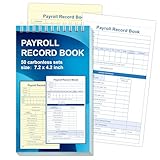
- 1. Efficient double-copy paper:The inner pages of payroll record book are made of carbonless white and yellow double-copy paper, which is clear and does not require additional carbon paper, saving costs. The white copy is used for archiving, and the yellow copy is used for checking or distribution, which is convenient for employees to check and manage wages. The tear line design on the top makes it easy to tear neatly, which is convenient for file sorting and filing. The torn documents can be directly used for salary verification or employee distribution, which is convenient for subsequent file sorting and filing, and improves work efficiency.
- 2. Portable size and professional design:The 4.2x7.2-inch size design not only ensures sufficient recording space, but also facilitates detailed recording of salary details, such as employee name, salary items (basic salary, bonus, subsidy, etc.), amount and other information, and is easy to carry. The weekly employee payroll log book can be easily put into a folder or handbag, which is convenient for financial personnel to check and record salary information anytime and anywhere. It is suitable for use in offices, out-of-office or mobile office scenarios.
- 3. High-quality binding and durability:White spiral binding can be completely flat, smooth writing, easy to flip through, suitable for frequent use. 50 double-copied inner pages create clear records for employees and management to meet daily wage record needs and can record the wage details of 50 employees.
- 4. Single-sided color printed inner pages:The inner pages are printed in color on one side, which is beautiful and practical. Different wage items or important information are distinguished by color to track employees' working hours, total income, deductions and net wages, and improve the clarity and readability of records. The payroll ledger book’s inner pages are made of high-quality paper, with smooth writing and clear carbon copies to ensure the accuracy and completeness of wage records.
- 5. Applicable to multiple scenarios:This set of weekly payroll record book is suitable for corporate finance departments, human resources departments, small businesses or individual businesses, and can provide efficient support for wage accounting, employee communication or salary surveys. Simple and easy to use, no professional training required, it is a powerful assistant for wage management, helping you to easily manage wage records and improve work efficiency.
Accounting, timekeeping, and other integrations
Check that payroll entries can be reconciled cleanly in the accounting system you already use. Also verify how the service handles time tracking, contractor payments, and the reports your accountant or bookkeeper needs. An integration listed on a marketing page may not cover every workflow, so confirm what data moves, in which direction, and whether the feature is included in your plan. Intuit’s payroll comparison guide discusses categories such as time tracking and contractor payments; use it as a feature checklist, not an independent ranking.
What’s actually slowing this PC down?
Pick the symptom - the matching free tool is one click away.
Employee access and administration
Consider whether employees can retrieve pay statements and year-end forms, view direct-deposit details, or use mobile access if that matters to your team. Check permission levels for employees, owners, accountants, and bookkeepers, and confirm how approvals work. Gusto’s product information describes direct deposit and employee access to pay statements and W-2s, but availability depends on current plan terms. Review Gusto’s payroll information and verify the equivalent details for any provider you consider.
Support and HR help
Compare support channels and hours, response commitments, access to specialists, and whether assistance is included or costs extra. A vendor’s description of a dedicated service adviser or certified HR experts is evidence of a particular tier’s offering—not an independent measure of service quality. Confirm what help applies to your plan and the types of questions the support team will handle. Gusto’s plan guidance illustrates how support and HR services can differ by tier.
Growth and migration
Look beyond today’s payroll run. Ask whether the provider can accommodate expected hiring, additional locations, more complex timekeeping, or changing benefits needs. If switching, confirm which employee records and year-to-date payroll data will be transferred, who is responsible for each step, how long migration takes, and whether there are setup charges. ADP’s provider-selection guidance and its small-business payroll information describe growth and service options from the vendor’s perspective.
Use provider examples to build a shortlist—not a ranking
These providers offer different reasons to investigate them. Their published materials are vendor claims; they do not establish which service is best for every small business.
Quick wins for a faster PC:
Scan for outdated or missing drivers - takes under a minuteDriver Scan →Clear out junk files and repair common Windows errorsFree Scan →| Provider | Why it may be worth evaluating | What to verify |
|---|---|---|
| QuickBooks Workforce / QuickBooks payroll | Intuit describes automatic payroll tax calculation, filing, and payment after setup, and offers payroll alongside other business services. This may merit a closer look if keeping payroll close to accounting is important. | Current product naming, eligibility, plan-specific tax services, and the accounting workflows available for your setup. See Intuit’s payroll information. |
| Gusto | Gusto describes payroll-tax automation, direct deposit, integrations, and employee access to pay statements and W-2s. Its materials also describe higher-tier support and HR services. | Which features, support, and HR services are included in the specific plan and locations you need. See Gusto’s payroll information and its plan guidance. |
| ADP | ADP publishes payroll and HR selection guidance and describes reporting and options for adding services as a business grows. | Which services match your needs, their current plan terms, and what is included at the quoted price. See ADP’s selection guidance and small-business payroll information. |
| Paychex and Square Payroll | Intuit includes these names among providers discussed in its comparison guide, so they can be included when building a broader shortlist. | Current features, coverage, plan terms, and fit with your workflow directly with each provider. Their inclusion in a comparison article is not a ranking. See Intuit’s comparison guide. |
Make the comparison practical
- Create a requirements sheet. Record worker types, jurisdictions, pay schedules, systems, permissions, support needs, current headcount, and a reasonable growth scenario.
- Ask each provider the same questions. Request confirmation of tax calculations, payments, filings, year-end forms, notices, support, integrations, and migration scope for your specific plan and locations.
- Compare total cost at two headcounts. Include base fees, per-person charges, required add-ons, setup or migration fees, and any tier changes.
- Walk through a real payroll cycle. Check how hours and variable pay enter the system, who reviews and approves payroll, how accounting entries are produced, and how employees get their pay information.
- Confirm responsibilities before switching. Establish who provides accurate worker and payroll data, who reviews results, and how corrections or tax notices will be handled. Keep an appropriately qualified person involved in classification and compliance questions.
- Recheck terms before signing. Provider features, prices, plan names, and geographic availability can change. Use current provider documentation and relevant government guidance for the final decision.
Interpret vendor savings claims carefully
Gusto reported that its customers saved an average of 100 hours per year on tax and compliance work after switching from ADP. That figure came from a survey of 538 Gusto customers conducted in September 2024 and published by Gusto; it is vendor-reported survey evidence, not an independent comparison, a guaranteed result, or a reliable expectation for every business. Read Gusto’s account of the survey and its methodology before using the number to inform a decision.
Quick Recap
Product prices and availability are accurate as of the date/time indicated and are subject to change. Any price and availability information displayed on Amazon at the time of purchase will apply.




